DFIR · Beginner
Backup Restore Verification · From Saved Copy to Recoverable Service
Use a real offline SQLite restore exercise to distinguish a matching hash, a usable database, an acceptable recovery point, and a service ready to resume.
Updated 2026-11-20
On this page
Learning goal. Given a backup record and a restore result, explain which checks support recovery and which checks still need evidence. Calculate the potential data-loss window and write a go or hold decision tied to a recovery objective.
1. What are we trying to recover?
A backup is a retained copy used to recover data or system state. A snapshot describes state at a point in time. Whether a snapshot survives the loss of the original account, storage infrastructure or key depends on where it lives and who can change or delete it. Restore means bringing the data or state back into a usable environment. Service recovery also includes access, dependencies, security checks and business operation.
| Term | What it means | Evidence |
|---|---|---|
| Recovery point objective (RPO) | The point in time to which data must be recoverable. A team can express it as maximum tolerable time at risk of data loss | Agreed objective and a validated application checkpoint |
| Recovery time objective (RTO) | The permitted duration of recovery for the agreed service scope | Start time, acceptance milestone and a timed exercise covering those stages |
| Backup manifest | A record describing the copy and how to identify it | Backup or object version ID, scope, hash and retention or replica details |
| Application checkpoint | A known processing or commit boundary | Evidence from the application, a transaction sequence or a separate trusted record |
A job marked successful at 09:56 may have saved a consistent copy through 09:52. The first time describes the job and the second describes the data. In the example below, the manifest recorded both. Some systems require replaying approved transaction logs to reach the recovery point. Test the full chain and use an application checkpoint to support any claimed boundary.
2. Follow a normal restore decision
Imagine a small order service became unavailable at 10:00 UTC. The team rehearses against a 15-minute RPO and 60-minute RTO. The agreed measurement begins at the outage and ends at acceptance by the service owner. The selected copy has separately confirmed complete coverage through 09:52 UTC. That gives an eight-minute potential data-loss window within the example RPO. It does not tell you the number of lost orders. Compare with transaction or reconciliation records for that.
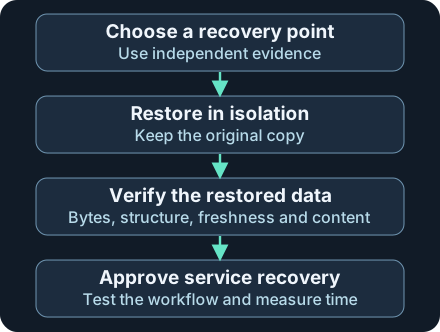
Keep the backup and original incident evidence separate from the working copy. When a check fails, document it before selecting another known recovery point or escalating.
In the fictional exercise the team retrieves the copy using the recovery account, checks a protected manifest, restores it into isolation, and compares expected records. The service owner also exercises a login and order lookup against test dependencies. Acceptance at 10:42 UTC gives 42 minutes for the stated recovery scope. If only the database had been ready at 10:42, the full service time would still be unknown.
| Layer to verify | What a pass supports | What to check next |
|---|---|---|
| Availability and access | An authorized recovery identity retrieved the selected version and can use the required decryption key | Dependencies on the original account, key store or network |
| Bytes | SHA-256 matches a separately trusted manifest for this artifact | Format and data integrity |
| Database | Format and structure pass. Referential constraints need their own checks | Known records, aggregate totals and recovery point |
| Service | Representative workflow and security controls passed within the agreed scope | Approval, timing, and monitoring after reopening |
3. How backup failures become security incidents
A synchronized copy can quickly inherit deletions or corruption. If production and recovery share an administrative account, a compromise can affect the source and its backups. An immutable version or an offline copy helps protect against modification, subject to how retention, storage and access actually work. Recovery also depends on a readable copy, independent access, usable encryption keys and compatible software.
A copy may also contain an unwanted configuration or persistence that predates discovery. A matching digest verifies the bytes against a trusted reference, which can describe an already affected snapshot. Record the earliest evidence of suspicious activity and what sources cover that period. Choose a candidate supported by evidence, scan and review it in isolation, and coordinate any trade-off between a safer older copy and the data loss objective. The last clean point can remain uncertain even when a restore succeeds.
4. Collect, detect and respond
Before an incident. Select a service owner and representative checks, such as fetching a known record, reconciling totals and completing a harmless transaction in isolation. Define the scope, acceptable loss and timing boundary. Record backup coverage, copy and object IDs, source checkpoints, protected manifests, retention and encryption-key dependencies. Restrict backup administration and test recovery access independently of the production account. Preserve your evidence in a destination the source workload cannot rewrite.
Watch for the risk to recoverability. Monitor repeated backup failures, unexpected retention changes, unusual backup-administrator activity, unavailable encryption keys and missing copies. Pair each control with evidence. For example, a retention alert needs the platform’s administrative audit records, backup or policy ID, actor, previous and new setting if available, and an approved change record. Confirm logs cover the account and repository in question. A changed policy could be an authorized migration. A successful backup job remains only one part of the coverage check.
During recovery. Preserve original backup versions and incident evidence. Avoid restoring over the only copy. Use an isolated environment with approved access, minimum necessary connectivity and compatible application versions. Recover configuration, identity, keys and upstream dependencies in the required order. Measure the time to the agreed acceptance milestone. Record the restored point, tested workflows, failed checks, unresolved scope and approval. Resume service under the incident process and monitor the restored workload. If an expected result fails, hold and test the next approved option after documenting the reason.
5. Offline lab · Five SQLite restores
Download restore-verification.py and run it on an owned system with Python 3 and its standard sqlite3 module. It takes no input and creates only fictional databases in a temporary directory. It uses the SQLite backup API to create snapshots, copies each closed snapshot as a restore, then opens the working copy read-only after the hash check. The lab stands in for an independently protected manifest and expected order amounts. It models a whole-service data checkpoint using a single fixture value.
python3 restore-verification.py
| Case | Expected result | Why it matters |
|---|---|---|
| A · Expected data | ready_for_lab_use, eight-minute window |
Digest, structure, relationship, recovery point and expected records pass for this worksheet |
| B · Stale | outside_rpo, 95-minute window |
The copy opens, but its 08:25 checkpoint is too old for a 10:00 outage and 15-minute objective |
| C · Wrong amount | business_check_failed, eight-minute window |
The copy is recent and valid SQLite. A changed order amount fails reconciliation |
| D · Broken reference | foreign_key_failed after integrity_check=ok |
An order references a fictional customer that is absent. SQLite checks foreign keys separately |
| E · Changed bytes | digest_mismatch before opening |
The working copy differs from the protected reference recorded in the scenario |
Expect a final PASS: 5 cases line. The measured seconds cover only this local script, including fixture creation. They give no production recovery estimate. If Python reports that sqlite3 is missing, use a Python build with SQLite support. If the script cannot create temporary files, check the system’s temporary directory permissions and free space. If a case changes, start with the original download and compare the reported stage instead of loosening a check. The script was executed with Python 3.12.14 and SQLite 3.53.1. No managed-backup service, ransomware execution, or production failover was exercised.
6. Check your understanding
- The digest matches and the database opens. Is the 15-minute objective met? Find the validated data checkpoint and compare it with the incident reference time. Confirm how the service establishes completeness.
- Does an eight-minute window mean exactly eight minutes of transactions were lost? It describes the interval potentially at risk. Count unrecovered transactions using independent records.
- The restore finished in 20 minutes, but identity and order lookup still fail. Which time should you report? Report the database restore milestone and the unresolved service acceptance separately. Measure RTO against the agreed scope.
Finish by explaining why B, C and D fail for different reasons. Write a go or hold note for one case with the backup ID, verified checkpoint, possible loss window, results by layer, and the next check required before opening the service.
Previous · Digital evidence preservation · Related · Blue Team fundamentals
Official references
Reviewed 20 November 2026. NIST provides recovery planning and metrics. CISA covers ransomware resilience. SQLite and Python references describe the lab interfaces rather than the behavior of other backup products.
- NIST SP 800-184 · Guide for Cybersecurity Event Recovery, December 2016
- NIST glossary · Recovery Point Objective · Recovery Time Objective
- CISA and partners · StopRansomware Guide, October 2023 edition
- SQLite · Online Backup API · Integrity and foreign-key checks
- Python 3.12 · sqlite3.Connection.backup
Related articles
Velociraptor Endpoint Collection: From a Network Alert to Host Evidence
Scope a request to one endpoint and interpret collection coverage, zero results, missing files and SIEM delivery using nine fictional cases.
Preserving Digital Evidence · SHA-256 and Custody
Preserve acquisition provenance and verify working copies and ZIP payloads in an offline SHA-256 lab.