Blue Team · Beginner
Windows App Control · Read Audit, Block and Signature Events
Connect Windows Code Integrity policy decisions, signature records and policy activation evidence without mistaking a block for malware execution.
Updated 2026-11-21
On this page
Learning goal. A pilot laptop reports that an application failed a code policy. Identify which event answers whether Windows blocked the file, what the event can say about its signature, and how to check whether the planned policy was loaded on that device.
1. What application control evaluates
App Control for Business, previously Windows Defender Application Control (WDAC), applies code policy to a whole Windows device. It can govern drivers and user-mode code according to the enabled policy options. Rules can use evidence such as a signing certificate, signed file attributes or a hash. A hash identifies bytes or a format-specific representation. A signer is an entity associated with a digital signature. Those facts help describe the file. Policy determines whether that evidence satisfies the organization’s rule.
Audit mode records failures against an audit policy for review. Enforcement blocks files that fail an enforced policy. Staged pilots can reveal a business dependency before it is affected. Audit mode alone cannot establish which operations completed, especially on a device with multiple controls or policies. Microsoft documents AppLocker separately. This chapter focuses on executable and DLL Code Integrity events.
| ID | Channel | Evidence |
|---|---|---|
| 3076 | CodeIntegrity/Operational | This file would have been blocked by the audit policy had that policy been enforced |
| 3077 | CodeIntegrity/Operational | This attempted file use was blocked by an enforced policy |
| 3089 | CodeIntegrity/Operational | Signature details for a related evaluation. A record with TotalSignatureCount=0 reports an unsigned file |
| 3099 | CodeIntegrity/Operational | A policy was loaded. Inspect its details and options to identify it |
A successful run that has no 3076 or 3077 in this query has no negative decision in the selected sample. Confirm the run using independent process or application evidence. These IDs do not form a complete inventory of files that ran.
2. Follow a normal policy pilot
A fictional Windows 11 pilot group tests an approved inventory app. Its UI works using the already approved build. The vendor then updates a helper DLL. In the audit ring, the helper’s attempted load produces a 3076 because its metadata falls outside the pilot policy. A matching 3089 describes signature information. In a separately approved enforcement test, a 3077 for the helper records a block, and the parent application may still leave its window open. The team checks the app’s approved release source, reproduction steps and process telemetry before deciding what broke.
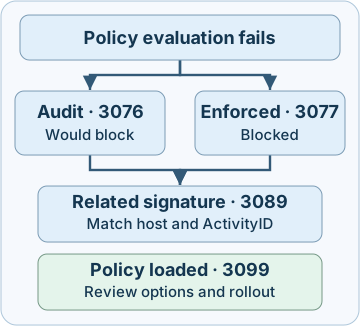
In Event Viewer’s XML view, look under System > Correlation for ActivityID. Keep the original computer, provider and channel. Compare same-host events in the relevant time window and require the same nonempty activity identifier before pairing 3076 or 3077 with 3089. File path and timing help confirm the match but cannot replace the activity identifier. A file with multiple signatures can produce several 3089 records. Check the reported total and signature indices in the installed schema when available. Deduplicate replayed records only within the preserved source scope. A single matched 3089 reporting zero is different from an absent 3089.
3. Interpret policy outcomes in context
| Observation | Investigate next |
|---|---|
| 3076 appears after a vendor update | Match the approved inventory, release source, signer and relevant policy version. Confirm actual functionality independently |
| 3077 names a DLL | Identify the triggering process and repeatable operation. The event describes the DLL block, so inspect process evidence for the parent app and other stages |
| Block appears for an unfamiliar file | Preserve the path and relevant metadata, check approved software records and collect independent process and endpoint evidence before labelling the file |
| 3089 is missing from the collector | Compare local and forwarded XML. Check the time range, retention and subscription filters. Record signature evidence as unknown until resolved |
| 3099 exists but the pilot has unexpected outcomes | Compare the policy ID, options and rollout record. A historical load event needs its timestamp and device scope |
An unauthorized binary may be blocked, and a legitimate update can trigger the same event on another machine. Conversely, software accepted by a policy still needs monitoring for unexpected activity. A signature alone cannot establish publisher intent or safe behavior. Escalate repeated unexpected blocks or suspicious provenance through the incident process, preserve the evidence and review policy changes through the approved owner. Investigate installer or script events using their own channel and host context. App Control uses events in AppLocker / MSI and Script for those paths, and script-host enforcement behavior varies. For example, Microsoft documents that 8029 can accompany restricted script execution depending on the host.
4. Collect and validate the pipeline
- Scope the source. Record the device, OS build, UTC time, applicable policy IDs, ring and expected operation. Confirm read access and channel availability. On builds that include it,
CiTool.exe -lp -jsonlists policy inventory, including inactive policies. Compare with 3099 and deployment records for historical context. Microsoft’s CiTool reference covers Windows 11 starting at 22H2 and Windows Server 2025. - Preserve the records. Use this illustrated read-only query in PowerShell on an authorized Windows host with local log access. It queries the last two hours. Adjust to the incident window. Keep original EVTX when collecting evidence and retain XML fields before transforming the feed.
- Compare source and collector. In the exported XML, keep
Computer,Channel,Provider,TimeCreated,EventRecordID,EventIDandCorrelation. Retain raw policy, file and signature fields where available. Do not interpret an empty result as protection without checking permissions, collection health, forwarding filters and timing. - Validate before a rollout. In an authorized, disposable Windows test VM, use the already approved audit and enforcement policy fixtures and locally approved benign binaries. Test a known permitted operation and a benign operation expected to fail the policy, keeping the expected result and timestamp for each. Confirm the decision and related records at the source, then trace their delivery to the collector. Use a separate enforced pilot ring with an approved recovery plan before broad deployment. Keep audit observations and enforced blocks in separate detection conditions.
$filter = @{
    LogName   = 'Microsoft-Windows-CodeIntegrity/Operational'
    Id        = 3076, 3077, 3089, 3099
    StartTime = (Get-Date).AddHours(-2)
}
$events = Get-WinEvent -FilterHashtable $filter
$events | ForEach-Object { $_.ToXml() }
5. Offline exercise · Join seven decisions
Download app-control-events-lab.py and run python3 app-control-events-lab.py with Python 3.10 or later. The script reads synthetic XML strings with only selected fields. It opens no Windows logs and changes no device settings. Its record ID deduplication applies to this single synthetic collection window. In production, retain the log instance or export context and inspect signature indices and file evidence.
| Decision record | Expected interpretation |
|---|---|
| 1 and 3 | Audit plus one unsigned report, then an enforced block with two matching signature records |
| 6 | Enforced block with partial signature evidence. A forwarded duplicate does not add a signature |
| 8 and 14 | Audit with no matching 3089. The other-host event and the same-activity 3099 cannot supply a signature |
| 9 and 11 | Enforced block without a correlation ID, and a separate block with conflicting signature counts |
Expect 7 synthetic decisions checked. If Python cannot find the file, check the download folder and filename. If a result differs, verify Computer, namespace, activity ID and signature count before interpreting the label. The fixture ran with Python 3.12. Windows event generation, PowerShell collection, CiTool and live policy behavior were reviewed in Microsoft documentation.
6. Check your understanding
- A 3076 is present. Can I say the process was prevented from running? Report what the audit policy would have blocked. Verify the actual operation and other enforcement separately.
- 3077 exists for a DLL. Can I claim that the entire application stopped? Identify the affected load and use runtime or application evidence for the larger outcome.
- No 3089 reached the collector. Is the file unsigned? Look for a same-activity source record with a reported count of zero. Investigate collection coverage before calling the signature state.
- Does a 3099 prove the selected policy blocked that file? It records a load. Use policy details, time, device and the decision event to explain the outcome.
Completion. Record the source, policy mode and file decision, the matching activity ID if available, and one missing item needed to establish the application or incident outcome.
Previous · Windows Event Logs · Continue · Detection validation
Official references
Reviewed 21 November 2026. Microsoft lists Windows 10, Windows 11 and Windows Server versions from 2016 through 2025 on the event guide. Available features, fields and tools depend on the installed build and policy, so verify the actual pilot version.
Related articles
Blue Team Fundamentals: Detection to Response
An introduction to security monitoring, triage, investigation, incident response, and detection improvement.
Detection Validation · From Event Generation to Alert Delivery
Test source, indexing, rule execution and delivery with positive and negative controls and nine offline cases.