Network Security · Beginner
Certificate Validation: Trust Chains, SAN, EKU, Expiry and an Offline PKI Lab
Build and validate a disposable root–intermediate–leaf chain; distinguish trust, service identity, purpose, time and revocation evidence with six controlled tests.
Updated 2026-11-18
On this page
Learning path: Previous: public keys and signatures → this chapter → AD CS enrollment and certificate authentication. This chapter extends the foundation with certificate inspection and validation; it does not repeat the encryption/signature lab.
1. What are we actually trying to trust?
A browser reaches a service that presents a certificate. Seeing a signature, a familiar organization name or a date in the future does not answer the whole security question. Ask separately: can this certificate lead to a configured trust anchor, does it identify the service requested, is it usable for this purpose at this time, and what status policy was applied?
Think of a visitor credential. Its issuing authority, name, permitted room and expiry are separate checks. The analogy stops at cryptographic details: certificate validation is performed by software under explicit rules, not by recognizing a logo.
Path building finds a candidate sequence of issuers. Path validation evaluates that sequence and applicable constraints. Service identity verification compares the intended service identity to appropriate certificate names. A TLS handshake additionally requires the relevant proof of private-key possession; validating a public certificate file offline does not prove a live server possesses its key.
2. Read a certificate without overclaiming
| Item | Meaning | Investigation boundary |
|---|---|---|
| Subject / Issuer | Named subject and issuing entity | Matching text is not signature validation or proof of an authorized CA |
| Serial number | Certificate identifier within an issuer context | Preserve issuer context; not a global person or device identifier |
| Subject Public Key Info | Public key and its algorithm | Not the private key |
| SAN | Subject Alternative Name entries, including DNS names or IP addresses | Match the relevant type to the reference identity |
| Basic Constraints | Whether a certificate may act as a CA and applicable path-length constraint | A leaf must not become a trusted CA merely because it was supplied |
| KU / EKU | Key Usage / Extended Key Usage restrictions | digitalSignature and serverAuth are different constraints |
| notBefore / notAfter | Validity interval | The verifier’s clock and the chosen evaluation time matter |
| Signature algorithm/value | Issuer’s signature over certificate data | A valid signature is not an instruction to trust its issuer |
| SKI / AKI | Subject/Authority Key Identifier hints | Help select issuer candidates; not a substitute for verification |
| CRL DP / AIA | Locations or access information for supporting services/material | Presence of a URL does not prove retrieval or enforcement |
A PEM file is a textual encoding/container and may hold several objects; a DER file is a binary representation. Extensions such as .crt, .cer or .pem are hints, not a reliable content classifier. A certificate fingerprint hashes the encoded certificate; a public-key fingerprint hashes different bytes. A renewed certificate can have a different certificate fingerprint even if it reuses a key.
3. Root, intermediate and leaf: both directions matter
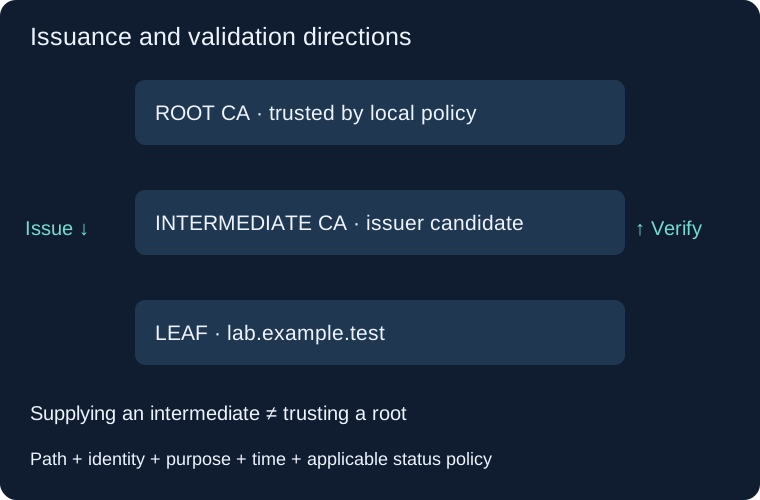
An ordinary example has a root issuing an intermediate CA certificate, which signs a leaf for lab.example.test. The root is trusted because the verifier’s policy or store selected it as an anchor. Its self-signature alone does not create that trust.
Servers commonly send the leaf and needed intermediates; clients already have or otherwise configure their anchors. Sending an extra root does not force a client to trust it. A missing intermediate can fail on one client and appear to work on another because cached issuers, fetching behavior and trust stores differ.
In this lab -CAfile root.pem declares the intended anchor. -untrusted intermediate.pem supplies an issuer candidate for chain building. Untrusted here describes its input role, not an allegation that the intermediate is malicious. The candidate must still fit the path. Do not “fix” a missing chain by putting every certificate into a trusted store.
Real deployments can offer alternate or cross-signed paths. Record the path the affected client actually built instead of assuming that one server-supplied sequence is universal.
4. Hostname, DNS, SNI and SAN are different evidence
Suppose the application intends to reach lab.example.test. The DNS result gives a connection address; it is not permission to replace the requested identity with any name in a certificate. SNI tells a TLS endpoint which virtual service the client is requesting; sending SNI does not by itself verify the returned certificate.
For current service-identity guidance, RFC 9525 uses appropriately typed SAN identifiers and rejects Common Name as the service identity. Some libraries retain legacy CN fallback: the OpenSSL 3.5 hostname option documents one. Our lab uses a DNS SAN and does not test or endorse fallback. Verify the actual application’s behavior.
A DNS-name SAN is not an IP-address SAN. If the intended reference is a literal IP, use the corresponding IP identity check and an appropriate IP SAN. Wildcards are not arbitrary substring matches: a leftmost-label wildcard does not grant every deeper name. This lab avoids wildcards, internationalized names and service-specific identity profiles so the negative control has one clear cause.
5. Purpose, constraints and time
A certificate usable for TLS server authentication is not automatically suitable for client authentication, code signing or AD logon. Interpret KU, EKU, CA constraints, signature/security requirements and the consuming application’s policy together. Merely seeing “certificate” in a file does not make it a credential for every protocol.
The lab intermediate has CA:TRUE,pathlen:0: it can issue this leaf but the constraint does not permit another non-self-issued intermediate CA beneath it. The leaf has CA:FALSE, digitalSignature, serverAuth and a DNS SAN. These are deliberate educational choices, not a production CA template.
Check validity on the relevant certificates in the selected path under the verifier’s rules. A bad clock can make an ordinary certificate appear not-yet-valid or expired. Our future-time test uses -attime; it does not alter the system clock. Public browser PKI and private enterprise PKI have additional, differing policy requirements. The lab’s 365/30/1-day lifetimes are not recommendations or claims about current public-certificate lifetime limits.
6. Revocation is another question
CRLs publish signed revocation information; OCSP provides signed certificate-status responses. Check the relevant issuer/certificate, response authorization, time coverage and consumer policy. OCSP good is not a complete statement that the certificate passed name, path and usage checks or that the peer is harmless.
Distinguish revoked, unknown, unavailable, stale and not checked. They are not synonyms. Whether a client fails closed, fails softly, uses stapled status or a vendor-specific mechanism depends on its configuration and implementation. Do not invent a universal browser revocation behavior.
A successful openssl verify invocation without the relevant revocation inputs/options does not prove a successful revocation check. Our lab generates no CRL or OCSP response and tests no revocation service. Certificate expiry and revocation are different states.
7. Abuse and a normal failure can look similar
| Observation / mechanism | Possible ordinary cause | Security hypothesis and next evidence |
|---|---|---|
| New leaf fingerprint | Renewal, key rotation, alternate endpoint | Unexpected issuance or interception; compare inventory, issuer/path, SAN and deployment change |
| Unknown root accepted | Approved enterprise inspection or private PKI | Unauthorized trust-store modification; identify policy source, actor and affected clients |
| Wrong hostname | Misrouted virtual host, stale deployment | Redirection/interception; record requested identity, DNS, proxy, SNI and endpoint |
| Missing issuer | Incomplete deployment, cache difference | Unapproved chain; obtain exact supplied chain and configured anchors |
| Valid signature on harmful content | Compromised or untrustworthy signer | Review signer authority, artifact origin and execution behavior |
| Validation disabled | Troubleshooting workaround | A route for accepting impostors; inspect effective application config and change history |
A public certificate copied from a legitimate service cannot by itself satisfy the live private-key proof. Conversely, a stolen key does not make an unrelated hostname match. Certificate facts, key control and authorization must remain separate claims. No certificate fingerprint, UA or single IP establishes an attacker or malware family.
8. Blue-team collection and response
Record a case tuple: client/application version, intended service name and port, UTC evaluation time, network/proxy path, presented chain, configured trust source, exact failure and policy. Preserve original public certificate files with hashes; issuer/serial, SAN, validity, key algorithm and selected path are useful pivots.
Collect client verification output, relevant application/termination logs, deployment history, endpoint process/network context and trust-store policy changes where audited. A packet sensor may not see TLS 1.3 certificate messages inside the encrypted handshake. Inventory absence or no sensor certificate record is not evidence that no certificate was used.
No universal Event ID means “bad certificate attack.” Product/provider, channel, error fields, logging level and forwarding determine coverage. Establish a benign baseline and reproduce a known failure on an owned test client before deploying alerts. A rise in failures can reflect an expired service, broken intermediate or bad clock; join it to deployment and endpoint evidence before assigning malicious intent.
For a confirmed unexpected trust change, preserve the prior/current store and policy provenance, scope affected clients, and contain the unauthorized change under change control. For confirmed key compromise, replace the key and dependent certificates, apply appropriate revocation and test relying-party behavior. Do not solve a failure by disabling verification or adding an unreviewed root.
9. Run an owned, offline miniature PKI
Download the complete Python lab. Requirements: Python 3, OpenSSL 3.x with the shown options, and an accurate system clock. Inspect the script, save it as certificate-validation-lab.py, then run:
openssl version
python3 certificate-validation-lab.py
The script creates four disposable RSA-3072 key pairs: the root, an unrelated root, an intermediate and a leaf. It issues a 30-day intermediate and one-day server leaf under a 365-day root, prints leaf metadata and runs six tests. It uses an explicit request config and extension files, explicit serials and an explicit trust file. It performs no network requests, trust-store installation or production-key access.
Keys are unencrypted inside a temporary directory only for this exercise. Normal exit removes them; interruption can leave material in your temporary area. Do not use these key-handling choices or the small scripted CA as an operational issuing service.
The underlying checks, after the script has created its files, look like:
openssl x509 -in leaf.pem -noout -subject -issuer -serial -dates \
  -ext subjectAltName,extendedKeyUsage,basicConstraints
openssl verify -no-CApath -no-CAstore -CAfile root.pem \
  -untrusted intermediate.pem -purpose sslserver \
  -verify_hostname lab.example.test leaf.pem
These are explanatory excerpts, not standalone file-generation instructions. The script uses a temporary location and removes its files. x509 displays metadata; the second command performs the selected checks. -no-CApath -no-CAstore prevents fallback to those trust sources; the intended CA file remains explicit. This isolates the experiment from the machine’s usual trust inventory.
10. Six controls and the evidence they produce
| Controlled change | Expected result | Example OpenSSL 3.5.7 diagnostic |
|---|---|---|
| Complete chain, intended DNS name, server purpose | Pass | leaf.pem: OK |
| Reference name becomes wrong.example.test | Fail | 62: hostname mismatch, depth 0 |
| Omit intermediate candidate | Fail | 20: unable to get local issuer certificate, depth 0 |
| Request client purpose for server-only leaf | Fail | 26: unsuitable certificate purpose, depth 0 |
| Trust only the unrelated root | Fail | 20: unable to get local issuer certificate, depth 1 |
| Evaluate two days later | Fail | 10: certificate has expired, depth 0 |
Actual execution: all six controls passed in the publication cloud environment using OpenSSL 3.5.7. The script checks success/failure and the expected diagnostic text so an unrelated command error does not count as a valid negative control. Expect six PASS: lines and the final DONE: line.
The two issuer failures share code 20 but occur at different path positions. In this example depth 0 is the leaf and depth 1 the intermediate. Preserve the certificate and depth instead of reporting only an integer. These are OpenSSL diagnostics, not Windows Event IDs, TLS alert numbers or universal browser errors.
The leaf serial printed as 64 is hexadecimal for the decimal serial 100 requested by the script. Generated key material, dates and fingerprints vary. A successful run establishes these offline checks; it does not validate every possible path or a real deployed endpoint.
11. Troubleshooting before declaring an attack
If a command fails, retain stdout, stderr, exit status, OpenSSL version and input files under appropriate protection. Check executable availability, supported options/provider configuration and the local clock. Do not silently remove security options to force a green result.
If the positive control fails, stop interpreting the negative controls. Inspect issuer relationships and extension files first. If the missing-intermediate control unexpectedly succeeds in a modified experiment, check extra issuer sources and trust inputs. A candidate cached or trusted elsewhere changes the experiment.
Do not bypass name or time checks, ignore critical extensions or trust a leaf simply to suppress an error. Establish whether the failure is on the client, server-chain deployment, trust policy or intended reference identity. Preserve the original failure before a corrective deployment.
Not executed here: browser/platform trust-store policy tests, live TLS handshakes, CA issuance in AD CS, CRL/OCSP availability or enforcement, Windows auditing and production SIEM detections. Those require their actual consumer environments.
12. Questions, answers and completion criteria
- The server sends its own root. Must the client trust it? No. Trust is a local policy decision.
- The chain passes without a hostname option. Did we prove the service name? No. Explicitly select and verify the reference identity.
- Why can two issuer failures have different depths? One cannot find the leaf issuer; the other cannot connect its supplied intermediate to the trusted root in this lab.
- Does serverAuth permit client authentication? Not automatically. Purpose and consumer policy must accept the certificate.
- Does OK establish revocation checking or private-key possession? Not in this offline experiment.
- Is a new certificate fingerprint an incident? It is a change; confirm renewal, endpoint and authorized deployment before escalating.
Complete the chapter when you can draw issuance versus verification direction, identify SAN/KU/EKU/validity, reproduce the six controls and write a finding that separates observed validation failure, likely cause and untested security hypotheses.
Continue: AD CS issuance and authentication or network evidence. Future network/TLS investigations can build on this checkpoint rather than repeating the key primitives.
13. Official sources and review scope
Reviewed: 18 November 2026. These references have different dates and scopes. RFC 5280 is a foundation read with its updates, not a complete current browser-policy manual. RFC 9525 (November 2023) replaces RFC 6125 for service identity; OpenSSL implementation behavior is separately documented. Original diagrams/scenarios and the disposable lab are educational material.
- RFC 5280, May 2008: certificate fields, constraints and path validation.
- RFC 9525, November 2023: TLS service identity.
- RFC 6960, June 2013: OCSP response semantics.
- OpenSSL 3.5: verify, verification options, X.509 extensions, x509, req.
TLS Handshake Evidence · From Connection to HTTP
TLS negotiation visibility and offline verification lab
Trace DNSSEC Validation and SERVFAIL
Follow the parent DS and child DNSKEY through to the signed answer.
Investigate Certificate Transparency Evidence
Distinguish a log promise, inclusion proof and actual service deployment.
Client authentication next
Mutual TLS (mTLS) · Follow client authentication through TLS termination and application authorization, then compare six loopback outcomes.
Related articles
Packet Capture Gaps · Did the Network Drop It or Did the Sensor Miss It?
Use paired TCP captures, acknowledgments and sensor counters to tell a coverage gap from possible network loss.
Certificate Transparency · Verify Log Evidence and Investigate Unexpected Issuance
Distinguish a certificate log entry from an SCT, a proof of inclusion and a certificate served by an HTTPS endpoint.