Network Security · Beginner
IPv6 Router Advertisements · Investigate Route, Prefix and DNS Changes
Read IPv6 Neighbor Discovery evidence and distinguish a normal router advertisement from an unexpected network configuration change.
Updated 2026-11-21
On this page
Learning goal. An endpoint starts using an unfamiliar IPv6 next hop. Separate the advertisement observed on its link from the configuration the endpoint actually adopted. Identify evidence that distinguishes normal redundancy, misconfiguration and possible abuse.
1. Where IPv6 hosts learn their settings
An IPv6 link is the segment where nodes can exchange packets directly at the network layer. A link-local address, from fe80::/10, only has meaning on its link. The same address text can occur on several interfaces. When documenting a next hop, retain the interface or VLAN as well as the address.
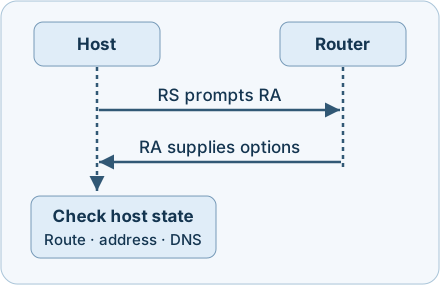
Neighbor Discovery (ND) is a family of ICMPv6 messages. A host can send a Router Solicitation (RS, type 133) to prompt a Router Advertisement (RA, type 134). Routers also advertise periodically. Neighbor Solicitation and Advertisement (types 135 and 136) serve other functions such as address resolution and reachability. Duplicate Address Detection (DAD) uses Neighbor Discovery to check whether an address is already in use. SLAAC means Stateless Address Autoconfiguration. A host can combine an advertised prefix with a locally formed identifier to configure an address.
| Setting on the host | Where to look in an RA | What it means |
|---|---|---|
| Default router | RA source and Router Lifetime | A nonzero lifetime makes the source eligible as a default router. Zero withdraws that router from default use |
| On-link prefix information | Prefix Information Option (PIO), L flag | Controls whether the advertised prefix is treated as on-link. It is separate from address generation |
| SLAAC address | PIO, A flag, prefix and preferred/valid lifetimes | An eligible prefix can be used to form an address. An address can be deprecated while it remains valid |
| Recursive DNS servers | RDNSS option and its lifetime | Advertises DNS servers. Zero withdraws the listed addresses for this mechanism |
| DHCPv6 information | M and O flags, and host policy | The flags signal managed address or other configuration availability. DHCPv6 can coexist with SLAAC. The default-router advertisement is a separate function |
Router Lifetime applies to default-router use. PIO and RDNSS lifetimes have separate meanings, so an RA with Router Lifetime zero can still contain useful options. Check each field independently. RFC 9915 replaced RFC 8415 for DHCPv6 in January 2026.
2. Follow a normal advertisement
On fictional VLAN 40, a new host sends an RS. Router R1 replies from fe80::1 with IPv6 packet Hop Limit 255, Router Lifetime 1,800 seconds and prefix 2001:db8:40::/64 with L and A enabled. The PIO gives a 30-minute preferred lifetime and a 60-minute valid lifetime. An RDNSS option advertises 2001:db8:40::53 for 1,200 seconds. Depending on its policy, the host can install a route via R1, configure an address after DAD and use the advertised DNS server.
Two Hop Limit fields. The outer IPv6 packet Hop Limit is part of RA validation. The RA’s inner Cur Hop Limit instead recommends a default for outgoing IPv6 packets and may be zero to leave that setting unspecified. RFC 4861 requires a link-local source, outer Hop Limit 255, ICMPv6 code zero, valid checksum and other message checks. Passing those checks does not establish that the sender is approved. A capture taken before NIC checksum offload or with a short snap length may not support a reliable checksum decision.
3. Separate unexpected input from observed impact
An unapproved device on the same link can publish configuration that some hosts accept, which may divert or interrupt traffic or change DNS resolution. An accidentally enabled router or bridged virtual lab can produce a similar observation. A planned failover may legitimately add a second RA source or withdraw one default router. Even an unexpected RA at a mirror gives limited evidence about whether a protected port forwarded it or a host adopted it.
| Evidence | What you can report | What to collect next |
|---|---|---|
| Unexpected RA on a verified access ingress | Sender or ingress does not match the approved baseline | Switch port and VLAN, control decision and endpoint state |
| Approved router with lifetime zero | It advertised withdrawal from default-router use | Maintenance record, subsequent route table and separately timed options |
| Different prefix or RDNSS on an approved port | Configuration differs from the baseline | Router config history, peer comparison and host state |
| Route or DNS changes on the host | The host’s configuration changed | Effective policy, matching RA, DHCPv6 or static configuration evidence |
4. Collect and respond
- Fix the boundaries. Record UTC time, capture interface/direction, VLAN, switch and port provenance. A SPAN destination is a capture point, not the sender’s physical ingress. If a switch or hypervisor stripped VLAN tags, obtain VLAN mapping independently. Preserve original packet records and relevant device logs.
- Compare with a per-link baseline. Record approved router source/MAC combinations and intended ingress ports, including redundant routers, prefix flags and lifetimes, plus DNS addresses and lifetimes. The same link-local text or MAC alone does not authenticate the sender. Consider switch movement, maintenance and VLAN assignment.
- Compare packet and endpoint evidence. In Wireshark, display filter
icmpv6.type == 134on an authorised capture decoded as IPv6/ICMPv6. Read the IPv6 header, RA Router Lifetime and options. Ask the endpoint owner for interface-scoped routes, addresses and DNS state with timestamps. Repeat across similarly affected and unaffected hosts. A route change and a DNS change need separate confirmation. - Verify protective controls. Confirm RA-Guard policy and counters for the correct access VLAN/ports, rather than assuming a supported feature is active. Check platform and firmware guidance for implementation and logging, including RFC 7113 guidance. Preserve the affected evidence first. If the source is confirmed unauthorised, coordinate approved restriction of the implicated port or workload and verify healthy IPv6 routes and DNS afterward. Avoid blanket ICMPv6 blocking, which can disrupt normal operation.
5. Offline exercise · Ten fictional observations
Download ipv6-ra-review.js and run node ipv6-ra-review.js with Node.js 18 or later. No packages or network access are needed. The executable exercise consumes embedded, normalised summaries. It does not parse, create or send packets. VLAN and ingress are supplied as trusted inventory context, and checksum/structure status is supplied as an observation.
| Cases | Expected result |
|---|---|
| LAB-01·02 | Two approved routers are in policy |
| LAB-03·04 | Unexpected ingress despite known identity, then invalid outer Hop Limit |
| LAB-05·06 | Default-router withdrawal, then unexpected prefix |
| LAB-07·08 | Unexpected DNS server, then insufficient evidence |
| LAB-09·10 | DNS-server withdrawal with route lifetime unchanged, then invalid non-link-local source |
Expect Expected results: 10/10. If the count differs, check that the script was saved unmodified. Inspect ipv6HopLimit, the source/port tuple and the separate lifetimes. The classifier assumes the fixture’s canonical address text and simple policy. Real tools must parse IPv6 and packet validity, preserve context and handle several options and outcomes at once. For an approved lab, use a passive capture of your own provisioned router and compare its known configuration to host state without modifying any production link. JavaScript case logic was executed. Device behaviour, RA-Guard and the Wireshark filter were reviewed against published documentation.
6. Check your understanding
- Can a router with Router Lifetime zero still recommend DNS servers? Yes. Inspect the RDNSS lifetime and addresses separately.
- Does the same
fe80::1mean the same router on two VLANs? Establish the link and switch-port context for both observations. - Does Hop Limit 255 prove the source was authorised? It is a validity check for the received IPv6 packet. Approval needs independent policy and ingress evidence.
- The sensor saw an unexpected RA. Did the client change routes? Collect contemporaneous endpoint route state and compare it with the observation and control logs.
Completion. Write a short finding for LAB-03 and LAB-08. Say what was observed and which evidence would establish impact. Then explain why LAB-05 and LAB-09 withdraw different settings.
Previous · Network monitoring · Related · Path MTU and ICMP
Official references
Reviewed 21 November 2026. Match product features to deployed hardware and software.
- RFC 4861 · IPv6 Neighbor Discovery and RA validation, September 2007 · RFC 4862 · SLAAC and DAD, September 2007
- RFC 8106 · DNS configuration in RAs, March 2017 · RFC 9915 · DHCPv6, January 2026
- RFC 9099 · IPv6 operations security, August 2021 · RFC 7113 · RA-Guard implementation guidance, February 2014
- Wireshark · ICMPv6 display fields through 4.6.10
Related articles
Packet Capture Gaps · Did the Network Drop It or Did the Sensor Miss It?
Use paired TCP captures, acknowledgments and sensor counters to tell a coverage gap from possible network loss.
Certificate Revocation · Follow the CRL to the Verifier
Read signed certificate status, distinguish revocation from missing or stale evidence, and reproduce six OpenSSL controls offline.