Blue Team · Beginner
SBOM and VEX · From a Component Alert to a Deployment Decision
Identify the exact deployed build, match its component inventory and vulnerability statement, and triage ten offline cases without suppressing unresolved findings.
Updated 2026-11-20
On this page
Learning goal. Take a package alert and explain which deployed build it applies to, how you checked the component and the advisory, and why the ticket should stay open, be remediated, or go through a scoped exception review.
1. What each record answers
A software bill of materials (SBOM) describes components and, when supplied, dependency relationships in a particular software deliverable. Its coverage depends on the generator and its inputs. A source lockfile, a build-time inventory and an inventory of the shipped image can describe different things. A direct dependency is a package that the software declares itself. A transitive dependency comes in through another dependency.
A Package URL (PURL) identifies a package using its type or ecosystem, name, an optional namespace and version, and possibly qualifiers or a subpath. For example, pkg:pypi/example-logging@2.4.1 and pkg:npm/example-logging@2.4.1 refer to different package types despite sharing a name and version. An artifact digest is a hash used to identify a specific artifact, such as an OCI image manifest. The component PURL and the artifact digest describe different entities.
| Record | Question it answers | Typical limit |
|---|---|---|
| Runtime deployment record | Which artifact and platform were deployed in this environment? | A tag can move. A multi-platform index and the platform manifest have different digests |
| SBOM | Which components did this inventory record for its subject? | An incomplete inventory can omit a component |
| Scanner finding | Which inventory entries matched a vulnerability or rule? | Name, ecosystem, version ranges and distribution patches need verification |
| VEX statement | What status did this issuer assert for this vulnerability and product scope? | Scope, issuer, date, conditions and reasoning still need review |
VEX means Vulnerability Exploitability eXchange. It communicates the status of a particular vulnerability in a specific product or set of products. A component can be present but the affected path may be disabled or excluded in the shipped product. That determination depends on evidence and configuration. A VEX statement also does not establish whether the product was attacked.
2. Follow one normal triage decision
A fictional scanner reports TRAINING-2026-001 for pkg:pypi/example-logging@2.4.1 in a report-rendering service. The deployed image metadata shows digest A on the Linux amd64 platform. An inventory associated with digest A records that exact PURL. The release security team issues a not_affected statement for the finding and this build. Its rationale says the affected path cannot execute in the build, and points to the reviewed build configuration. The fictional finding ID is for training only.
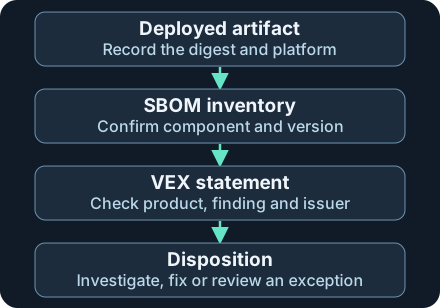
Record the strength of each link before suppressing alerts. A statement for digest A does not clear a different build under the same tag.
The analyst checks the issuer against policy and verifies the statement’s provenance. They confirm the build, architecture, feature configuration and rationale with the owner. Only this deployment enters a scoped exception review. They preserve the original alert, document the exception’s conditions and put it back in review if the image, configuration, advisory or provenance changes. A signature can attest to a document’s source and integrity under your trust policy. It does not validate every claim in the document.
| VEX status | How to use it |
|---|---|
affected |
Assess exposure and prioritize approved remediation. Follow the issuer’s action guidance |
not_affected |
Check the reason or impact statement and the exact product conditions before reviewing a scoped exception |
fixed |
Identify the fixed product version or artifact. Verify the running deployment reflects it |
under_investigation |
Keep triage open. Record the owner and follow-up date |
3. Where the evidence can mislead
Version-only matches can miss distribution backports, where a maintainer ships a fix without adopting the upstream release number. Compare the correct distribution’s advisory and package revision. Likewise, comparing only the name can confuse ecosystems. A PURL match helps with identity, while the advisory’s version rules and branch scope determine whether it applies. If a digest identifies a multi-platform index, identify the platform manifest used at runtime and verify that the inventory covers it.
An attacker who compromises a build or documentation channel may misrepresent what was shipped. A stale or misplaced exception can also hide a real finding when the build changes. If a component is absent from an SBOM, consider incomplete generation, bundled code or the build-versus-runtime difference before concluding absence. If trusted sources disagree, compare publication order, author, product, environment and conditions. Document unresolved conflicts and leave the finding for review.
4. Blue-team collection, detection and response
Anchor the investigation to a deployment. Record environment, owner, observation time, image repository, digest and platform. In OCI-based deployments, know whether the observed digest identifies an index or the platform manifest and record the mapping where applicable. Preserve the original scanner alert with the scanner version, advisory database time, package identity and match rule.
Validate inventory and advisory coverage. Preserve the SBOM generator, its scope and date, and a trusted link from its subject to the deployed artifact. Verify the direct or transitive path from the dependency graph if one was supplied. Compare package versions with the advisory for the correct ecosystem or distribution. Review the statement identifier, issuer, revision or date, vulnerability identifier, product scope, status and supporting reason. Apply your organization’s signature or trusted-channel verification policy. A trusted signature on an unrelated product remains out of scope.
Monitor drift and respond. Compare open exceptions with the active deployment inventory after each release. Flag a digest change with no matching inventory, a statement that no longer applies, and conflicting trusted statements for the same scoped finding. Preserve the conflicting documents and track the unresolved owner. For an affected build, prioritize using exposure and business impact, apply the approved fix or mitigation and verify the resulting deployment. Track which workloads still run the old digest. If a statement is missing or its provenance cannot be verified, leave the finding open pending evidence.
5. Offline exercise · Ten fictional tickets
Download sbom-vex-cases.json and sbom-vex-review.py into the same folder. Read S01 and S02 side by side first. The JSON represents simplified, normalized evidence, not CycloneDX or OpenVEX schema documents. Each artifact digest is a fictional string. The worksheet’s source_verified flag is a supplied premise, not a signature result computed by Python. The checker uses literal equality for fictional PURLs and a single expected issuer. It does not interpret real version ranges, signature chains or production policy.
python3 sbom-vex-review.py
| Cases | Expected decision |
|---|---|
| S01 / S02 | Review the reason for a scoped exception in S01. The inventory in S02 is for a different deploy |
| S03 / S04 | S03 has an identically named package from a different ecosystem. S04 has a statement for a different build |
| S05 / S06 | Provenance remains unverified in S05. S06 has no machine-readable justification in this worksheet |
| S07 / S08 | Verified statuses conflict in S07. S08 is affected and enters remediation |
| S09 / S10 | S09 requires verifying the deployment of the fix. S10 remains under investigation |
Expect Reviewed: 10 synthetic cases. If files are missing, put both downloads in one folder without renaming them. If a match surprises you, compare digest and PURL character for character, then check finding, issuer and the provenance premise. Some VEX formats allow an impact statement in place of a machine-readable justification. This worksheet intentionally uses only the justification field. For approved hands-on practice, take an SBOM and deployment record from an owned test build, compare them without running any vulnerability tests, and write down what the inventory actually covers. Python was run against the supplied fictional cases. No live registry, scanner, SBOM producer or signature verification service was exercised.
6. Check your understanding
- The advisory uses the same package name and version. Is that enough? Compare ecosystem, distribution, identifiers and the advisory’s applicable versions first.
- A supplier marks digest A as not affected. The workload uses digest B. What do you do? Keep the workload finding open and request evidence for B.
- A vendor publishes a fix, but the workload still uses the old digest. Is remediation complete? Confirm the image actually running and record any remaining exposure.
Finish by explaining S02, S05 and S07, then write one ticket update with the deployed digest and platform, component PURL, finding and advisory scope, provenance result, and the next evidence or action required.
Related · Public-key signatures and trust · Next · Blue Team fundamentals
Official references
Reviewed 20 November 2026. Compare the actual document version and format before applying a production parser or policy.
- CISA · Minimum Requirements for VEX, April 2023
- CycloneDX · JSON reference v1.7, October 2025
- Ecma · ECMA-427 Package URL, first edition December 2025
- OpenVEX · Project specification and status fields
- Open Containers Initiative · Image descriptor and digest, November 2025 · Image index and platform descriptors
Related articles
Windows App Control · Read Audit, Block and Signature Events
Connect Windows Code Integrity policy decisions, signature records and policy activation evidence without mistaking a block for malware execution.
Blue Team Fundamentals: Detection to Response
An introduction to security monitoring, triage, investigation, incident response, and detection improvement.