Active Directory · Beginner
Windows Security Group Changes · From Membership to Access Evidence
Read Windows group-change events, correlate the right logon, and distinguish a membership update from actual resource access.
Updated 2026-11-20
On this page
Learning goal. Identify the actor, member and target group in a Windows event. Determine which system owns the group, then explain what would show whether a later session included that group or actually accessed a resource.
1. Membership, session and access
A security group lets administrators assign access rights or permissions to a collection of accounts and groups. Direct membership is a recorded link between a member and a group. Nested membership means that the member is itself a group. In that case a single link can affect other accounts through the membership chain. A security identifier (SID) identifies a security principal. Names are convenient labels, while a SID and the owning security authority are better evidence for comparisons. An access token carries security context used in access checks, including user and group SIDs and attributes.
| Evidence | What it supports | What remains to check |
|---|---|---|
| Change on a domain controller or member host | A particular membership link was added or removed | Change approval, propagation and other paths to the same rights |
| 4624 and corresponding 4627 on the resource host | A logon occurred and specified group SIDs were recorded for it | Complete event fragments, token attributes and later operations |
| Resource’s own access evidence | An authorization decision or operation the audit source actually recorded | Exact object, access type, account, session and audit coverage |
Logon and permission checks are separate. A membership update does not prove that an existing session picked it up. The consulted domain controller, replication, ticket and session lifetime, and resource policy can affect what is observed later. A subsequent login can contain the SID without proving it was enabled, elevated or used for a particular operation.
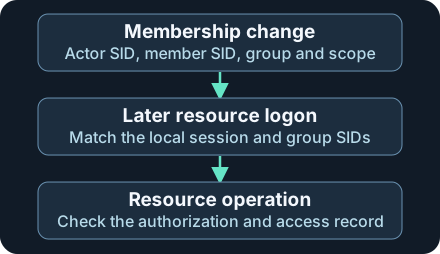
Each stage asks a separate question. Missing session or resource records leave those stages unconfirmed.
2. Decode a normal addition
Suppose the access team approves adding a test employee to a global security group used for report reading. The domain controller that handles the operation writes 4728 to its Security log when successful group-management auditing applies. Read the event’s SubjectUserSid for the account that performed the change, MemberSid for the added principal, and TargetSid for the group. SubjectLogonId refers to the actor’s local session on that recording computer. It is not the session of the newly added member.
In the fictional normal case, DC01 records the addition at 10:12. Its 4624 from 10:10 has the same actor SID in TargetUserSid and the same logon ID in TargetLogonId. That supports the session association. The change ticket establishes approval. Later, the new member logs on to FILE01 and its 4627 records the report group SID. To establish that a report was read, look for resource access evidence such as the applicable file or application audit record. Join using the resource’s session and object identifiers when available.
| Group type | Add / remove | Where to look |
|---|---|---|
| AD global security group | 4728 / 4729 | Security log on the domain controller that records the operation |
| AD universal security group | 4756 / 4757 | Security log on the relevant domain controller |
| Domain-local or Builtin Local security group in AD | 4732 / 4733 | Relevant domain controller’s Security log |
| A local security group on a member server or workstation | 4732 / 4733 | Security log of the computer that owns the local group |
A 4732 for S-1-5-32-544 concerns the Administrators group in the security authority that manages it. Two member hosts can display that same well-known SID. Each has its own membership list. For AD changes, scope the group to its domain and SID. One domain controller’s log may contain the addition and another’s the removal.
3. Investigate suspicious changes and ambiguity
Overly broad group-management rights or a compromised account can lead to an unauthorized addition through an otherwise legitimate management path. Normal events can also come from onboarding, provisioning automation or an approved temporary grant. Prioritize changes to groups that actually control sensitive systems or privileges. Track both additions and removals. A rapid removal may reflect planned expiry or corrective action, and it cannot prove that access was never obtained in the interval.
If the added SID resolves to another group, reconstruct the nested chain and its effective members for the relevant time and authority. Today’s directory or local group list only describes today’s state. Use timestamped directory and configuration snapshots where available. Member display names may be missing or have changed. Preserve the raw SID and lookup provenance.
4. Collect and correlate
Collect from the owner. Enable and verify Success for Audit Security Group Management on the applicable systems in an approved deployment. Collect the Windows Security channel across relevant DCs and member hosts. Preserve originating Computer, event ID, channel, original timestamp, event record ID and raw EventData. Keep collector identity separately. If using WEF, validate that the subscription, filters, retention and downstream parser retain the fields and event families needed. If using 5136 as corroboration, enable Audit Directory Service Changes and the applicable SACL on the object or attribute. Inspect AttributeLDAPDisplayName, operation and value when recorded. It is a different source of evidence from group-management events.
Correlate the actor session on that host. Match the change’s SubjectUserSid and SubjectLogonId to the successful logon’s TargetUserSid and TargetLogonId on the same originating computer and boot context, within a plausible window. Event IDs and numerical logon IDs have different meanings. A logon ID can coincide on another host. This association identifies a recorded account session. Attribution to a person requires context from the management path, automation records or change approval.
Examine the member’s resource logon independently. 4627 requires successful Audit Group Membership and Audit Logon on the resource computer. Match group-list events to the member’s 4624 by that computer, target SID, target logon ID and time. Check EventIdx and EventCountTotal for split lists. For a negative finding, require the complete list for the specific observed session. Use resource audit evidence to determine whether access was attempted or granted. A gap can come from audit policy, retention, filtering or collection.
Respond using impact and provenance. Compare sensitive group SIDs and owning scope with a maintained inventory. Flag an unexpected direct or nested addition after checking automation, the change ticket and whether the same change arrived through multiple collectors. Keep removals by group authority, group SID and member SID. When an unauthorized change is supported, preserve the pre-remediation state, coordinate approved removal, and investigate sessions, downstream activity and inherited membership. Verify the resource side separately rather than treating removal as immediate revocation for all existing sessions.
5. Offline exercise · Eight fictional investigations
Download ad-membership-cases.json and ad-membership-review.py into the same directory. Use Python 3 on an owned system. The JSON contains normalized fictional excerpts. group_authority and relative minute are worksheet metadata. Each case has one addition and assumes each computer is in one boot context. The worksheet supplies the member type as if it came from a directory lookup. The group list is represented as an array of SIDs. Raw Windows events use different field names and formatting.
python3 ad-membership-review.py
| Cases | What to find |
|---|---|
| G01 / G02 | Match the actor logon on DC01 in G01. The same SID and logon ID on ADMIN01 in G02 do not establish the same session |
| G03 / G04 | G03 shows a removal five minutes later on another DC of the same domain. G04 uses the same built-in group SID but a different member host, so the removal does not match |
| G05 | The added principal is a group in the scenario. Look up the nested members and access scope. The worksheet has no resource evidence |
| G06 | The report-group SID appears in the member’s observed resource logon |
| G07 / G08 | One 4627 fragment is missing in G07. G08 has a complete list without the group SID for that session |
Expect Reviewed: 8 synthetic cases. If the checker cannot find the JSON, keep the original filenames together. A failed join calls for checking which computer generated the event, whether the actor and member were reversed, the time scope and normalized field mapping. For an optional approved Windows exercise, use an isolated domain or member host and an existing harmless test group with no administrator or production rights. Compare the change against the local Security log and a fresh login on a test resource with auditing already configured. Record which systems made each observation. The Python fixture was executed. Windows auditing and session behavior were checked against Microsoft documentation.
6. Check your understanding
- Same group SID and member on two workstations. Does a removal on one cancel the addition on the other? No. Use each host’s local security authority for its membership list.
- A new member’s resource session includes the SID. Did that person open the report? Look for the applicable resource access audit. The observed group list does not include the authorization result for the report.
- A five-minute grant was removed. Are all sessions and nested access paths now gone? Review other membership paths and evidence about affected sessions and resources. The removal establishes one link change.
Finish by writing a finding with actor, member, group and scope, source host, observed time window, which logon can be linked, and the next evidence required to establish access.
Previous · Active Directory fundamentals · Next · Windows Security logs
Official references
Reviewed 20 November 2026. The Windows Server guidance covers AD group scopes and policy. The previous-version field references document individual event records. Check samples from the deployed version and collection pipeline.
- Microsoft Learn · Active Directory security groups, Windows Server 2016–2025
- Microsoft Learn · Advanced audit policy configuration, including Security Group Management
- Microsoft Learn · 4732 group change fields · 4624 logon fields
- Microsoft Learn · 4627 group-list fields · Audit Group Membership policy
- Microsoft Learn · Event 5136 and its SACL requirements
Investigate Group Policy Application
Investigate Group Policy Application. Compare directory and SYSVOL versions and verify the client result.
Related articles
Active Directory Fundamentals: Domains, DCs, DNS, OUs, GPOs and Security
A thorough, beginner-friendly AD DS guide covering identity architecture, Kerberos, authorization, Group Policy, replication, FSMO, defensive logging and safe lab exercises.
AD CS Security: Certificate Templates, ESC Risks, Strong Mapping, Detection and Defense
Understand certificate enrollment and authentication, AD CS template and CA permissions, selected ESC risks, modern mapping enforcement, audit evidence, Splunk searches and a synthetic investigation.