Active Directory · Beginner
Active Directory Fundamentals: Domains, DCs, DNS, OUs, GPOs and Security
A thorough, beginner-friendly AD DS guide covering identity architecture, Kerberos, authorization, Group Policy, replication, FSMO, defensive logging and safe lab exercises.
Updated 2026-10-22
On this page
Learning outcomes: Explain how an organization uses Windows domains to manage identity, distinguish authentication from authorization, understand how DCs, DNS, OUs and GPOs interact, and identify security and forensic evidence. Commands are read-only inventory or diagnostic examples unless explicitly stated. Names like
corp.example.comandjohnare fictitious.
1. What is Active Directory?
Active Directory Domain Services (AD DS) is the centralized directory and identity infrastructure typically deployed on Windows Server for managing people, computers, groups, services, authentication and administrative policies.
Rather than giving each of 500 employees separate local credentials on every workstation, an organization can manage accounts through a domain. A user such as john@corp.example.com may sign in at a company workstation, access \\fileserver\Finance and receive centrally administered computer/user policies.
A successful sign-in does not guarantee permission to read every corporate file. Authentication and authorization are different security decisions.
AD DS is not the same product as Microsoft Entra ID, which is a cloud identity platform, nor Microsoft Entra Domain Services, a managed domain-services offering. This article focuses on Windows Server AD DS.
Five core capabilities
| Function | Example |
|---|---|
| Identity lifecycle | Create, disable and manage users, computers and service accounts |
| Authentication | Kerberos and sometimes NTLM establish an identity |
| Authorization | Group memberships and ACLs control access to resources |
| Policy management | GPOs define workstation, server and user settings |
| Directory services | LDAP queries, DNS-based DC discovery and domain controller replication |
2. Forests, trees, domains, OUs and sites
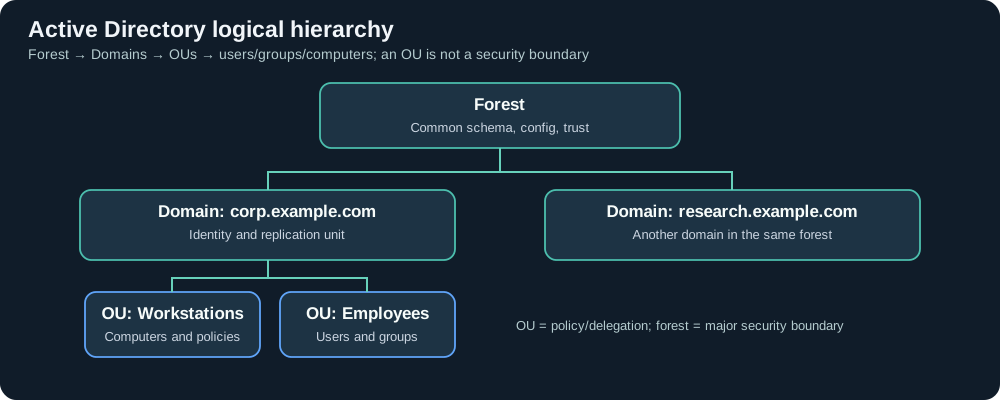
These five terms describe different layers of Active Directory.
| Term | Definition | Key idea |
|---|---|---|
| Forest | One or more domains with a shared schema, configuration, global catalog structure and trust relationships | Major AD DS security boundary |
| Tree | Related domains sharing a contiguous DNS namespace | Logical domain name hierarchy |
| Domain | Unit of account management, authentication and directory partition replication | Multiple DCs can host writable replicas |
| Organizational Unit (OU) | Administrative container for directory objects | Delegation and Group Policy links |
| Site | Physical/topological grouping of IP subnets and network connectivity | DC selection and replication scheduling |
Example: one forest might contain corp.example.com and research.example.com. Each domain can have an OU=Servers or OU=Workstations. Creating an OU does not create a new authentication database, domain or security boundary.
A site is not an OU. A Sydney office site might contain computers stored in many different OUs, while one OU may contain objects from several sites.
Distinguished Names (DN)
A directory object can be identified by a path such as:
CN=John Lee,OU=Finance,OU=Employees,DC=corp,DC=example,DC=com
CN refers to a common name, OU to organizational units, and DC to domain components. Moving an account between OUs primarily changes its directory location and policies/delegation context; it does not automatically grant access to a file share.
3. Domain Controllers and their responsibilities
A Domain Controller (DC) runs AD DS. It usually provides or participates in several essential services:
- Directory database: Stores objects/attributes in the
NTDS.ditdata store. - Kerberos Key Distribution Center (KDC): Issues ticket-granting tickets and service tickets.
- LDAP interface: Exposes directory searches and authorized updates.
- DNS integration: DNS is often installed on DCs, but it need not be hosted on every DC; AD relies on DNS records to find services.
- SYSVOL and NETLOGON: Shared content used by Group Policy and logon operations.
- Replication: Keeps directory changes synchronized between DCs.
- Global Catalog (GC): Offers forest-wide partial-attribute search and supports some authentication/group scenarios. Not every DC is necessarily a GC.
DCs are high-value assets. Directory secrets and critical authentication data must be protected even though NTDS.dit is not merely a text file containing visible plaintext passwords.
4. Why DNS is foundational to AD
Clients locate domain controllers using DNS SRV records, such as:
_ldap._tcp.dc._msdcs.corp.example.com
The Windows DC Locator process uses registered DNS records and can account for AD site/subnet topology to choose a suitable DC. Once found, the client communicates through the necessary LDAP, Kerberos and SMB services.
Common failure: Configuring a domain-joined workstation to use only an unrelated public DNS resolver can break DC discovery, domain functions, Group Policy and service access.
Protocols and common ports
| Port | Service | Typical purpose |
|---|---|---|
| TCP/UDP 53 | DNS | Discover DCs and other named services |
| TCP/UDP 88 | Kerberos | Authentication tickets |
| TCP/UDP 389 | LDAP / CLDAP | Directory operations and aspects of DC discovery |
| TCP 636 | LDAPS | LDAP over TLS |
| TCP 3268/3269 | Global Catalog / TLS GC | Forest-wide queries |
| TCP 445 | SMB | SYSVOL, NETLOGON and file services |
| TCP/UDP 464 | Kerberos password change | Password change operations |
| TCP 135 plus dynamic RPC | RPC | Management, some replication functions |
| UDP 123 | NTP | Time synchronization important for Kerberos |
These are representative ports, not an exhaustive firewall ruleset. Consult current Microsoft port requirements and the actual installed services before deployment.
5. Authentication vs authorization: a worked example
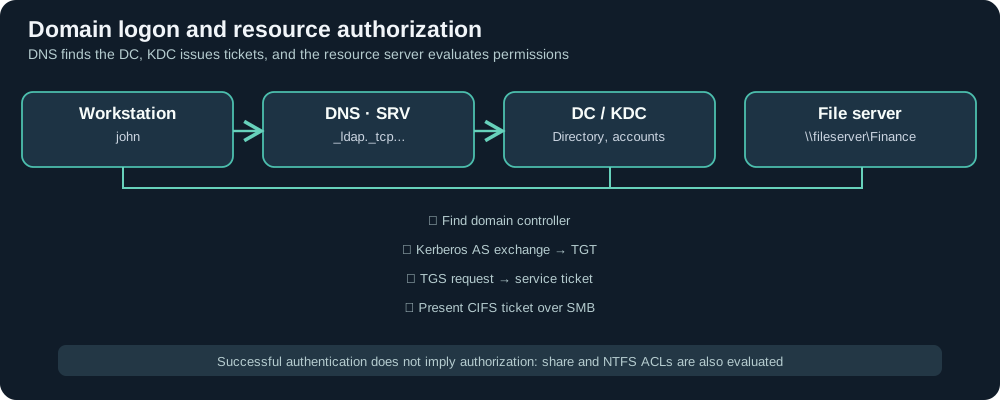
Consider john accessing the Finance share:
- His workstation finds a DC through DNS.
- During Kerberos authentication, an AS-REQ / AS-REP exchange obtains a TGT, assuming a new authentication is needed (existing cached tickets can change the observed sequence).
- When
\\fileserver\Financeis requested, the workstation uses TGS-REQ / TGS-REP for a service ticket associated with thecifs/fileserverSPN. - The client presents the service ticket to the SMB server.
- The server verifies the session and checks share permissions, NTFS ACLs and other effective access controls before allowing the requested operation.
Windows domains commonly prefer Kerberos but may use NTLM in some configurations and compatibility cases. The distinction is:
- Authentication: Is the client the identity it claims to be?
- Authorization: Does this identity have the requested right on this specific resource?
A 4624 successful logon event alone does not prove that the same client successfully opened a particular spreadsheet.
6. Directory objects, attributes and naming
The AD schema defines object classes and their permitted attributes.
| Term | What it means |
|---|---|
| User | A person or user-style service identity |
| Computer | Domain-joined device principal, commonly ending in $ |
| Group | Collection of principals used for access and management |
sAMAccountName |
Legacy account name, e.g. john; CORP\john combines the domain’s NetBIOS name with this value |
userPrincipalName (UPN) |
User-style sign-in string, e.g. john@corp.example.com |
objectSID (SID) |
Security identifier used for authorization; includes domain SID/RID components |
objectGUID |
Directory object’s GUID identifier |
servicePrincipalName (SPN) |
Identifies a service, e.g. cifs/fileserver or MSSQLSvc/sql01... |
memberOf |
Some direct group relationships; group nesting and primary group need separate handling |
adminCount |
Attribute potentially connected with protection of formerly/currently privileged objects; by itself not proof of current admin status |
Service identities may be traditional accounts with administrator-managed passwords or group Managed Service Accounts (gMSAs) with automatically managed, highly resistant secrets. Service SPNs and privilege are important to the risk of Kerberoasting.
7. Security groups, distribution groups and AGDLP
Security groups can grant resource permissions. Distribution groups are used for things such as email distribution and cannot normally be used as security principals in ACLs.
| Scope | Common practical use |
|---|---|
| Global | Organize identities/roles from the same domain |
| Domain Local | Represent access permissions on resources in a domain |
| Universal | Aggregate members across multiple domains when needed |
| Builtin Local | Special built-in groups |
The AGDLP pattern is widely used for scalable access design.
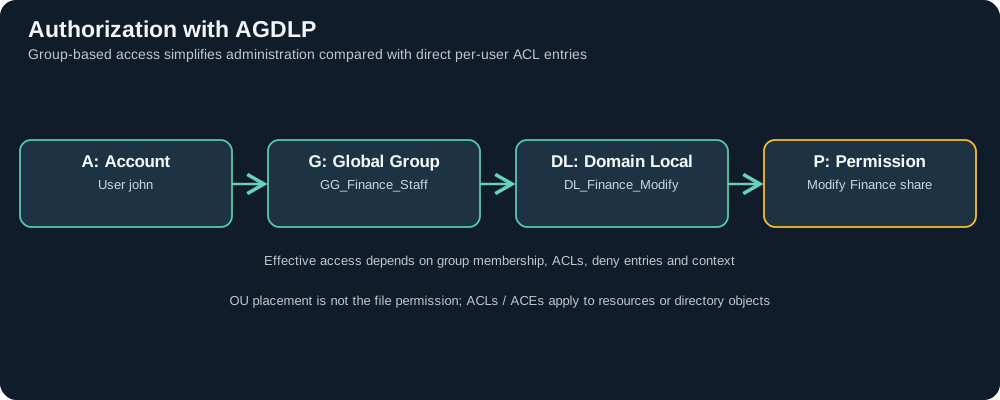
A   Accounts               john, mary
G   Global group           GG_Finance_Staff
DL  Domain Local group     DL_Finance_Modify
P   Permissions            Modify access to Finance
Accounts belong to a role-based Global group; that group is nested in a resource-oriented Domain Local group; the Domain Local group receives ACL permissions. An AGUDLP variation introduces Universal groups where multi-domain aggregation is appropriate.
Effective permissions still depend on nested memberships, share/NTFS ACLs, deny ACEs, inheritance and token/context. A group membership alone is not unconditional access to every resource.
High-impact administrative groups
- Domain Admins: Highly privileged within the domain. Avoid assigning to normal daily user accounts.
- Enterprise Admins: Forest-wide administrative impact.
- Schema Admins: Permission to change the forest schema.
- Account Operators, Backup Operators and similar groups: Can have sensitive access even if their names sound less powerful.
- DnsAdmins and delegated management groups: May expose indirect privilege paths depending on server and policy configuration.
Analyze effective privileges, object ACLs and delegated authority, not merely obvious group names.
8. OU design and Group Policy Objects
An OU organizes objects for delegation and GPO targeting. A Group Policy Object (GPO) contains policies applied to selected users and computers.
For example:
corp.example.com
├── OU=Workstations
│   └── GPO: Workstation Security Baseline
├── OU=Servers
│   └── GPO: Server Security Baseline
└── OU=Employees
    └── OU=Finance
        └── GPO: Finance User Settings
Default Group Policy processing order: LSDOU
- Local Group Policy
- Site-linked GPOs
- Domain-linked GPOs
- Parent OUs and then child OUs
Later-applied conflicting settings usually take precedence by default, but Enforced, Block Inheritance, Security Filtering, WMI Filtering, Link Order and Loopback affect outcomes. Simply linking a policy does not guarantee its application.
GPC versus GPT
GPOs have a Group Policy Container (GPC) in AD and a Group Policy Template (GPT) containing policy files in SYSVOL. Both AD object permissions and SYSVOL file access/replication matter when investigating unauthorized GPO modifications.
Misconfigured GPO editing or linking permissions can allow a delegated operator to influence many machines. Yet every GPO update is not automatically malicious—compare against approved changes and endpoint effects.
9. AD Sites, subnets, replication, GC and RODC
- Sites and subnets: Help clients locate suitable DCs and schedule replication based on network topology.
- Multi-master replication: Ordinary writable DCs can each receive many kinds of changes, and those changes replicate to others.
- SYSVOL replication: Modern AD environments typically use DFSR for policy files. SYSVOL/DFSR replication and AD directory replication are related but distinct systems.
- Global Catalog: Forest-wide partial-attribute search and group/authentication-related functionality.
- Read-Only DC (RODC): Provides a directory replica suitable for some branch-office scenarios, with specific password caching controls.
Troubleshooting implication: A user whose group memberships were changed may not see the same results at different DCs immediately. Similarly, an AD GPO change and its SYSVOL files might become consistent at different times. Replication delays are important forensic context, not automatic proof of an intrusion.
10. FSMO: five single-master roles
AD DS is generally multi-master, but certain critical operations have one designated FSMO (Flexible Single Master Operations) role holder.
| Role | Scope | Purpose |
|---|---|---|
| Schema Master | One per forest | Schema modification coordination |
| Domain Naming Master | One per forest | Add/remove domains and directory partitions |
| RID Master | One per domain | Allocate RID pools for new security identifiers |
| PDC Emulator | One per domain | Important password-update and time/compatibility duties |
| Infrastructure Master | One per domain | Maintain cross-domain object reference information |
FSMO roles can reside on different DCs. Understand the role holders and health of replication before transferring a role; seizing a failed role has operational risks.
Windows Server 2025 functional levels
A functional level is not the same thing as the OS version of every workstation or server. Windows Server 2019/2022 do not have separate 2019/2022 AD functional levels; Windows Server 2016 was their latest supported functional level. Windows Server 2025 introduces a newer domain/forest functional level.
Raising a level requires compatible DC versions and a healthy directory. It does not itself patch Windows clients or grant stronger permissions.
11. Trust relationships and boundaries
Domains within a forest are normally connected by automatic, two-way transitive trusts. Separate forests can be linked by configured forest trusts or other supported relationships.
A trust provides a path by which an identity from another domain may be authenticated; it does not by itself grant access to a particular file share. Resource ACLs still control authorization.
The forest is a principal security boundary in AD DS design. Placing sensitive objects in another OU or in another domain in the same forest does not guarantee isolation from sufficiently privileged forest administrators.
12. Security risks that build on AD fundamentals
| Category | Typical abuse or misconfiguration | Defender strategy |
|---|---|---|
| Kerberoasting | Offline guessing against weak SPN service-account passwords | gMSA, random long secrets, 4769 behavioral detection |
| NTLM relay / Pass-the-Hash | Abuse live NTLM exchanges or obtained NT hashes | SMB/LDAP signing, channel binding, NTLM reduction and credential protections |
| LDAP enumeration | Search accounts, SPNs and delegated rights | Contextual endpoint/directory monitoring, limit excessive permissions |
| Privileged group changes | Add unintended members to admin groups | Alert on membership events such as 4728/4732/4756 |
| GPO abuse | Modify policies or SYSVOL with delegated rights | Audit edits/links and protect GPO/SYSVOL ACLs |
| Object ACL / delegation abuse | Unintended write or control rights over users and OUs | Regular DACL review, audit 5136/4662 when configured |
| DCSync | Misuse high-impact directory replication rights | Limit replication rights and monitor relevant object operations |
| AD CS misconfiguration | Misuse certificate enrollment/templates or identity mapping | Review PKI/template configuration and issuance |
| Legacy auth/crypto | Unnecessary legacy protocols or weak encryption | Stage Kerberos, LDAP and SMB security modernization |
Ordinary LDAP queries, Kerberos ticket requests or remote administration are not automatically attacks. Attribution requires source, timing, account role, process evidence and corroborating behavior.
13. Security events every defender should recognize
| Event | Usual location | Significance |
|---|---|---|
| 4768 | DC Security | Kerberos TGT request |
| 4769 | DC Security | Kerberos service-ticket request |
| 4771 | DC Security | Kerberos pre-authentication failure |
| 4776 | DC or related authentication system | NTLM credential validation |
| 4624 / 4625 | System processing logon | Logon success / failure |
| 4740 | DC and related systems | Account locked out |
| 4720 / 4726 / 4738 | DC Security | User created / deleted / changed |
| 4728 / 4756 | DC Security | Member added to a Global / Universal security group |
| 4732 | DC Security for domain-local groups; the relevant member server/workstation Security log for its local groups | Member added to a security-enabled local group; collect from the system managing the group |
| 5136 | DC Security | Directory object attribute changed (requires applicable auditing/SACL) |
| 4662 | DC Security | Audited AD object operation (requires appropriate object SACL) |
| 4672 | Logon system | Special privileges assigned to a logon |
| 1102 | System whose Security audit log was cleared | Security audit log cleared |
Logging caveat: A missing event is not reliable evidence that an action never occurred. Check audit subcategories, SACLs, data ingestion, time windows and DC coverage before reaching that conclusion.
14. Starter Splunk searches for AD investigations
A. Confirm ingestion of authentication and directory events
index=* (EventCode=4768 OR EventID=4768
         OR EventCode=4769 OR EventID=4769
         OR EventCode=5136 OR EventID=5136)
| eval event_id=coalesce(EventCode,EventID)
| stats count by host sourcetype event_id
| sort - count
Depending on ingestion and parsing, an event may have only EventCode or EventID. Normalize them into event_id with coalesce before grouping; requiring both original fields in BY can omit events where one is absent.
index=* is for discovery. Replace it with your real index once known, verify extraction and select an appropriate time range.
B. Review account and group changes
index=* (EventCode=4720 OR EventID=4720
         OR EventCode=4728 OR EventID=4728
         OR EventCode=4732 OR EventID=4732
         OR EventCode=4756 OR EventID=4756)
| table _time host EventCode EventID SubjectUserName TargetUserName MemberName GroupName
| sort - _time
C. Inspect AD object attribute modifications
index=* (EventCode=5136 OR EventID=5136)
| table _time host SubjectUserName ObjectDN AttributeLDAPDisplayName OperationType AttributeValue
| sort - _time
Missing extracted fields can indicate a different Windows source format or Splunk sourcetype rather than an absent security event.
15. Read-only administrator inventory and diagnostics
The AD PowerShell examples require RSAT ActiveDirectory module and sufficient read permissions, and use fictional identity names.
A. Domain, forest, FSMO and DC inventory
Import-Module ActiveDirectory
Get-ADDomain |
  Select-Object DNSRoot,DomainMode,PDCEmulator,RIDMaster,InfrastructureMaster

Get-ADForest |
  Select-Object Name,ForestMode,SchemaMaster,DomainNamingMaster,GlobalCatalogs

Get-ADDomainController -Filter * |
  Select-Object HostName,Site,IsGlobalCatalog,OperatingSystem
B. Organizational units and group membership
Get-ADOrganizationalUnit -Filter * |
  Select-Object Name,DistinguishedName

Get-ADUser -Identity "john" -Properties Enabled,UserPrincipalName,MemberOf |
  Select-Object SamAccountName,Enabled,UserPrincipalName,MemberOf

Get-ADGroupMember -Identity "GG_Finance_Staff" |
  Select-Object Name,ObjectClass
C. Resolve the DC locator record
Resolve-DnsName -Type SRV "_ldap._tcp.dc._msdcs.corp.example.com"
nltest /dsgetdc:corp.example.com
D. Inspect GPOs and replication
Get-GPO -All | Select-Object DisplayName,Id,GpoStatus
Get-GPO requires a compatible GroupPolicy module and relevant directory permissions.
repadmin /replsummary
gpresult /r
repadmin /replsummary reports DC replication status. gpresult /r reports the policies applying to the user/computer where that command runs. These tools answer different questions. Avoid modifying DC, DNS, FSMO or GPO settings outside approved lab/change procedures.
16. A realistic troubleshooting and DFIR scenario
Fictional case: User john can sign in but cannot access \\fileserver\Finance.
- DNS/DC discovery: Check workstation DNS and
nltest /dsgetdc. - Authentication: Correlate the destination’s 4624 with relevant DC Kerberos/NTLM records and rule out time skew.
- Groups: Confirm John belongs to the appropriate role-based Global group and any nested resource-oriented Domain Local group.
- Authorization: Inspect the file server’s SMB share ACL and NTFS ACL, including deny entries and whether an old logon token is still in use.
- GPO: Check the applied policies using
gpresult, security filtering, inheritance and SYSVOL reachability. - Replication: Determine whether a recent group or GPO change has reached the DC/resource and whether a new sign-in is needed.
- Conclusion: Document the specific authentication and/or authorization failure rather than labeling every “access denied” error as bad credentials.
Self-check questions
- Does a new OU create a new domain or security boundary? No.
- Does Event 4769 prove Kerberoasting? No; ordinary CIFS access requests service tickets.
- Why can a valid domain logon still be denied file access? Share/NTFS ACLs, groups, token and policy context.
- Who replicates the directory? AD DS domain controllers, not ordinary file servers.
- Does a GPO always apply because it is linked to an OU? No; inheritance, filtering, links and processing rules matter.
17. Hardening principles for a production domain
- Protect DCs and forest administration as high-value infrastructure. Strictly limit network and administrative access.
- Design role-based access groups. Prefer AGDLP-style allocation and scheduled membership reviews over direct individual ACEs.
- Separate privileged and everyday identities. Apply appropriate MFA and privileged administrative workstation practices.
- Protect service accounts. Use gMSAs where supported, long random passwords, least privilege and SPN inventory.
- Modernize Kerberos, LDAP and SMB controls. Plan LDAP signing/channel binding, SMB signing, safer crypto and NTLM reduction after compatibility testing.
- Protect GPO change authority. Restrict edit/link permissions, monitor changes and maintain approval records.
- Validate DNS, DC replication and disaster recovery. Include SYSVOL, system-state backups and tested recovery steps.
- Centralize useful logs. DC Security/Directory Service, target workstation/server, EDR and network evidence work best together.
18. Continue your learning in this wiki
- Kerberoasting: attack mechanics and Event 4769
- SMB security and remote execution
- WPAD: proxy discovery and abuse
- Windows logs essentials
- Next: Kerberos Authentication Complete Guide
Suggested next chapter: Kerberos Authentication (AS-REQ, AS-REP, TGT, TGS, PAC, SPNs), followed by NTLM Authentication and Attacks.
19. Microsoft documentation and references
- Understanding the AD DS logical model
- DNS and AD DS
- How DC Locator finds domain controllers
- Active Directory security groups
- Group Policy processing
- Active Directory FSMO roles
- Raise domain and forest functional levels
- LDAP signing
- Audit Directory Service Access
DNS foundations and evidence
DNS resolution, caching, response codes and a synthetic evidence lab
Microsoft Entra Sign-in Investigation · MFA and Conditional Access
Entra sign-in and resource evidence lab
Trace Security Group Changes to Access Evidence
Identify the actor and group, then verify which later session included the membership
Investigate Group Policy Application
Investigate Group Policy Application. Compare directory and SYSVOL versions and verify the client result.
Related articles
AD CS Security: Certificate Templates, ESC Risks, Strong Mapping, Detection and Defense
Understand certificate enrollment and authentication, AD CS template and CA permissions, selected ESC risks, modern mapping enforcement, audit evidence, Splunk searches and a synthetic investigation.
Windows Security Group Changes · From Membership to Access Evidence
Read Windows group-change events, correlate the right logon, and distinguish a membership update from actual resource access.