Active Directory · Beginner
Investigate Group Policy: Directory, SYSVOL, and Client Evidence
Compare Group Policy versions on named domain controllers, investigate link and content changes, and verify client application.
Updated 2026-11-21
On this page
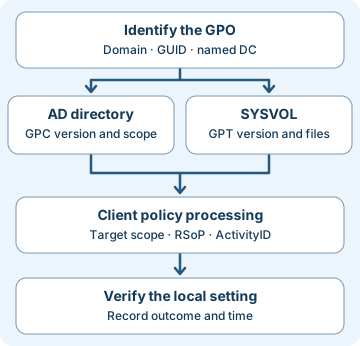
A workstation still shows the old setting after an approved Group Policy change. Start with three questions. What did Active Directory record? What files could the client retrieve from SYSVOL? What did that client process for the relevant user or computer? Investigating each step helps distinguish replication lag, scope, and an unexpected change.
1. The two halves of a GPO and the client that uses them
Active Directory Domain Services (AD DS) is the directory. A domain controller (DC) hosts directory services and exposes the domain’s SYSVOL share. A Group Policy Object (GPO) is a collection of settings for computers, users, or both. It has a directory half, the Group Policy Container (GPC), and a file half, the Group Policy Template (GPT) in SYSVOL. The GPO GUID identifies the object in its domain. Display names can be duplicated or changed.
A link associates a GPO with a site, domain, or organizational unit (OU). Linking changes the possible scope without editing the policy files. A link has its own options. Security and WMI filtering, inheritance, link order, and loopback can affect which settings win. Loopback changes how user policy is selected based on the computer. Record whether the question concerns the user half or computer half.
| View | Examples of evidence | What it helps establish |
|---|---|---|
| Directory (GPC and scope) | GPO GUID, versionNumber, gPCFileSysPath, GPO and scope permissions, gPLink on the linked container |
Which version and scope were visible on the queried DC. |
| Files (GPT) | Same DC’s SYSVOL path, GPT.INI version, relevant file bytes, hashes and ACLs |
What that replica held at collection time. |
| Client processing | User or computer RSoP, the Group Policy Operational log, and the affected setting | How the policy was evaluated and what the local setting shows. |
| Change audit | DC Security 5136, deployment approval, and separately collected SYSVOL file evidence | Which directory attributes changed and whether evidence corroborates the file or link change. |
RSoP means Resultant Set of Policy. It describes the outcome of policy processing for a user or computer. To establish the current state of an individual setting, also check the setting itself. An applied GPO can include other settings, and precedence or a client-side extension can affect the individual result.
2. Read versions on a named DC
The directory’s versionNumber and the template’s Version in GPT.INI pack two counters into 32 bits. The high 16 bits are the user version. The low 16 bits are the computer version. For decimal 196615, divide by 65,536: quotient 3 is user and remainder 7 is computer. Decimal 196616 is user 3, computer 8. Some exporters present the same bits as a signed integer. Preserve the original and decode the bit pattern without relying on a comparison of signed magnitudes.
Take time-stamped observations from the same named DC for both halves. Then repeat on a second DC. AD replication and SYSVOL replication are separate. A difference in one pair suggests an issue between those halves at that observation point. Two internally consistent pairs can still differ between DCs. A number is a version counter, so equal numbers cannot establish byte equality, a change’s authorization, or a client’s processing result.
| Situation | What to check next |
|---|---|
| Directory 3/8 and SYSVOL 3/7 on DC A | Inspect the edit timeline, collection errors, and AD and SYSVOL replication separately. |
| A is consistently 3/8 and B consistently 3/7 | Preserve both observations and determine which DC served the affected processing instance. |
| SYSVOL value unavailable | Retain the actual access or parse error. Check the named server, share, permissions, filename, and reachability. Do not replace the value with zero. |
| Both report 3/8 and the same scoped file differs | Compare the exact path, bytes, timestamps, collection scope and approved version. Digests support byte comparisons. Document provenance. |
| All versions and compared content agree | Move to link scope, client processing, and the requested local setting. |
3. Follow a normal change and an unexpected one
In the synthetic example an authorized computer policy edit increments the computer counter from 7 to 8. After convergence, both DCs report AD and SYSVOL as user 3, computer 8. The relevant file bytes match on the two DCs. A client report identifies the GPO as applied for the computer. An independent local check shows the approved value. This supports application on that client at that time. Other clients still need their own evidence.
If a GPO link changes on an OU, the GPO’s own versions and files can stay the same. A newly linked policy may affect more clients without a template version increase. In the worksheet, E01 and E02 show a removed and added gPLink attribute value for the same OU and operation. The observed change can widen or narrow scope. Confirm the target, link options, filtering, approval, and effective client impact before assigning intent.
A delegated role with overbroad rights may affect fleet configuration by changing policy content or scope. Unexpected link expansion or changes to SYSVOL contents warrant a review against known-good settings and deployment evidence. Routine rollout, inherited permissions, and replication delay can also produce surprising observations.
4. Collect read-only evidence and validate impact
Use an authorized Windows management station with the GroupPolicy PowerShell module (for example via RSAT), network access to the named DCs, and permission to read the domain’s GPO and share. Replace the fictional domain, DC, and GUID. Repeat for each named DC and retain timestamps. The first command shows versions and policy status. Independently read the expected SYSVOL path on the intended DC through a trusted path. If the recorded gPCFileSysPath is unexpected, validate it against inventory before attempting to open it.
$gpo = 'd389ee57-38d4-4c3c-a24b-7797329d53ea'
Get-GPO -Guid $gpo -Domain 'lab.example' -Server 'dc-a.lab.example' |
  Format-List Id, DisplayName, GpoStatus, UserVersion, ComputerVersion
Get-Content -LiteralPath "\\dc-a.lab.example\SYSVOL\lab.example\Policies\{$gpo}\GPT.INI"
On the authorized affected computer, an elevated prompt can collect computer-scope RSoP with gpresult /r /scope computer. For a user-policy issue, collect the relevant user’s RSoP in the appropriate session or approved administrative context. Preserve the affected user and computer, collection time, applied or denied GPOs and reported reasons. For processing errors, check Microsoft-Windows-GroupPolicy/Operational and group one client processing instance using its ActivityID. Preserve the report before changing any policy or requesting another processing cycle.
- Establish scope. Record the domain, GUID, DC for each observation, site or OU, affected principal and UTC intervals. Read both halves and preserve the affected policy files or approved exports as well as their metadata. Compare the same relative files across replicas and against approved content.
- Read audit coverage. On DCs, Security event 5136 requires successful Audit Directory Service Changes auditing and a matching SACL for the attribute write. A SACL defines what actions to audit. Keep source DC, object DN or GUID, attribute, operation type, correlation ID, subject and UTC time. Pair the applicable Value Deleted and Value Added records where both are present.
gPLinkis on the linked site, domain, or OU object. The GPO’s ownversionNumberis on its GPC. Fields may be missing or normalization may differ, so preserve raw XML. - Correlate across layers. A 5136 correlation ID helps group directory operations. Client Group Policy ActivityID describes a separate processing instance. Collect SYSVOL file changes separately. Compare DC audit and client telemetry by GPO GUID, scope and time, and look for separate authorized file-audit or endpoint data. Compare a suspicious change with its change approval, originating DC evidence, delegated permissions and approved settings. Audit gaps and ambiguous initiators remain open findings.
- Respond to the verified effect. If it is a delivery issue, have AD administrators verify both replication paths and the client’s processing conditions. For unauthorized scope or content changes, preserve relevant logs and known-good policy, then coordinate containment and approved rollback. Recheck multiple DCs and representative clients after recovery.
5. Offline exercise · Ten checks
Download the synthetic worksheet and Python review script into the same directory. The JSON uses training labels for file content and audit values. They are not raw GUIDs, hashes, or event XML. Each case isolates one main evidence question. Python 3 is sufficient and the script does not contact AD.
- Calculate user and computer counters for 196615 and 196616. Compare AD and SYSVOL on each DC, then compare across DCs.
- Match
E01to its Added partner by DC, directory correlation ID, object and attribute. KeepE03andE04out of that pair. Name what remains unknown about client application. - Run the review script. It should finish with
10 synthetic checks passed.
python3 gpo-evidence-review.py
| Cases | Expected result |
|---|---|
G01 |
Client application observed along with matching snapshots. |
G02 / G03 |
Mismatch within a DC / mismatch between internally consistent DCs. |
G04 / G05 |
SYSVOL unobserved / equal versions with different sampled content. |
G06 / G07 / G08 |
Link changed at equal versions / client filtered / client outcome unobserved. |
E01 and version controls |
E02 is its only partner. The signed sample decodes to user 32768, computer 1. |
If the script cannot find the worksheet, verify both filenames and the folder. If G04 seems like a mismatch with version zero, check your handling of a missing value. If multiple audit rows match, compare the attribute and DC in addition to the correlation label. In a real investigation preserve duplicate, ambiguous or partial pairs rather than selecting a single row by proximity.
Verification scope. Python ran the ten synthetic checks. The Windows and AD collection commands were reviewed against Microsoft documentation. Live DC replication, GPO edits, and client processing were outside this exercise.
6. Check your understanding
- Two DCs show different computer versions but each DC agrees with its SYSVOL. Which evidence is missing? Resource and processing context for the affected client, plus replication and timing data. The snapshot supports a between-DC difference.
- Versions agree, and an OU’s link was edited. Could policy scope still change? Yes. The link is on the scope object’s directory data. Verify the resulting scope and client processing separately.
- Does matched 5136 prove SYSVOL contents changed? It supports a matching directory attribute change. Inspect SYSVOL and its independent evidence for file changes.
- A GPO appears as applied and one setting is wrong. Where next? Identify the exact setting, winning policy, relevant client-side extension and current state. An applied GPO can contain many settings.
Completion criteria. Decode the version pair, explain the eight cases, find the audit partner, and write a short case note separating observed directory and file facts from client outcome and cause.
7. Official references and next steps
Reviewed 2026-11-21. The architecture and processing guidance covers Windows Server 2016–2025 as listed. The PowerShell reference is in the Windows Server 2025 documentation view. The older Security audit reference describes event 5136’s schema and prerequisites. Verify collection on your deployed Windows builds.
- Architecture, processing and collection. Group Policy overview · Processing · Troubleshooting and ActivityID
- Packed versions and command references. MS-GPOL GPO Search · MS-GPOL version fields · Get-GPO · gpresult
- Directory audit scope and values. Audit Directory Service Changes · Event 5136
Previous · Active Directory Fundamentals
Next · AD Group Membership Evidence
Related articles
Active Directory Fundamentals: Domains, DCs, DNS, OUs, GPOs and Security
A thorough, beginner-friendly AD DS guide covering identity architecture, Kerberos, authorization, Group Policy, replication, FSMO, defensive logging and safe lab exercises.
AD CS Security: Certificate Templates, ESC Risks, Strong Mapping, Detection and Defense
Understand certificate enrollment and authentication, AD CS template and CA permissions, selected ESC risks, modern mapping enforcement, audit evidence, Splunk searches and a synthetic investigation.