DFIR · Beginner
Investigate the NTFS USN Journal: File Identity, Renames, and Gaps
Follow file and parent references, interpret combined change flags, and check whether a saved journal cursor is still usable.
Updated 2026-11-21
On this page
A report appears in a folder with a new name. One analyst asks what file changed. Another asks who moved it and whether it left the server. The NTFS change journal can help identify the file and move. Actor attribution and transfer require different evidence.
1. Read the journal as a history of selected changes
NTFS is a Windows file system. A volume is a logical storage unit that can contain a file system. NTFS can maintain a change journal for each volume, allowing tools such as indexers to discover changes since a previous read. A USN (update sequence number) records a position in that journal stream. Variable-size records and acquisition filters can leave numerical gaps between entries. A difference between two USNs is neither a count of missing events nor a time interval.
| Field or context | What it represents | How to use it |
|---|---|---|
| Host and volume identity | Where the file system was acquired | Record the original volume or snapshot and acquisition provenance. A drive letter alone can be reassigned. |
UsnJournalID |
Instance identifier obtained from journal status | Store it alongside the cursor. A new ID requires rechecking historical continuity. |
FileReferenceNumber |
Identity reference of the affected object on that volume | Keep the complete reference and version. For the documented NTFS MFT reference layout, dropping the sequence component can collapse different occupants of a reused slot. |
ParentFileReferenceNumber and FileName |
Parent reference and the name in a name-bearing record | Reconstruct the path with time-appropriate directory evidence. A current path may differ from the historical one. |
Usn, TimeStamp, and Reason |
Stream position, record time where available, and reason bits | Order within one journal instance by USN. Compare times in UTC across sources and retain original values. |
SecurityId in V2/V3 |
File or directory security identifier in the record | It is associated with the object. Use audit evidence to identify a caller or process. |
This lesson uses name-bearing, V2-style exports. V3 uses wider file references. V4 has a different layout for range-tracking records and lacks the V2 name and timestamp fields. Keep version and record length during acquisition. In a spreadsheet or JavaScript pipeline, preserve large references and USNs as strings or exact integers to avoid rounding.
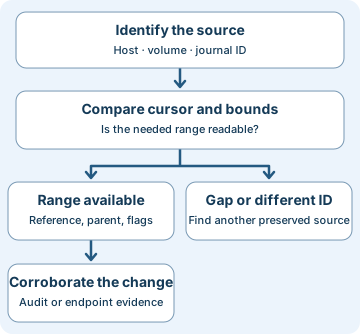
2. Read combined reason flags and follow a rename
A reason field can hold several flags. For example, 0x80000003 has DATA_OVERWRITE (1), DATA_EXTEND (2), and CLOSE (0x80000000) set. Treat it as evidence that those changes were recorded for the object. Repeated changes of the same kind can be coalesced. The mask cannot identify the number of writes, the order of the writes, or their contents. BASIC_INFO_CHANGE can reflect timestamp or attribute changes. It cannot tell you which attribute changed without more evidence.
A same-volume rename or move can produce old-name and new-name records. In the synthetic worksheet, R01 shows draft.csv under parent 0x0001000000000018 with reason 0x1000 (old name). Later R02 shows report.csv under 0x0002000000000021 with reason 0x2000 (new name). Both share the complete file reference, volume and journal instance. In this bounded slice, R01 is the strongest old-name candidate. If parent references differ, investigate a directory move as well as renaming. Old and new rows can be separated by records for other objects.
A similar name and time can be misleading. R03 belongs to another volume, R04 to another journal instance, and R05 has a different complete reference despite the same low digits and filename. If two plausible old names remain, as in R09, retain both candidates. A cross-volume copy and deletion requires separate source and destination evidence.
3. Decide whether the relevant history is available
A cursor is the position a collector saved for its next read. Start with the original host and volume, then compare journal IDs. The current query reports a snapshot, so retain the query time and capture the actual read result. In this lesson, the cursor is a previous next-read position and a nonzero hex number.
| Observation | What to conclude | Next check |
|---|---|---|
Same ID, cursor at or above both FirstUsn and LowestValidUsn, below NextUsn |
Cursor lies in the captured bounds | Check read status, configured reason filters and parser coverage. |
Cursor below FirstUsn |
Saved position predates the earliest readable record | Look for older exports or snapshots. Retention trimming can cause this. |
Cursor below LowestValidUsn |
Position predates the current journal instance’s lower validity bound | Examine instance history and confirm with read results. Older file references can still surface in enumeration. |
| Journal ID changed | Saved position cannot establish continuity in the current instance | Preserve both IDs, seek earlier evidence, and establish a separate baseline for the current instance. |
Cursor at NextUsn |
Cursor was at the captured tail | Additional activity can occur after acquisition. |
Cursor beyond NextUsn |
Saved position is inconsistent with the queried snapshot | Check volume or snapshot mix-ups, stale inventory and parser radix. |
Within a healthy range, a missing rename half could also reflect a time or reason filter, an acquisition boundary, or unsupported record handling. A new ID can have legitimate causes. Avoid attributing gaps to tampering without independent evidence.
4. Collect and investigate with other evidence
On an authorized Windows host, an elevated shell can query the current journal metadata for an identified NTFS volume. Use the correct local volume in place of C:. This read-only query shows status and bounds. Record the exact output and errors. The offline exercise does not require Windows.
fsutil usn queryjournal C:
- Preserve. Record UTC acquisition time, Windows build, volume identity, journal ID, bounds, last successful cursor and collection settings. Preserve the raw capture or approved volume snapshot and work with a verified copy. Retain parser version, filters and errors. Check range and continuity before making absence claims. An inaccessible or inactive journal is a separate finding from an empty search.
- Reconstruct. Group by source volume and journal instance, then match complete file references. Use old and new parent references, path metadata or a historically appropriate Master File Table (MFT) view. Compare with endpoint file events for process attribution. A reconstructed path from later metadata is a hypothesis if no historical snapshot or directory records are available.
- Test competing explanations. A burst of renames, writes or deletions across unrelated user directories can justify an incident review. Compare rate, affected paths and user or host roles against normal sync, backup, deployment, and application save behavior. Corroborate the earliest affected files and unique process or session evidence. A file extension or a reason flag alone cannot establish encryption, exfiltration, or the attacker.
- Respond by claim. If investigating an SMB share, correlate with Security file audits on the server if collected. Event 4663 requires the relevant audit policy and object SACL, an access-audit rule on the object. Use the SMB audit lesson to distinguish a granted right from a completed transfer. For content changes, compare known-good versions, hashes or application records. When evidence supports malicious activity, preserve it and coordinate containment and recovery. Record what remains unknown.
5. Offline exercise · Ten checks
Download synthetic cases and records and the Python review script into the same folder. The JSON is a normalized worksheet, not raw NTFS data. Volume and journal labels are synthetic. Python 3 is sufficient. Use an approved copy and separate authorization for investigating a real volume.
- For
K01throughK06, compare the journal ID before looking at the hex bounds. State what the check can and cannot establish. - For
R02,R05, andR09, find earlier old-name records within the same volume, instance, complete file reference, and worksheet slice. Then decodeR06independently. - Run the script. The last line should read
10 synthetic checks passed.
python3 ntfs-usn-review.py
| Case | Expected evidence reading |
|---|---|
K01, K06 |
Within captured bounds, and at the captured tail respectively. |
K02, K03 |
Before first readable position, and changed journal instance respectively. |
K04, K05 |
Ahead of the captured tail, and below the current validity bound respectively. |
R02, R05, R09 |
One candidate (R01), no candidate, and two candidates (R07, R08) respectively. |
R06 |
Overwrite, extend, and close bits. No operation count or order. |
If the file cannot be found, verify both filenames and the directory. If the output pairs R05 with R01, check for truncated references. If R09 yields only the nearest record, keep the alternate candidate. The candidate check is intentionally scoped to this fixture. Production parsers need record-version, time-window and competing-event handling.
Verification scope. Python executed all ten synthetic checks. The Windows query and data structures were reviewed against Microsoft documentation. No live Windows journal was examined.
6. Check your understanding
- Can a USN tell you how many writes occurred? No. It is a stream position. Multiple writes may contribute the same accumulated reason bit.
- A candidate rename shares a filename and low reference digits with an earlier row. Is it the same object? Compare the full reference, volume and journal instance. In the lab,
R05differs in the high sequence portion. - The journal ID matches but a cursor is below
FirstUsn. Can you infer that a file did not change near that cursor? No. The old position is unavailable from the current journal. Look for another preserved source. - A change record has
SecurityId. Who moved the file? Seek a security audit or endpoint record that links an actor to the object and time. The journal’s object security field cannot answer that on its own.
Completion criteria. Explain the six cursor cases, mark the ambiguous rename honestly, and write a case note that gives one supported change, the available coverage, and the next evidence needed for attribution.
7. Official references and next steps
Reviewed 2026-11-21. The command reference covers Windows 10/11 and Windows Server 2016–2025 listings. The Win32 references describe versioned records. The examples here use V2-style, synthetic data.
- General change history and accumulated reasons. Change journals · Change journal records
- Record structures and file references. USN_RECORD_V2 · V3 · V4 · MFT reference
- Instance identity, cursor bounds and metadata lookup. Journal identifier · Journal data · Read parameters · fsutil usn
- Object-access auditing and SACL prerequisites. Security event 4663
Previous · Windows File Share Auditing
Next · Preserving Digital Evidence
Related articles
Backup Restore Verification · From Saved Copy to Recoverable Service
Use a real offline SQLite restore exercise to distinguish a matching hash, a usable database, an acceptable recovery point, and a service ready to resume.
Velociraptor Endpoint Collection: From a Network Alert to Host Evidence
Scope a request to one endpoint and interpret collection coverage, zero results, missing files and SIEM delivery using nine fictional cases.