Blue Team · Beginner
Windows File Share Auditing · From Access Check to File Evidence
Correlate Windows Security events 4624, 5140, 5145, 4656 and 4663 without mistaking an access check for a completed transfer.
Updated 2026-11-21
On this page
Learning goal. An alert says someone read a shared report. Determine what Windows recorded, which records could describe the same action and which evidence is still needed to establish a complete copy. This lesson uses a Windows file server with an NTFS-backed SMB share.
1. One request can leave evidence at two permission boundaries
SMB exposes a named share over the network. The client uses a UNC path such as \\FS01\Reports\daily.csv. On the file server the share maps to a local folder, for example D:\Shares\Reports. Access across SMB is subject to share permissions and file-system permissions. A DACL controls allowed or denied rights. A file or folder’s SACL selects which attempts are audited, subject to effective audit policy. A handle is a reference a process or system component obtains to use an object. Requesting one and using a right through it produce different evidence.
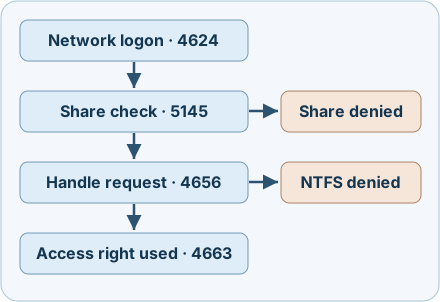
The diagram shows investigative stages. A successful session can serve multiple file operations. Logging depends on policy, matching audit entries and what was collected.
| Security event on the file server | What to read | Collection requirement |
|---|---|---|
| 4624, Logon Type 3 | A network logon session. Read New Logon / XML TargetLogonId, SID and any source address |
Audit Logon success. Type 3 also covers other network access |
| 5140 | First share access attempt in the session. Read share and source address | Audit File Share for the recorded outcome. Its count is not a file-operation count |
| 5145 | Share-level check for requested access. Read share path, relative target, source address, requested mask and audit outcome | Audit Detailed File Share success/failure as appropriate. Failure refers to the share-level check |
| 4656 | Requested object handle and result. Read local object name, subject session, audit outcome and handle ID if present | Audit File System plus a matching SACL for this NTFS case |
| 4663 | Successful use of the recorded access right. Read object name, subject session, process/handle and mask | Audit File System success plus a matching SACL. 4663 has no Failure variant |
2. Follow a normal report read
At 09:00 UTC, a client at documentation address 192.0.2.24 connects to FS01. Successful 4624 Type 3 records target logon ID 0x53ab; 5140 identifies the Reports share. When the client opens daily.csv, 5145 shows a successful share check with ShareLocalPath of D:\Shares\Reports in our normalised view and RelativeTargetName of daily.csv. The local file path matches the 4663 ObjectName. Its mask 0x81 contains the file-data read bit 0x1 and attributes bit 0x80.
Correlate the server, boot interval, SID, path and time. Compare 4624’s target logon ID with SubjectLogonId in the share or object events. A logon ID is local to the computer and can be reused after reboot. For 4656 and 4663, a valid Handle ID and process context can strengthen the object-level correlation on that host. 5145 does not supply the same handle identifier. Preserve all plausible matches when several reads overlap. Treat DFS referrals, volume mount points and reparse paths as reasons to check the server and share mapping instead of relying on string concatenation.
| Access mask bit | On a regular file | On a directory |
|---|---|---|
0x1 |
ReadData, a file-data read right | ListDirectory, a directory listing right |
0x2 |
WriteData, a right to write file data | AddFile, a right to create a file in the directory |
0x80 |
ReadAttributes, a metadata right | ReadAttributes, a metadata right |
A mask can combine bits, so exact equality to 0x1 misses 0x81. Establish the object kind from path and inventory evidence. The Windows object type label alone can be insufficient to distinguish a file and a directory. A 4663 ReadData event indicates use of that right at the server. It contains no byte count or proof that a destination retained a complete copy.
3. Explain denials and misleading patterns
A share policy can block a request before the file system is reached. Microsoft documents 5145 Failure for share-level denial, not NTFS denial. Look for an appropriately audited 4656 Failure or a corroborating client error when investigating an NTFS denial. An empty 4663 result can reflect an unmatched SACL, disabled success auditing, retention, collector filtering, a different server or no observed right use.
A stolen account or over-broad entitlement can allow someone to read many sensitive files or modify shared content. A reporting task, backup, antivirus scan or search indexer can also produce bursts of access. Compare the account, source, approved job timing and distinct sensitive paths with a baseline. Use 4663 masks to distinguish data access from metadata. Investigate potential impact using client, endpoint and file-state evidence. A share check alone cannot establish ransomware, remote execution or exfiltration.
4. Collect, detect and respond
- Start on the serving host. Record UTC, destination server and boot interval, source address, SID and relevant share mapping. Preserve raw Security EVTX or event XML and note whether the forwarded copies cover the period and event IDs. Keep original record IDs and XML field names. Preserve the account’s logon context and infer the network source from matching share and session evidence.
- Verify audit coverage before interpreting gaps. Check effective Advanced Audit Policy and the account, rights and success/failure options in the NTFS SACL. Audit File Share and Audit Detailed File Share are distinct policies. Detailed auditing can be high volume across the server. Scope the file-system SACL to approved objects, estimate volume and confirm retention and downstream filters. Exact SACL and event behaviour should be verified on the deployed Windows version.
- Correlate before counting. Group by destination, boot and session, then compare the canonical local object and a plausible window. Use trusted file-server timezone and clock evidence. Separate distinct records from forwarding duplicates and keep ambiguous candidates. Alert on changes in sensitive-file access by workload and source rather than treating raw 5145 totals as file counts.
- Establish impact before response. Compare file state, snapshots, application and client EDR evidence. Network flow volume can bound traffic, while SMB encryption and concurrent operations limit attribution to a specific file. If unauthorised activity is supported, coordinate access containment with the file and identity owners. Preserve copies and verify expected work still runs after changes.
5. Offline exercise · Eight synthetic cases
Download the event cases and Python reviewer. Save both in one folder and run python3 smb-file-audit-review.py with Python 3.8 or later. The records are normalised fictional projections, not EVTX exports. Boot identifiers and object kind are supplied as investigation context. The script reads only these files, applies a five-second case window and does not access Windows or the network. That window is a lab parameter, not a recommended production threshold.
| Case | Expected interpretation |
|---|---|
| LAB-01 | 0x81 includes file ReadData and attributes. The data-read right was used |
| LAB-02 | 0x80 indicates attributes only |
| LAB-03 | The share-level check failed |
| LAB-04 | An audited local object handle request failed in a known network logon session |
| LAB-05 | The object events belong to a different server or boot |
| LAB-06 | A file WriteData right was used. Verify the resulting file state |
| LAB-07 | Two distinct object records are plausible. No unique match |
| LAB-08 | A directory used 0x1 for listing, not file data |
If a result differs, check the filenames and compare the raw mask bits, server, boot and path. The fixture uses case-insensitive simple paths and does not resolve real aliases or duplicated deliveries. On an approved test file server, an administrator can configure the appropriate audits for a dummy read-only share and a test folder, then open one harmless file with a permitted account and compare the local and forwarded records. A separate restricted test account can provide a denial control. Use Event Viewer on the server and compare original XML before testing detection. The eight offline cases were executed. Windows event generation and forwarding were reviewed in the documentation.
6. Check your understanding
- 5145 succeeds and 4663 is missing. Did the file reach a client? The available record supports a share check. Verify NTFS audit coverage and obtain file-operation or client evidence.
- 4663 has mask
0x1. Does that mean data was read? Establish object kind first. A directory uses the same bit for listing. - Two hosts report
0x53ab. Is this one logon? Scope IDs to the server and boot, and correlate independent identity and source fields. - Why keep two plausible object records? Multiple operations can have the same session, path and timing. A nearest timestamp alone cannot identify the exact operation.
Completion. Write one incident note for LAB-01 and one for LAB-05. Include the permission stage, the correlation fields and a source needed to establish the file’s outcome.
Previous · SMB fundamentals · Related · Windows Security logs
Official references
Reviewed 21 November 2026. Microsoft’s individual event schemas are Windows 10-era references. The current Windows Server audit policy guide lists Server 2016 through 2025. Verify event version and effective policy in the target environment.
- Microsoft Learn · Advanced Audit Policy for Windows Server
- Microsoft Learn · 4624 · 5140 · 5145
- Microsoft Learn · Audit File System · 4656 · 4663
Investigate the NTFS USN Journal
Investigate the NTFS USN Journal. Follow file renames and distinguish journal gaps from missing changes.
Related articles
Windows App Control · Read Audit, Block and Signature Events
Connect Windows Code Integrity policy decisions, signature records and policy activation evidence without mistaking a block for malware execution.
Blue Team Fundamentals: Detection to Response
An introduction to security monitoring, triage, investigation, incident response, and detection improvement.