Network Security · Beginner
SMTP Delivery Evidence · Follow a Message from Queue to Mailbox
Read recipient replies, queue retries and delivery notifications without confusing relay acceptance with mailbox delivery.
Updated 2026-11-21
On this page
Learning goal. A sender says a message was sent and the recipient says it never arrived. Reconstruct the last verified step for that recipient. Identify which server has the next piece of evidence and what the existing records establish.
1. What happens on one SMTP hop?
A mail transfer agent (MTA) sends or receives messages using the Simple Mail Transfer Protocol (SMTP). A hop is one transfer between two systems. An outgoing relay, an inbound security gateway and a mailbox transport can each keep their own records. A queue holds messages that a system has stored for its next action. A queue ID identifies an entry within a particular queueing system. The envelope contains the return address and recipients used for transfer. These values can differ from the visible From and To fields in the message.
| Stage | Example observation | What you can report |
|---|---|---|
MAIL FROM and RCPT TO |
Server replies 250 to one RCPT TO |
It accepted that address at the recipient stage. Read each recipient’s reply |
DATA command |
354 |
The server invited the client to send message content |
| End of message data | Final 250 |
This receiving server accepted responsibility for the message for recipients accepted in that transaction |
| Mailbox or quarantine processing | Local delivery event or quarantine record | The named system reports that later disposition for the mapped recipient |
| User activity | Independently collected client or mailbox audit evidence | Interpret the actual recorded activity and verify its collection scope |
A 4xx reply reports a temporary failure at its stage. An MTA that already holds the message can defer that recipient and retry according to its queue policy. A 5xx is a permanent negative reply to that request. Preserve the three-digit code, the optional enhanced code (for example 5.1.1) and the diagnostic text. The enhanced code adds context. Record which server supplied it and at what stage.
2. Follow an ordinary retry
In this fictional example the sender’s relay mx-a.example has already queued a report as A1 at 09:00 UTC. Its first outbound transaction gets 250 for Alice’s RCPT TO and 550 5.1.1 for Bob’s. For Alice’s copy, the other server responds 354 to DATA, then 451 4.3.0 after the end of content. Alice’s copy remains eligible for a retry. On a later attempt at 09:17, the other server answers with a final 250 and supplies its own queue reference, B73. Bob’s rejection still stands for that attempt. On Alice’s retry the client starts another SMTP transaction and must obtain acceptance for her address again.
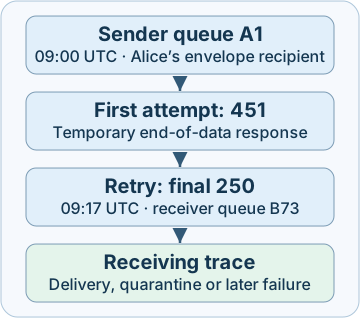
For Alice, A1 and B73 refer to the respective queues, provided the second ID comes from the trusted peer response or a correlated receiver record. A final 250 does not reveal the mailbox folder or user activity. If the connection drops after the content terminator and the final reply is absent, mark the handoff unconfirmed. The receiver may have accepted the message and lost the reply on the way back. Retrying can produce duplicates. Check the downstream system if you have legitimate access.
3. Interpret a bounce or a missing message
A delivery status notification (DSN) is a separate message that can report a delivery result. A standards-format DSN identifies the Reporting-MTA and lists Final-Recipient, Action and Status per recipient. An optional Diagnostic-Code can retain the original transport reply. A Remote-MTA field can identify the remote system that supplied that diagnostic. Action: delayed indicates the reporting MTA expects further attempts. Action: failed indicates that it has given up for that recipient. A later DSN can describe downstream failure even after an earlier hop accepted the message.
| Clue | Corroborate with |
|---|---|
| Unexpected delivery failure report | Trusted submission or queue history, original recipient and time. A forged DSN or a bounce to an unrelated return address may look plausible |
| A burst of temporary replies | Peer, reply stage, enhanced code, queue growth across recipients and service health. A maintenance window or rate limit can explain a burst |
5xx for one recipient |
The recipient and stage, policy detail and other attempts. Other recipients on the message can still succeed |
Final 250 and user reports absence |
Recipient-side trace, alias expansion, quarantine, mailbox delivery or mailbox rules |
Identical Message-ID or queue ID |
Use it to find candidates. Compare queue instance, time, envelope recipient, peer and trusted hop evidence before merging |
Abuse can include a compromised account sending unauthorized mail, or deceptive failure notices prompting a recipient to open a file or follow a link. Compare unusual submission volume or recipients with authentication and application logs. Preserve the message and transport evidence when investigating an unexpected DSN. A bounce or a volume change alone does not identify a compromised account.
4. Collect, detect and respond
- Start with the right keys. Capture the approximate submission time and zone, sender, envelope recipient, connector and known relay. Normalize times to UTC while preserving originals. Use the message’s
Message-IDas a search pivot. Scope queue IDs by mail system or instance and arrival time because IDs can repeat. Keep the raw stage and reply, surrounding lines and any trustworthy next-hop ID. - Read queues in context. On an authorized Postfix instance,
postqueue -jlists queue files as JSON lines on Postfix 3.1 or later. It requires queue listing access. Record the instance, collection time, queue name, arrival time and pending recipients. The queue can change during listing, and entries can be missed or repeated. Use transport logs to learn whether a message was accepted or rejected earlier. - Confirm disposition independently. In Exchange Online, an administrator with message trace access can search a narrow interval and recipient with
Get-MessageTraceV2and inspect per-recipient details withGet-MessageTraceDetailV2. Microsoft documents a 90-day lookback and up to ten days per V2 query. Output timestamps are UTC. Inspect the trace endpoint and events before interpretingDeliveredas mailbox delivery. A result can describe an external destination. Escalate to the owner of the next hop for its disposition evidence if it is outside your visibility. - Respond to corroborated abuse. Preserve incident timestamps, recipient mapping, gateway replies and policy events. Coordinate quarantine or other containment with the authorized mail team when evidence supports it. If the evidence instead points to service trouble, continue with the peer and recipient-specific diagnosis. Retest an approved mail path with a harmless message in a controlled tenant and verify the expected logs on both sides.
Access to server logs, trace roles and retention are prerequisites. If you have only the user’s original message, start from the trusted receiving boundary described in the email authentication chapter. A user report or an absent trace can also reflect a wrong alias, expired retention, ingestion latency or an upstream failure.
5. Offline lab · Compare nine recipient outcomes
Download smtp-delivery-lab.py and run python3 smtp-delivery-lab.py with Python 3.10 or later. The offline script uses only synthetic, pre-normalized records. It makes no network requests and sends no mail. The fixture has already mapped receiver-side events to their sender-side traces. It does not parse raw product logs.
| Fixture | Expected interpretation |
|---|---|
| A1 Alice and A1 Bob | Alice’s latest retry gives NEXT_HOP_ACCEPTED. Bob’s independent reply gives PERMANENT_REPLY |
| B2 Carol and G7 Hana | RECIPIENT_ACCEPTED_ONLY after a positive recipient reply, TEMPORARY_REPLY after a 4xx |
| C3 Dan | HANDOFF_UNCONFIRMED. Identical queue IDs on a different host or in a later queue entry do not supply the missing reply |
| D4 Eve and F6 Gina | Their separately mapped destination events show QUARANTINED and MAILBOX_DELIVERED, respectively |
| E5 Farah and unlisted A1 recipient | An end-of-data refusal gives PERMANENT_REPLY. A recipient absent from the fixture gives NO_MATCHING_EVIDENCE |
Expect 9 synthetic checks passed. If the file cannot be opened, check the download directory and the saved filename. If an expected result changes, compare the relay, arrival time and recipient and then find the latest matching observation. Run the lab once and try explaining Dan’s result without using a record from another relay. The fixture ran on Python 3.12. Postfix and Exchange Online were reviewed in product documentation.
6. Check your understanding
- The recipient reply is
250. Has the server accepted the content? Read the end-of-data reply for the transaction. The recipient reply only covers that recipient command. - Relay A reports a final
250. Who can establish mailbox disposition? Trace the receiving system or an authorized mailbox source. Relay A observed a successful handoff to its SMTP peer. - Why keep the original and normalized time? The original timestamp and zone help explain offset or clock differences. A shared UTC timeline makes cross-hop comparisons easier.
- A DSN names a familiar recipient. What ties it to your investigation? Establish provenance and compare the reporting system, original or final recipient, trusted transport identifiers and approximate send time with your queue records.
Completion. Record one recipient’s last confirmed step, the relay and scoped ID, the approximate UTC time, the supporting reply or trace event, and the specific evidence still needed.
Previous · Email authentication evidence · Continue · Evidence preservation
Official references
Reviewed 21 November 2026. Internet standards below describe the SMTP exchange and DSN fields. Use the current registry and the documentation for your product and installation.
- RFC 5321 · SMTP transaction and responsibility, 2008 · RFC 7504 · Additional SMTP codes, 2015
- RFC 3463 · Enhanced mail status, 2003 · IANA · Current enhanced SMTP status registry
- RFC 3464 · Delivery status notification format, 2003
- Postfix · postqueue manual, JSON queue format and queue ID scope · Debian · Postfix package manual
- Microsoft · Exchange Online message trace FAQ · Get-MessageTraceV2 · Get-MessageTraceDetailV2
Related articles
Packet Capture Gaps · Did the Network Drop It or Did the Sensor Miss It?
Use paired TCP captures, acknowledgments and sensor counters to tell a coverage gap from possible network loss.
Certificate Transparency · Verify Log Evidence and Investigate Unexpected Issuance
Distinguish a certificate log entry from an SCT, a proof of inclusion and a certificate served by an HTTPS endpoint.