Network Security · Beginner
Email Sender Authentication and Phishing Investigation
Learn the SMTP envelope, message headers and SPF, DKIM and DMARC alignment, then investigate three synthetic raw headers.
Updated 2026-11-19
On this page
Learning goal: Explain the displayed sender, the domains that passed authentication, and the receiver’s final disposition. Sections 1–5 explain the pieces. Section 6 reads a header line by line. Sections 7–9 turn those observations into an investigation.
1. Follow an order confirmation to the inbox
Suppose Example Orders hires a provider to send receipts. The provider looks up the recipient domain’s mail exchanger using DNS MX records, connects over SMTP and sends the envelope and message. The receiving gateway can evaluate sender authentication and local policy before delivery, quarantine or rejection. The mail app displays the message’s From header.
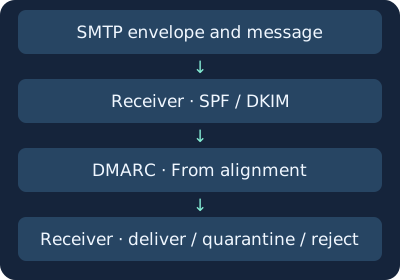
The envelope contains delivery information used in SMTP exchanges. Headers travel with the message. In ordinary outsourced mail, the provider may handle bounces while the customer’s identity appears in From. SMTP acceptance, inbox delivery and a recipient following a link are separate events. SMTP TLS protects the relevant transport hop. Sender authentication answers the domain questions below.
| Where to look | Example | Why it matters |
|---|---|---|
| SMTP MAIL FROM | bounces@relay.mailer.invalid | Envelope return address for delivery failures |
| SMTP RCPT TO | analyst@receiver.test | Requested delivery recipient in this exchange. It can differ from the visible To |
| From | Example Orders <receipts@orders.example.test> | Display name and author address. DMARC compares the address domain |
| Reply-To | support@orders.example.test | Reply destination. Compare a different destination with approved configuration |
| Return-Path | bounces@relay.mailer.invalid | Envelope return path recorded at final delivery |
| Received | from relay.mailer.invalid … by mx.receiver.test | A hop added by a receiving server. Start with a server your organization trusts |
MAIL FROM comes from the SMTP transaction. A forwarder can rewrite it, so establish which hop the Return-Path reflects. Expand the address in the mail app when only the display name is visible.
2. SPF checks which IP was allowed to send
Sender Policy Framework (SPF) compares the actual connecting IP and an SMTP sender identity against DNS policy. If a receiver saw 192.0.2.25 and the envelope sender was bounces@relay.mailer.invalid, the question is whether that IP is authorized to send using relay.mailer.invalid. For ordinary mail, read the MAIL FROM domain. For a null reverse path, as used in some delivery notifications, check the SPF evaluation context based on the HELO identity.
The fictional policy v=spf1 ip4:192.0.2.25 -all permits the example IP and returns fail for addresses that match no earlier mechanism. The domain and IP are documentation examples. Review the inventory of authorized senders and likely side effects before editing live records.
| SPF result | How to read it |
|---|---|
| pass | The connecting IP is authorized for the evaluated SMTP identity |
| fail / softfail | The policy denies authorization or gives a weaker negative result, respectively. Check receiver handling |
| none / neutral | No applicable SPF result or an explicit lack of a positive or negative assertion, respectively |
| temperror / permerror | Temporary evaluation problem or persistent policy/evaluation error. Check retry and diagnostic evidence |
A recipient’s server may see the forwarder’s IP instead of the original sending server. Forwarding can therefore cause an SPF failure. Record the passing domain whenever you see pass. That domain will matter in DMARC.
3. DKIM checks which domain signed covered content
With DomainKeys Identified Mail (DKIM), a sending service uses a private key to attach a signature covering selected headers and incorporating a hash of the covered body. The receiver looks up the public key in DNS and checks the signature. See the earlier chapter for how private keys sign and public keys verify. Public keys and signatures
| Signature tag | What to read |
|---|---|
| d= | Signing domain used for DKIM alignment |
| s= | Selector used to locate the public key |
| h= | Header fields included in the signature |
| bh= | Body hash used for verification |
| b= | Signature value |
For d=orders.example.test and s=notice, the DNS key lookup name is notice._domainkey.orders.example.test. A message can carry several signatures. Read the d= domain of each valid signature. A mailing list that adds a subject tag or footer can affect validation. What changes matter depends on the signed scope and canonicalization rules that govern details such as whitespace.
4. DMARC connects passing identities to the visible From
A receiver evaluating Domain-based Message Authentication, Reporting, and Conformance (DMARC) starts with the author domain in From.
- Read the full From address and write down its domain.
- If SPF passes, compare the authenticated SMTP domain with From for alignment.
- For each passing DKIM signature, compare d= with From for alignment.
- At least one aligned pass can satisfy DMARC authentication. If neither method supplies one, inspect the policy and any temporary errors.
- Confirm the applicable receiver evaluation and the actual delivery, quarantine or rejection in trace records.
Strict alignment requires an exact domain match. Relaxed alignment compares Organizational Domains found under the applicable standard. If both domains are determined to have example.test as their Organizational Domain, orders.example.test and notify.example.test can align in relaxed mode, while strict comparison fails. Matching the last two labels alone does not establish relaxed alignment.
| SPF | DKIM | Example under an applicable DMARC policy |
|---|---|---|
| Pass, aligned | Fail | SPF can satisfy DMARC |
| Pass, unaligned | Pass, aligned | DKIM can satisfy DMARC |
| Pass, unaligned | Pass, unaligned | Neither passing check supplies alignment |
| Temporary error | No usable passing signature | Inspect evaluation and disposition in receiver logs |
RFC 9989, published May 2026, supersedes RFCs 7489 and 9091 and defines DNS Tree Walk for policy and Organizational Domain discovery. Earlier guidance often describes Public Suffix List-based discovery. Check the receiver implementation in use. Policy discovery starts with a TXT lookup at _dmarc.<From domain>. The p=none, quarantine and reject values communicate domain-owner handling preferences. The receiver’s own logs establish what it actually did. Aggregate reports help identify sending routes and trends. Individual click evidence comes from other records.
5. Identify the server that wrote the result
Use the original message or Internet headers to find Received, Authentication-Results and From. In Gmail on the web, open the message and choose Show original from the menu next to Reply. In an organization, use the approved client or administrative trace. Original headers can contain private addresses and internal routing information. Handle them under your organization’s policy. Gmail header guide
The first token in Authentication-Results, before the semicolon, identifies the authentication service. Match it against your approved receiving infrastructure and message trace. A matching string still needs provenance from the mail boundary’s header handling and the trace. An external sender may insert a field with the same name. Lines starting with whitespace generally continue the previous header.
Each receiving hop normally prepends Received, putting recent hops at the top. Start with the first receiving system your organization controls. Read the connecting IP, UTC time and queue ID there. Earlier claims outside that boundary need corroboration.
6. Read three synthetic raw headers
Open each download as text. The files are illustrative excerpts with prewritten results and carry no live DKIM signature or real delivery. For the exercise, assume your trace confirms mx.receiver.test as your authorized receiving service.
A. Ordinary outsourced sender
Authentication-Results: mx.receiver.test;
 spf=pass smtp.mailfrom=relay.mailer.invalid;
 dkim=pass header.d=orders.example.test header.s=notice;
 dmarc=pass header.from=orders.example.test
- The visible From domain is orders.example.test.
- SPF passed for the provider domain, relay.mailer.invalid. Strict alignment fails for SPF.
- The valid signature from orders.example.test exactly matches From. It explains the receiver’s DMARC pass.
- Look for the authorization relationship in the vendor inventory or outbound trace.
B. An untrusted result appears beside the receiver’s
The trusted mx.receiver.test logged SPF pass for relay.alerts.invalid, DKIM none and DMARC fail. The separate supplied.relay.invalid header claims DMARC pass. In this exercise, it comes from outside the trusted boundary. Record the receiver result and trace ID LAB-2042 together. Reply-To also differs from From. Check the approved sender and reply routes, then retrieve the actual disposition.
C. A lookalike domain passes
The display name says Example Orders. The actual From domain is 0rders.example.invalid, starting with a zero. SPF and DKIM pass and align for that domain. The receiver’s DMARC result applies to the domain in the actual address. Verify any payment change through an established contact channel and existing transaction records.
7. Investigate without jumping from a result to a verdict
| Observation | Alternative explanation and supporting evidence |
|---|---|
| SPF fails after forwarding | Receiver saw the forwarder’s IP. Check trusted hops and mail routing |
| DKIM fails after a mailing list | Subject or footer may have changed. Compare signature coverage and relay records |
| DMARC fails more often for an owned domain | Compare suspected impersonation with new vendors and DNS changes |
| Familiar domain passes DMARC while sending a risky request | An account or authorized sending service may have been abused. Check login and sending audit |
| Reply-To is another domain | Could be support routing or an attempt to redirect the reply. Compare the actual destination with approved configuration |
- Preserve the original message and headers through approved mailbox or gateway access. Record UTC, recipient, internal trace and Message-ID. Corroborate Message-ID with time, recipient and internal trace.
- Compare SPF domain, DKIM d=, From, alignment and disposition at the trusted receiving point. Confirm vendor-specific fields and collection coverage with a known ordinary message.
- Document lookalike addresses, reply destinations, visible link text versus target and attachment types separately. Where there is evidence of a click or credential entry, correlate approved proxy, endpoint and sign-in logs.
- If the evidence supports phishing, use trace records to scope affected mailboxes and quarantine under local procedure. For rising failure rates, compare the denominator and changes to authorized sending routes.
Example finding: “The trusted receiver logged DMARC fail for LAB-2042. The observed checks supplied no aligned pass. We are checking whether Reply-To matches an approved route. Delivery and recipient interaction still need trace evidence.”
8. Second exercise · Calculate strict alignment
Save both files in one folder. Run with Python 3. This separate synthetic worksheet uses precomputed SPF and DKIM outcomes and compares domains exactly. Live DNS, policy discovery and signature verification are separate operations.
python3 mail-auth.py
| CSV case | Expected outcome |
|---|---|
| A | Aligned SPF supplies the pass |
| B | Both checks pass and neither strictly aligns |
| C | Aligned DKIM supplies the pass despite SPF failure |
| D | A lookalike authenticates under its own domain |
| E | Temporary error leaves the worksheet result unresolved |
Expect PASS: five synthetic cases. Check filenames and folder if loading fails. Check CSV fields if a result differs. For B, evaluating relaxed alignment also requires Organizational Domain determination. For E, check receiver retry and disposition. Publication verified parsing the header examples and running the CSV analysis. Live delivery and vendor telemetry require testing in your environment.
9. Check your understanding
- Does an SPF pass for a different domain indicate an error? Outsourcing can explain it. Check the authorized sender and DKIM alignment.
- What should you compare when there are two DKIM signatures? Check each result and d= value. Look for any passing signature aligned with From.
- What if two Authentication-Results fields disagree? Use the result corroborated by the approved receiving boundary and trace.
- Can you close an investigation because DMARC passed? Confirm the exact authenticated domain. Evaluate the request, potential lookalike and account misuse separately.
Complete the lesson by recording From / SPF domain / DKIM domain / trusted receiver / DMARC / evidence still needed for the three headers. In an authorized environment, correlate one ordinary test message’s authentication results with its mailbox trace.
Related reading: DNS records and responses · HTTP logs for follow-up activity
Official references
Reviewed 19 November 2026. Use standards for protocol behavior and the deployed product documentation for available fields.
- SMTP · RFC 5321 (2008) · Message format · RFC 5322 (2008)
- SPF · RFC 7208 (2014) · DKIM · RFC 6376 (2011)
- DMARC · RFC 9989 (2026) · DMARC aggregate reporting · RFC 9990 (2026)
- Authentication-Results · RFC 8601 (2019)
- Gmail full headers · Microsoft 365 message headers
Continue from Authentication to SMTP Delivery
Trace one recipient from the SMTP reply to subsequent delivery evidence.
Related articles
Packet Capture Gaps · Did the Network Drop It or Did the Sensor Miss It?
Use paired TCP captures, acknowledgments and sensor counters to tell a coverage gap from possible network loss.
Certificate Transparency · Verify Log Evidence and Investigate Unexpected Issuance
Distinguish a certificate log entry from an SCT, a proof of inclusion and a certificate served by an HTTPS endpoint.