Network Security · Beginner
SSH Host Keys · Verify the Server Before Login
Distinguish server and user keys, investigate a changed-key warning, and compare fingerprints in an offline OpenSSH exercise.
Updated 2026-11-20
On this page
Learning goal. Explain which party proves its identity at each SSH stage. For a changed-host-key warning, identify the exact destination and trust rule, compare full fingerprints using independent evidence, and record whether the connection can be approved.
1. What does the host key prove?
An SSH host key belongs to an SSH server. During the initial key exchange, in the usual public-key host authentication flow, the server signs data that binds the exchange to its key. The client checks that signature and checks that the presented key is trusted for the intended host. These are separate questions. Someone who controls a different private key can produce a valid signature for that key. A trusted binding from a hostname to a public key gives the signature its meaning.
A fingerprint is a short digest of a public key. In OpenSSH, a SHA-256 fingerprint appears as SHA256:…. Compare the full string using the same hash format. The fingerprint helps identify the key, while a trusted source establishes whose key it should be. known_hosts is a client-side database that can store this binding. authorized_keys is one server-side source of permission for user public keys. Servers may also use account policies, an SSH user CA or other authorization mechanisms.
| What you want to know | Typical key holder | Evidence |
|---|---|---|
| Is this the intended SSH server? | The server holds the host private key | A valid exchange signature and a matching, independently trusted binding or host certificate |
| Does this client possess a key accepted for the account? | The client holds or has controlled access to the user’s private key | A valid user-authentication signature and the server’s authorization policy |
| Does this login have the requested session or privilege? | Checked by the server and operating system | Session open, command or privilege logs. The key alone does not answer this |
2. Follow a normal login
Suppose an operator connects to node.lab.example.test on the default SSH port and already has a host key enrolled through a trusted provisioning record. The client and server agree on algorithms and establish session keys. The server supplies its public host key and signs the key exchange. The client verifies the signature and compares the key against the expected identity. The negotiated session keys protect later transport traffic. If public-key user authentication is used, the client signs session-bound user-authentication data and the server checks that the requested account accepts that key. The user’s private key stays with the client or its signing device.
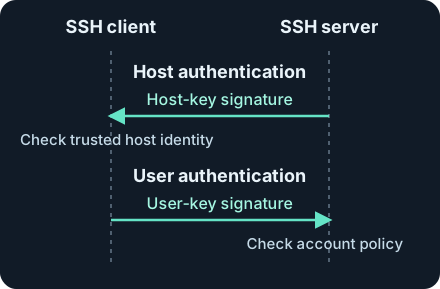
The arrows show the direction of each signature. The first check verifies the server. The second checks access to an account. The Linux authentication chapter continues with server-side login and session evidence.
A network flow to TCP 22 confirms only what the sensor observed. Successfully exchanging an SSH banner also leaves both identity questions unanswered. The client can reject a host key before the server sees a user authentication attempt. Missing server-side login evidence therefore cannot settle whether a client-side host verification failed.
3. First contact, rotation and unexpected changes
| Trust method | What the operator relies on | Important limit |
|---|---|---|
| Pre-enrolled public key | Exact key or fingerprint supplied by an approved inventory or independently authenticated console | Maintain separate entries for distinct endpoints and update them through reviewed changes |
| Trust on first use (TOFU) | The initially accepted key, then continuity on later connections | If first contact is unverified, an endpoint presenting its own key can become the remembered identity |
| SSH host certificate | A trusted SSH CA for the host scope, valid host principal and validity period | Verify which CA and name apply. An SSH host CA is separate from the browser TLS trust store |
| SSHFP with DNSSEC | A secure DNS answer and client policy configured to verify SSHFP | An unsigned or insecure answer does not provide the same trust. Check that validation applies end to end |
In upstream OpenSSH StrictHostKeyChecking=yes requires an existing trusted identity rather than automatically enrolling an unknown key. The default ask prompts before adding an unknown key and refuses a changed known key. accept-new automatically enrolls new keys and refuses changed ones. Its first-contact risk remains relevant. An inventory-controlled key or an SSH host CA avoids relying only on first contact. Confirm the installed client’s effective policy, particularly when a wrapper or automation supplies its own settings.
A changed fingerprint can follow a rebuild, an approved rotation, an address reassignment, or a connection to the wrong SSH endpoint. It also fits a misdirected or intercepted connection. A copied or stolen host private key can have the opposite problem: the fingerprint stays the same even though possession has changed. Look at the evidence for the exact endpoint and time before attributing intent.
For a planned rotation, keep proof of both fingerprints, the allowed endpoints and the overlap or retirement time. OpenSSH’s UpdateHostKeys mechanism can learn alternate keys through an already-authenticated server under its documented conditions. It is suitable for planned continuity, with conditions including user known-hosts enrollment and plain host-key authentication. An unexplained warning needs independent verification. An algorithm negotiation failure is a separate case. For example, OpenSSH 8.8 disabled RSA/SHA-1 signatures by default, while the same RSA key type can also support SHA-2 signatures. Match the installed version and platform policy before interpreting the message.
4. Collect and respond before changing trust
Preserve the original warning. Record UTC, client and version, typed destination, resolved endpoint, port, host key algorithm and presented fingerprint. Save the referenced file and offending line when available. Capture the relevant client output from an approved terminal or job. Restrict access to diagnostic logs because they can contain internal hostnames and account metadata. Preserve the baseline before approved changes to its contents.
Find the actual lookup identity. Review trusted client configuration for the effective hostname, port, HostKeyAlias, user and global known-host files, and any jump path. With a jump host, distinguish the key checked for the jump from the key checked for the destination. The alias can replace the name used for key lookup and host certificate validation. A standard non-default port commonly uses a bracketed lookup such as [node.lab.example.test]:2222. Hashed hostnames can be searched with ssh-keygen -F when you know the exact lookup value. A text search can miss that entry.
Get an independent reference. Ask the approved asset owner or use a provisioning record, an authenticated management console, or the trusted SSH CA inventory. On the server side, use the public key file for the configured host-key algorithm when checking its fingerprint, and protect the corresponding private key. A new key observed again through the same uncertain network path provides little independent evidence. Correlate with the rebuild, rotation or address-change record. If there is no reliable match, keep the connection blocked and escalate to the system owner. Scope similar warnings before distributing any new key.
Triage using evidence that exists. In an approved deployment, collect client verification results where available, plus server login logs, bastion records, DNS or asset changes and change tickets. Flag unexpected changes across multiple managed clients after deduplicating retry events by endpoint, client and time window. Distinguish first-time enrollment from a change to an existing binding. Correlate a later login with a matching endpoint and account. A warning is a lead for investigation, and a matching fingerprint still does not establish that the host is uncompromised.
5. Offline exercise · Read an enrollment file
Download ssh-lab-known-hosts.txt and ssh-lab-public-keys.txt into one folder. These contain disposable public material only. Run the commands there on an owned system with the OpenSSH client tools installed. The commands read the two local files and make no connections. Three public keys have exercise labels A, B and C. Compare the complete SHA-256 fingerprints in the output.
ssh-keygen -E sha256 -lf ssh-lab-public-keys.txt
ssh-keygen -F node.lab.example.test -l -f ssh-lab-known-hosts.txt
ssh-keygen -F '[node.lab.example.test]:2222' -l -f ssh-lab-known-hosts.txt
ssh-keygen -F db.lab.example.test -l -f ssh-lab-known-hosts.txt
ssh-keygen -F new.lab.example.test -l -f ssh-lab-known-hosts.txt
| Case | Expected result | Defensible decision |
|---|---|---|
| Default-port node presents A | Stored row 1 matches A | The presented key matches the enrolled fingerprint. A live connection still needs successful signature verification |
| Default-port node presents B with no independent record | A is enrolled on the default port. B belongs to row 2 for port 2222 | Keep blocked and check endpoint and the change record |
| Default-port node presents B with an independently verified, approved rotation for that endpoint | The old entry still yields A | Record the verified approval and use the managed enrollment process for this endpoint |
| Port 2222 presents B | Bracketed lookup finds row 2 and matches B | Treat this as its own binding. Do not reuse it as proof for the default port |
| Database endpoint presents C | Row 3 matches C even though the stored hostname is hashed | The database has an entry. A plain-text hostname search can give a misleading result |
| New endpoint presents C | No row, and the final command exits 1 in this worksheet | Establish an approved identity before access. Missing enrollment does not establish a server-side failure |
If every lookup fails, check the working directory and -f path. If only the non-default port fails, preserve the brackets, port and shell quotes. If the fingerprints look different, compare the complete SHA-256 output and make sure you used the matching key type. A missing result in this one file does not rule out another configured trust source in production. The fixture was verified with OpenSSH 10.0p2 on Linux. No live server handshake, rotation or SSH CA deployment was executed.
6. Check your understanding
- The client prints a changed-key warning and the server has no authentication event. Is that contradictory? No. Host verification can stop the connection before user authentication. Check the client output and which server received the transport connection.
- Why does a key on port 2222 not validate the same name on the default port? In this exercise, the enrollment names are distinct and may represent different SSH services. Verify the binding for the exact endpoint.
- An inventory entry shows the approved new key but the warning remains. What should you check first? Compare the whole fingerprint and algorithm against the intended host, port or alias, confirm the approval window, and verify which known-hosts source the client actually uses.
Finish by finding all three stored keys, explaining the absent entry, and writing a short decision note with the exact endpoint, presented and enrolled fingerprints, the independent reference, and whether the connection remains blocked.
Previous · Public-key cryptography · Next · Linux login investigation
Official references
Reviewed 20 November 2026. The 2006 RFCs explain the protocol stages. Consult updated recommendations and your platform’s maintenance notices for permitted algorithms and deployed settings.
- IETF RFC 4253 §8 · SSH transport and server authentication, January 2006
- IETF RFC 4252 §7 · User public-key authentication, January 2006
- IETF RFC 4255 · SSHFP and DNSSEC, January 2006
- IETF RFC 9142 · Key exchange recommendations, January 2022
- OpenBSD 8.0 · ssh_config options · sshd files and CA markers
- OpenBSD 8.0 · ssh-keygen fingerprint and known_hosts lookup
- OpenSSH · Release notes, including 8.8 and November 2026 maintenance releases
Related articles
Packet Capture Gaps · Did the Network Drop It or Did the Sensor Miss It?
Use paired TCP captures, acknowledgments and sensor counters to tell a coverage gap from possible network loss.
Certificate Transparency · Verify Log Evidence and Investigate Unexpected Issuance
Distinguish a certificate log entry from an SCT, a proof of inclusion and a certificate served by an HTTPS endpoint.