DFIR · Beginner
Investigate Linux Authentication Logs with SSH, PAM and sudo
Interpret SSH authentication, PAM sessions and sudo decisions using a 14-record offline timeline.
Updated 2026-11-20
On this page
Learning goal: Read failed SSH authentication, accepted authentication, session opening and sudo authorization as separate observations. Learn to correlate them by host, account and time. Read sections 1–3 first, then work through the data in section 6.
1. A login and an administrative action have several stages
SSH, or Secure Shell, establishes a protected channel and authenticates a user to a remote system. Authentication checks who can enter an account. Authorization determines what that account can do. sudo asks to run a specific command as a target user under local policy. The target is often root and can also be another user.
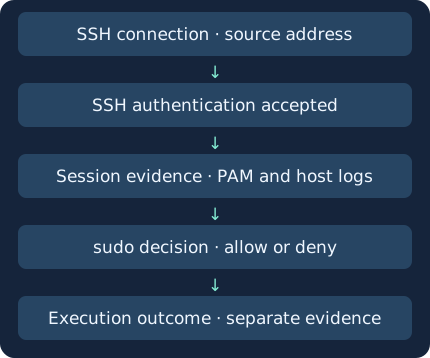
Suppose Alex connects from an approved management workstation using a key, then requests an approved status command through sudo. The SSH transport establishes a protected channel. The client proves possession of the key during user authentication and the server evaluates it against local policy. A session or other channel can follow. File transfer and noninteractive commands are possible, so check the requested activity before recording that an interactive shell opened.
Pluggable Authentication Modules (PAM) provide service-specific authentication, account and session handling on many Linux systems. In an appropriate configuration, PAM account and session processing can follow successful SSH public-key authentication. Interpret PAM messages at the stage they describe.
2. Understand what each log message supports
The examples below are shortened illustrations of common messages. Process names, format and fields vary with versions and policy. The downloadable CSV provides normalized synthetic fields and does not parse these text examples.
sshd[2417]: Failed password for alex from 192.0.2.10 port 51512 ssh2
sshd[2431]: Accepted publickey for alex from 192.0.2.10 port 51516 ssh2
sshd[2431]: pam_unix(sshd:session): session opened for user alex(uid=1001)
sudo[2450]: alex : TTY=pts/1 ; PWD=/home/alex ; USER=root ; COMMAND=/usr/bin/id
| Observation | What it supports | Evidence to check next |
|---|---|---|
| Failed password | An authentication request failed | Later attempts on the host, account, remote address and connection context |
| Accepted publickey / password | Server accepted authentication using the logged method | Session, account and key fingerprint where captured, change window |
| session opened / closed | A session stage handled by the named PAM service | Service, PID, host, boot and session identifiers |
| sudo allowed / denied | A recorded policy decision for an invocation | Invoker, target, terminal, working directory, command, policy and audit |
| Process or file audit | Separate evidence of execution or state change | Exit status, subsequent processes, files and application outcomes |
In the sudo line, alex is the invoking user and USER=root is the target. TTY is the terminal and PWD is the working directory. COMMAND is the recorded request. Use process or service and file evidence to establish exit status or state change. sudo input/output logging depends on separate configuration and retention. Command arguments can contain sensitive data.
3. Identify the host, service and collection route
On an authorized systemd host, the following read-only examples list candidate service names and look for recent journal records. Follow local access policy and preserve the time range and filters in your notes.
systemctl list-unit-files 'ssh*.service'
journalctl --utc --since "30 minutes ago" -t sshd -t sshd-session --no-pager
journalctl --utc --since "30 minutes ago" -t sudo --no-pager
- -t selects a log identifier (SYSLOG_IDENTIFIER). The two SSH names are examples. Additional processes and identifiers can appear in different releases. Inspect metadata and original messages.
- -u selects a unit. Use the actual unit name, commonly ssh.service on Ubuntu. Other distributions and instances can use different names.
- Depending on configuration, records may be routed to /var/log/auth.log, /var/log/secure or a central collector. The same event can appear in journald and syslog. Compare source, original message and timing before counting both.
- Retain host, UTC, original message, service and PID, plus boot and audit session identifiers where available. The journal’s _BOOT_ID and _AUDIT_SESSION are metadata where supplied. Preserve missing values.
If a search returns nothing, check collector access, time range, host, unit or identifier, retention, rotated files and forwarding. Compare an approved normal login in the local and central records to locate collection gaps. The commands here are read-only examples. Check product-specific messages and collection in the target environment.
4. Investigate suspicious patterns alongside normal explanations
| Observation | Ordinary possibility | Evidence to narrow the security hypothesis |
|---|---|---|
| Several failures before success | Typing errors or approved automation retrying | Allowed login methods and sources, maintenance window |
| One source fails across accounts | Authorized assessment or outdated service configuration | NAT or jump host context, affected accounts and normal frequency |
| Unfamiliar key succeeds | Scheduled key rotation | Approved key inventory, enrollment history, account owner |
| Denial then allowance after a session | Admin corrected a command | sudo policy, change record, target, command and process evidence |
An unauthorized use of a valid account can travel the same SSH path as ordinary administration. Treat failure, success and privilege use as clues that justify review. NAT and jump hosts mean a visible source address can represent several people.
Baseline accepted methods and management routes. Give unexpected successful authentication additional scrutiny. Controls include limiting administrative ingress, managing account and key lifecycles, removing excess privilege and limiting sudo policy. Confirm normal access and recovery before changing these controls.
5. Build a timeline and decide on response
- State the question, such as “Was sam’s successful authentication on app01 an approved task?”
- Collect the host original and central records. Document UTC, clock offset, log source, boot identifier and gaps.
- Compare failures and success for the same host, boot, account and remote IP in time order. Treat matching time or IP alone as a lead.
- Where trustworthy audit session information exists, join sudo using session, host, boot and account. Otherwise corroborate with time, PID, TTY and process lineage or mark it unlinked. SSH and sudo can have different PIDs. PIDs can be reused.
- Compare with ordinary activity. If the evidence supports compromise, use approved procedures to scope affected accounts, sessions and keys. Coordinate session termination or key revocation as warranted and record the action time and service validation.
Example note: “On app01, sam had three authentication failures from one address before password authentication was accepted. Audit session 42 on the same host and boot had one sudo denial and one allowance. Change authorization and command outcome remain to be checked.”
6. Practise with 14 synthetic observations
linux-auth-events.csv · linux-auth-evidence.py
Save the files together and run Python 3. The normalized CSV is fictional and the script works offline. Addresses are documentation examples. The boot and audit_session fields are pre-enriched for this exercise. Expect differences and missing values in native product logs.
python3 linux-auth-evidence.py
| Worksheet observation | How to interpret it |
|---|---|
| app01 alex: one failure before public-key acceptance | Timing relationship from the same IP. Compare the fictional approved test with inventory |
| app01 sam: three failures in five minutes before password acceptance | Investigate a possible guessing pattern and check authorized work |
| app01 sam session 42 | One sudo denial and one allowance linked within host, boot and account |
| app02 sam session 42 | Same number on a different host and boot. It is unlinked in the supplied data |
| One further sam failure from a different address | Record separately from the earlier success |
Expect PASS: 14 rows, one candidate and four scoped sudo observations. For a missing file, check both filenames and the folder. If results differ, inspect UTC, remote IP, boot and session fields. Three failures in five minutes is a teaching threshold. Tune operational detections using baselines and coverage. Publication verified the offline worksheet. Live SSH, PAM and sudo collection require testing in your environment.
7. Check your understanding
- What can Accepted publickey show? Authentication was accepted. Check later records for shell use, transfers and command outcomes.
- Can session 42 on app02 be attached to sam on app01? Host and boot differ. Find a corresponding app02 session or leave it unlinked.
- Does a sudo allowance show successful administrative work? Confirm process execution, exit status and any expected state change.
- Does an empty failure search establish that nobody failed authentication? Verify log creation, forwarding and search scope with an authorized ordinary test.
To complete the lesson, write one line each for the ordinary example and the investigation candidate. Name the source of one extra piece of evidence required for each.
Related reading · Blue-team fundamentals · Windows event comparison · TCP connection evidence
Next lesson
Linux process investigation and PID reuse
Official references
Reviewed 20 November 2026. RFC 4252 documents SSH authentication (2006). Match command and logging behavior to your installed product and distribution.
- SSH authentication · RFC 4252 (2006)
- OpenSSH sshd · sshd_config · Ubuntu OpenSSH Server
- systemd journalctl · Journal fields
- Linux-PAM pam_unix manual · sudoers manual source
Verify the SSH Server Before User Authentication
Read host-key warnings and distinguish server identity from login evidence
Verify Local and Central Linux Journal Coverage
Compare boot, namespace and cursor evidence to locate collection gaps.
Related articles
Backup Restore Verification · From Saved Copy to Recoverable Service
Use a real offline SQLite restore exercise to distinguish a matching hash, a usable database, an acceptable recovery point, and a service ready to resume.
Velociraptor Endpoint Collection: From a Network Alert to Host Evidence
Scope a request to one endpoint and interpret collection coverage, zero results, missing files and SIEM delivery using nine fictional cases.