DFIR · Beginner
Windows Security Log Gaps · Clearing, Retention and Forwarding
Distinguish a cleared log from a full log, altered auditing or a delivery gap using source events and nine offline cases.
Updated 2026-11-21
On this page
Learning goal. Given a missing stretch of Windows Security events, identify the earliest point where the evidence is missing. Explain whether you have evidence of clearing, overwritten records, an audit coverage change or a delivery problem. Start with Windows Security event analysis if the Windows channels are new to you.
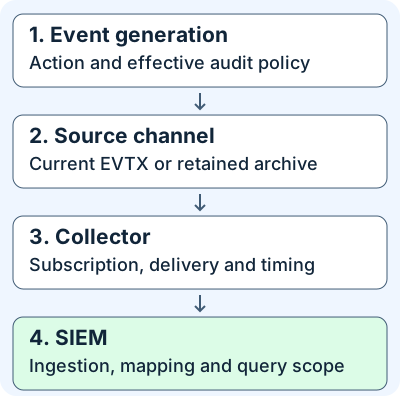
1. A missing event can disappear at four stages
A provider publishes a type of event. A channel, such as Security or System, is where Windows routes that record. The audit policy controls generation for many classes of Security events. An EVTX is an event log file. The current file may cover only the latest part of a host’s history. Windows Event Forwarding (WEF) sends selected source events to a Windows Event Collector (WEC). A SIEM can then ingest and index those records for searching.
EventID identifies an event type in its provider context. EventRecordID is the number assigned when the event is logged. It is useful within an identified source channel and log lifecycle. It is not a sequence shared by all hosts, channels, archives or collector projections. A filtered stream can legitimately jump between record numbers. TimeCreated/@SystemTime is the source timestamp. Arrival or indexing time answers a different question.
2. Compare the events and retention modes
| Evidence | Documented meaning | What to check next |
|---|---|---|
Security 1102 · Microsoft-Windows-Eventlog |
The Security audit log was cleared | The recorded subject, session, change history and independently retained evidence |
System 104 · Microsoft-Windows-Eventlog |
An event log was cleared. Inspect the payload for the target log | A 104 for Application establishes nothing about clearing Security |
Security 1104 · Microsoft-Windows-Eventlog |
Security log full | Effective retention mode, free space, coverage period and later records |
Security 1105 · Microsoft-Windows-Eventlog |
Security log became full and a new log file was created during automatic backup | Find the archive. Inspect its record span and confirm successful preservation |
Security 1100 · Microsoft-Windows-Eventlog |
Event Log service shut down, including during a normal shutdown | Reboot and maintenance evidence, continuity afterward |
Security 4719 · Microsoft-Windows-Security-Auditing |
System audit policy changed | Subcategory GUID and change values, effective settings, policy application time and change approval |
Microsoft lists 1100, 1102, 1104 and 1105 as automatic events. The 4719 reference specifies generation independently of the Audit Policy Change subcategory setting. All still need a usable channel, enough retention and a working collection path to appear in a particular investigation. The ordinary events you expect before and after a gap may have different prerequisites. For example, 4624 depends on applicable successful Logon auditing, and 4688 depends on Process Creation auditing.
| Log mode | Behavior on reaching the log limit | Common investigative symptom |
|---|---|---|
| Circular | Incoming events replace older records | The oldest retained event moves forward during ordinary use |
| AutoBackup | Windows archives a full log and starts a new active file | An item absent in the active file may be retained in an archive |
| Retain | Existing records are retained without automatic overwrite | A full log can stop accepting additional events. Investigate capacity and missing coverage |
A configured maximum size in bytes is not a time interval. Estimate actual coverage from the oldest and latest retained timestamps, segment history and activity rates. Current configuration and oldest-record number report the present snapshot. They do not reconstruct past settings or prove the reason for a gap.
3. Work through a legitimate maintenance example
In fictional case W01, a collector preserves 1102 from LAB-WIN-01 at 07:00 UTC. The source XML would identify channel Security and provider Microsoft-Windows-Eventlog. The event’s subject fields are in UserData/LogFileCleared, including SubjectUserSid, SubjectUserName, SubjectDomainName and SubjectLogonId. A pipeline mapping only EventData can miss them. The worksheet projects a fictional subject and logon ID from that payload.
- Record source
System/Computer, channel, provider,TimeCreated, original record metadata and subject. Record the independent arrival time separately if available. - Match
SubjectLogonId=0x124ato the new session’sTargetLogonIdin a retained 4624 on the same host and boot context, with compatible time and SID. A missing 4624 could have aged out or never been collected. A successful match associates the session, while the operator’s identity and intent require other evidence. - The fixture supplies a verified change window and an independently confirmed prior archive. In a real case, verify the activity from the ticket, operator and archive content. The clear occurred and has a corroborated maintenance explanation. The prior archive still needs a recorded time span and integrity check.
W02 preserves 1102 without comparable approval. Record clear observed, reason unresolved, then investigate. W03 instead has no observed clear event. The current Circular log has an oldest record number of 45211, and a previously observed record 45021 belonged to the same active-log lifecycle. That supports loss from active retention. It does not show that all copies of the older record are gone.
4. Collect and triage without changing the source
Establish host, time window and expected channel coverage. Preserve the approved source EVTX exports, archives and independently retained collector or SIEM copies. Retain the file times and hashes and make an analysis copy. Record source clock and collection UTC time, event ID, provider, channel, original computer, record number and ingestion route. Compare the actual subscription selection and delivery window with the expected event. Forwarded records can preserve origin fields even when SIEM metadata calls the collector the host.
The examples below read the current log and policy on an authorized Windows host from a PowerShell session with Security channel and audit-policy read rights. They do not export or modify the logs. Set the time range for the case. An empty result can mean no matching retained record, insufficient access, error or insufficient query scope. Inspect errors and compare with other sources. Use raw XML or a separate, approved evidence export to preserve the event’s payload.
$since = (Get-Date).AddHours(-24)
Get-WinEvent -ListLog Security |
  Select-Object LogName, LogMode, MaximumSizeInBytes, IsLogFull, OldestRecordNumber, RecordCount
Get-WinEvent -LogName Security -Oldest -MaxEvents 1 |
  Select-Object TimeCreated, RecordId, MachineName, LogName
Get-WinEvent -FilterHashtable @{
  LogName = 'Security'
  Id = 1100, 1102, 1104, 1105, 4719
  StartTime = $since
} | Select-Object TimeCreated, MachineName, LogName, ProviderName, Id, RecordId
auditpol /get /category:*
| Pattern | Evidence to compare | Response |
|---|---|---|
| Unexpected 1102 | Subject and same-host session, ticket, endpoint records, independent copies | Preserve the affected window and scope the account and host. Coordinate containment based on corroboration |
| Full or overwritten channel | Effective mode, oldest event, event rate, archives and storage state | Restore coverage with the log owner, then confirm storage and delivery with a new benign event |
| Local selected event missing at WEC beyond the delivery window | Subscription runtime, connection, actual destination and source retention | Troubleshoot that delivery leg. When WEC has the event, inspect SIEM ingestion separately |
| 4719 near a coverage change | Subcategory and change values, Group Policy application and baseline | Determine whether the expected events were still being generated. Check the effective policy and verify restored coverage |
An actor with administrative access may suppress visibility by removing retained evidence or causing fewer future events to be generated. A legitimate reboot, audit change, log overflow or collector outage can look similar in one feed. Compare sources before making an attribution. WEF uses the source log as a buffer and an additional collector notification may not exist for overwrites during disconnection. A heartbeat, one record-number jump, or missing 1102 alone cannot establish what happened. For the forwarding leg, see WEF delivery evidence.
5. Offline lab · Nine evidence combinations
Download the synthetic case data and Python review script. Save them together. Use a computer or sandbox you control with Python 3.10 or later. The script reads a local JSON projection, has no dependency on Windows or a collector, and does not contact a host or generate log-clearing events. Fields outside the event rows are hypothetical facts from separate evidence sources.
python3 windows-log-continuity-review.py windows-log-continuity-cases.json --check
| Case | Expected conclusion |
|---|---|
| W01 | Security clear observed, with corroborated maintenance |
| W02 | Security clear observed, reason unresolved |
| W03 | Loss from Circular source retention supported by the matching active-log context |
| W04 | A selected event still exists at source. Review delivery after the expected latency window |
| W05 | Full Security log with Retain. Determine the missing coverage |
| W06 | Audit policy changed. No clear event in the supplied evidence |
| W07 | System 104 targets Application. The adjacent 1102 belongs to a different host |
| W08 | AutoBackup evidence. Identify and verify the archive |
| W09 | Service shutdown with corroborated reboot |
On 2026-11-21 Python 3.12.14 produced 9/9 synthetic cases matched. Windows commands, event schemas and WEF behavior were reviewed in official documentation. There was no live Windows replay. If the command fails, check the filenames, directory and Python version. Undo fixture edits or re-download it for the expected results. To validate real coverage, use an approved benign marker in an owned test host, with its applicable audit policy enabled, and verify it at each stage without altering production logs.
6. Check your reasoning
- The SIEM has 4624 record numbers 20 and 27. Was Security cleared? A selective subscription can omit other IDs. Compare the source span, the actual filter and whether a 1102 exists.
- Does 1102 identify a specific person and their motive? It records a security subject associated with the operation. Use the same-host session, source evidence and approved change history to assess who or what acted and why.
- The source still holds a selected marker, but WEC is empty after the delivery window. Where do you look? At the source-to-collector leg, including the subscription status, destination channel and delay. Preserve the local copy while investigating.
- What does 4719 add if 4688 disappears? It may explain a change in generation. Check whether the applied change affected Process Creation success auditing and whether collection and retention also worked.
Complete the chapter when you can reproduce the nine cases, identify the earliest supported gap for each and name one independent artifact needed before calling it malicious. Continue with WEF delivery and evidence preservation.
Official references
Reviewed 2026-11-21. The event references describe Microsoft event schemas documented in the Windows 10-era audit material. For operational application, verify provider, channel and behavior on the managed Windows release.
- Microsoft Learn 1100, 1102, 1104 and 1105, audit event references from 2021.
- Microsoft Learn 4719 and 4624, policy-change and logon schemas.
- Windows Event Forwarding, Windows host and collector behavior, including System 104 and source overwrites.
- EventRecordID and .NET Framework EventLogMode, record schema and retention modes.
- Get-WinEvent for Windows PowerShell 5.1 and auditpol get for supported Windows client and server releases.
Related articles
Backup Restore Verification · From Saved Copy to Recoverable Service
Use a real offline SQLite restore exercise to distinguish a matching hash, a usable database, an acceptable recovery point, and a service ready to resume.
Velociraptor Endpoint Collection: From a Network Alert to Host Evidence
Scope a request to one endpoint and interpret collection coverage, zero results, missing files and SIEM delivery using nine fictional cases.