Blue Team · Beginner
Windows Event Forwarding: Verify the Path from Endpoint to SIEM
Distinguish event generation, subscription selection, collector delivery and SIEM visibility using ten fictional delivery cases.
Updated 2026-11-20
On this page
Learning goal. Find where a selected Windows event stopped being observable and explain which conclusions you can draw from the available evidence.
1. What is being forwarded?
A Windows event provider records activity. The channel is the named event log in which a record is written, such as Application, Security or a product’s Operational channel. Windows Event Forwarding (WEF) selects existing events and sends them to a system running Windows Event Collector (WEC). The subscription determines which sources participate, which events qualify, how they are delivered and where they are written. A SIEM can ingest from WEC through a separate input, which has its own permissions, checkpoints and parsing.
A source-initiated subscription accepts eligible sources that are configured to contact the collector, often through Group Policy. A collector-initiated subscription defines its source computers on the collector. In both designs, the local event must exist, the channel must be readable by the relevant identity, and the selection and transport must work. WEF does not generate an event or enable an audit policy.
2. Follow one normal marker
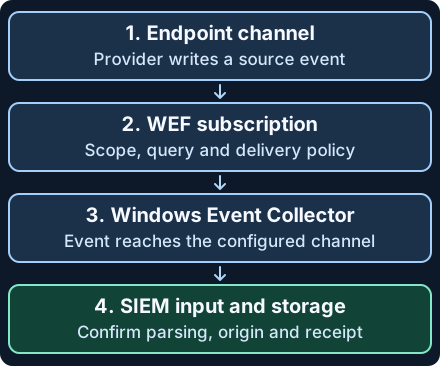
In a fictional lab at 10:00 UTC, lab-ws01.example.test writes an Application event, ID 970, with a unique marker wiki-wef-w01. The lab subscription includes the provider and channel. WEC records the forwarded copy at the collection stage at 10:01. The SIEM input makes it searchable at 10:01:15. Those three timestamps describe different things. The original event time should still refer to 10:00 even if the downstream system recorded a later arrival.
| Stage | Look for | Limits |
|---|---|---|
| Endpoint | Source record, computer, provider, channel, event ID, source time and marker | The event cannot be forwarded if it was not generated or is no longer retained. |
| WEF subscription | Source eligibility, enabled status, selection query, read-existing setting, runtime status and schedule | A healthy heartbeat shows contact. It does not show that a particular event qualified or arrived. |
| WEC | Forwarded copy in the configured destination channel, often ForwardedEvents |
Check raw XML and record the collector separately from the originating machine. |
| SIEM | Matching original fields in the correct data input, index and time window | A visible row may carry metadata rewritten by normalization. Compare to the collector copy. |
On reconnection, WEF uses bookmark state to resume. If the relevant source records were overwritten while a machine was disconnected, the bookmark cannot recreate them. Check the log’s observed retention, not just its configured maximum size. By default a subscription collects events generated after it is received by the source. A deliberate Read existing events setting can include retained older events, subject to scope and selection. Verify it before judging a historical gap. Batching and heartbeat timing depend on the configured subscription, so a just-generated marker may legitimately be waiting.
3. Diagnose the gap with read-only checks
- Check the source first. Does the intended provider produce the event in this channel? Verify source coverage, audit or product settings, time range and local access. Check the channel’s record span and retention. Search with the origin, channel and provider, since event IDs are not globally unique.
-
Check the subscription. On the approved collector with WEC running and authorized access, use the following. Substitute the actual subscription ID and source computer name.
gsshows configuration andgrshows runtime status.wecutil gs "Wiki-WEF-Lab" wecutil gr "Wiki-WEF-Lab" "lab-ws01.example.test"Compare the query, eligible sources, destination channel, backlog behavior and delivery settings. The endpoint’s
Microsoft-Windows-Eventlog-ForwardingPlugin/Operationalchannel can contain connection and subscription diagnostics. In Microsoft’s documented source-initiated setup, event 104 reports a successful connection to the subscription manager and 100 reports subscription creation. Verify the channel, provider and message. Neither records delivery of an individual source event. Check authentication, connectivity and channel-read permissions under approved procedures. - Check WEC and the downstream input separately. Query the collector’s actual destination channel. A marker present in WEC but absent in the SIEM calls for reviewing the downstream reader, route, checkpoint, time mapping, index permissions and retention. If the SIEM shows the collector as
host, locate the field derived from the original XMLSystem/Computer. Do not overwrite the distinction. - Reconcile duplicates and act on evidence. For this lab, a marker plus origin, channel and event ID is enough for comparison. In a production export, also preserve provider, original event timestamp and observed record identifiers. Compare raw events before deduplicating.
EventRecordIDis a number assigned when logged. A bare value alone cannot identify an event across systems, channels or log lifecycles.
Misuse and response. Audit or subscription changes, interrupted forwarding, or loss of retained logs can reduce visibility. Benign reconnects, subscription edits and parser changes also cause gaps. Compare to an approved baseline and change history, review source retention and subscription health, and preserve raw source and collector evidence. If coverage is lost, use authorized alternate evidence and record the affected systems and time window. Confirm restoration with a new benign marker and verify each stage. A heartbeat alone cannot prove recovery.
4. Offline exercise · ten delivery cases
Download the fictional delivery records and the Python reviewer into one folder. Run with Python 3:
python3 wef-delivery-review.py
The data uses invented 2030 timestamps and normalized records from three stages. It is neither EVTX nor Windows event XML. The coverage, filter, runtime and delivery-window fields summarize facts an investigator would need to verify separately. The reviewer reports one prioritized diagnosis per case and does not contact a system.
| Case | Expected finding | Evidence |
|---|---|---|
| W01 | End to end observed | The same scoped marker is in all three stages. |
| W02 | No local match | A scoped search with verified source coverage found no marker. |
| W03 | Subscription excluded | Source exists and the known filter fails to select it. |
| W04 | Delivery window open | The source exists, and the agreed delivery window has not elapsed. |
| W05 | Source coverage gap | The relevant interval was overwritten at the source. |
| W06 | Runtime error | The source exists and the subscription reports a transport error. |
| W07 | Index unconfirmed | WEC has the marker, SIEM result absent. |
| W08 | Indexed metadata mismatch | The SIEM row names WEC as the original computer. |
| W09 | Duplicate index rows | Two rows match one scoped exercise marker. |
| W10 | Collector unconfirmed | Runtime is active, but no matching event is observed after the delivery window. |
Expect Reviewed: 10. If the reviewer cannot load the files, check the names, folder and JSON syntax. If W08 ends up as a match, compare the origin fields. For W09, check the copies’ timestamps and input paths before deciding to deduplicate in a real environment. Two observations need not mean two source events.
Optional approved Windows validation
Use an isolated test endpoint already included in a permitted lab subscription whose query includes Application events from Wiki-WEF-Lab, ID 970, Information level. Have an authorized administrator write a single local marker with a new unique description:
eventcreate /l APPLICATION /so Wiki-WEF-Lab /t INFORMATION /id 970 /d "wiki-wef-test-unique-01"
Verify the source with Event Viewer or, on the endpoint with read access, with a time-bounded PowerShell check. Replace the example marker, adjust the lookback to the test’s elapsed time and inspect the raw record on each side:
Get-WinEvent -FilterHashtable @{
  LogName = 'Application'
  ProviderName = 'Wiki-WEF-Lab'
  Id = 970
  StartTime = (Get-Date).AddMinutes(-30)
} | Where-Object { $_.ToXml() -like '*wiki-wef-test-unique-01*' } |
  Select-Object TimeCreated, MachineName, ProviderName, Id, RecordId
On WEC, query the subscription’s destination channel using its local name and compare original XML fields. Then look for the same marker in the approved SIEM input. Record the receipt latency where observable. If you find nothing, start from the source and work through the stages above. This marker tests the selected Application route. It does not test that Security or Sysmon auditing and forwarding work. The downloadable exercise ran in the cloud. The Windows commands and WEF behavior were reviewed against Microsoft documentation and were not executed in a Windows deployment.
5. Check your understanding
- The source is active but WEC has no marker. Is the route healthy? Active is evidence of runtime state. Confirm filter, wait window and the exact record in WEC.
- Can Read existing events recover a rolled-over local record? No. It can read only retained records in scope.
- What distinguishes W07 from W08? In W07 no downstream copy was found. In W08 there is a copy but the normalized origin is wrong.
- Does Event ID 970 prove this test occurred? Pair the provider, channel, origin, time and unique marker before making the association.
Finish by classifying W04, W05, W08 and W10. For each, name the last confirmed stage and the evidence that would resolve the remaining question.
Previous · Windows event logs · Next lesson · Validate a detection · Related · Sysmon investigation
Official references
Reviewed November 20, 2026. Test procedures depend on the installed Windows version, subscription and audit policy.
- Microsoft WEF guidance, updated August 2025. Scope, bookmarks, heartbeat, delivery and log overwrite. Use WEF for intrusion detection
- Windows Event Collector subscription model and Win32 event schema. Source-initiated subscription · Event origin schema · EventRecordID schema
- Windows commands for Windows 11 and Server 2025 among other supported platforms, and PowerShell 7.6 reference. wecutil · eventcreate · Get-WinEvent
Check the Clock Behind an Event Timestamp
Investigate the Windows time source and decide whether clock correction is justified
Investigate missing Windows events
Windows Security log gaps · Distinguish clearing, retention, policy changes and delivery gaps.
Related articles
Windows App Control · Read Audit, Block and Signature Events
Connect Windows Code Integrity policy decisions, signature records and policy activation evidence without mistaking a block for malware execution.
Blue Team Fundamentals: Detection to Response
An introduction to security monitoring, triage, investigation, incident response, and detection improvement.