Cloud Security · Beginner
AWS KMS Investigation · Key Use, CloudTrail and S3 Reads
Follow envelope encryption, read key-policy and Decrypt evidence, and distinguish a KMS call from the use of application data.
Updated 2026-11-21
On this page
Learning goal. Given a KMS event and an application alert, explain which key was involved, what the operation established and what evidence remains missing. For session attribution, start with AWS roles and CloudTrail.
1. Two keys protect a payload
AWS Key Management Service (KMS) manages keys and performs cryptographic operations on authorized requests. A KMS key is a resource with an ARN, a key state and an access policy. An alias is a changeable name pointing to a key. Use the Region, account and actual key ARN in investigations. After an alias is reassigned, its current target is insufficient to identify the key involved at an earlier time.
In envelope encryption, a data key encrypts the payload, and a KMS key protects a copy of the data key. For example, a reporting job can call GenerateDataKey with a symmetric KMS key. KMS returns a plaintext data key and its encrypted copy. The job encrypts a file using the plaintext data key, removes that key from memory as soon as possible and stores the encrypted data key alongside the encrypted file. To read the file later, the job submits the encrypted data key to Decrypt, then uses the returned plaintext data key to decrypt the file. The KMS key material is not handed to the job in this flow.
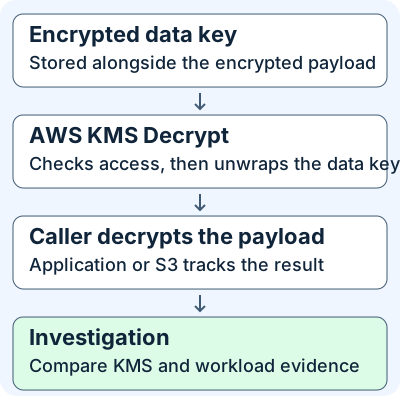
An encryption context is a set of non-secret key-value pairs. Symmetric KMS encryption binds this context to the ciphertext as additional authenticated data. If it was used at encryption time, present the same case-sensitive pairs to decrypt. This is separate from policy conditions that can restrict use to an expected context. Values such as purpose=daily-report may appear in CloudTrail in plaintext, so keep credentials and sensitive identifiers out of them. An application-supplied label is a clue, with independent evidence needed to establish what happened to the file.
2. Who can manage or use a key?
| Control | What it does | What to inspect |
|---|---|---|
| Key policy | Resource-side policy for the specific key in its Region | Allowed principals, operations, constraints and whether it enables IAM policy authorization |
| IAM policy | Identity-side permissions for a caller | The actual role/session and relevant restrictions. An IAM allow alone cannot grant use when the key policy does not enable the IAM path |
| Grant | Can allow listed operations on one key, often for service integration | Grantee, operations, constraints and lifecycle. A grant provides permissions and cannot deny access |
| Key state | Affects whether the cryptographic operation can run | Enabled, disabled or pending deletion, and changes around the incident |
For the cross-account policy path, authorization requires the key owner’s policy and permissions in the caller’s account. Grants are a separate authorization mechanism. Review applicable explicit denies and organization, boundary, session or endpoint restrictions when they matter to the request. Access to manage a key and access to decrypt with it are separate privileges.
A customer managed key lets your team manage its policy and monitor its use. An AWS managed key is managed by AWS for an integrated service and is visible in your account. AWS owned keys are owned and managed by AWS services outside your account, so the same customer-side controls and evidence do not apply. This chapter uses customer managed, symmetric encryption KMS keys.
3. Read a successful operation and a failure
In the synthetic K01 example, an assumed role called TrainingReport makes a successful Decrypt call in us-west-2. Start with eventSource=kms.amazonaws.com, eventName=Decrypt, the timestamp, Region, and the recorded role session. Confirm the full ARN from resources[].ARN when present and compare it with requestParameters.keyId when provided. The former describes the recorded resource and the latter describes the requested identifier. Document the difference if only a request identifier is present. CloudTrail omits cryptographic responses. responseElements: null is therefore compatible with success. Look for the operation’s error fields.
K02 instead records IncorrectKeyException. The requested key cannot decrypt that ciphertext. Compare the key ID with the stored encrypted data key’s provenance before changing permissions. InvalidCiphertextException is a different result and can reflect invalid ciphertext or missing or mismatched context. AccessDenied requires reviewing the authorization path. Capture the error and the exact request scope rather than assuming each failure is an IAM misconfiguration.
Cross-account visibility also differs by result. In K03, two records with different eventID and recipientAccountId share one sharedEventID: CloudTrail delivered two account views of one KMS action. Preserve both originals and count the action once for volume. For a cross-account request rejected because access was denied, AWS documents logging in the caller account only. In K04 the owner-side absence is expected. Use the caller’s record and preserve the account views you actually obtained.
4. Distinguish key use from an S3 object read
S3 SSE-KMS uses KMS in its server-side encryption workflow. For an SSE-KMS object without an S3 Bucket Key, the default S3 encryption context uses the object ARN. When the object uses an S3 Bucket Key, the context uses the bucket ARN. S3 can reuse a short-lived bucket-level key, reducing per-object calls. AWS says subsequent requests making use of that key do not call KMS or re-evaluate the KMS key policy for that request. The S3 access decision still matters.
| Evidence | Supports | Follow-up and limits |
|---|---|---|
Successful KMS Decrypt |
KMS successfully processed that cryptographic request | Check the workload, data path and consumption separately. CloudTrail does not supply decrypted bytes |
Successful S3 GetObject data event |
S3 recorded the specified object request without an error in the event | Check bytes sent, ranges and client-side handling where needed |
| Nearby bucket-level KMS context | KMS recorded an operation in the bucket’s context | It does not identify the object. Time proximity alone cannot join a KMS request to a particular GetObject |
GetObject present and KMS event absent |
A data event and an observation gap between the feeds | Check the object’s Bucket Key state at the time and KMS read-event coverage before inferring the cause |
K05 provides a successful object request and verified Bucket Key use but no KMS event. A call need not appear for every read. K08 adds a nearby bucket-level Decrypt. Both events can be real and the object-level link still unproven. Verify encryption on the specific object or version. Current bucket defaults do not establish settings for older or overridden objects. See S3 object-read evidence for request IDs and bytes sent.
5. Collect, detect and respond
For historical trail data, check account, Region, retention, delivery and incident-time selectors. CloudTrail treats Decrypt and GenerateDataKey as read management events even when an application is writing data. A write-only trail or KMS exclusion can omit them while a separate source still shows S3 data activity. For S3 object events, confirm the data selector covers the relevant ARN and time. Event history is a separate view of the last 90 days of management events for the selected Region. Clear the console’s default read-only-false filter when investigating cryptographic calls. Use original delivered files and keep eventID, sharedEventID when present, account, time, Region, session issuer, request and error fields.
These optional read-only AWS CLI v2 examples require an approved investigative profile and the corresponding CloudTrail permissions (cloudtrail:LookupEvents and cloudtrail:GetEventSelectors). Substitute the account profile, trail ARN, Region and incident window. Use the region of the activity for the first command and the trail’s home Region for the second. The first command looks up management events, not S3 object data events. The second reports current selectors. Reconstruct historic settings from configuration history or change records.
aws cloudtrail lookup-events --profile YOUR_AUDIT_PROFILE --region us-west-2 \
  --lookup-attributes AttributeKey=EventSource,AttributeValue=kms.amazonaws.com \
  --start-time 2026-11-21T05:00:00Z --end-time 2026-11-21T05:20:00Z
aws cloudtrail get-event-selectors --profile YOUR_AUDIT_PROFILE --region us-west-2 \
  --trail-name YOUR_TRAIL_ARN
| Signal | Corroborate | Respond |
|---|---|---|
| First-seen caller account or role for a sensitive key | Key ARN, owner and caller views, session issuance, expected integrated services and approved work | Preserve both views and scope downstream workload activity before declaring data exposure |
| Increase in denied or wrong-key calls | Group by error, caller, key and Region. Compare deployments, key state, alias changes and normal volume | Fix the specific issue. Avoid widening policy as a first response |
Unexpected PutKeyPolicy, CreateGrant or key disablement |
Old and new access state, granted operations, change ticket, key owner and service dependencies | Coordinate containment and preserve evidence before modifying a shared key. A successful change event does not establish subsequent use |
A misused role session or overly broad grant can permit cryptographic operations that look like legitimate calls. Compare expected service, key and role bindings and corroborate use with workload evidence. A planned service rollout can create grants and cryptographic spikes too. For control validation, use a sandbox you own or have explicit permission to test. With your cloud owner, define an allowed case, a denied case and an expected collector output for disposable training data. Keep the examples below offline, without creating keys, altering policies or accessing AWS.
6. Offline evidence lab and completion check
Download the synthetic JSON cases and Python review script. Python 3.10+ with its standard library is sufficient. Both files belong in the same directory. The records are simplified field projections, and Boolean fields outside the events supply independently checked facts for this exercise. In a real investigation you must confirm those facts from the original sources. The script groups Decrypt records within each case for teaching, without simulating AWS permission evaluation or proving a data flow.
python3 kms-cloudtrail-review.py kms-cloudtrail-cases.json --check
| Case | Expected interpretation | Observed Decrypt actions in the fixture |
|---|---|---|
| K01 | KMS processed Decrypt successfully. Application outcome remains separate | 1 |
| K02 | KMS rejected an incorrect key | 1 attempted |
| K03 | Two account views of the same successful action | 1 |
| K04 | Access denied across accounts. Caller view is expected | 1 attempted |
| K05 | S3 read, with no requirement for a per-read KMS call | 0 observed |
| K06 | Missing read coverage. No conclusion about use | 0 observed |
| K07 | Key policy changed. No Decrypt in this case | 0 observed |
| K08 | S3 read and nearby bucket-level KMS use. Object-level join unproven | 1 |
On 2026-11-21 Python 3.12.14 returned 8/8 synthetic cases matched. The CLI examples, policy semantics and service behavior were reviewed against AWS documentation. The exercise does not use a live AWS environment. If it fails, confirm the exact filenames, directory and Python version. Re-download the fixture to restore the expected checks, or omit --check when exploring intentionally altered case data.
- Does
responseElements: nullin K01 mean decryption failed? No. Read the error fields and operation context. The response contents are omitted. - Can an investigator count K03 as two decrypts? Preserve both account records, but use their shared identifier to count a single action.
- Is zero in K06 equivalent to zero in K05? No. K06 establishes a coverage gap. K05 shows an S3 request for an object whose Bucket Key can make a per-read KMS call unnecessary. Neither case proves an exact number of underlying calls.
- What would support a claim of data disclosure after K01? Corroborate object or application access with server responses, transfer telemetry and client or endpoint records. KMS establishes the key operation.
You have completed this chapter when you can reproduce all eight results, explain why account copies and S3 records have different meanings, and identify the next source to collect. Continue with S3 object-read evidence and CloudTrail log integrity.
Official references
Reviewed 2026-11-21. The links describe current AWS cloud-service documentation and AWS CLI v2. Apply incident-time configuration and retention to historical data.
- AWS KMS key types.
- KMS data keys, encryption context, and Decrypt API.
- KMS key policies, access across accounts, and grants.
- KMS CloudTrail logging, Decrypt records, and CloudTrail record fields. Older management records may lack resource attributes that AWS added in December 2022.
- S3 SSE-KMS and S3 Bucket Keys.
- CloudTrail management event collection, Event history, and AWS CLI v2 lookup-events and get-event-selectors.
Related articles
AWS IAM Roles and CloudTrail Investigation
Trace role trust, temporary STS credentials and subsequent API calls through eight CloudTrail examples.
CloudTrail Log Integrity · Verify Delivered Logs and Investigate Gaps
Use signed CloudTrail digests and SHA-256 to test file integrity, then check whether the trail captured the activity you are investigating.