Cloud Security · Beginner
Amazon S3 Object Reads · Correlate Requests and Bytes Sent
Match CloudTrail S3 data events with server access logs, then separate metadata, denied requests, partial responses and gaps in collection.
Updated 2026-11-20
On this page
Learning goal. Given an S3 read alert, identify the request, its apparent caller, what S3 reported sending, and which questions still need evidence from outside S3. This chapter uses general purpose buckets and direct object requests.
1. A bucket is a container, a key is an object name
A bucket contains objects. An object key names an object in that bucket. In reports/daily.csv, the slash is part of the key. Analysts often group keys by prefix, such as reports/. For versioned buckets, the version ID distinguishes stored versions of a key when it can be established from the request and other evidence.
The management plane changes or inspects configuration, such as an update to a bucket policy. The data plane operates on the stored material. GetObject fetches bytes, HeadObject asks for metadata without an object body, and PutObject writes data. A role session identifies the credentials used to make a request. The person or workload that used those credentials may need separate verification.
| Source | What to read | Collection and interpretation |
|---|---|---|
| CloudTrail management events | Bucket policy changes and related activity such as role assumption | Start here for configuration and identity history |
| CloudTrail S3 data events | eventName, requestID, userIdentity, errorCode, bucket and key where present |
Opt in for the applicable resource scope. Event history excludes data events |
| S3 server access logs | Request ID, operation, HTTP status, Bytes Sent, Object Size | Enable on the source bucket. Delivery is best effort and can be late, incomplete or duplicate |
| Application, proxy or endpoint records | What job called S3 and how it handled the response | Collect independently. A server-side byte count cannot confirm client retention |
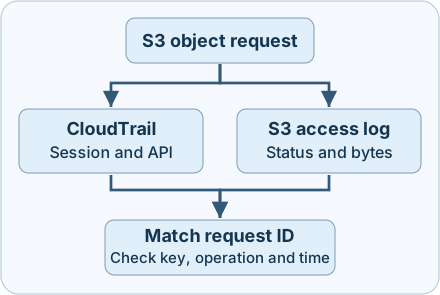
Figure. The two logs describe different aspects of the request. Their delivery can occur at different times.
2. Follow a normal object read
At 11:01 UTC the approved reporting job uses the temporary session report-reader/session-a to request reports/daily.csv from the fictional wiki-training bucket. In CloudTrail, eventSource=s3.amazonaws.com and eventName=GetObject show which API was called. The identity context shows the role session. The access log’s REST.GET.OBJECT row has HTTP 200, 8,192 Bytes Sent, and an Object Size of 8,192.
Start with CloudTrail’s requestID and the access log’s Request ID. CloudTrail eventID identifies a CloudTrail record. The S3 access log Host ID is the extended S3 request identifier and is a different field. Cross-check bucket, object key, operation, timing and version if visible. Request time, API event time and ingestion time can differ. In cross-account collections, retain the event recipient account and use sharedEventID where present to identify multiple CloudTrail views of one action. Preserve raw forms and normalise encoding only once, following the format of each source.
At 11:02 the same job asks for a byte range. A second request ID returns 206 Partial Content, with 1,024 Bytes Sent for the same 8,192-byte object. The server reported sending 1,024 response bytes excluding HTTP overhead. The object size is still 8,192. Where available, a trusted record of the requested or returned range gives more precision. Range requests or retries can overlap, so summing successful response bytes measures traffic represented by the rows, not distinct data exposed.
| Evidence | Sound interpretation |
|---|---|
| Paired GET, 200, 8,192 Bytes Sent | S3 reports sending a successful response of 8,192 bytes. Check client evidence for receipt and persistence |
| Paired GET, 206, 1,024 Bytes Sent | S3 reports sending a partial response. Check the range and version before estimating distinct data |
Paired GET, 403 and AccessDenied |
S3 denied that read. A nonzero count can be the error response body |
| Paired HEAD, 200 | S3 responded to a metadata request. The object body was excluded |
| CloudTrail only or access log only | Describe the evidence present and verify collection scope before estimating totals or attributing the action |
3. Recognise possible misuse and innocent lookalikes
A compromised role session can make reads that look like those made by the legitimate job. A policy configured more broadly than intended can allow an unexpected principal to read sensitive objects. A presigned URL can be used by someone holding that URL within the applicable validity and authorisation conditions. When present, server logging’s Authentication Type=QueryString helps identify this pattern. The signing identity and the person using the link can differ. Treat full presigned URLs, query strings and customer object keys as sensitive in case notes.
Compare known job schedules, identity and prefixes with the observed requests. A new prefix or sustained volume from an unexpected session deserves investigation. A scheduled export, backup or retry storm can create similar volume. A source IP can identify a proxy or NAT address and a User-Agent can be supplied by a client. Use them as context and corroborate with role issuance, workload and destination evidence. An unfamiliar IP or a 403 spike does not establish a successful transfer.
4. Collect, detect and respond
- Confirm collection at the incident time. Check the AWS account, Region, bucket type, time range and selectors. For a general purpose bucket, include eligible
AWS::S3::Objectevents for the relevant bucket or prefix, with read activity in scope. Confirm the setting existed when the action occurred. Query the actual CloudTrail delivery or collection destination. Check server access log delivery, permissions, retention and ingestion. Both sources have blind spots, including the AWS-documented case of S3 requests denied by a VPC endpoint policy. - Preserve both originals and enrich safely. Record UTC event and ingestion times, bucket, key, operation, region, account, request ID and status. From CloudTrail retain the session ARN and issuer where present. Keep raw records access-controlled. Treat missing, conflicting or truncated fields as investigation items. Use a compatible access log parser because some quoted fields can contain unescaped quotes. Never join unknown IDs as empty strings.
- Detect deviations with a denominator. Compare successful GETs, denied requests and collection volume by workload, bucket or sensitive prefix, and time window. Flag scope changes and unexpected successful object reads alongside deviations from comparable periods. Deduplicate verified copies of the same access-log entry. Retain distinct retries as separate requests and record unmatched rows separately. A coverage gap should lower confidence in the count.
- Contain using evidence and verify. If an unexpected read is corroborated, preserve policy and session evidence with the IAM and bucket owners. Use approved steps to restrict further reads or revoke affected access, and confirm that expected workloads still work. Check other object reads, versions, caller logs and downstream destinations. Record the difference between observed response bytes, potentially exposed versions and what the client is known to have received.
5. Offline exercise · Ten fictional S3 requests
Download the CloudTrail projection, server access projection and Python reviewer into one folder. They contain fake bucket, session and request labels. They are simplified CSV projections, not provider export formats. The script uses only the Python 3 standard library and packaged files. It does not connect to AWS.
Before running, match LAB-01 and LAB-02 by bucket and request ID. Confirm their keys and operations. Compare HTTP status and the byte count on the server side. Then run:
python3 s3-read-review.py
| Cases | Expected decisions |
|---|---|
| LAB-01 and LAB-02 | Successful object response of 8,192 bytes and partial response of 1,024 bytes |
| LAB-03 and LAB-04 | Denied read, then a CloudTrail-only record with no paired byte count |
| LAB-05 and LAB-06 | Access-log-only record, then a metadata response |
| LAB-07 and LAB-08 | Count the identical duplicate once for 4,096 bytes. Hold differing records for review |
| LAB-09 and LAB-10 | Same ID but different key, then a successful GET of an empty object showing zero bytes |
Expect Paired successful GET bytes in this fixture: 13312. This is the sum for verified pairs in this exercise. The access-only row reports an additional 2,048 response bytes, excluded from the paired subtotal. The 214-byte error body is also excluded. If the count differs, confirm all three filenames, inspect the request IDs and compare the two LAB-08 rows. The script checks fixture joins, not production schema, identity or receipt. In an approved AWS lab, a defender can validate coverage with one known harmless read of a dummy object and compare the SDK request ID with both log systems after delivery. The offline cases were executed. AWS service delivery and policy enforcement were reviewed in documentation.
6. Check your understanding
- Why does LAB-02 contribute 1,024 instead of 8,192? Use Bytes Sent for the response and Object Size for the stored object. HTTP 206 describes a partial response.
- Why exclude LAB-03’s 214 bytes? The request was denied and S3 can send an error representation. These bytes do not establish object disclosure.
- Does LAB-04 prove there was zero transfer? The CloudTrail record can describe the request while the paired response evidence is missing. Check the log scope and reported outcome before settling the byte count.
- What can the session name tell you? It labels the session used. Verify the caller against the issuing event, workload logs or other identity evidence.
Completion. Write one investigation entry with the bucket, key, request ID, apparent session, response status and bytes S3 reported sending. State a remaining uncertainty and name the source you would consult to resolve it.
Previous · AWS IAM roles and CloudTrail · Next · CloudTrail log integrity · Related · Evidence preservation
Official references
AWS general purpose S3 and CloudTrail documentation reviewed on 20 November 2026. Check current bucket type, collection configuration and retention before applying the results.
- Amazon S3 · Logging options, coverage and restrictions
- Amazon S3 · CloudTrail event categories, supported APIs and resource types
- AWS CloudTrail · Event record contents · Identity fields
- Amazon S3 · Server access log format · Best-effort delivery
- Amazon S3 API · GetObject and range responses
Follow the key evidence
AWS KMS investigation · Trace the key operation and check what CloudTrail and S3 can each establish.
Related articles
AWS IAM Roles and CloudTrail Investigation
Trace role trust, temporary STS credentials and subsequent API calls through eight CloudTrail examples.
AWS KMS Investigation · Key Use, CloudTrail and S3 Reads
Follow envelope encryption, read key-policy and Decrypt evidence, and distinguish a KMS call from the use of application data.