Cloud Security · Beginner
CloudTrail Log Integrity · Verify Delivered Logs and Investigate Gaps
Use signed CloudTrail digests and SHA-256 to test file integrity, then check whether the trail captured the activity you are investigating.
Updated 2026-11-21
On this page
Learning goal. An investigator can open a log file that looks normal, but how can they tell whether its bytes match what AWS delivered? Follow a signed digest back to the original logs, then check separately whether the trail was configured to capture the events the investigation needs.
1. Three questions to ask about a log
A trail is a CloudTrail configuration that delivers selected events to a destination such as an S3 bucket. An S3 object is identified here by its bucket and key, the name within that bucket. A digest file is a separate inventory of delivered log files and their hashes. A SHA-256 hash is a fingerprint computed from bytes. Anyone can recompute a hash, so its evidential value depends on where the expected hash came from. A digital signature gives the verifier a way to authenticate the digest using the corresponding trusted public key.
| Question | Evidence to look at | What you can conclude |
|---|---|---|
| Is this digest authentic? | Signature, original S3 location, matching CloudTrail public key for its Region and time | The authenticated digest can supply expected log hashes and the reference to its predecessor |
| Does the delivered file match? | Digest entry for the log, plus SHA-256 of the uncompressed bytes | The checked bytes match the bytes described by that digest |
| Would my event have been captured? | Trail configuration at the time, event selectors, account and Region, delivery records | The scope in which missing events can be interpreted |
The file integrity workflow here applies to trail log files delivered to S3 with validation enabled. An Event history lookup, a CloudTrail Lake query, or an export from your SIEM has its own scope and provenance. Use the original trail evidence to support an integrity conclusion about a delivered file.
2. Follow a normal delivery
Consider a fictional account and Region. An EC2 DescribeInstances event occurs at 10:14 UTC and a compressed log containing it arrives in S3 at 10:21. The 10:00–11:00 UTC digest lists that log with its SHA-256 value. CloudTrail signs the digest using a Region-specific RSA key and places the current signature in that S3 object’s metadata. When there is a previous digest, the new digest also carries its location and signature.
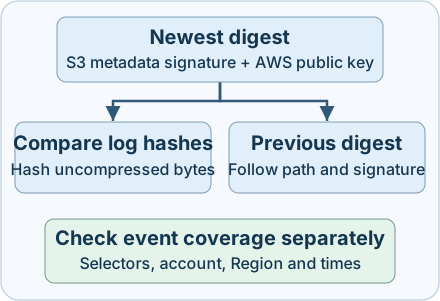
- Start at the most recent applicable digest and retain its S3 location and signature metadata. The fingerprint in the digest helps identify the matching CloudTrail public key for the Region and time.
- Verify the digest. Only then use its log references and expected hashes. Hash the uncompressed bytes as delivered, before reformatting or parsing JSON.
- Follow the previous digest reference and check the earlier log files. A starting digest can legitimately have no predecessor.
- Record the interval actually examined. The example’s 10:14 event time, 10:21 delivery time and 11:00 digest window end describe different things. One validated hour of deliveries may contain records whose event times fall outside that hour.
3. Interpret gaps before assigning a cause
A user with unauthorized access to the archive might alter or remove objects. A compromised administrator might instead change selectors or stop recording, shrinking the evidence being generated. Each leaves a different question for the investigator. Legitimate permissions changes, retention rules, maintenance and temporary delivery delays can produce similar symptoms.
| What you observe | What to check next |
|---|---|
| Digest signature fails | Preserve the bytes and metadata. Check original location, expected Region, key fingerprint, and whether the export omitted or substituted metadata |
| Authenticated digest references an unreadable or missing log | Check the exact key, read permissions, encryption key access where applicable, object version or delete marker if present, and lifecycle records |
| Log hash differs | Check that you hashed uncompressed bytes from the referenced object. Compare retained versions and read the independently collected evidence before attributing the difference |
| Expected digest appears absent | Check trail status, delivery errors and restart times. Delayed delivery can lead to backfill and temporarily out-of-order digests. A valid empty digest has no log files listed for its interval |
| Validated logs omit a request | Check the selection rules in force then. For example, a trail collecting management events can omit S3 object reads if data events were outside its selectors |
Enabling validation causes CloudTrail to deliver digests. Verification is a separate operation. AWS documents a chain break after one hour when log file validation is disabled and no digest coverage for logs delivered while it was disabled. Stopping logging or deleting the trail can also interrupt coverage. Track restarts as boundaries and record any unverified intervals.
4. Collect, detect and respond
- Scope the investigation. Record the trail ARN, account, Region, bucket, prefix and UTC interval. Preserve current selectors and trail status, then use change records to reconstruct the configuration at the time. Widen the delivery search if the event window sits near a delivery boundary.
- Watch configuration and delivery. In an independently collected management-event stream, look for
StopLogging,DeleteTrail,UpdateTrailandPutEventSelectorsfromcloudtrail.amazonaws.com. Compare the trail, request parameters, result, session and change ticket. Alert on a persistent gap against the expected trail/Region baseline, and checkLatestDigestDeliveryErrorfromget-trail-statusin the affected Region. A status snapshot describes the latest known state, so keep its collection time. - Preserve and contain. Keep read-only copies of the original compressed logs, digest bodies, S3 location/version details and signature metadata. Preserve Region-specific public keys for the relevant interval if an offline review is planned. Save the validation output and the tool version with the collection notes. Use separate access for the archive and investigation. If unauthorized changes are corroborated, coordinate containment through the incident owner and verify restored delivery with a new known benign event in the authorized scope.
On an authorized trail, this read-only AWS CLI v2 example requests a bounded UTC delivery window. Replace all example values. Run from an approved identity with AWS connectivity, access to the trail details and CloudTrail public keys, and permission to list and read the original S3 locations and inspect bucket location. Encrypted logs can require KMS decrypt permissions. Organization trails require organization description access, and --account-id scopes validation to the member you are investigating.
aws cloudtrail validate-logs \
  --trail-arn arn:aws:cloudtrail:us-east-2:111122223333:trail/ExampleTrail \
  --region us-east-2 \
  --start-time 2026-11-20T10:00:00Z \
  --end-time 2026-11-20T12:00:00Z \
  --verbose
Compare the requested and found ranges and record the digest and log counts and failures. For multiple Regions, record which regional evidence was actually checked. If you see an access error, confirm the collection identity and policy with the archive owner. For downloaded copies, use a process that preserves the signature metadata and original S3 path mapping and implements the documented format. The AWS CLI command expects the original S3 location.
5. Offline exercise · Read nine validation outcomes
Download cloudtrail-integrity-lab.js and run node cloudtrail-integrity-lab.js with Node.js 18 or later in your own workspace. The script generates an ephemeral RSA key and fictional data in memory, makes no network calls, and requires no packages or AWS account. Its simplified signature input and JSON schema are for training.
| Try or inspect | Expected |
|---|---|
| Normal chain and gzip-only recompression | Both return VALID_FILES_1. Compression changes while decompressed bytes stay the same |
| Add a space to the uncompressed log | LOG_HASH_MISMATCH, even though a JSON parser can still read the records |
| Leave out a log or its earlier digest | LOG_UNAVAILABLE or DIGEST_UNAVAILABLE, respectively |
| Edit a signed digest body | BAD_DIGEST_SIGNATURE before its log hashes are used |
| Lose the newest object’s signature metadata | NO_ANCHOR_SIGNATURE for this starting point |
| Place a signed digest at an unexpected path | WRONG_DIGEST_PATH even though its signature verifies |
| Use a valid starting digest with zero entries | VALID_FILES_0, a valid digest covering no listed files |
Predict the result for the extra-space case before running it. Then compare the final line with 9 synthetic cases passed. If Node reports that the file is missing, run from the download folder and check the saved filename. An assertion prints the case name if a result changes. The fixture was executed with Node.js 24. AWS delivery, IAM permissions and CLI behavior were reviewed in documentation.
6. Check your understanding
- The digest signature is valid. Why hash the log again? The signature authenticates the inventory of expected hashes. Computing the referenced log’s hash tests the bytes currently available.
- The newest digest is empty but valid. Did the account do nothing that hour? You can report no log files were listed for that digest. Examine selectors, Region, delivery lag and other evidence before drawing conclusions about activity.
- A referenced object could not be read. Can you report tampering? Report the failed read and unverified scope. Distinguish permissions, retention and availability from confirmed deletion or modification.
- The CLI found a shorter range than requested with all files valid. What do you put in the incident notes? Record both ranges and mark the uncovered interval as unverified. Check adjacent digests and delivery status before revising the finding.
Completion. Record the trail, Region, requested and observed ranges, the first unverified link or object, and a source that would test your leading explanation.
Previous · Amazon S3 object-read evidence · Continue · Evidence preservation · Background · Public keys and signatures
Official references
Reviewed 21 November 2026. These sources cover S3 delivery by AWS CloudTrail trails and AWS CLI v2 behavior as documented on the review date. The AWS guide includes historical dated sample records for illustrating the format.
- CloudTrail · Log integrity overview and digest structure, empty and backfill digests
- CloudTrail · Custom validation and offline preservation requirements
- AWS CLI v2 · validate-logs, get-trail-status and list-public-keys
- CloudTrail · Event categories and trail scope
Investigate AWS VPC Flow Logs
Investigate AWS VPC Flow Logs. Read cloud flow records by observation point and distinguish network decisions from logging gaps.
Related articles
AWS IAM Roles and CloudTrail Investigation
Trace role trust, temporary STS credentials and subsequent API calls through eight CloudTrail examples.
AWS KMS Investigation · Key Use, CloudTrail and S3 Reads
Follow envelope encryption, read key-policy and Decrypt evidence, and distinguish a KMS call from the use of application data.