Cloud Security · Beginner
AWS IAM Roles and CloudTrail Investigation
Trace role trust, temporary STS credentials and subsequent API calls through eight CloudTrail examples.
Updated 2026-11-20
On this page
Learning goal. Use CloudTrail to distinguish a role request, credential issuance and subsequent API activity. Read sections 1–3 before tracing the fictional incident in section 6.
1. Accounts, roles and sessions
An AWS account contains resources and provides an administrative boundary. IAM governs who can perform actions. A principal is an AWS identity that makes an API request. An IAM user or a role session used by a person, federated identity or workload can be the principal.
A role is an AWS identity that an authorized principal can assume. An operator can use their regular identity and assume a reporting role for a limited task. AWS Security Token Service (STS) issues temporary credentials. An access key ID identifies the credentials. The secret access key and session token are sensitive parts used with the key ID. Temporary credentials carry an expiration time.
| Term | Example | Investigative purpose |
|---|---|---|
| Caller | Mina’s AWS identity | Who requested the role |
| IAM role | ReportReader | Role targeted by the request |
| Session name | daily-report | Chosen label that can be reused |
| Assumed-role ARN | assumed-role/ReportReader/daily-report | Named role session path in the logs |
| Temporary access key ID | LAB-KEY-A | Candidate link between issuance and use |
| Expiration | 01:00 UTC | Check the permitted time window for a link |
An ARN names an AWS resource or identity. The IAM ARN for a role and the STS ARN shown for an assumed-role session have different meanings.
2. Trace role assumption through a resource request
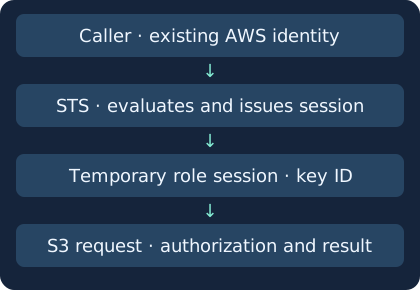
Suppose Mina in account A needs the ReportReader role in account B.
- Mina uses her existing AWS identity to request AssumeRole from STS. The caller’s cross-account permissions and target role’s trust policy must allow the request. Same-account arrangements can have different policy rules.
- STS evaluates applicable trust and authorization conditions. If the request is allowed, STS issues credentials with an expiration time.
- Mina uses the issued session to call S3 GetObject. The role session’s permissions and relevant resource policies govern this request.
- If ReportReader lacks write permission, PutObject can be denied. Authorization to assume a role and authorization to perform an S3 operation are separate decisions.
| Policy | Question | Example |
|---|---|---|
| Role trust policy | Who can assume the role, and under what conditions? | Trust an approved principal or account |
| Role permissions policy | Which operations and resources can the role access? | Allow reads for reports |
| Session policy | How much of the role’s permissions does this session retain? | Narrow the session within the role’s permissions |
| Resource and organization controls | What other policies allow or constrain the request? | Check bucket policy and applicable organizational controls |
Explicit denies, permissions boundaries, organization controls and resource policies can affect the outcome. Examine the operation, resource and policies in force at the time. An AccessDenied record alone rarely identifies the policy responsible.
3. Read CloudTrail one field at a time
CloudTrail records audit activity for AWS API operations. Collection coverage varies by event type, account and Region.
| Record | Fields to inspect | Interpretation |
|---|---|---|
| STS role request | eventSource, eventName, userIdentity, requestParameters.roleArn | Caller and target at request time |
| STS response | errorCode, responseElements.assumedRoleUser, responseElements.credentials.accessKeyId | Distinguish denial and issuance using available fields |
| Follow-up API | userIdentity.type, userIdentity.arn, userIdentity.accessKeyId | Session and temporary key used to call the API |
| Role information | userIdentity.sessionContext.sessionIssuer.arn | Issuing role, which does not identify the original caller on its own |
| Receipt and time | recipientAccountId, awsRegion, eventTime, eventID | Preserve account, Region, UTC and event context |
| Outcome | errorCode, requestParameters, service audit or response evidence | Inspect errors and resource. A missing error alone does not establish impact |
When the issuance record contains an access key ID, compare it with userIdentity.accessKeyId in the activity. Confirm session ARN, issuance and expiration times, account and Region. Leave an event unlinked if the fields or issuance record are missing. When configured and logged, sourceIdentity offers another pivot. Confirm who controls that value. For role chaining, trace the intermediate identity one step at a time.
Event history shows 90 days of management events per Region. It is a starting point for STS activity. S3 object actions are data events, which require data-event coverage for relevant resources in a trail or event data store, for example. Before interpreting absence, check account, Region, supported operations, event selectors, time window, retention and delivery. For cross-account requests, compare available records on both sides.
4. Distinguish authorized administration from misuse
| Observation | Ordinary explanation | Evidence to gather |
|---|---|---|
| New caller assumes a scheduled job’s role | Approved workload migration | Change approval, deployment and caller policy |
| Session used from an unfamiliar address | NAT or new workload network | Provider and network records, baseline |
| Repeated issuance with one session name | Scheduled jobs reuse a name | Compare issuance keys, times and callers |
| Denied write after a read | Misconfigured automation | Target, effective policies and adjacent API events |
| Sensitive policy change | Approved administration or permission misuse | Before/after policies, approval and the changing session |
Someone misusing valid credentials can call the same APIs as a legitimate job. Expiration limits how long credentials can be used. Investigate actions during the valid window and under applicable policy. An address or User-Agent is a lead. Person, compromise and intent require supporting evidence.
5. Investigate and respond
- Frame separate questions about issuance and resource activity. “Who assumed the role?” and “Which object actions were recorded?” require different evidence.
- Preserve original JSON, UTC, account, Region, event IDs and collection scope under approved access controls. Protect secret keys and session tokens.
- Link the issuance to subsequent requests using the fields above. Compare the caller, sensitive target, permission changes and activity after denial with authorized work.
- When evidence supports misuse, scope the original caller, role trust and existing sessions. Restricting new issuance and restricting credentials issued earlier are separate actions. AWS role session revocation can use a policy to deny access to sessions issued before a cutoff. Assess disruption and verify results under incident procedures.
- Corroborate service outcomes and impact. A logged API request alone leaves questions about subsequent effects such as client receipt, use or onward transfer.
6. Correlate eight synthetic CloudTrail events
aws-role-events.json · aws-role-evidence.py
Save both files together and run Python 3. No AWS login is needed. Account numbers, event IDs and key IDs are fictional. The JSON is a simplified CloudTrail-shaped excerpt with no live secrets.
python3 aws-role-evidence.py
| Observation | Expected interpretation |
|---|---|
| lab-01, lab-02 | Two successful issuances with different callers and key IDs, despite the same session ARN |
| lab-03 | AssumeRole denied. This record supplies no evidence of issuance |
| lab-04, lab-05 | Both link to lab-01. The read has no error recorded. The write shows AccessDenied |
| lab-06 | Same session name. The key ID connects it to lab-02 |
| lab-07, lab-08 | Unlinked because the key ID is missing or the issuance is absent |
Expect PASS: two issuances, one denied request, five API observations. For file errors, check names and folder. For join differences, review key ID, ARN, time zone, issuance time and expiration. This analyzer is specific to the exercise. Real logs can be duplicated or incomplete, so review coverage before attributing activity. Publication verified the offline exercise. Live AWS issuance and data-event capture were not exercised.
7. Check your understanding
- Does an AssumeRole denial prove S3 activity? This event shows no issuance. Search separately for any other sessions or credentials within scope.
- Can matching session ARNs be combined? Names can be reused. Compare the issuance key and time window.
- Does Event history show that GetObject did not occur? Check data-event selection, retention and delivery for that resource.
- Does changing trust end existing sessions? Verify what happens to new role requests and old session access separately.
Find the callers behind lab-04 and lab-06 and explain why lab-07 remains unlinked. Write one sentence of supported evidence and one sentence naming evidence you still need.
Blue-team fundamentals · Linux authentication evidence
Official references
AWS product documentation reviewed 20 November 2026. Verify collection and retention in your deployment.
- AWS STS AssumeRole
- AWS IAM policy evaluation logic
- CloudTrail identity fields
- IAM and STS CloudTrail examples
- Event history · Data events
- Revoke IAM role sessions
Microsoft Entra Sign-in Investigation · MFA and Conditional Access
Entra sign-in and resource evidence lab
Kubernetes API Audit Evidence
Follow a Kubernetes API request from the recorded identity to the response and object state
Investigate Amazon S3 Object Reads and Bytes Sent
Pair a role session’s S3 request with the server-side response
Follow the key evidence
AWS KMS investigation · Trace the key operation and check what CloudTrail and S3 can each establish.
Related articles
AWS KMS Investigation · Key Use, CloudTrail and S3 Reads
Follow envelope encryption, read key-policy and Decrypt evidence, and distinguish a KMS call from the use of application data.
CloudTrail Log Integrity · Verify Delivered Logs and Investigate Gaps
Use signed CloudTrail digests and SHA-256 to test file integrity, then check whether the trail captured the activity you are investigating.