Network Security · Beginner
DHCPv4 Lease Evidence: From an IP Address to a Device Candidate
Follow a first DHCP lease, compare network evidence, and resolve eight synthetic flow observations against scoped lease history.
Updated 2026-11-20
On this page
Learning goal. Explain how a device obtains an IPv4 configuration, find the lease records relevant to a network event, and report whether the evidence supports one client candidate or leaves the source unresolved.
1. What does the server lease?
The Dynamic Host Configuration Protocol (DHCP) gives a client network settings automatically. In DHCPv4, the server can allocate an IPv4 address for a period called a lease. A scope is a server’s address range and configuration for a network. A binding associates an address with a client identity for a time. A reservation is an administrative rule for which address a particular client should receive. It does not show the device was present when an event occurred.
A subnet mask tells a client which IPv4 destinations are local. A router option can specify the default gateway, and a DNS server option can specify resolvers. The client may obtain different settings from a VPN or local configuration. This chapter follows DHCPv4. DHCPv6 and IPv6 router advertisements have their own message and configuration models.
2. Follow the first lease and its renewal
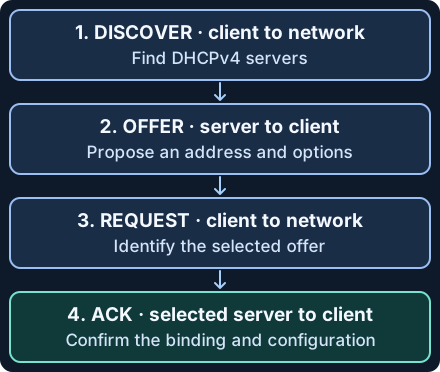
| Step | What crosses the network | What the record supports |
|---|---|---|
| Discover | A client seeking configuration broadcasts DHCPDISCOVER on its local link. | A request for configuration. |
| Offer | A server answers with DHCPOFFER, which proposes an address and settings. More than one server can respond. | A proposal. A server may reserve the offer briefly without a committed lease. |
| Request | The client selects an offer and broadcasts DHCPREQUEST, identifying the choice. | The client’s request. Other servers can see that their offers were not selected. |
| Acknowledge | The chosen server records the binding and sends DHCPACK. The client checks the configuration and can decline an address already in use. | The server’s decision. Corroborate that the device received and used the configuration. |
This four-step pattern is often called DORA. Clients use UDP port 68 and servers listen on UDP port 67 in the ordinary configuration. A relay forwards messages between a client link and a server elsewhere. The relay address field giaddr can help the server choose a subnet. With configured and trusted relay instrumentation, Option 82 can add circuit or remote information. A circuit ID is often meaningful only relative to the relay and its configuration. A sensor on the server-facing side may see a relay sender where a client-side capture would show a client.
A configured client normally renews by sending DHCPREQUEST to its server at T1. If that fails, it can broadcast a request to rebind at T2. Without overrides, T1 and T2 default to half and seven-eighths of the lease duration. An ACK can extend an existing lease. DHCPINFORM can also receive an ACK for configuration without assigning an address. To interpret an ACK, read the preceding message and binding state. A DHCPNAK can force the client back to obtaining configuration, and DHCPRELEASE can end a lease early when the server records it. Use effective binding history instead of assuming every proposed or scheduled expiry was realized.
Normal example. A laptop joins the office VLAN and receives 192.0.2.40 for an hour. The server confirms the lease, the laptop checks the address, and an endpoint inventory sees it on that VLAN. An office flow at 09:10 falls inside that lease. At 10:00 the address is no longer associated with the original binding and a different client gets it in the example. Separately, a guest network can use the same number in its own routing domain. The IP string alone cannot select a client.
3. Collect a binding, a location and a time
| Evidence source | Minimum useful fields | Interpretation and pitfalls |
|---|---|---|
| DHCP server or HA pair | Scope, IPv4 address, client identifier or hardware address, binding state, effective start/end, source server and event time | Primary evidence for what the server assigned. A lease table snapshot can lose history on reuse. Check audit retention and both peers when applicable. |
| Relay or network sensor | Time, observing interface or VLAN, message types, addresses, transaction ID, relay and Option 82 if present | Shows what the sensor saw. Broadcasts, renewals and replies may take different paths. An xid alone is not unique across clients or long intervals. |
| Access network and endpoint | Switch/AP attachment time and port, network or asset ID, approved NAC/802.1X details, observed gateway or resolver if relevant | Corroborates physical or logical attachment. A MAC can be randomized, changed or shared across observations, and a hostname is not authentication. |
| Firewall or flow source | Original source address and time, observation point and VLAN or routing domain, NAT tuple when needed | Shows observed traffic at that point. Start by reversing NAT when the address is the translated one. |
DHCP’s client identifier (option 61) may differ from the link-layer address carried in chaddr. Preserve both when available and store the identifier type. RFC 6842 updated the older RFC 2131 rule about echoing client identifiers. A conforming server echoes the option in its response when the client sent it. An absent field in a partial capture or normalized log needs its own explanation.
For Zeek 9.0.1, dhcp.log can report fields such as msg_types, requested_addr, assigned_addr, lease_time and server_addr when observed. The DHCP analyzer and adequate packet visibility are prerequisites. These are conversation fields, and some are optional. Use the underlying packets or server evidence to establish when the binding actually began, renewed or ended. Conversation start, ACK capture time and server binding start can differ. Avoid treating the conversation start plus lease duration as an authoritative end time. On an authorized Windows Server 2025 DHCP service with the DhcpServer module and read access, Get-DhcpServerv4Lease -ScopeId 192.0.2.0 -AllLeases reads records for a scope with the fictional subnet replaced. The switch includes retained offered, declined and expired records as well as active ones. It does not query a complete historical audit archive.
Investigate unexpected configurations
An unauthorized DHCP server can supply an unexpected gateway or resolver. A client configured with a static IP may appear in traffic without any server lease. A server IP you have not seen before may also reflect an approved HA peer or migration. Verify the offered or acknowledged settings against the authorized server inventory and effective endpoint config. Locate the switch/AP and VLAN from trusted evidence, compare server and relay logs, and keep a scoped packet capture only when authorized. Do not infer compromise from one unusual OFFER or an unfamiliar MAC.
On supported managed switches, DHCP snooping can restrict server responses to approved paths. Map server/relay/HA paths and trust boundaries using the installed platform’s documentation, then test an ordinary lease, renewal and failover behavior in a controlled change. If you confirm an unauthorized source, isolate the affected access path through approved response procedures and confirm clients recover the expected gateway and resolvers. Collect contemporaneous evidence before logs rotate. Avoid disrupting uninvolved devices based on an address that may already have changed hands.
4. Match the flow to the lease in time
Take the tuple segment, original IPv4 address, event-time range. The segment label must encode the relevant scope such as site, VLAN or VRF, with tenant if needed. Preserve the source timezone and measured clock uncertainty. Log arrival is not necessarily the event time. Check authoritative binding updates for early release, expiry, renewal and conflicting snapshots. When two sources disagree, verify clocks, HA synchronization and historical coverage before choosing one. If two records reflect the same binding replicated by HA, reconcile them and retain both source references.
The offline exercise uses normalized lease intervals [start, end). An event exactly at an interval’s start can match it, and the interval excludes its end. The flow time window is inclusive at both ends. This simplified model assumes trustworthy interval boundaries and a symmetric uncertainty bound on the flow clock. If a live lease boundary also has uncertain timing, carry that uncertainty separately. A single binding covering the full flow window is a candidate. Multiple intersecting bindings, or a window only partly supported by one binding, warrant further investigation.
5. Offline exercise · Eight fictional flows
Save the lease and flow data and the Python reader in one folder. Use Python 3.7 or newer. The fixture uses documentation IPv4 addresses and fictional 2030 timestamps. It contains no captures and the reader makes no network requests.
python3 dhcp-lease-evidence.py
| Flow | Expected result | Why |
|---|---|---|
| F01 | Candidate A | At 09:10 the office lease for this address covers the time. |
| F02 | Candidate B | At exactly 10:00 the old interval has ended and the next begins. |
| F03 | Ambiguous A/B | A two-second clock margin crosses that boundary. |
| F04 | Candidate G | Same address and time as F01, guest segment. |
| F05 | Ambiguous X/Y | Two sources claim overlapping bindings in one segment. |
| F06 | Unresolved | There is no intersecting binding in the supplied history. |
| F07 | Unresolved | Segment context is missing, so matching by address is unsafe. |
| F08 | Unresolved | The window overlaps the end of B’s lease and extends beyond retained evidence. |
Expect 3 candidates, 2 ambiguous and 3 unresolved. For a file error check the names, JSON structure and UTC offsets. For a surprising result compare the segment and interval before checking the client. A lab candidate identifies a lease record, not a person or verified source of the traffic. For an optional authorized capture, have a lab client join an isolated network with an approved DHCP server. Record the normal lease with the server, and compare its scoped times and assigned settings to a client-side observation. Avoid changing live lease timers or creating a second server on a shared network. The fictional reader was executed in the cloud. Actual DHCP server and sensor behavior was reviewed against documentation.
6. Check your understanding
- A DHCPOFFER shows an IP. Can you attach a later flow to it? Check the request, acknowledgement context and effective binding interval first, then corroborate client use.
- What if the same IP exists on two networks? Select the original address in the correct routing or VLAN scope before comparing times.
- The flow is on the exact boundary but the clock may be off by two seconds. Which device sent it? Keep both candidates and look for an independent attachment or endpoint event.
- Does a missing lease identify a rogue device? No. Static configuration, missing scope or missing history can explain the absence.
To finish, work out F02, F03 and F08 by hand. Report each outcome with the IP scope, time and source you relied on, and name a second source that could corroborate use of the address.
Previous · Firewall and NAT evidence · Next lesson · DNS investigation · Related · Network monitoring
Official references
Reviewed November 20, 2026. Protocol documents define their respective versions. Check your installed product version and capture configuration for differences.
- March 1997 DHCPv4 allocation, renewal and options. January 2013 update to client identifier handling. RFC 2131 · RFC 2132 · RFC 6842
- January 2001 relay agent information and trust scope. RFC 3046
- Product scope at review, Windows Server 2025 DhcpServer cmdlet and Zeek 9.0.1 analyzer schema. Microsoft Learn · Zeek DHCP log
- Catalyst 9300 with Cisco IOS XE 17.16.x, DHCP snooping and trusted interfaces. Cisco IP Addressing Services Configuration Guide
Related articles
Packet Capture Gaps · Did the Network Drop It or Did the Sensor Miss It?
Use paired TCP captures, acknowledgments and sensor counters to tell a coverage gap from possible network loss.
Certificate Transparency · Verify Log Evidence and Investigate Unexpected Issuance
Distinguish a certificate log entry from an SCT, a proof of inclusion and a certificate served by an HTTPS endpoint.