Network Security · Beginner
Correlate Firewall, NAT and Network Sensor Evidence
Trace original and translated tuples, firewall decisions and Zeek observations using a 12-record offline lab.
Updated 2026-11-20
On this page
Learning goal. Separate a firewall’s decision from the packets a sensor saw. Use both records to trace the same traffic across address and port translation. Start with sections 1–3, then work through the fictional records in section 6.
1. What do a firewall and NAT do?
A firewall enforces policy about traffic crossing a boundary. A stateful firewall can track existing flows and decide whether return packets belong to them. Network Address Translation, or NAT, changes packet addresses. Translation that also maps transport-layer ports is commonly called NAPT or PAT. A single device can perform both functions.
| Term | Function | Evidence to record |
|---|---|---|
| Five-tuple | Describes traffic in one direction | Source and destination IPs and ports, plus TCP or UDP |
| SNAT | Changes the source address, sometimes with its port | Original and translated source |
| DNAT | Changes the destination address, sometimes with its port | External service address and actual server address |
| Policy decision | Allows or blocks traffic at the device | Device, rule, zone, time and result |
| Observation point | Location where the sensor sees packets | Interface, pre/post-NAT segment and visibility in both directions |
TLS and application authentication have separate outcomes. Confirm them with protocol or application evidence.
2. Follow ordinary source and destination translation
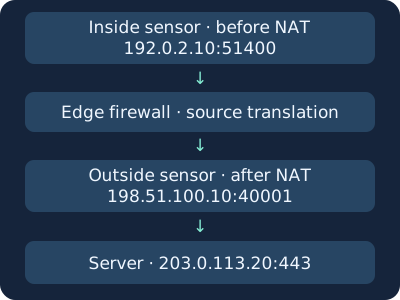
A fictional inside host at 192.0.2.10:51400 connects to 203.0.113.20:443 over TCP. The edge permits it under a configured rule and translates the source to 198.51.100.10:40001. An inside sensor sees the original source. An outside sensor sees the translated source. If a reply returns, the translator uses its mapping to pass it to the inside host.
In the other direction, an outside client can contact 198.51.100.20:8443 and be forwarded to 192.0.2.80:443 through DNAT. An inside sensor then sees a different destination. Which addresses the policy evaluates and how the device logs them depends on the product and deployment. Check the actual configuration and traffic records.
All IPs are documentation examples. Check for tunnels and proxies in a real deployment. A proxy can open a separate connection, which can require request identifiers or proxy records beyond a NAT tuple comparison.
3. Compare firewall, Zeek and packet evidence
| Source | Capture these fields | Check the limit |
|---|---|---|
| Firewall traffic log | Device or virtual system, zone, rule, action, original and translated addresses and ports, start and end times | Verify start/end logging and the field definition for the installed version |
| Zeek conn.log | Sensor and uid, id.orig_h/p, id.resp_h/p, proto, ts, duration, conn_state | Connection state from that observation point. Policy and identity require other records |
| Packet capture | Time, interface, direction, TCP flags and replies | Capture loss, asymmetric routes, retention and encryption |
| Application or host log | Process, account, request ID, authentication and handling result | Compare clocks, proxy path and field coverage before linking layers |
PAN-OS traffic logs illustrate fields for original and NAT addresses and ports, session ID, rule and session-end reason. Verify that the collector preserves those distinctions. Scope session IDs to device and virtual system as applicable. Zeek’s uid links records in its observation context. It is independent of another product’s session ID.
For example, if the firewall says allow and outside Zeek reports TCP S0, record both the permission decision and the connection attempt with no observed reply. Check destination ingress, return path and sensor capture. TCP SF indicates observed normal establishment and termination in Zeek. Use other evidence for HTTP outcome or user intent.
4. Correlate one flow across the boundary
- Record where each sensor sits. Use original values before translation and translated values after it. Normalize direction using the first packet or the device’s original fields.
- Keep the UTC time range, measured clock offset, flow start/end and log receipt time separate. An end record may arrive only when a long session finishes.
- Narrow by boundary or tenant, protocol, both endpoint addresses and ports, and overlapping time. Translated ports may be reused later. A shared public address alone cannot identify the inside host.
- If several candidates remain, check direction, clocks, device scope and duplicate collection. Leave uncertain records unlinked or ambiguous.
- Report policy decision and actual flow separately. For access or exfiltration questions, add server, application or endpoint evidence.
For unsynchronized clocks, measure the offset with an ordinary authorized test and document any time tolerance. The worksheet uses an already aligned clock.
5. Investigate suspicious patterns and validate coverage
| Observation | Ordinary possibility | What to check next |
|---|---|---|
| Sudden increase in denies | Retry, outage recovery or approved diagnostics | Change window, destination spread, baseline and later permits |
| Unfamiliar internal host makes an external connection | Approved update or new workload | NAT mapping, endpoint process, destination and time |
| Inbound management traffic | Approved administration or overexposure | Actual DNAT target, approved sources and authentication evidence |
| Allowed without a reply | Return path problem or one-way sensor visibility | Target logs, two-way packet capture and sensor health |
In an owned or authorized environment, send one ordinary HTTP request to a known test service and check local and external observations and the permit decision. With a prepared deny rule and dedicated test service, verify a single blocked request to the designated address and port. This validates collection without production policy changes or broad scanning. When considering containment, assess other legitimate hosts behind the same translated address.
6. Offline lab · Twelve fictional observations
nat-correlation.csv · nat-correlation.py
Save both files in one folder and run Python 3. The normalized worksheet models post-translation observations. The inside obs-04 row is on the inner side after inbound DNAT. The states are supplied teaching values. The script performs no connectivity checks or packet parsing.
python3 nat-correlation.py
| Case | Expected result |
|---|---|
| obs-01 / obs-02 | Same outside tuple, linked to fw-01 and fw-02 by different time ranges |
| obs-03 | Links to fw-04. Record firewall allow and sensor TCP S0 |
| obs-04 | Links to fw-05. External port 8443 was translated to internal port 443 |
| obs-05 / obs-06 / obs-07 | Unlinked because protocol, boundary or time differs, respectively |
| fw-03 | Denied at the specified boundary. Investigate any other route separately |
Expect PASS: four correlations, three unlinked observations, one firewall deny. If a file cannot be found, check both filenames and folder. For different results, compare direction, translation fields, boundary and UTC intervals. The analyzer is specific to the worksheet and does not reconcile production asymmetric routing, duplicate collection or clock error. Publication verified the CSV analysis. Live firewall, Zeek and traffic capture require separate tests.
7. Check your understanding
- Same public IP, same inside host? Compare translated port, protocol, destination, time and device scope.
- Does firewall allow show that the application handled the request? It records the device policy decision. Corroborate later activity using the sensor and server logs.
- Why does the inside sensor see 192.0.2.80:443? Its capture is downstream of inbound destination translation from the external port 8443.
Draw the original and translated tuples for two examples. Explain which field prevented each of the three unlinked joins. Finish by documenting firewall allow and Zeek S0 as separate observations for fw-04 and obs-03.
Previous · TCP connection evidence · Next · Zeek, Suricata and Arkime
Official references
Reviewed 20 November 2026. IETF and NIST references provide the protocol and policy foundations. Check field meanings and logging behavior against the installed product and configuration.
- IETF RFC 3022 · Traditional NAT, 2001
- IETF RFC 5382 · TCP NAT behavior, 2008, with linked updates
- NIST SP 800-41 Rev. 1 · Firewalls and firewall policy, 2009
- Palo Alto Networks · NGFW traffic log fields
- Zeek · conn.log current documentation
DHCPv4 Lease Evidence and IP Address Investigation
Use lease history to narrow the device candidates behind an address
Correlate Zeek and Suricata with Community ID
Practise comparing shared IDs, event time and sensor scope
Investigate AWS VPC Flow Logs
Investigate AWS VPC Flow Logs. Read cloud flow records by observation point and distinguish network decisions from logging gaps.
Related articles
Packet Capture Gaps · Did the Network Drop It or Did the Sensor Miss It?
Use paired TCP captures, acknowledgments and sensor counters to tell a coverage gap from possible network loss.
Certificate Transparency · Verify Log Evidence and Investigate Unexpected Issuance
Distinguish a certificate log entry from an SCT, a proof of inclusion and a certificate served by an HTTPS endpoint.