Network Security · Beginner
DNS Fundamentals and Investigation: Resolution, Caching, Response Codes and Evidence
Follow DNS from a client to authoritative data, distinguish DNS failures and encrypted DNS visibility, and investigate a 14-record synthetic worksheet without over-attribution.
Updated 2026-11-18
On this page
Network foundation. Start here before DNS-based hunting. Continue with network monitoring, AD service discovery and certificate identity checks. Examples, addresses and downloaded records are original synthetic learning material, not observed indicators.
1. DNS is a distributed database, not just an address book
The Domain Name System (DNS) answers questions about names using typed records. An application might need an address, a mail destination or a service location. An answer to one record type does not imply an answer to every other type, and resolving a name does not prove a later connection or login.
A domain is a portion of the name tree; a zone is an administratively served portion of that tree, with delegation boundaries. A resolver finds answers for clients; an authoritative server serves data for zones it is responsible for. One product can perform both roles, but the roles remain different.
A workstation can use an OS stub resolver, a local service, browser-specific resolution or a configured enterprise resolver. It can also obtain answers from caches or local configuration. Therefore, “the application used a hostname” does not guarantee a new outbound DNS packet.
2. Vocabulary and record types
| Term / type | What it does | Security interpretation |
|---|---|---|
| QNAME / QTYPE | Asked name / asked record type | Preserve both; A and AAAA are separate questions |
| FQDN | Fully qualified name; a final dot can explicitly denote the root | Search suffixes can change unqualified inputs |
| A / AAAA | IPv4 / IPv6 address records | No AAAA answer does not imply no IPv4 service |
| CNAME | Alias pointing to another name | Follow the answer chain; not an IP record |
| MX | Mail exchange preference and server name | Still needs address resolution for the target |
| NS / SOA | Nameserver / zone authority information | Delegation, administration and negative-response context |
| PTR | Reverse lookup name | Reverse naming is not authentication of a host |
| TXT | Text data used by many protocols | TXT is common in legitimate verification/email configuration |
| SRV | Service target, port, priority and weight | Important in AD discovery; not automatic access permission |
| TTL | Time-to-live for cached record data | Not the domain’s age or a universal propagation timer |
HTTPS/SVCB and other types extend DNS beyond this starter table. Do not discard unfamiliar record types without checking their defined meaning. Applications may handle aliases and service records differently.
A zone can exist below a domain without the entire domain tree being one zone. A delegated child has its own administrative context. Record owner names and answer targets are also different: an alias can lead to a target under another operator.
3. A normal cache-miss resolution
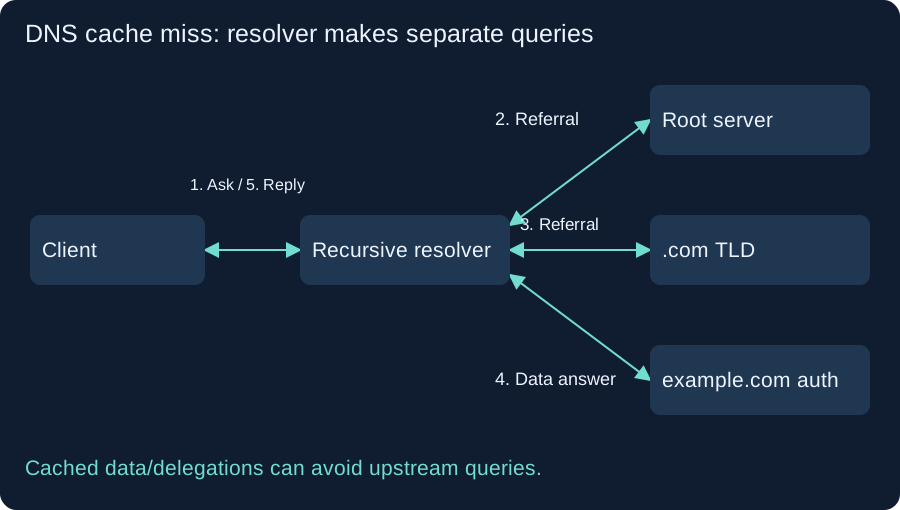
For a simplified lookup of www.example.com.:
- The client asks its configured recursive resolver for a type, such as A.
- On a cache miss, the resolver obtains a referral from a root server to the relevant TLD servers.
- It asks a TLD server and obtains a referral toward the domain’s authoritative servers.
- It asks an authoritative server for the data, following aliases or further delegations as needed.
- It caches eligible results and replies to the client.
The resolver makes the separate queries. The root does not forward the client’s query through a chain of servers. Cached delegations, forwarding resolvers and query minimization can change the actual exchanges; the drawing does not claim every lookup sends the complete name to every server.
Recursive service asks a server to do the resolution work. Iterative processing follows answers/referrals. A forwarder can pass work to another resolver rather than performing the illustrated traversal itself. Record the configured path before interpreting upstream traffic.
4. Cache and response codes: read the whole response
| Observation | Meaning to start with | What it does not establish |
|---|---|---|
| NOERROR with requested data | Successful answer for the question | Safe destination or completed application access |
| NODATA | Name exists but the requested RRset is absent, under the response context | NXDOMAIN; NODATA is not a separate RCODE |
| NXDOMAIN | Name nonexistence result | Malware, or proof that all parent/sibling names are absent |
| SERVFAIL | Server could not complete processing | One fixed cause; upstream trouble or validation issues are possibilities |
| REFUSED | Server refuses the operation under its policy | The name does not exist |
| Timeout | No response was observed within the chosen interval | A DNS response code or definite server failure |
An empty NOERROR answer alone is not sufficient to classify NODATA: inspect referrals, aliases, authority information and the full response. A logging pipeline can also omit answer fields. The lab’s NODATA-like row explicitly supplies a simplified SOA/no-referral context and has no CNAME.
Positive and eligible negative answers can be cached. Repeating a typo can therefore produce a cached negative reply. TTL values can decrease on cache hits; a lower value by itself does not identify a malicious change. Cache policy, prefetch, serving stale data and multiple answer sources can complicate timing. A configuration edit does not instantly expire every client, browser and resolver cache.
Keep DNS error rates separate by response type and by observation point. A blocked answer rewritten to a sinkhole, an NXDOMAIN response and a timeout have different evidence and operational consequences.
5. Header flags and transport
RD requests recursion; RA indicates recursion availability; AA relates to authority for the answer; TC marks truncation. They are protocol context, not verdicts. Transaction IDs help match exchanges within context, but a 16-bit ID is not globally unique.
Conventional DNS uses UDP and TCP on port 53. TCP is not limited to zone transfers: truncated UDP responses and other ordinary cases can use it. Dropping all TCP/53 can break legitimate resolution. EDNS extends DNS behavior, including UDP payload negotiation; the old 512-byte limit is not a universal description of modern traffic.
If TC is set, inspect the client’s subsequent behavior and any TCP exchange. Do not interpret a partial answer as a complete dataset. Port number alone does not prove the application protocol, and DNS-family transports can use different ports.
6. DNSSEC and encrypted DNS solve different problems
| Mechanism | Primary protection | Remaining question |
|---|---|---|
| DNSSEC validation | Data origin authentication and integrity through the configured chain of trust | Is the destination/service itself benign? |
| DNS over TLS (DoT) | TLS protection of the relevant DNS transport, commonly stub-to-resolver | Who operates the resolver, and what happens beyond that hop? |
| DNS over HTTPS (DoH) | DNS exchanges over HTTPS | What endpoint/process is using it and where are policy/audit controls? |
| Ordinary DNS + HTTPS website | DNS and website connection are separate stages | Did the TLS peer match the intended service identity? |
DNSSEC does not hide queries. Encrypted DNS does not automatically mean DNSSEC validation. A validating resolver can encounter secure, insecure, bogus or indeterminate situations under its trust configuration; an unsigned domain is not automatically a malicious domain.
An AD bit should be interpreted in the context of a trusted resolver and protected/appropriate path; do not treat an arbitrary captured bit as independent proof that you validated the chain. Even authenticated DNS data can point to infrastructure used maliciously.
DoH/DoT can remove plaintext names from a passive network sensor’s view. Resolver logs and authorized endpoint telemetry may provide another view. This is a collection-design issue, not proof that encrypted DNS users are evading controls.
7. Attack and misuse hypotheses, with alternative explanations
| Pattern / mechanism | Why investigate | Alternatives and necessary evidence |
|---|---|---|
| Spoofing/cache poisoning | False DNS data may redirect a client | Resolver security/configuration, response context and endpoint outcome |
| Many NXDOMAIN results | Could fit name generation or failed beaconing | Typos, search suffixes, broken software, scans; identify process and baseline |
| Long/varied query labels | Could carry encoded data | Tracking, validation tokens or legitimate generated names; evaluate volume and application |
| Repeated TXT requests | Possible control/data channel | Email/ownership verification and normal clients; inspect query/answer/process |
| Unexpected resolver changes | Changes trust and visibility path | VPN, DHCP, approved policy or browser setting; inspect change source |
| Broad enumeration/zone transfer | May expose names or discovery behavior | Authorized administration; validate scope, server policy and exact requests |
A DNS lookup is not proof that a user intentionally visited a domain. A returned address is not proof of a successful connection; a connection is not proof of compromise. Shared CDNs, hosting, NAT and security tools also complicate attribution.
Approval for a lab does not authorize production cache poisoning, tunneling or broad enumeration. Here the red-team objective is to validate that known benign test queries are observed and explained; no attack against a third-party DNS service is required.
8. Collect evidence at the right point
At the client-to-resolver point, the source can be a workstation, local proxy or NAT address. At the resolver-to-upstream point, the source is commonly the resolver: it is not automatically the originating workstation. Several client questions can be served from one cached result without upstream queries.
Useful evidence includes UTC time and offsets, sensor/vantage, original endpoints/ports/transport, question name/type/class, response code, answer records and TTLs, flags, transaction ID, resolver policy and client process where collected. Preserve raw names and originals; create separate normalized fields rather than destroying case/trailing-dot evidence.
In Zeek dns.log, fields such as query, qtype_name, rcode_name, answers, TTLs, trans_id and uid depend on observed traffic and analyzer output. One connection UID can contain multiple DNS transactions. Scope IDs to sensor, connection, time and question rather than joining unrelated tools by identical numbers.
Check enabled logging, visibility of both directions, encrypted paths, packet loss, forwarding and retention before interpreting absence. A normal resolver log does not necessarily include process identity, and an upstream sensor cannot reconstruct every client cache hit.
9. Investigation and response workflow
- State the claim: name resolution failed, unusual queries occurred, resolver policy changed, or a confirmed endpoint communicated?
- Preserve the observation point, time window and raw fields before enriching.
- Split NOERROR, NXDOMAIN, SERVFAIL, REFUSED and unanswered queries. Measure a denominator and compare an appropriate baseline.
- Identify the client via endpoint/resolver records, accounting for NAT, forwarding and caches.
- Correlate subsequent connections with the returned addresses, TTL/time and process; keep shared-address ambiguity.
- Review authorized software, maintenance, DNS policy and deployment changes.
- If malicious activity is supported, contain the affected endpoint or policy route, preserve evidence and apply scoped DNS controls.
- Test legitimate dependencies after changes. A DNS block does not terminate an existing connection or stop direct-IP access.
Do not flush caches before collecting evidence unless an urgent response decision requires it. Flushing can remove useful state and has operational impact. Record the decision and the relevant cache/policy state if possible.
10. Offline evidence lab: 14 synthetic records
Download events.jsonl and analyze.py into one folder. Requires Python 3 standard library only. Inspect the script and run:
python3 analyze.py --self-test
This is a normalized synthetic worksheet, not native Zeek JSON, raw packets, a live resolver trace or a production detection. The custom view, client, resolver, authority_soa, referral and cache_status fields describe the scenario. Cache annotations are given facts within the fiction, not conclusions inferred from TTL alone.
| Expected result | Interpretation |
|---|---|
| 14 records: 13 client-view, 1 upstream-view | Do not count the upstream row as a fourteenth client response |
| 192.0.2.10: 10 responses, 4 NXDOMAIN, 40% | Candidate for explanation; no universal malicious threshold |
| 192.0.2.11: 3 responses, 0 NXDOMAIN | Tiny sample; not a security clearance |
| One NODATA-like AAAA row | IPv4 can still resolve for that name |
| Two client TXT responses | Record type alone does not prove tunneling |
| Transaction ID 42 appears at both views | Identical ID is not a global transaction/client join |
Execution record: the analyzer and six bundled-fixture checks passed in the publication cloud environment. --self-test is for the unchanged provided fixture; omit it when inspecting your own compatible worksheet. The script performs no DNS queries, capture, cache changes or external connections. It deliberately prints no infection verdict.
11. Worked answers and a scoped Splunk starting point
The poratl typo explains two negative responses in the fictional sequence. Two other generated-looking names merit process/software review but cannot establish a DGA. The server failure and refusal are separate from the four NXDOMAIN responses. A cache-hit A response with TTL 290 follows a TTL-300 response ten seconds earlier; the explicit fictional cache annotation supports that interpretation.
The upstream row has the resolver as its source and repeats one question. It cannot be merged into per-workstation counts. To link it to a client in a real deployment, use resolver transaction/cache context and compatible time/question evidence, not the shared transaction ID alone.
If you deliberately ingest this worksheet into a lab index with these custom field extractions and parsed timestamps, this illustrative query mirrors the client-view summary:
index=dns_lab view=client
| stats count AS responses count(eval(rcode="NXDOMAIN")) AS nxdomain BY client
| eval nx_percent=round(100*nxdomain/responses,1)
| sort - nx_percent
This query was reviewed, not executed in Splunk. For real Zeek data, map original fields deliberately and select the actual index/sourcetype/time range. Do not paste the normalized worksheet schema into production assuming those fields exist.
No result requires checking ingestion, time parsing, field extraction and the selected view before a security conclusion. Missing answers is not automatically an empty answer. Script JSON/schema errors or failed fixture checks mean the exercise failed; investigate the file and arguments rather than declaring an attack.
12. Optional live checks on your own DNS service
On an approved system with BIND dig installed, substitute your own resolver IP and a name you control. 192.0.2.53 below is a documentation placeholder, not a server to contact:
dig @192.0.2.53 portal.example.test. A
dig @192.0.2.53 portal.example.test. AAAA
dig @192.0.2.53 portal.example.test. A +tcp
Compare status, question, answer and authority sections, flags, responding server and time. These commands are templates, not executed for this publication. Using dig directly against a chosen server does not fully reproduce a browser’s cache, search suffixes or encrypted-resolver policy.
Do not point a default recursive test at a production authoritative server and assume it offers recursion. Start with a known positive query and an owned absent name; record both local generation and arrival in the collection pipeline. DNSSEC validation, DoH/DoT, resolver failover and AD behavior need separate consumer-environment tests.
13. Completion questions and learning path
- No upstream query: did the client do nothing? No; its question may have been answered from cache or another resolution path.
- NOERROR and no A records: is the name nonexistent? Not necessarily; inspect type, alias/referral and negative-answer context.
- SERVFAIL: was it DNSSEC? Possibly, but the response code alone does not identify the cause.
- DNSSEC: are queries hidden and the destination safe? Neither follows from DNSSEC.
- 40% NXDOMAIN: infected? No. Explain the sample, process, baseline and alternative causes.
- A lookup and an IP match: confirmed exfiltration? No. Establish connection, application behavior and impact separately.
Complete this chapter when you can draw the resolver’s separate queries, distinguish the response states, reproduce the six fixture checks and write an evidence statement with its collection limits.
Next: Zeek, Suricata and Arkime, AD discovery and TLS certificate identity. WPAD and NTLM address separate discovery/authentication mechanisms; do not conflate DNS with LLMNR/NBNS.
14. Official references and verification scope
Reviewed: 18 November 2026. Historical foundation RFCs are read with their updates; they are not a complete current resolver configuration guide. Product field/options references apply to the documented versions, not every installed environment. The diagram, worksheet and analyzer are original educational material. No live DNS, sensor, AD, encrypted DNS or production Splunk validation was performed.
- RFC 1034, November 1987: DNS concepts and RFC 1035, November 1987: messages/records.
- RFC 2308, March 1998: negative caching.
- RFC 7766, March 2016: DNS over TCP; RFC 6891, April 2013: EDNS.
- RFC 2782, February 2000: SRV; RFC 3596, October 2003: IPv6 DNS; RFC 9460, November 2023: SVCB/HTTPS.
- RFC 4033, March 2005: DNSSEC capabilities and limits.
- RFC 7858, May 2016: DoT and RFC 8484, October 2018: DoH.
- Zeek dns.log documentation (reviewed current documentation identifies version 9.0.1).
- ISC BIND 9 manual pages, dig (latest documentation is a development branch; check installed
dig -v).
TCP connections and packet evidence
Handshake, teardown and retransmission lab
Email Sender Authentication and Phishing Investigation
SPF, DKIM and DMARC investigation lab
DHCPv4 Lease Evidence and IP Address Investigation
Use lease history to narrow the device candidates behind an address
Trace DNSSEC Validation and SERVFAIL
Follow the parent DS and child DNSKEY through to the signed answer.
Investigate cached negative responses
DNS negative caching · Track SOA TTLs and resolver failures during a DNS repair.
Related articles
Packet Capture Gaps · Did the Network Drop It or Did the Sensor Miss It?
Use paired TCP captures, acknowledgments and sensor counters to tell a coverage gap from possible network loss.
Certificate Transparency · Verify Log Evidence and Investigate Unexpected Issuance
Distinguish a certificate log entry from an SCT, a proof of inclusion and a certificate served by an HTTPS endpoint.