Network Security · Beginner
HTTP Requests, Responses and Web Log Investigation
Learn HTTP semantics and correlate reverse proxy, application and worker logs in seven offline cases.
Updated 2026-11-18
On this page
1. Follow one browser request
Opening https://shop.example.test/catalog?lang=en produces a GET request with path /catalog and query lang=en. HTTP/1.1 conveys the target host in Host. HTTP/2 and HTTP/3 normally use :authority. TLS SNI helps select the server name for a connection. Look for SNI and HTTP authority at their respective layers.
The server returns a status code, headers and, where applicable, a body. A 200 with Content-Type: application/json describes a successful response and its format. Establish the user, authorization and resource access from application evidence.
2. Read methods and status codes
| Item | Meaning | Evidence to check |
|---|---|---|
| GET / HEAD | Retrieve a resource / retrieve response metadata without a body | Route, cache decision, requested resource |
| POST | Ask the target resource to process data | Outcome, work ID, retries and duplicate effects |
| PUT / DELETE | Replace or create the target / remove its current association | Actual state change and authorization |
| 200 / 202 | Successful response / accepted for processing | Job outcome after 202 |
| 301 / 302 | Redirect | Location and any subsequent request |
| 401 / 403 | Lacks valid authentication credentials / request refused | Which layer generated the response |
| 404 / 429 | Target absent or undisclosed / too many requests | Route, permissions and rate limit enforcement |
| 502 / 504 | Gateway received an invalid upstream response / upstream response timed out | Connection, timeout and upstream application evidence |
A safe method expresses a request without an intended state change. Logging and counting can still occur. Idempotence describes the intended effect of multiple identical requests compared with one request. Status codes and audit records can differ across attempts.
3. Identify the response-producing layer
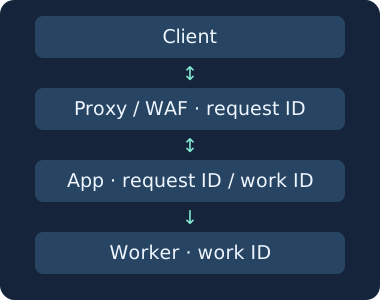
A reverse proxy can terminate TLS, serve from cache, deny a request under a WAF policy or forward it to the application. A worker can fail after an application returns 202. An app can also finish processing after an edge proxy returns 504. When statuses differ, establish which layer replied, to whom and when.
HTTP/1.1 and HTTP/2 generally use TCP. HTTP/3 uses QUIC. HTTP/2 and HTTP/3 can carry multiple concurrent requests on one connection. Use addresses, ports and connection IDs to narrow the scope. Use a trusted request ID with time, host and route to correlate requests. Passive capture of encrypted traffic usually cannot expose HTTP headers and bodies. Use authorized TLS termination and application logs.
4. Collect and correlate web evidence
- Record UTC and clock offsets, environment, logging layer, host, method, route, final status and duration. Preserve the actual URI only where needed, with redaction and access controls.
- At the proxy, look for request ID, policy decision, cache outcome, upstream status and timing. NGINX fields depend on the configured log_format and deployment. Verify fields with a known test request.
- Use the same request ID in application logs for authentication, authorization and resource outcome. Account for retries, fan-out and reused identifiers with service, time and attempt. Follow separate queue or worker IDs after 202.
- Distinguish the socket peer from forwarding headers. Interpret Forwarded or X-Forwarded-For within a trusted proxy boundary that validates and sets those fields. Using the first address from unchecked input can misattribute activity.
- Exclude or redact authorization headers, cookies, session tokens, sensitive queries and request bodies according to policy. Zeek http.log reports what its sensor could analyze. Coverage differs from the complete proxy or application history.
5. Move from alert to evidence
Repeated 401 responses for one account can suggest password guessing. Compare expired tokens, misconfigured clients and shared NAT. Establish the denominator by account, route and time window. Look for later authentication success, a new session or sensitive resource access. Repeated 404s can suggest exploration, stale links or an ordinary deployment error.
A 403 supports refusal at the layer that issued it. Check WAF decisions, proxy forwarding fields and app log completeness to determine reachability. When evidence supports malicious activity, scope affected accounts and routes, consider session revocation or policy changes, and rerun a normal request to confirm service and logging. In an owned test environment, start with an ordinary allowed request and an authorized test denial.
6. Run the offline exercise
Save both files together and run with Python 3. Twelve synthetic rows represent seven requests. Join proxy and app records by request_id, then link app and worker records by work_id. The CSV uses a simplified instructional schema.
http-evidence.csv · http-evidence.py
python3 http-evidence.py
| Request | What the records support |
|---|---|
| r-101 | 200 at both layers |
| r-102 | Accepted with 202, then worker job j-20 failed |
| r-103 | Proxy returned 403 and logged a deny decision |
| r-104 | Proxy timed out with 504, then app completed with 200 |
| r-105 | Proxy served a cached 200 |
| r-106 | App logged 404. Check authorization and resource existence separately |
| r-107 | Proxy logged 502. App record is unobserved and cause remains unresolved |
Expect seven cases and PASS. If the file cannot be opened, check names and paths. An ID error indicates a missing or duplicated identifier in a layer. The synthetic exercise ran in Python before publication. Live NGINX, Zeek and WAF collection requires validation in the deployed environment.
7. Check your understanding
- Edge 200 with no app row? Check cache evidence and whether app logs are complete.
- Can you count 202 as job success? Count acceptance and worker outcome separately.
- Does the missing app row after 502 prove it never arrived? The worksheet shows no app record. Upstream connection and app collection evidence would clarify.
Finish by joining records from the three layers and writing one supported observation and one missing piece of evidence for each request.
Previous · TCP packet evidence · Further reading · User-Agent
Official references
Reviewed 18 November 2026. Check fields and settings against your installed product version.
- RFC 9110 · HTTP Semantics, June 2022
- RFC 9114 · HTTP/3, June 2022
- RFC 7239 · Forwarded, June 2014
- NGINX HTTP log module
- Zeek http.log
Email Sender Authentication and Phishing Investigation
SPF, DKIM and DMARC investigation lab
TLS Handshake Evidence · From Connection to HTTP
TLS negotiation visibility and offline verification lab
Related lesson
OAuth 2.0 and OIDC tokens and API evidence
Investigate HTTP Caches
Investigate HTTP Caches. Trace edge reuse, conditional responses and cache scope.
Related articles
Packet Capture Gaps · Did the Network Drop It or Did the Sensor Miss It?
Use paired TCP captures, acknowledgments and sensor counters to tell a coverage gap from possible network loss.
Certificate Transparency · Verify Log Evidence and Investigate Unexpected Issuance
Distinguish a certificate log entry from an SCT, a proof of inclusion and a certificate served by an HTTPS endpoint.