Network Security · Beginner
TCP Connections and Packet Evidence
Read handshakes, retransmissions, FIN and RST using four synthetic flows and a defensive investigation workflow.
Updated 2026-11-18
On this page
1. What does a TCP connection establish?
TCP provides an ordered byte stream between two endpoints. An application message can span several TCP segments, and a segment can contain bytes from several application messages. After establishing TCP, check TLS authentication, HTTP response and login outcome with evidence from their respective layers.
Identify flows by source and destination IPs and ports plus transport protocol. Add the sensor location and time window to that five-tuple. Ports can be reused, and NAT or proxies may change addresses and ports. Port 443 suggests a service to investigate. Identify the actual application protocol with supporting evidence.
2. Read the handshake and numbers
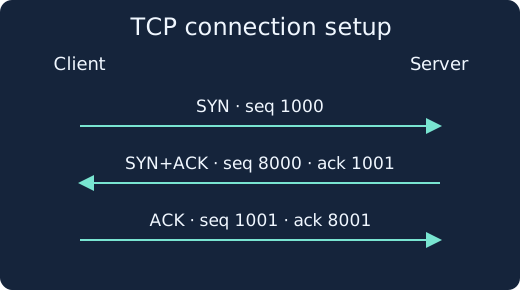
The client offers sequence 1000 in SYN. The server sends SYN+ACK with its own sequence 8000 and acknowledgment 1001. The client sends ACK with sequence 1001 and acknowledgment 8001. Both directions have independent sequence spaces. The ACK number normally tells the sender the next byte expected. SYN and FIN each consume one sequence number. An ordinary ACK with no data consumes none.
If the client sends 40 bytes starting at sequence 1001, the receiving TCP stack can acknowledge through ACK 1041. Use application logs or a response to establish what the server did with those bytes. Wireshark may display an initial sequence of zero when using relative numbers.
3. Termination and failure patterns
| Observation | First interpretation | Evidence to gather |
|---|---|---|
| Repeated SYN, no response observed | Possible retry of one connection attempt | Firewall decision, server ingress, return visibility |
| SYN followed by RST+ACK | Likely refusal of this attempt | Listener state and firewall or middlebox logs |
| FIN and ACK in both directions | Orderly closure of both byte streams | Application response, status and closing time |
| Established connection ends in RST | Abrupt termination | Server restart, proxy timeout, captures at both ends |
| Same sequence range appears twice | Possible retransmission or duplicate collection | ACK progress, mirror duplication, timing, second vantage point |
A FIN closes the sender’s direction. The peer may continue sending for a time. Retransmission can follow delay or lost ACKs as well as lost data. Compare observation points when a single capture leaves the location of any loss uncertain.
4. Blue-team evidence collection
- State the claim. “Did TCP establish?” and “Did the server accept authentication?” require different evidence.
- Record the time zone, interface, sensor, capture boundaries, and position relative to NAT or proxies. Confirm visibility in both directions.
- In Zeek, locate the connection by time and tuple and record its UID. Read
conn_state,historyand byte counts together. S0 describes a connection attempt with no observed reply. Document coverage limits. Read Zeek conn.log. - Check SYN, ACK, RST and sequence numbers in a matching capture. Wireshark generates its TCP analysis flags from the packets it observed and its analysis state. Account for missing or reordered packets and captures that began midway through a session.
- Compare firewall decisions, listener and application logs, and endpoint process context. Check changes and outage records when delay or retries increase.
Short attempts across many destination ports can warrant investigation for service discovery. Compare approved scanners, health checks and outage retries. Use ordinary successful and refused connections on an owned system to validate coverage before operational alerting. After containment, verify service dependencies and logging.
5. Work through four offline flows
Save both files in the same folder and run with Python 3. Time is milliseconds relative to each flow’s start. C means client and S means server. Work out the sequence numbers before checking the script output.
tcp-evidence.csv · tcp-evidence.py
python3 tcp-evidence.py
| Flow | What the synthetic evidence supports |
|---|---|
| A | Handshake, 40 bytes covered by ACK 1041, a FIN in each direction with its ACK |
| B | Two matching SYN observations and no reply shown |
| C | Reset acknowledging the original SYN. Gather more evidence to identify the sender |
| D | Two observations of the same 50-byte range. The capture shows no handshake |
Expect PASS with 16 rows. If a file cannot be opened, check both filenames and their folder. The published check executes against the synthetic CSV. Packet capture, Zeek and Wireshark behavior were reviewed against official documentation.
6. Check your understanding
- What did ACK 1041 establish? The acknowledged TCP byte range. Check the server response and logs for application processing.
- Do two SYNs establish firewall blocking? Record that no reply was observed. Check server ingress, return visibility and the firewall decision.
- Can the source IP identify the device that sent a reset? Use it as a lead and corroborate with middlebox logs and both endpoint captures.
To finish, record the five-tuple and observation point, verify the numbers in the four flows, and write one observed fact and one piece of evidence you still need for each flow.
Network monitoring · DNS · Certificate validation
Official references
Reviewed 18 November 2026. The RFCs document TCP behavior and timing. The product guides describe analyzer behavior and fields.
- RFC 9293, August 2022 · TCP
- RFC 6298, June 2011 · Retransmission timer
- Zeek · conn.log
- Wireshark User’s Guide · TCP Analysis
HTTP requests and web logs
HTTP status codes and proxy-to-app log correlation
Correlate Firewall, NAT and Network Sensor Evidence
NAT mapping and sensor correlation lab
Investigate Path MTU and ICMP Feedback
Compare packet size, associated ICMP feedback and ACK progress when a TCP transfer stalls
Distinguish Network Loss from Capture Gaps
Compare two captures of the same TCP connection and account for missing bytes.
Related articles
Packet Capture Gaps · Did the Network Drop It or Did the Sensor Miss It?
Use paired TCP captures, acknowledgments and sensor counters to tell a coverage gap from possible network loss.
Certificate Transparency · Verify Log Evidence and Investigate Unexpected Issuance
Distinguish a certificate log entry from an SCT, a proof of inclusion and a certificate served by an HTTPS endpoint.