Cloud Security · Beginner
Kubernetes API Audit Logs · From Permission to Outcome
Read Kubernetes audit stages, distinguish authorization from API outcomes and state changes, and review ten fictional requests offline.
Updated 2026-11-20
On this page
Learning goal. Given an audit record, identify the caller, API operation, target and observed result. Explain what extra evidence would let you say that an object changed or that a workload started.
1. What does the API server record?
The control plane maintains the cluster’s desired state. Its API server accepts requests from administrators, CI jobs and software such as controllers. A controller observes objects and takes actions to make the cluster match the requested state. A namespace scopes names and access for many objects, such as a ConfigMap. A service account identifies software acting in the cluster. For example, system:serviceaccount:audit-lab:observer identifies the service account named observer in namespace audit-lab.
An API audit event records a point in server-side request handling, when configured to do so. Kubernetes workload logs tell you what a process wrote to stdout or stderr. Kubernetes Event objects report operational observations such as scheduling failures. API audit records serve a different purpose. They let you investigate who asked the API to do what, what the server reported, and which stages were collected. A controller may later react to a successful write in its own request with its own identity and audit ID.
| Question | Evidence | Where to follow up |
|---|---|---|
| Who called and what permission was evaluated? | user, impersonatedUser if present, verb, target, authorization annotations if present |
Identity provider, service account ownership and policy at that time |
| What did the API return? | stage and responseStatus.code on an observed result |
Raw event, admission or API server diagnostics |
| What state changed? | Successful write evidence plus object UID, resource version if available, and contemporaneous state evidence | Approved snapshots, versioned inventories, later writes and controller records |
| Did it run? | Pod status and conditions, container states, node or runtime records | Correlate workload or object identity with runtime telemetry |
2. Follow a normal request
Suppose a monitoring workload reads the existing ConfigMap settings in audit-lab. This is a named read, so the Kubernetes verb is get. Authentication identifies the workload’s service account. Authorization decides whether it may perform that verb against this target. Role-based access control (RBAC) is one authorization mechanism that works by granting verbs on resources through roles and bindings. In our fictional case, that check allows the read and the API responds with HTTP 200. The ConfigMap’s content can be absent from the audit log because the policy records only metadata.
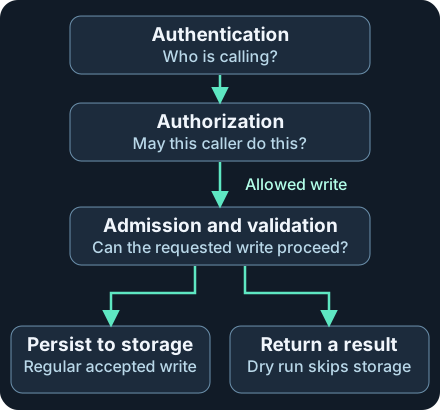
The diagram expands what happens on the allowed write path. A permission check can deny a request before admission. Reads such as get and list bypass admission. A write can also fail during later handling because of policy, invalid input or a conflict.
The following is a reduced view of the fictional read. A single completed record can describe all four elements: the caller, operation, target and response.
{
  "stage": "ResponseComplete",
  "user": {"username": "system:serviceaccount:audit-lab:observer"},
  "verb": "get",
  "objectRef": {
    "namespace": "audit-lab",
    "resource": "configmaps",
    "name": "settings"
  },
  "annotations": {"authorization.k8s.io/decision": "allow"},
  "responseStatus": {"code": 200}
}
Read the stage before the status. RequestReceived shows a request arriving at the audit handler before delegation. ResponseStarted is used for long-running requests, such as watches, when headers have been sent. A 200 at that stage can describe a stream that started while its end and delivery remain unobserved. ResponseComplete marks the end of the API response. Panic records a panic if that stage is collected. A deployment that later becomes healthy needs its own evidence. An API response to creating the deployment cannot measure readiness.
3. Keep permission, response and storage separate
| Evidence in the request group | What it supports | What to check next |
|---|---|---|
Completed 403 with authorization forbid |
The authorization check rejected the API action | Confirm which actor, verb, namespace and subresource were involved |
Completed 403 with authorization allow |
Authorization allowed the action, but the API returned 403 | Find the rejection detail or policy logs. A 403 alone cannot identify the admission policy |
Completed 409 with authorization allow |
Authorization allowed the request and the API reported a conflict | Review the error detail, existing object and concurrent writes |
Completed 201 and dryRun=All on a create |
The API returned a successful server-side preview | Preserve the URI and distinguish it from any later real create |
| Completed 201 on a regular create | The API reported a successful create | Check the object UID, state at the relevant time, and later reconciliations or deletions |
| Only a request or stream-start stage | Only the earlier stage is observed | Confirm stage exclusions, collection delay, and whether a stream is still open |
A server-side dry run evaluates a write through ordinary processing without persisting it. Its response can look like a real creation. A dry run is useful for checking the API path, but cannot validate subsequent controller activity. A request to pods/log and a request to the Pod object itself also have different meanings. Keep the subresource when the event records it. For collection-level operations such as list, expect that objectRef may be absent. Read the resource and filter scope from the URI when available. A successful read of a collection does not identify every returned object at the Metadata audit level.
4. Collect, detect and respond
Collect at the right source. For self-managed Kubernetes verify the effective audit policy and enabled log or webhook backend on the API server. Rules are evaluated in order and the first match decides what to record. None records nothing. Metadata preserves context including annotations when present, without request and response bodies. For resource requests, Request adds the request body and RequestResponse adds both bodies. Start with Metadata for identity and response investigation. Review sensitive fields, access, retention and storage load before collecting bodies. Secret values or sensitive workload configuration may be exposed in body logs. URI and identity metadata also need protected access. For an example of a managed service, Amazon EKS exports the audit control-plane log type to CloudWatch Logs when enabled. Verify that type, the cluster and Region, the relevant streams, and the destination’s retention. Do not assume application logging or CloudTrail includes the same Kubernetes requests.
Preserve fields before grouping. Keep the cluster identifier from trusted collector metadata, raw event, API version, auditID, stage, original timestamps, identity fields, URI, target and outcome. Group stages by cluster + auditID. Use requestReceivedTimestamp and stageTimestamp to reconstruct the API sequence, and keep collector arrival time separately. A query based only on the newest ingested row may discard a completed outcome if an earlier stage arrived late. Keep conflicting copies until you can explain them. An event’s userAgent is client-provided. For sourceIPs, the Kubernetes schema lists forwarded headers and the connection’s remote address. Validate trusted proxies and corroborate network origin before attributing an action.
Start with a specific detection question. For example, alert on a completed, successful, non-dry-run write to a namespace’s RoleBinding when the effective identity or target falls outside the expected deployment pattern. A RoleBinding can grant permissions in a namespace, so confirm the subjects and referenced role from approved state or change records. Require a known cluster and scope, a write verb, final result, the dry-run flag extracted from the raw URI, both identities if present, and deduplication by request. Keep denied requests in a separate view since they can show failed validation, a misconfigured operator, or suspicious use. Validate the signal with expected activity, denied sample requests in a designated lab, and a fixture that simulates a missing completion.
Investigate unexpected successes and missing evidence separately. A legitimate controller may write during rollout or recovery. A leaked workload credential or overly broad binding can also produce a valid authorized request. The audited identity can be the service account even when the human origin is unknown. If impersonatedUser is populated, preserve both the authenticated caller and the effective user. Compare the change ticket, CI or controller run, identity activity and actual object state. If misuse is supported, preserve evidence, scope affected resources and arrange approved credential or binding changes. If the event is absent, trace the path from audit policy to backend to collector and index. Check excluded stages, retention and delays before inferring that the request never happened.
5. Offline exercise · Ten fictional requests
Download kube-audit-samples.jsonl and the Python review tool. Put both in one folder. The dataset has one JSON object per line. The outer cluster is simulated collector metadata, while event contains the synthetic audit record. First group using full IDs on paper or in a local viewer. Then run the checker with Python 3. It reads only the downloaded file and displays shortened IDs to keep the output readable.
python3 kube-audit-review.py
| Request in training-east | Expected interpretation |
|---|---|
| 001 | Successful read. The completed record arrived before the received stage in the file. One identical completion is a duplicate |
| 002 / 003 | Both return 201. The first is a dry run. Investigate object state for the second |
| 004 / 005 | Both return 403. Authorization explicitly forbids the first, and allows the second before the API returns the error |
| 006 / 007 | Watch response started / request received with completion unobserved |
| 008 | Successful read with two different identity fields to preserve |
| 009 | Conflict 409 despite authorization allow |
training-west/000000000001 reports an authorization refusal. It remains a separate request group. Expect Requests: 10; duplicate stage records: 1. If an ID appears to conflict, check that the cluster key is included and that you are comparing the same stage. If the result stops on a JSON error, restore the original download and keep one whole object per line. The checker demonstrates grouping and simple rules on the provided data. Missing fields and provider wrappers need their own parsing and validation in production.
Optional approved self-lab. Use an owned test cluster with audit collection already enabled for ConfigMap reads and writes, a pre-created audit-lab namespace, a harmless settings ConfigMap and test credentials with only the required access there. Replace OWNED_LAB with the approved local context. Check the cluster before running either command. The second command asks the server for a preview with a new test name.
kubectl --context OWNED_LAB -n audit-lab get configmap settings -o name
kubectl --context OWNED_LAB -n audit-lab create configmap audit-marker \
  --from-literal=purpose=audit-lab --dry-run=server -o name
Record UTC, caller, context, target and command outcome. In the audit backend expect a named read and a create carrying dryRun=All if policy keeps those stages and fields. Verify the preview’s object is absent with the lab’s read-only inventory. If a command is denied, record the outcome and inspect the lab role, namespace admission policy and audit settings. Avoid widening access merely to make the test pass. Python was run on the provided synthetic records. kubectl, API server and EKS checks in this chapter were reviewed against documentation.
6. Check your understanding
- Two completed writes both return 201. Which one warrants checking live object state? Start with the regular write. The URI with
dryRun=Allidentifies the preview. Follow any later regular write as a separate request. - Why can
allowand 403 appear on the same request? They answer different questions. Authorization decided the action could proceed. A later check returned an error, and you still need supporting evidence to identify that check. - Does a successful request by a service account name tell you which person initiated it? It identifies the audited account. Match authenticated and effective identities, controller or CI records, and related identity evidence before attributing it to a person.
To finish, explain the two 201s and two 403s, identify both actors in 008, and write one case note with a cluster, full audit ID, strongest supported claim, and one specific next source.
Next · Validate detection and collection · Related · AWS role and CloudTrail evidence
Official references
Reviewed 20 November 2026. The core scenarios use the Kubernetes v1.36 documentation and audit API v1. Verify the policy and behavior for the actual cluster version or provider.
- Kubernetes v1.36 · Auditing, stages, policy and backends
- Kubernetes v1.36 · Audit Event v1 schema
- Kubernetes v1.36 · Audit authorization annotations
- Kubernetes v1.36 · API concepts and dry run, stable since v1.19
- Kubernetes v1.36 · Admission control
- Amazon EKS User Guide · Control-plane audit exports to CloudWatch Logs
- Kubernetes v1.36 · ConfigMap server-side dry-run syntax
Related articles
AWS IAM Roles and CloudTrail Investigation
Trace role trust, temporary STS credentials and subsequent API calls through eight CloudTrail examples.
AWS KMS Investigation · Key Use, CloudTrail and S3 Reads
Follow envelope encryption, read key-policy and Decrypt evidence, and distinguish a KMS call from the use of application data.