Blue Team · Beginner
Linux File Permissions · From Mode Bits to Access Evidence
Explain a denied Linux file open using directory search rights, POSIX-style ACLs and the credentials of the process that made the request.
Updated 2026-11-21
On this page
Learning goal. A service reports Permission denied for a file that looks readable. Find the exact operation, the process that attempted it, and the directory or rule that can explain the outcome. Use current permissions to describe current state and audit records to investigate earlier changes.
1. Read the permission bits
A mode contains three basic sets of permissions for the owner, group class and other users. Each digit is the sum of read (4), write (2) and execute or search (1). With a basic ACL, 0640 grants the owner read/write, the owning group read and others no access. An ACL (access control list) can add rules for named users or groups. With an extended ACL and a mask, the middle mode digit shows the mask, the maximum permissions available to the owning-group entry and named entries.
| Bit | On a regular file | On a directory |
|---|---|---|
r |
Read contents | List entry names |
w |
Write contents | Add or remove directory entries, normally together with search permission |
x |
Execute the file where otherwise allowed | Search the directory and look up a known name |
For a new pathname open, each directory traversed must be searchable by the requesting process. Directory read alone can expose names while preventing access to their contents. An unlink removes a name from its parent directory, so assess that directory’s permissions and restrictions such as the sticky bit. A read-only file mode alone does not describe whether its directory entry can be removed.
2. Follow a normal service read
In a fictional service, /srv/reports belongs to root:reporting with mode 0750, and current.csv is owned by publisher:reporting with mode 0640. Assume earlier path components permit search, the service process belongs to reporting, the filesystem IDs are mapped as expected and there are no other denials. The group search bit allows lookup in reports. The group’s read bit on current.csv allows the service to open it for reading. Testing with an administrator’s shell uses different credentials and can give a different result.
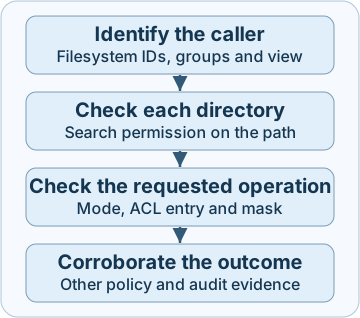
For Linux file checks, the filesystem UID and GID normally match the effective UID and GID. Supplementary groups and capabilities can change the result. A container can also see a different mount, object or numeric ID mapping at the same pathname. Mandatory policies such as SELinux or AppArmor can deny an operation that mode bits and ACLs would allow. The diagram gives an investigation order, not a kernel call trace.
3. Read an ACL and explain common changes
This abbreviated fictional output represents an access ACL for a file whose owner is publisher. In the example a named user svc-report has a read/write entry limited by a read-only mask.
user::rw-
user:svc-report:rw-    #effective:r--
group::---
mask::r--
other::---
For ordinary discretionary access checks, examine the matching owner entry first. A matching named-user entry is checked with the mask. For group matches, find an applicable group entry that grants the requested permissions and apply the mask if present. The other entry applies only when there is no prior owner, named-user or group match. A denied named user does not fall through to a more permissive group. In the example, svc-report can read through its named entry if the path and other policies allow it.
| Change you find | What to verify |
|---|---|
| A named ACL grant broadens access | Numeric user or group, effective mask, business approval and actual process credentials |
| A mode change unexpectedly reduces ACL rights | With a mask present, the middle mode digit and mask change together. A named entry can remain while its effective rights change |
| A new file has different permissions than expected | With no parent default ACL, creation removes the bits set in the process’s umask from the requested mode. With a default ACL, the kernel inherits it and limits it by the requested mode |
| A path changes after a deployment | Compare device and inode, mount view and change ticket. A replacement may be a new object with its own permissions |
Misuse can include an unauthorized ACL grant on sensitive data or an unexpected permission change that prevents service access. A package update, file replacement or legitimate support change can look similar. Establish the previous state and access scope before attributing intent.
4. Collect, detect and respond
- Capture the failing operation. Record the host, UTC time, operation, path and process. For a live process, record
Uid,Gid,GroupsandCapEfffrom its/proc/PID/statusif authorized to read them. Confirm process identity and mount namespace. An administrator’sidonly describes the current shell. - Collect current state without altering it. With an authorized account and the correct filesystem view, use
namei -l -- /srv/reports/current.csvto inspect path components, GNUstat -c '%a %u:%g %d:%i %z %n' -- /srv/reports/current.csvfor mode, numeric ownership, device and inode, status-change time and name, andgetfacl -n -p -- /srv/reports /srv/reports/current.csvfor numeric ACL entries and effective rights. Theaclutilities and filesystem must support ACLs. Repeat for other relevant ancestors. A status-change time cannot identify who made a change. - Build the audit timeline. If Linux Audit was active and its matching rule assigned the key
report_permissionsduring the incident,ausearch -k report_permissions -ts today --rawqueries today’s records on the source host. The operator needs log read access. For another incident window, set the corresponding start and end times in the host’s time basis and retain the raw records. Inspect loaded rules, lost-event counters, retention and forwarding before using a zero-result query as evidence. On Linux Audit, prefer filesystem rules with narrow scope and explicit architectures as appropriate. The upstreamauditctlmanual marks old-wsyntax deprecated. - Join and act. Group
SYSCALLandPATHrecords by originating host and fullmsg=audit(timestamp:serial). Check outcome,auid(login UID, sometimes unset), current UID fields, executable, path and inode when present. An abbreviated fictional event might showSYSCALL success=yes auid=1001 euid=0andPATH name="/srv/reports/current.csv" inode=41012under one event ID. This supports a successful monitored operation by a privileged process associated with a login UID. Inspect the actual syscall and arguments before calling it a permission change. Preserve approved baseline and evidence before repairing access, and retest with the intended service identity through the same path. If access may have broadened, look for separately collected evidence of reads.
Current permissions and a successful permission-change event have different evidential scope. Changes to mode or ACL do not in general revoke an already open file descriptor in ordinary local Linux DAC. Existing handles, other policy layers and remote filesystems can behave differently. This chapter focuses on local Linux POSIX-style ACLs. NFSv4 ACLs and SMB server-side authorization require their own analysis.
5. Offline lab · Read six kernel observations
Download linux-file-permissions-lab.py into a private writable directory on a Linux filesystem supporting POSIX ACLs. Use Python 3, the system libacl library and an ordinary account. The script creates only disposable files and changes only its own umask. Run from the download directory.
TMPDIR="$PWD" python3 linux-file-permissions-lab.py
| What the lab changes | Expected evidence |
|---|---|
| Create without and with a parent default ACL | Requested file mode 0666 yields 0600 with umask 077 alone, and 0640 when the default ACL applies |
| Add a named group entry, then change mode | The entry starts as rw- with mask r--. After the mode change the entry remains and the mask is --- |
| Remove search permission from the parent after opening the file | A new open fails for the same account. The already open descriptor still reads the test content |
Expect 6 checks passed. A library error means libacl is missing. An ACL error such as Operation not supported means to check the filesystem behind TMPDIR. If the new open succeeds unexpectedly, verify that the test process lacks discretionary-access override capabilities. The named-group checks inspect kernel ACL metadata with the same account. They do not attempt a read as another user. All six checks ran on Linux 6.18.57 with Python 3.12. Linux Audit and mandatory-policy behavior were reviewed in documentation.
6. Check your understanding
- The file still says
0640and opening it fails. What else could explain that? Check whether the process can search every parent directory, and then verify ACLs, credentials and policy in that process’s filesystem view. - A named entry is
rw-, but its mask isr--. Can the entry authorize a write? Its effective permissions include only read. Parent and additional checks still apply. - A new file is
0640under a process using umask077. Is the observation impossible? A parent default ACL can produce this result when the requested mode permits those bits. Check the creation path and parent ACL. - An audit search yields no event. Can you rule out a change? Establish rule coverage, retention and collection health for the period before deciding what the empty search means.
Completion. Record a failed open with the process identity, path, requested operation, first evidenced restriction and one observation that would distinguish another cause.
Previous · Linux process evidence · Continue · Evidence preservation
Official references
Reviewed 21 November 2026. Use the documentation for the installed kernel, ACL tools and Audit package when applying the examples.
- Linux man-pages online at review. Path resolution · File creation mask · Open and file descriptors · Capabilities
- Linux ACL project, manual snapshot from its upstream source at review. acl(5) · getfacl(1)
- Linux Audit upstream manual and RHEL 9 product documentation. auditctl · ausearch · RHEL 9 audit record examples and coverage
Investigate Linux file activity
Linux Audit file evidence · Join system calls and paths, then test what a file-open record can establish.
Related articles
Windows App Control · Read Audit, Block and Signature Events
Connect Windows Code Integrity policy decisions, signature records and policy activation evidence without mistaking a block for malware execution.
Blue Team Fundamentals: Detection to Response
An introduction to security monitoring, triage, investigation, incident response, and detection improvement.