DFIR · Beginner
Linux Audit File Evidence · From a System Call to an Investigation
Reassemble Linux Audit records, distinguish login identity from process privilege, and check what a file-open event can prove.
Updated 2026-11-21
On this page
Learning goal. Given several interleaved audit lines, identify the host and operation, attribute it to a recorded login identity and process, and explain what the records leave unresolved. Start with Linux file permissions if owner, group and access bits are new to you.
1. Why collect Linux Audit records?
A file’s permissions describe who may perform an operation under the relevant access controls. An audit event records an operation that matched auditing conditions at a moment in time. If a service configuration has changed, you need both perspectives. The permission snapshot helps explain why access was possible. The audit event can help determine which process attempted access, its result at the kernel boundary, and the file object involved.
A system call is a request from a program to the kernel, such as opening a file. The kernel’s Linux Audit subsystem generates records according to configuration and rules. The userspace daemon auditd receives them and can write them to disk. A collector may forward or transform the results. A record is one component of an audit event. Several records with the same event identifier can describe one operation. A rule key such as training_config is an operator-chosen label for searching and organizing rules.
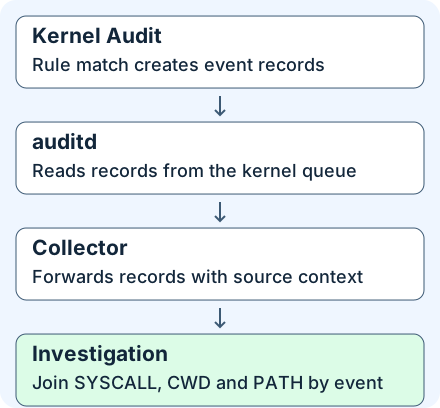
2. Reassemble the event before interpreting it
- Find the originating endpoint. With aggregation, use the collector’s authenticated source identity and preserve boot or equivalent execution context when available. The synthetic lab uses
node=to represent that identity. It can label a real record but should be corroborated with ingestion metadata. - Group records by source and the full
msg=audit(seconds.fraction:serial)identifier within that source context. Serial numbers alone are unsafe across hosts. The log can interleave records, so an adjacent line may belong to another event. - Locate SYSCALL for the operation and result. Confirm its architecture before mapping a numeric syscall. Check
itemsagainst the zero-baseditemvalues in the accompanying PATH records. CWD supplies working-directory context. Real events may include other record types such as PROCTITLE, which can carry hex-encoded command-line data. - Use all available path roles, identities and context to form a statement. For a relative
openatpath, the caller’s working directory is the base when the directory argument isAT_FDCWD. Other directory file descriptors can designate a different base. Namespace boundaries and symlinks can also affect the path you see. Keep the original values and mark any path inference.
| Field | Question it answers | Interpretation limit |
|---|---|---|
arch, syscall, success, exit |
Which system call ran and what did it return? | Interpret the number with the ABI and the return value with that syscall’s semantics |
auid, ses |
Which recorded login identity and audit session does the process carry? | Login context may be unset. Confirm the session before attributing activity to a person |
uid, euid, pid, exe |
What real and effective IDs and executable did the process have? | Effective UID alone does not capture filesystem UID, capabilities, namespaces or mandatory access controls. PIDs can be reused |
items, PATH.item, name, nametype |
How many path records were expected and what roles did they have? | A single path may omit another side of a rename. A path alone does not show success |
dev, inode, cwd |
Which object and path context were recorded? | Pair device and inode with host and time. Replacement, inode reuse and mount namespaces matter |
3. Read a normal file open from start to finish
This is a synthetic example from the downloadable fixture. On the x86-64 ABI arch=c000003e syscall=257 identifies openat. At 04:00:00.110 UTC on November 21, 2026, lab-a records an event ending in :40. The SYSCALL record shows a0=ffffff9c (the 32-bit representation of AT_FDCWD for the directory argument), a2=1 (write-only flags in this example), success=yes exit=3 and items=1. Its PATH item=0 contains report.conf, and CWD is /srv/training. This supports a successful open for writing at that path. The returned number 3 is a file descriptor, a handle used by the process for later operations.
The process has auid=1001 and euid=0. That is consistent with an elevated maintenance process in login session ses=7. Correlate the login, sudo or service records and an approved change ticket before determining how the process obtained its privileges. Verify content changes separately, for example with a known baseline and a preserved hash or diff. An open with the flags in this example says nothing about bytes subsequently written.
At the exact same timestamp and serial, lab-b reports success=no exit=-13 (EACCES) when it tried to open a file of the same name. That is a separate denied open. The return code alone cannot distinguish a denied permission bit from a parent-directory permission or a mandatory policy decision. Review permissions in effect at the time and any matching SELinux AVC records on hosts where SELinux applies, using the originating endpoint and event context.
4. Investigate unexpected access and visibility gaps
An unexpected privileged process may attempt to change a configuration, but planned deployment and maintenance can produce the same opening pattern. Look for a mismatch in service, path, principal, executable and change window. A service-originated operation may carry auid=4294967295 (unset in the raw unsigned representation). Check its unit, process ancestry and deployment history. An unset audit user ID alone does not imply anonymity or suspicious activity. An editor or deployment tool can also write a temporary file and replace the target via rename. Monitoring only one open syscall or matching only the final filename may miss the relevant operation. Validate the actual application behavior and coverage.
| Observation | Evidence to collect next | Decision it supports |
|---|---|---|
| Unexpected privileged open | Audit session and login or sudo records, process ancestry, approved deployment window, baseline and observed file state | Separate routine maintenance from an unexplained action. Preserve evidence and scope other files and hosts if corroboration warrants |
| Denied attempt | Same-event records, service context, access policy and repetitions by identity and target | Distinguish a persistent policy problem from isolated expected noise. Consider only independently supported signs of misuse |
SYSCALL says items=1, PATH missing |
Raw local and rotated logs, collector parsing and delivery counters, filtering and deduplication | The result may be known while target attribution remains incomplete |
| No local or central match | Rule version, key, ABI, namespaces, timeframe, kernel status, auditd disk settings and collector health | Determine whether the operation would have been visible. A zero-result search alone cannot rule out the action |
On an authorized Linux host with kernel auditing and the utilities installed, these are read-only checks. Use an approved administrator session with rights to query kernel Audit state. Capture the time, host and boot context with the outputs. A raw export can be reviewed with ordinary read access on a separate analysis machine.
sudo auditctl -s
sudo auditctl -l
ausearch --input ./audit-export.log --key training_config --raw
The last command assumes an actual raw audit export with the indicated rule key. Substitute the key deployed on your host. Query all relevant retained segments and record any limits. Prefer numeric IDs in the evidence copy. With --interpret, unenriched numeric user IDs can be resolved against the analysis machine’s account database. A current status snapshot cannot establish historical configuration. If lost increases between observations in the same boot and counter epoch, the kernel discarded records in that interval. backlog shows records currently waiting. Check disk and forwarding loss separately. An unchanged counter cannot certify complete coverage.
For ongoing control validation, list loaded rules separately from files intended to load at boot. Review rule order and exclusions, relevant ABI, path or directory coverage, and filesystem and mount boundaries. The upstream auditctl manual deprecates the legacy -w watch syntax from some older examples and describes syscall-form rules. Use narrow, host-approved rules and test known allowed, denied and out-of-scope operations on disposable files in an owned or explicitly authorized environment. Measure that the intended records arrive both locally and centrally before relying on a detection. This chapter does not load or change host audit rules.
5. Offline lab · Ten lines, five events
Save the synthetic audit log and the Python review script in the same directory. This exercise reads only the fixture and writes results to your terminal. It uses Python 3.10 or later with its standard library. It needs no root, network, auditd or Linux access to the example paths. Its teaching parser handles the fixture’s simple fields, not arbitrary audit encodings or multiline exports.
First try grouping the lines by serial alone and spot the contradiction. Then run the script. It groups by node and full audit identifier, checks PATH indexes and compares outcomes with the expected set.
python3 linux-audit-file-review.py linux-audit-file-sample.log --check
| Event | Expected output | Why |
|---|---|---|
lab-a:40 |
open-succeeded · auid 1001, euid 0 |
The relative path has CWD context and the syscall returns fd 3 |
lab-b:40 |
open-denied · auid 1002, euid 1002 |
Same time and serial as the first event, different source and result |
lab-a:41 |
open-succeeded · auid unset, euid 998 |
A read-only open returned fd 4. The login ID is unset |
lab-a:42 |
path-incomplete |
The system call succeeded, but the expected path is missing |
lab-b:43 |
syscall-unavailable |
A path survived without a supporting SYSCALL record |
Verification and troubleshooting. On 2026-11-21 the script produced 5/5 event outcomes matched. under Python 3.12.14. The fixture is synthetic. The host commands and production collection behavior were checked against documentation. If a file is missing, confirm both downloads kept their original names and run from that directory. If you edit the log, omit --check to inspect the revised output, then use the original files to reproduce the table. Keep the source tag and both parts of the event ID intact when comparing records.
6. Check your reasoning
- Can two records with the same timestamp and serial be joined automatically? Only after confirming the same source context. The lab shows contradictory operations that would appear to be one event if node were dropped.
- Do
euid=0andauid=1001prove a specific administrator made the change? They support effective ID 0 and a recorded login identity 1001. Check the session and the elevation path, and corroborate any claimed modification with file state. - Could
lab-a:42refer to the same target aslab-a:40? Possibly. The surviving CWD does not identify the file. Reacquire the raw PATH record or leave the target unconfirmed. - Does
lost=0with no matching event exclude the operation? No. It does not prove the rule matched at the relevant time or that files and forwarding remained intact.
You have completed the chapter when you can reproduce all five outcomes, explain the two different identities, and identify the next evidence needed to confirm an actual modification or a collection gap. Continue with Linux process evidence for ancestry or journal coverage to reason about missing service records.
Official references
Reviewed 2026-11-21. Check your installed Audit and kernel versions when applying these references.
- Red Hat Enterprise Linux 9 Security hardening · Auditing the system, RHEL 9 documentation, especially §12.5 for audit record structure.
- Linux Audit userspace upstream and release history, reviewed for the 4.x documentation and event assembly behavior.
- Upstream
auditctl(8)manual and upstreamausearch(8)manual, current online manual snapshots for status, rule syntax and searches. - Linux kernel x86 syscall table and Linux
open(2)manual, current source and Linux man-pages for the x86-64 mapping andopenatsemantics.
Related articles
Backup Restore Verification · From Saved Copy to Recoverable Service
Use a real offline SQLite restore exercise to distinguish a matching hash, a usable database, an acceptable recovery point, and a service ready to resume.
Velociraptor Endpoint Collection: From a Network Alert to Host Evidence
Scope a request to one endpoint and interpret collection coverage, zero results, missing files and SIEM delivery using nine fictional cases.