Cloud Security · Beginner
Passkeys and WebAuthn: Read the Sign-in Evidence
Follow passkey registration and verification, distinguish access and app sessions, and review ten fictional sign-in attempts.
Updated 2026-11-20
On this page
Learning goal. Explain what a passkey proves, identify where an attempt stopped, and corroborate whether the intended application opened a session.
1. Who stores which key?
A passkey is a public-key credential for signing in. The authenticator manages the credential key and can ask the user to verify locally. A platform authenticator can be built into a phone or computer. A roaming authenticator can be an external security key. The relying party (RP) is the service verifying the credential, which might be the identity provider in a single sign-on flow. The browser or platform mediates between the site and authenticator. WebAuthn defines the browser-facing API and the registration and authentication procedures. FIDO2 includes WebAuthn and CTAP, the protocol used with supported external authenticators.
| Term | Meaning | Evidence boundary |
|---|---|---|
| Credential ID and public key | The service uses the identifier to find a registered public key | The ID does not indicate a person or device by itself. |
| RP ID and origin | RP ID identifies the credential’s domain scope. Origin describes the web caller, including scheme, host and port as applicable | A permitted RP ID and an expected origin are separate checks. |
| User presence (UP) | An interaction or indication of presence | Insufficient to determine identity or the verification method. |
| User verification (UV) | The authenticator reports local verification, such as PIN or biometric verification | The RP receives the flag, not a biometric sample. The flag alone does not tell the relying party which local method was used. |
A device-bound credential is designed to stay tied to its authenticator. A synced passkey can be made available on devices through its provider. A device-bound label alone is insufficient to establish an assurance level. NIST SP 800-63B-4 excludes syncable authenticators at AAL3, where a non-exportable key and additional requirements apply. A browser’s passkey prompt cannot tell you the entire assurance story. Check the deployed policy, recovery and enrollment controls, and the credential type. If your verifier exposes WebAuthn Level 3 backup flags, BE indicates eligibility and BS indicates current backup state, as reported by the authenticator. They do not identify the sync provider, which device was used, or the cause of a change.
2. Follow a normal sign-in
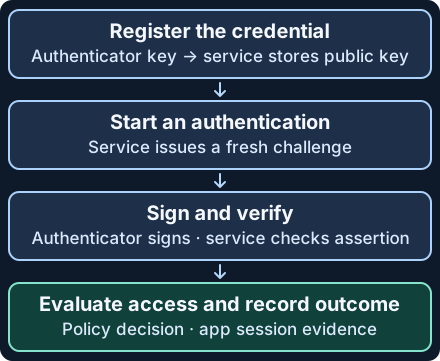
- Register. After an authorized account enrollment, the RP sends registration options, including a fresh challenge. The authenticator creates a credential. The service verifies the registration response and stores the public key and credential ID for that account. The private key is not sent to the RP. If attestation is used, it can support authenticator policy subject to the trust and privacy model.
- Request an authentication. The RP issues a new, unpredictable challenge tied to the pending transaction. The browser requests a credential for the configured RP ID. On an ordinary top-level page at
https://login.example.test,example.testcan be a valid RP ID. The expected web origin is separately configured. - Sign and verify. The authenticator signs the authenticator data together with a hash of the client data. The client data binds the challenge and origin. Authenticator data includes the RP ID hash and flags. The RP validates the response type, challenge, origin, RP ID hash, required flags, account/credential association and signature. Use a maintained WebAuthn library and the current standard for a full implementation.
- Evaluate access and confirm the outcome. The verified assertion supports authentication. A separate access decision or federation step can still reject the request. The protected application may create a session, deny it or leave no log. The three events belong in separate records.
Normal example. Ada signs in to a training identity service with a previously enrolled passkey. The authenticator reports the required UV. The verifier accepts the assertion, the access policy permits the request, and a scoped application audit record shows a session was created. If the service uses SSO, look at the identity provider’s authentication result and the application’s own record. The browser’s successful prompt alone cannot establish either outcome.
3. What can fail and how should you respond?
WebAuthn’s binding to the expected verifier limits credential phishing. A lookalike origin cannot normally request the real site’s passkey as its own. Risk remains in enrollment and recovery, weaker fallback methods, compromised clients and already authenticated sessions. Someone who controls a fallback or a recovery path may gain account access without a passkey assertion. Investigate the actual method used. Limit and audit enrollment, recovery and exceptions, and verify any new credential with the account owner through an approved channel.
| Observation | Evidence to collect | Safe interpretation |
|---|---|---|
| Browser cancellation and no verifier record | Browser-side error class and time, server request and telemetry coverage | An attempt was reported. It may have stopped before reaching the verifier. |
| Origin, RP ID or challenge rejection | Internal reason category, trusted expected configuration, request IDs and recent changes | A security check failed. Configuration drift, an expired transaction or a suspicious attempt can produce similar symptoms. |
| UV missing when required | Verification policy, allowed authenticators and the recorded flag outcome | The attempt failed the applicable requirement. It does not reveal the user’s PIN or biometric. |
| Counter warning | Stored and observed counter behavior where legitimately available, authenticator profile, duplicate deliveries and account activity | A signal to review under RP policy. Some authenticators use zero. A non-increasing counter is not proof of cloning. |
| Assertion accepted, access denied or unconfirmed | Correlated policy event and application session audit within the same scope | Authentication and the application outcome must be evaluated independently. |
Start with the UTC time, stable pseudonymous account or credential reference, organization or RP namespace, transaction ID, method, reason category and release or policy version. Confirm telemetry retention and where each field comes from. Preserve access-restricted originals and redact raw challenges, assertions, session cookies and unnecessary device information from shared results. Server reason categories in this chapter are conceptual. WebAuthn does not require providers to publish these exact labels.
For Microsoft Entra, use the sign-in record’s Authentication Details and corroborate with Conditional Access and app logs as available. Check the affected tenant’s passkey policy and details rather than assuming the raw WebAuthn checks appear in its logs. If evidence points to unauthorized enrollment or recovery, contain the account under the incident procedure, review enrolled methods and sessions, and verify that the application no longer accepts the affected sessions.
4. Offline exercise · ten fictional attempts
Save the fictional audit records and the Python reviewer to the same folder. Run with Python 3:
python3 passkey-evidence-review.py
The data contains normalized observer decisions, not authenticators, assertions, credentials or real system logs. The script does not generate or validate cryptographic messages, call a service, or grant access. For accepted assertions it looks up a session using scope and attempt ID.
| Attempt | Expected result | Why |
|---|---|---|
| A01 | Session created | Assertion accepted, scoped session audit found. |
| A02 | Verification unconfirmed | Client cancellation, no matching verifier outcome. |
| A03 | Verifier denied | Challenge failed the verifier’s check. |
| A04 | Verifier denied | Origin did not match the expected configuration. |
| A05 | Verifier denied | RP ID hash did not match. |
| A06 | Verifier denied | Required user verification was absent. |
| A07 | Session created, signal to review | The RP recorded a counter signal and its policy allowed the assertion. |
| A08 | Session denied | The assertion passed before access policy denied the session. |
| A09 | Session unconfirmed | A session record with the same ID belongs to another scope. |
| A10 | Alternate method | The successful session used a non-WebAuthn method. |
Expect Reviewed: 10, with four verifier denials and two observed session creations after a passkey assertion, including the review signal in A07. If a file error occurs, check names and JSON syntax. If A09 shows a session, check the scope on the two source records. If A07 and A08 seem contradictory, compare what the verifier accepted with what the application allowed.
Optional authorized product check. On a test RP or an approved test account in an already configured tenant, complete one ordinary passkey login and preserve its method, policy and app-session records. On a second attempt, cancel the normal browser prompt before approval. Compare what the browser and server can report. Do not change production policy for this exercise. The offline exercise was run in the cloud. The product procedure was reviewed against documentation. No live passkey/tenant test was performed for publication.
5. Check your understanding
- Does the service receive your fingerprint? It receives signed evidence and flags. Local verification is handled by the authenticator or platform.
- Can the user sign in successfully while the app remains unavailable? Yes. The access policy, federation or app session outcome is separate. A08 is an example.
- Does a counter warning establish credential cloning? No. Review the authenticator and transaction context and seek corroboration before deciding.
- Why keep A09 unresolved? A reused ID from a different scope does not connect the verifier event to the app session.
Finish by explaining A02, A07, A08 and A09 in terms of the source, the confirmed event and the evidence you still need.
Previous · Signatures and public keys · Next lesson · Entra sign-in evidence · Related · OAuth and OIDC API evidence
Official references
Reviewed November 20, 2026. Verify deployed browser, authenticator and provider behavior separately.
- W3C WebAuthn Level 3 Recommendation, August 25, 2026. Registration, assertion verification, credential backup flags and counter interpretation. WebAuthn Level 3. Earlier behavior is documented in the April 2021 Level 2 Recommendation.
- NIST SP 800-63B-4, 2025 edition. Phishing resistance, assurance levels and syncable authenticators. Authentication and Authenticator Management
- Microsoft Entra implementation and policy, including the November 17, 2026 method overview. Passkeys in Microsoft Entra ID · Enable passkeys
Related articles
AWS IAM Roles and CloudTrail Investigation
Trace role trust, temporary STS credentials and subsequent API calls through eight CloudTrail examples.
AWS KMS Investigation · Key Use, CloudTrail and S3 Reads
Follow envelope encryption, read key-policy and Decrypt evidence, and distinguish a KMS call from the use of application data.