Cloud Security · Beginner
Microsoft Entra Sign-in Investigation · MFA and Conditional Access
Distinguish Entra sign-in, MFA, Conditional Access and application activity using eight synthetic records.
Updated 2026-11-20
On this page
Learning goal. Read Entra sign-in outcome, MFA details, Conditional Access evaluation and application activity as separate observations. Explain what the fictional evidence supports and what still requires corroboration.
1. Who used which client to access which resource?
Microsoft Entra ID authenticates cloud identities and issues tokens for applications. A tenant is an organization’s identity administration boundary. The application listed for a sign-in can be the requesting client, while the resource is the service for which the token is requested. For example, a mail client can request a token for a mail service. MFA concerns multiple authentication factors or an authentication requirement. Conditional Access (CA) evaluates applicable policy controls using conditions such as identity, app, location and device.
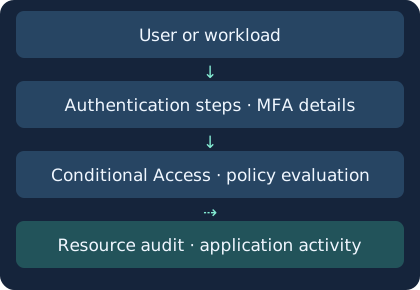
The diagram simplifies the evidence path. A successful Entra sign-in and a later application file read appear in different records.
| Log type | Principal and flow | Ordinary example |
|---|---|---|
| Interactive user | User participates in authentication | Initial browser sign-in |
| Non-interactive user | Client authenticates or refreshes on behalf of a user | Mail client refresh in the background |
| Service principal | Application or workload identity | Scheduled reports service |
| Managed identity | Azure-managed workload identity | Authorized Azure resource access |
Non-interactive sign-ins can group multiple similar events. Expand the group and review individual timestamps and counts. Workload identities require workload-specific controls and evidence.
2. Read a normal sequence in layers
Ada opens Portal in a browser. Entra records an interactive success and authentication details show an MFA step. Check the applicable CA policies and results. Then a Portal audit record of a test-document read supports the application action. A later background refresh can produce a non-interactive success. A requirement satisfied by a prior token claim gives different evidence from a fresh authentication prompt.
| Field | What to read | Scope in an investigation |
|---|---|---|
| Sign-in status | Success, failure or interruption and reason | Sign-in outcome. Check resource side effects separately |
| Authentication details | Step method, result and claim | Fresh authentication step or existing claim |
| Conditional Access | Applied policy names and individual results | Policy evaluation separate from overall sign-in outcome |
| Report-only | Report-only evaluation outcome | How that policy evaluated without enforcing its result |
| App, resource and tenant | Requesting client, target and identity boundary | Avoid mixing accounts and targets across tenants |
| Request ID and Correlation ID | Diagnostic pivots | Verify how IDs relate before using a cross-service join |
Authentication details can be incomplete or inaccurate before aggregation. If the primary step or MFA claim is unclear, revisit the record and retain its request and correlation IDs. Inspect individual policies even when the summary says success. Which control operated depends on the actual policy and conditions.
3. Collect the evidence and test alternative explanations
- Use approved access to preserve original records by sign-in type. Record UTC, tenant, app and resource, identity, error and policy details. Select the relevant diagnostic categories if forwarding to a SIEM. Retention depends on licensing, log type and external routing.
- Distinguish sign-in time from arrival. In the documented Log Analytics sign-in context, TimeGenerated is workspace ingestion and CreatedDateTime concerns the sign-in timestamp. Verify definitions and raw values for your table.
- Compare unusual addresses or countries with VPN, proxy, carrier or travel context. Check prior logins, device, session and application actions. IP geolocation is approximate.
- For suspected consent, authentication method or policy changes, use directory audit logs to identify actors and edits. Check resource audit records for mailbox, file or other downstream actions.
| Observation | Ordinary explanation | Evidence to gather |
|---|---|---|
| Repeated failure followed by success | Typing errors or network change | Failure reasons, user confirmation, session and resource audit |
| Prior MFA claim satisfied requirement | Expected SSO or refresh | Token context, original authentication and device, app session |
| New app or service principal signs in | Approved deployment | Registration, permissions or certificate change, service owner |
| Report-only failure with a successful sign-in | Evaluation-only policy | Policy mode and other enforced CA policies |
| Attempt interrupted at authentication | User abandoned the flow | This attempt’s status, subsequent attempts and step evidence |
Misuse of an existing token can resemble legitimate sign-in or app activity. Where evidence supports misuse, scope the account or workload and affected applications. Use your response procedure for access restrictions or session revocation. Already issued access tokens and app-owned sessions depend on platform and application behavior. Check downstream access after the change.
4. Offline lab · Eight fictional records
entra-signin-cases.json · entra-signin-evidence.py
Save both files together and run Python 3. The worksheet contains six sign-ins and two application observations in a synthetic normalized schema. The shared link is deliberately present in both sources. It is not a claim about a native Entra join field. The exercise joins only by tenant, app and link together.
python3 entra-signin-evidence.py
| Case | Interpretation |
|---|---|
| s-01 | Interactive success, MFA performed. a-01 in the same scope supports a test-item read |
| s-02 | Non-interactive success with prior MFA claim. a-02 shares a link but belongs to a different tenant |
| s-03 | Sign-in and CA failure. No supporting resource record in the worksheet |
| s-04 | Actual sign-in succeeds. Report-only policy evaluates to failure |
| s-05 | Service-principal success. User MFA does not describe this flow |
| s-06 | Interrupted attempt. Keep it separate from other completed attempts |
Expect PASS: six sign-ins, one scoped resource match, five unlinked. For file errors, check names and folder. For join errors, inspect the three scope fields and the event types. Unlinked means the available data could not make the association. Publication ran the synthetic analyzer. Live Entra authentication, CA configuration and Log Analytics collection require separate testing.
In an owned or explicitly authorized tenant, have a test user sign in and read one test file under existing controls. Confirm separate sign-in and application audit observations without changing production policy or real user sessions.
5. Check your understanding
- Does MFA satisfaction mean the user approved a prompt just now? Check whether authentication details show a fresh step or a previously satisfied claim.
- Does report-only failure block access? That policy supplies an evaluation. Check enforced policy and overall sign-in outcome.
- Does sign-in success prove a file was read? Corroborate with resource audit and a supported association.
Write one sentence each comparing s-01 and s-02 on MFA and application evidence. Then explain the difference between policy evaluation and actual outcome in s-04.
Previous · AD fundamentals · Related · AWS IAM roles and CloudTrail
Next lesson
OAuth 2.0 and OIDC tokens and API evidence
Official references
Microsoft Learn product documentation reviewed 20 November 2026. Verify licensing, collection and app behavior in the target tenant.
- Sign-in log types
- Non-interactive logs and grouping
- Sign-in activity details
- Conditional Access report-only
- Audit logs
- Retention
- Revoke user access
Passkeys and WebAuthn Sign-in Evidence
Distinguish public-key verification, access policy and app sessions
Related articles
AWS IAM Roles and CloudTrail Investigation
Trace role trust, temporary STS credentials and subsequent API calls through eight CloudTrail examples.
AWS KMS Investigation · Key Use, CloudTrail and S3 Reads
Follow envelope encryption, read key-policy and Decrypt evidence, and distinguish a KMS call from the use of application data.