Network Security · Intermediate
SMB Security: Remote Access, Attacks, Detection and Defense
Understand SMB file sharing, RDP versus SMB, PsExec-style remote execution, NTLM relay, pass-the-hash, exploitation, Windows event logs, Splunk and hardening.
Updated 2026-10-22
On this page
Purpose: A defender-oriented reference for understanding SMB and investigating authorized remote administration versus malicious lateral movement. Commands below are intended for authorized configuration audits. Example accounts, hosts and logs are fictional.
1. SMB: more than a file-sharing protocol
Server Message Block (SMB) lets computers access remote files, folders, printers and certain interprocess communication services. It is widely used by Windows and also implemented by platforms such as Samba on Linux and SMB clients on macOS.
Example: \\fileserver\Finance is a UNC path to a network share. In an Active Directory domain, SMB also serves SYSVOL and NETLOGON and can transport named-pipe RPC for Windows administration.
| Transport | Typical use |
|---|---|
| TCP 445 | Modern direct-hosted SMB, including SMB 2.x/3.x |
| TCP 139 | Legacy SMB over NetBIOS session service |
| UDP 137/138 | Legacy NetBIOS name and datagram services—not the normal SMB file-data transport |
| UDP 443 | SMB over QUIC, only on configured/supported systems |
SMB protocol generations
| Generation | Core security consideration |
|---|---|
| SMBv1 | Obsolete; remove when possible. Notable history: MS17-010/EternalBlue |
| SMB 2.x | Better performance and modern message model; configure signing and access controls |
| SMB 3.x / 3.1.1 | Encryption support, improved integrity, pre-authentication integrity in 3.1.1 |
Do not confuse protocol version with encryption. Negotiating SMB 3.1.1 does not prove that every share and session is encrypted.
2. Is SMB used for remote access?
Yes—but not as a remote desktop protocol. SMB gives network access to shares and pipes, and in combination with RPC or a remote service can support remote command execution.
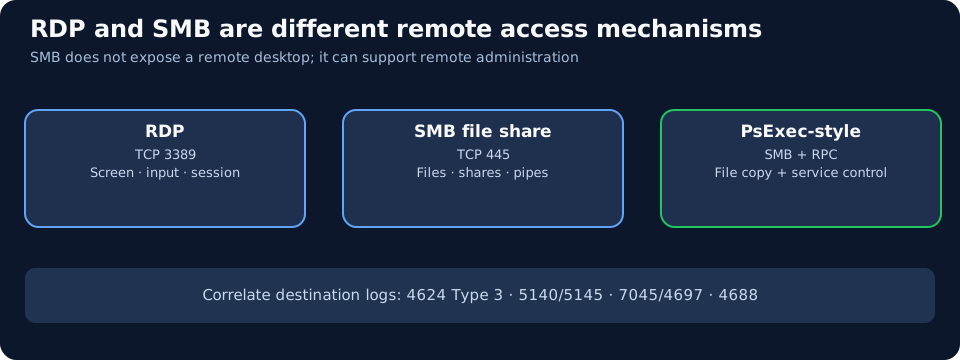
| Technology | Typical port | What remote access means | SMB’s role |
|---|---|---|---|
| RDP | TCP/UDP 3389 | Remote interactive graphical desktop | Not required for core RDP; redirected resources are separate features |
| SSH | TCP 22 | Remote shell / secure file transfer | Not required |
| WinRM / PowerShell Remoting | TCP 5985/5986 | Remote management over WS-Management | Not required for the normal command channel |
| SMB file share | TCP 445 | Read/write a remote share | Primary protocol |
| PsExec-style remote execution | TCP 445 (and RPC transport as applicable) | Remote execution using admin shares, Service Control Manager and sometimes named pipes | Usually fundamental to this method |
| WMI / DCOM-based management | RPC endpoint mapper + negotiated RPC ports | Remote administrative functions | May use SMB in related workflows; not universally required |
Key distinction: Seeing SMB remote execution does not mean a user logged in with RDP or opened a remote desktop window. Likewise, every connection to port 445 is not remote command execution.
3. What happens during a normal SMB connection?
- Name resolution: The client locates the server, preferably with trusted DNS.
- SMB NEGOTIATE: The peers agree on an SMB dialect and security capabilities.
- SESSION_SETUP: Authentication is negotiated—commonly Kerberos or NTLM in Windows.
- TREE_CONNECT: The client attaches to a share, e.g.
\\server\Finance. - CREATE/OPEN, READ, WRITE and CLOSE: The client works with files and directories.
CREATEcan also mean opening an existing object. - Disconnect: File handles, tree connections and/or the session are closed as needed.
Kerberos vs NTLM: In a domain, clients may request a ticket for a cifs/server SPN. NTLM uses challenge-response authentication. Captured NetNTLMv2 responses are not the same as the user’s NT hash.
Administrative shares
| Share | Typical purpose | Monitoring implication |
|---|---|---|
C$ |
Administrative access to the C: volume | High-value target; investigate unusual clients |
ADMIN$ |
Windows system directory administrative share | Frequently involved in remote management/file copy |
IPC$ |
Named-pipe and related IPC access | Can carry RPC; access alone is not malicious |
SYSVOL and NETLOGON |
AD policy/logon content | Normal domain activity; potentially high event volume |
The existence of IPC$ does not imply that anonymous/null-session access is allowed.
4. How PsExec-style remote execution uses SMB
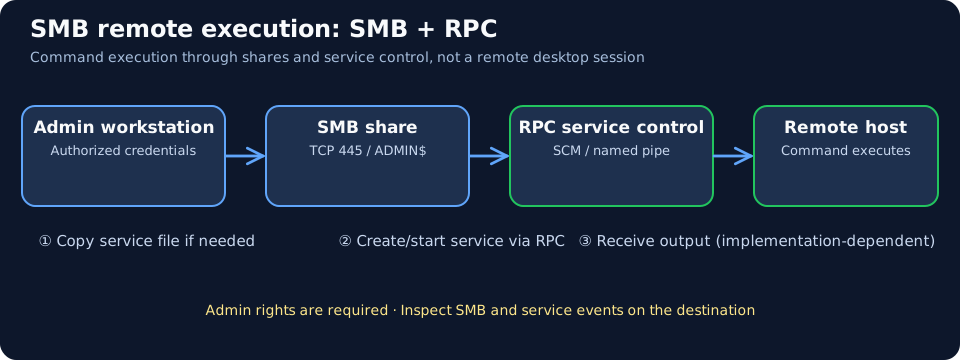
For a common service-based remote execution pattern:
- An administrator or attacker with sufficient remote administrative rights authenticates to the target.
- SMB provides access to an administrative share such as
ADMIN$; some implementations copy a service executable to the host. - RPC accesses the Service Control Manager (SCM), sometimes over SMB named pipes, to create or start a service.
- A command/process runs on the remote host with the privileges assigned to that service.
- Output is returned through implementation-dependent channels such as named pipes.
Not all implementations copy a file, use the same service name or transport every RPC call over SMB. SMB is often the file/pipe transport; SCM RPC performs service management. Remote control does not imply an interactive desktop.
Examples include legitimate Microsoft Sysinternals PsExec and attacker use of similar service-execution workflows. The tool’s presence alone is not proof of malicious activity.
5. Major SMB-related attack classes
| Attack technique | How it works conceptually | Primary evidence | Main mitigations |
|---|---|---|---|
| Share enumeration / anonymous access | Discover reachable hosts, shared folders or overly permissive anonymous interfaces | Many 445 connections, 5140/5145, share inventory | Restrict 445, remove anonymous access, least privilege |
| LLMNR/NBT-NS poisoning and NTLM capture | Induce a client to authenticate to a rogue SMB endpoint after spoofed name resolution | Suspicious name replies, NTLM handshakes, unusual destinations | Disable unnecessary fallback resolution, restrict outbound NTLM/445 |
| NTLM relay to SMB | Forward an authentication exchange to a vulnerable SMB target | Authentication anomalies and follow-on share/RPC usage | Require SMB signing and appropriate server hardening |
| Pass-the-Hash | Use an already-compromised NT hash to perform NTLM authentication | Unusual network logon/account/source combinations | Credential Guard, LAPS, NTLM reduction, admin tiering |
| Admin-share lateral movement | Access C$, ADMIN$ or IPC$, copy files, invoke remote execution |
4624 type 3 → 5140/5145 → 7045/4697 → 4688 | Least privilege, network segmentation, EDR |
| Password spraying | Try common passwords across multiple accounts online | 4625, 4776, authentication failures | Access control, password hygiene, monitoring |
| SMB implementation vulnerabilities | Exploit vulnerable SMB server code, e.g. SMBv1 MS17-010 or SMBGhost CVE-2020-0796 | IDS signatures, vulnerable versions, network/endpoint evidence | Patch affected builds, remove SMBv1, restrict 445 |
| Forced SMB authentication | Lure a user or system into fetching a remote UNC reference or initiating remote authentication | Odd UNC paths, outbound 445, NTLM exchange | Restrict outbound 445/NTLM, harden endpoints and RPC |
| Data theft or ransomware via shares | Abuse existing write/read access to collect or alter shared files | 5145, 4663, EDR file telemetry, abnormal volume | Least privilege, behavior detection, immutable/offline backups |
NTLM capture vs relay vs Pass-the-Hash
- Capture: Obtain a NetNTLM challenge-response, potentially allowing offline password guessing. This is not an NT hash dump.
- Relay: Forward a live authentication exchange to a target that accepts it under vulnerable conditions. The attack does not first need to recover the password.
- Pass-the-Hash: Authenticate using an already obtained NT hash, often to services accepting NTLM. SMB signing does not, by itself, stop valid hash-based authentication.
SMB signing protects the SMB target against ordinary NTLM relay to that signed session. It does not secure every other destination protocol (for example LDAP or HTTP); deploy protocol-specific signing, channel binding, EPA and NTLM controls as appropriate.
Key CVEs to recognize
- MS17-010 / CVE-2017-0144: Well-known SMBv1 vulnerability family associated with EternalBlue and WannaCry; apply patches and remove SMBv1.
- CVE-2020-0796 (SMBGhost): SMB 3.1.1 compression issue in affected historic Windows builds; patched systems and correct access restrictions are the solution.
6. Windows events to investigate
Location matters: SMB file-share and service-creation events generally appear on the destination server, while authentication validation and Kerberos events may also involve domain controllers. Collect both endpoint and DC telemetry.
| Event | Source / meaning | Important caveat |
|---|---|---|
| 4624 | Security: successful logon; Type 3 often reflects SMB network access | Also generated by other network services; does not prove PsExec or PtH |
| 4625 | Security: failed logon | Investigate outcome, source and authentication mechanism |
| 4776 | Credential validation using NTLM (often DC for domain accounts) | Does not by itself identify a malicious SMB session |
| 4769 | DC Kerberos service ticket request | A CIFS ticket does not imply a Kerberoasting attempt |
| 5140 | Security: a network share was accessed | Share-level information, not a per-file write proof |
| 5145 | Security: detailed file-share access check | An access check isn’t proof of completed file modification |
| 4663 | Security: object access with suitable File System SACL/audit | Requires targeted audit configuration |
| 7045 | System: new service installed | Service installation, not guaranteed hostile |
| 4697 | Security: service installed when audit enabled | Optional depending on audit policy |
| 4688 | Security: process creation if auditing enabled | Stronger with command-line/process context |
| Sysmon 1/3/11/17/18 | Process, connection, file and pipe telemetry when configured | Collection and configuration vary |
Counting 5140 correctly: Microsoft documents 5140 at the first share access attempt in a session. Its event count is not a count of file opens, writes or transferred bytes; many operations may follow one event. Later activity in an existing session may have no new 5140. Correlate 5145, appropriately configured 4663 and EDR file records by session, identity and time. 5140 generation conditions.
Strong investigative sequence: 4624 Type 3 → 5140/5145 ADMIN$ → suspicious file creation → 7045/4697 → 4688/Sysmon 1. Investigate the requesting host, account, service binary, signatures and the organization’s change window before attributing it to an attacker.
7. Practical Splunk detection examples
These are field-name templates. Check real indexes, time range, Windows event parsing, auditing and ingestion first.
7.1 Confirm share auditing data is present
index=* (EventCode=5140 OR EventCode=5145 OR EventID=5140 OR EventID=5145)
| stats count by host sourcetype
| sort - count
If the search returns no events, verify Audit File Share and Audit Detailed File Share policies on the destination host before treating the absence as evidence of no activity.
7.2 Detect unusual administrative-share access
index=* (EventCode=5140 OR EventID=5140)
| eval share=coalesce(ShareName,Share_Name)
| eval requester=coalesce(SubjectUserName,Account_Name,user)
| eval source_ip=coalesce(IpAddress,Source_Address,src_ip)
| where isnotnull(share)
| where like(upper(share),"%\\ADMIN$")
    OR like(upper(share),"%\\C$")
    OR like(upper(share),"%\\IPC$")
| stats count as events values(share) as shares dc(host) as target_host_count values(host) as targets by requester source_ip
| sort - target_host_count - events
Adapt paths and escaping to the extracted field values. Beware that ADMIN$ and IPC$ are legitimately used by administration and application services.
7.3 Review new service installations
index=* (EventCode=7045 OR EventID=7045 OR EventCode=4697 OR EventID=4697)
| table _time host EventCode EventID ServiceName ServiceFileName ImagePath AccountName
| sort - _time
Correlate each installation with a preceding admin-share logon, destination network activity, change records and process/file telemetry. A 7045 event alone does not establish remote execution or malicious intent.
7.4 Detect fan-out to multiple SMB destinations
index=* (dest_port=445 OR dport=445)
| eval src=coalesce(src_ip,src,source_ip)
| eval dst=coalesce(dest_ip,dest,destination_ip)
| bin _time span=5m
| stats dc(dst) as distinct_servers count as connections values(dst) as servers by _time src
| where distinct_servers>=8
| sort - distinct_servers
This query requires a normalized network connection data source; the field names and threshold are illustrative. Network scans, asset inventories and legitimate software deployments can cause similar bursts.
8. Network investigation: Zeek, Suricata and Wireshark
- Zeek
conn.loghelps establish client-to-server TCP 445 connections. If parsed and enabled, SMB-related file, share-mapping and command logs can reveal metadata. - Suricata can detect some known SMB exploit patterns when appropriate rules and network visibility exist. No rule set detects all lateral movement.
- Wireshark display filters:
tcp.port == 445,smb2,smb2.cmd == 3(TREE_CONNECT),smb2.cmd == 9(WRITE). - With SMB Encryption, network sensors may not see file paths or individual commands; rely more on SMB server auditing, EDR and file-system records.
9. Defenses and administrator checks
Verify current configuration (read-only)
Get-SmbServerConfiguration |
  Select-Object EnableSMB1Protocol,EnableSMB2Protocol,RequireSecuritySignature,EncryptData

Get-SmbClientConfiguration |
  Select-Object RequireSecuritySignature,EnableInsecureGuestLogons

Get-SmbConnection

Get-SmbShare
Get-SmbShareAccess -Name "Finance"
EnableSMB2Protocol includes the SMB 2.x/3.x server stack on supported Windows versions. Per-connection signing and encryption may differ from global configuration values.
Recommended hardening priorities
- Patch SMB implementations (Windows, Samba, NAS) and remove SMBv1 wherever possible.
- Require SMB signing on appropriate SMB clients and servers. Check legacy compatibility before enforcement. Signing protects integrity, not confidentiality.
- Enable SMB 3.x encryption for sensitive file shares, where supported and needed.
- Prefer Kerberos, reduce NTLM, and investigate compatibility before enforcing NTLM blocking. SMB signing does not stop Pass-the-Hash by itself.
- Segment TCP 445: restrict workstation-to-workstation access, allow approved file servers and domain controllers as necessary, and block SMB to/from the public internet except for explicitly engineered secure solutions.
- Restrict administrators: unique local administrator passwords with Windows LAPS, Credential Guard where applicable, separate administrative accounts and least-privilege share/NTFS permissions.
- Enable appropriate destination logging: 4624, 5140/5145, relevant process and service events. Avoid excessive high-volume auditing on all shares without capacity planning.
- Prepare for ransomware: protected backups, recovery tests and alerting on anomalous mass file modification.
Signing is not SMB Encryption. Signed SMB can protect against many message-tampering and SMB-relay attacks while file content remains readable on the wire. Encryption protects confidentiality as well as integrity, when negotiated and enforced.
Microsoft’s Windows 11 24H2 and Windows Server 2025 have improved SMB signing defaults; specific edition, client/server role, patch and applied policy still matter, so inspect the device rather than assuming every connection is signed.
10. DFIR example: suspected SMB lateral movement
Fictional timeline: A normal workstation named CLIENT01 unexpectedly connects to FILE01:445, opens ADMIN$, transfers a program and is followed by a service installation on FILE01.
- Scope: Identify all servers contacted by
CLIENT01over TCP 445 and the account used. - Authentication: Review destination
4624Type 3 and related domain authentication telemetry. - Share access: Review
5140and5145, including the source IP, share and available relative filename. - Execution: Examine
7045or4697, then4688/Sysmon; collect the binary hash, signing details and command line where available. - Classify: Check whether this was sanctioned software distribution, administrative maintenance, PsExec-style remote execution, or suspicious activity. Do not infer PtH or NTLM relay solely from SMB use.
- Contain and remediate: Preserve evidence, isolate confirmed affected systems as appropriate, review the compromised account, rotate secrets safely and restrict unnecessary SMB lateral connectivity.
11. Key takeaways
- RDP shows a remote desktop; SMB accesses remote shares/pipes and can enable remote execution with RPC/service-control functions.
- A connection to
ADMIN$does not prove a command was executed. Correlate with service and process creation. - NTLM capture, NTLM relay and Pass-the-Hash are different attack mechanisms.
- Strong SMB defense combines signing, encryption as needed, patched implementations, Kerberos/NTLM controls, least privilege and network segmentation.
- Distinguish successful access, access checks, and confirmed malicious execution when writing a DFIR conclusion.
12. Official references and related wiki articles
- MITRE ATT&CK: SMB/Windows Admin Shares (T1021.002)
- MITRE ATT&CK: Multi-event SMB lateral movement detection (DET0530)
- Microsoft Sysinternals: PsExec
- Microsoft: Overview of SMB signing
- Microsoft: Control SMB signing behavior
- Microsoft: SMB security hardening
- Microsoft: Audit File Share
- Microsoft: Event 5140
- Related: WPAD Security
- Related: Kerberoasting
Distinguish Share Checks from NTFS File Evidence
Use eight synthetic cases to distinguish the share check from the access right used.
Related articles
Packet Capture Gaps · Did the Network Drop It or Did the Sensor Miss It?
Use paired TCP captures, acknowledgments and sensor counters to tell a coverage gap from possible network loss.
Certificate Transparency · Verify Log Evidence and Investigate Unexpected Issuance
Distinguish a certificate log entry from an SCT, a proof of inclusion and a certificate served by an HTTPS endpoint.