Network Security · Beginner
WPAD Security: Auto-Discovery, Spoofing and DFIR
How Windows Proxy Auto-Discovery works, how attackers abuse it, and how defenders investigate suspicious WPAD activity.
Updated 2026-10-22
On this page
What is WPAD?
Web Proxy Auto-Discovery (WPAD) is a mechanism through which an operating system or application locates proxy configuration automatically. WPAD is not itself a proxy server. It discovers a Proxy Auto-Configuration (PAC) file, commonly named wpad.dat, which tells supported clients whether to connect directly or use a specific proxy.
Think of WPAD as the question: “Which proxy settings should I use on this network?”
Normal workflow
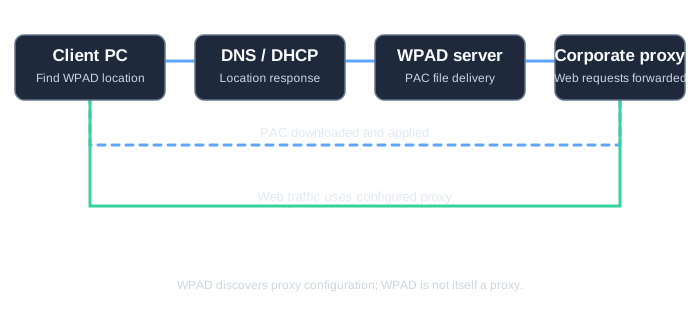
- A client with automatic proxy discovery enabled looks for a WPAD configuration location, commonly using DHCP or DNS.
- It may resolve a hostname such as
wpad.example.comand fetchhttp://wpad.example.com/wpad.dat. - The returned PAC file contains JavaScript proxy-selection rules.
- The client follows those rules when making supported web requests.
For example, this illustrative PAC snippet sends requests through a corporate proxy:
function FindProxyForURL(url, host) {
  return "PROXY proxy.example.com:8080; DIRECT";
}
Not every application honors WPAD or PAC files, and proxy discovery behavior varies with the client and its settings.
Reading the PAC example: PROXY proxy.example.com:8080; DIRECT offers both a proxy and a direct route. Clients that implement this fallback may connect directly when the proxy is unavailable; this is not a proxy-enforcement policy. Retry and failover behavior varies by client. If proxy use is mandatory, verify the approved network egress controls as well as PAC behavior. PAC return values and fallback.
How can attackers abuse WPAD?
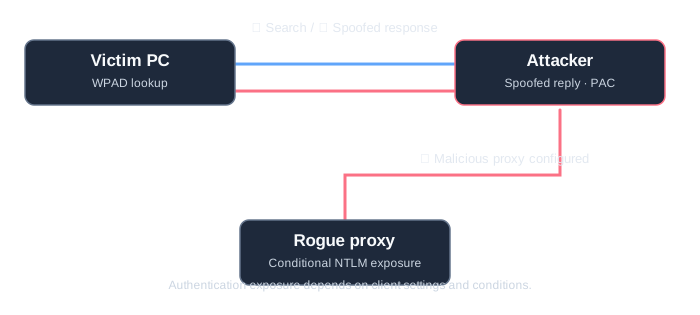
When an attacker can manipulate WPAD discovery on a network, they may impersonate the configuration server and supply a malicious PAC file:
- The client searches for WPAD configuration.
- The attacker supplies a fraudulent discovery response, subject to the network and client configuration.
- The victim fetches attacker-controlled proxy settings.
- Supported web requests may be redirected to the attacker’s proxy.
- Under specific authentication and client-policy conditions, the attacker may trigger or capture an NTLM challenge-response exchange.
Important: WPAD discovery does not automatically expose a plaintext password, an NT hash, or credentials. Captured NetNTLM challenge-response data is different from an NT hash and may be susceptible to offline password guessing or certain relay scenarios under additional conditions. Modern Windows mitigations can restrict automatic credential transmission during WPAD discovery.
Can a rogue proxy read HTTPS too?
Traffic redirection and TLS decryption are separate capabilities. With an ordinary HTTPS CONNECT tunnel and valid certificate verification, a proxy can observe connection metadata such as the destination, timing and volume without automatically reading the encrypted body. Reading content requires additional conditions, such as trusted TLS inspection, endpoint compromise or a certificate-validation failure. Distinguish plaintext HTTP, proxy authentication and application data inside HTTPS. CONNECT and TLS tunneling.
WPAD versus LLMNR / NBT-NS
| Technology | Legitimate purpose | Potential abuse |
|---|---|---|
| WPAD | Discover proxy configuration | Malicious PAC file / rogue proxy |
| DNS | Resolve names such as wpad.example.com |
Poisoned or attacker-controlled resolution |
| LLMNR / NBT-NS | Legacy local name resolution | Spoofed name replies and traffic redirection |
WPAD is the discovery goal; DNS, DHCP and, in some configurations, fallback name-resolution protocols can be paths to that goal. Disabling LLMNR alone does not eliminate WPAD risk.
DFIR: what to look for
- DNS queries or responses for
wpadand environment-specific WPAD FQDNs. - HTTP requests for
/wpad.dat, their source and destination addresses, and the returned PAC content where available. - PAC files that route traffic to unfamiliar or unapproved proxy hosts.
- Unexpected proxy traffic originating from multiple workstations.
- HTTP
407 Proxy Authentication Requiredand NTLM-relatedProxy-Authorizationheaders, where visible; neither proves that credentials were stolen. - Changes to proxy configuration or the appearance of a new WPAD host in DNS/DHCP records.
Useful investigation workflow
- Establish whether auto-discovery is enabled and which legitimate proxy infrastructure exists.
- Identify the WPAD hostname and IP address returned to the affected workstation.
- Obtain and inspect the PAC file safely; do not execute an untrusted PAC file on an analyst workstation.
- Correlate DNS, HTTP and proxy logs, network sessions and endpoint activity over the same time window.
- Determine whether authentication was attempted or succeeded, rather than inferring compromise from a WPAD lookup.
Example Splunk search (adapt field names to your environment)
index=* ("wpad.dat" OR "wpad")
| stats count values(uri) as uris values(dest_ip) as destinations by src_ip
| sort - count
This is an exploratory search, not a production detection rule. The index, field names, logging coverage and normal WPAD behavior must be verified first.
Defenses
- Disable Automatically detect settings when WPAD is not needed; use centrally managed proxy configuration where appropriate.
- Restrict who can modify corporate DNS/DHCP WPAD records and PAC files.
- Monitor for unexpected WPAD servers, proxy destinations and NTLM proxy authentication.
- Reduce unnecessary NTLM usage; enforce SMB signing where applicable to limit certain SMB relay scenarios. SMB signing does not prevent every WPAD attack or every type of relay.
- Validate changes in a pilot group: turning off WPAD can affect networks that depend on automatic proxy configuration.
Disablement scope: user settings and WinHTTP
Turning off Automatically detect settings in Windows is not proof that every service and application has stopped using WPAD. User proxy preferences, WinHTTP API calls and application-specific implementations have different scopes.
For supported Windows 10 version 1809 / Windows Server 2019 and later environments, Microsoft documents setting the DisableWpad DWORD to 1 at the following location to restrict WinHTTP API discovery. The commands below inspect configuration only; they do not change it.
Get-ItemProperty -LiteralPath 'HKLM:\SOFTWARE\Microsoft\Windows\CurrentVersion\Internet Settings\WinHttp' -Name DisableWpad -ErrorAction SilentlyContinue
netsh winhttp show proxy
A missing value does not establish whether an application actually uses WPAD. Nor is netsh winhttp show proxy a complete view of every application’s automatic or per-request proxy decisions. Check user UI, application/service settings, effective policy and observed connections. Restricting WinHTTP discovery does not block direct DNS lookups such as nslookup wpad. Inventory dependencies before applying changes through the approved process, and test browser and service-account contexts, including direct fallback. Microsoft disablement scope.
References
- Microsoft: WinHTTP AutoProxy support
- MDN: Proxy Auto-Configuration (PAC) file
- Microsoft Security Bulletin MS16-077
DNS foundations and evidence
DNS resolution, caching, response codes and a synthetic evidence lab
Related articles
Packet Capture Gaps · Did the Network Drop It or Did the Sensor Miss It?
Use paired TCP captures, acknowledgments and sensor counters to tell a coverage gap from possible network loss.
Certificate Transparency · Verify Log Evidence and Investigate Unexpected Issuance
Distinguish a certificate log entry from an SCT, a proof of inclusion and a certificate served by an HTTPS endpoint.