Blue Team · Intermediate
Windows Persistence: Run Keys, Scheduled Tasks, Services, WMI, Detection and Response
Investigate Windows persistence through registration, triggers and execution; compare Run keys, tasks, services and WMI with audit evidence, Splunk searches and a synthetic case.
Updated 2026-10-22
On this page
Windows defense extension. Continue from Windows Lateral Movement and AD CS Security. All names and lab records are fictional. Commands inspect local configuration or logs; no persistence mechanism is installed or executed by these examples.
1. What persistence means
Persistence preserves an adversary’s ability to regain execution or access after an interruption such as process termination, logoff or reboot. The exact survival boundary depends on the mechanism. A logon entry may survive a reboot but still require the relevant user to log on; a one-time task may have no recurring behavior.
Keep persistence, execution, privilege escalation and lateral movement separate. The same service or task can support several behaviors, but one installation event does not prove all of them. A per-user entry does not automatically acquire administrator or SYSTEM privileges.
This guide covers common host mechanisms, not every Windows persistence technique. Account manipulation, domain policy, certificate-based access, boot components and application-specific extensions need separate investigation. An endpoint cleanup does not invalidate stolen credentials or authentication certificates.
2. Registration, trigger and execution are different claims
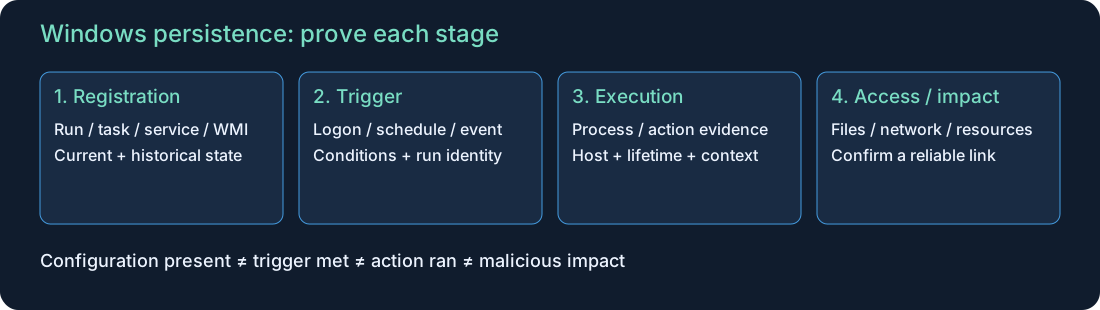
| Stage | Evidence to seek | What remains unknown |
|---|---|---|
| Configuration changed | Registry value, task XML, service configuration or WMI objects | Whether enabled, authorized and usable |
| Trigger became eligible | Logon, schedule, startup, service demand or matching WMI event | Whether execution occurred successfully |
| Process or action ran | Process identity, parent, command, account and scheduler/service context | Whether the payload achieved its objective |
| Access or impact followed | Resource access, network activity, files and application logs | Whether it belongs to this mechanism without a reliable join |
Maintain two tracks: current state tells you what is present now; historical telemetry helps establish when and by whom it changed. Neither fully replaces the other. A deleted task can leave historical events, while a longstanding task may predate retained logs.
3. Compare the four mechanisms
| Mechanism | Typical trigger / scope | Privilege considerations | Essential artifact |
|---|---|---|---|
| Run / Startup | Relevant user logon | Per-user changes can be possible without elevation; machine locations require appropriate rights | Hive/SID or resolved Startup path and exact value/link target |
| Scheduled task | Defined trigger or on-demand run | Creator rights and configured run identity differ; high privilege requires authorization | Host + full TaskPath/TaskName + complete task definition |
| Windows service | Configured startup, demand or other supported trigger | Creating/changing services requires effective SCM/service permissions | Service name, executable/arguments, account, start configuration and ACLs |
| Permanent WMI subscription | Filter matches a specified event | Namespace/object and consumer security rules apply | Filter + consumer + binding and namespace |
A writable launch target or script can matter even if the registration itself looks unchanged. Inspect the target file, parent-directory permissions and referenced scripts/libraries. A friendly name, familiar directory or valid signature is context, not a benign verdict.
4. Run keys and Startup folders
Common locations are the Run and RunOnce keys beneath Software\Microsoft\Windows\CurrentVersion in HKCU and HKLM, plus the user’s and shared Startup folders. Resolve paths for the actual affected profile; HKCU in a responder shell belongs to the responder.
Run normally applies at logon; RunOnce has one-time and deletion semantics, with documented exceptions. Machine-wide Run entries do not mean execution as SYSTEM. Registry architecture views and loaded/unloaded user hives affect what an inventory sees. Microsoft Run/RunOnce reference, MITRE T1547.001.
For each candidate, preserve the exact value type/data, hive/SID, file or shortcut content, resolved target, arguments, working directory and available change evidence. Do not launch an unknown target to identify it. A Startup shortcut’s file hash describes the shortcut, not necessarily the executable it references.
5. Scheduled tasks
Read the complete definition: triggers, actions, enabled state, principal, run level, logon type, conditions and settings. Separate the user registering a task from the account configured to run it. Registration is not execution; a task can be disabled, have unmet conditions or fail to launch.
Security 4698 records task creation when auditing is configured; 4702 records updates and 4699 deletion. Preserve the full path and XML rather than searching names alone. Task Scheduler Operational history and process telemetry can help establish actual runs. Retention, event version and configured logging affect visibility. Microsoft 4698 documentation, task audit policy.
Compare old and new definitions, including changes to existing vendor tasks. A task under a Microsoft-looking path is not automatically genuine, and a root-level task is not automatically malicious. Last-run state is a useful lead, not a complete historical execution record.
6. Windows services
Inspect the service’s internal name, binary command, run account, start mode, state, dependencies and effective permissions. Some services load a DLL through a shared host, so an executable-path listing may not expose every component. An unquoted path is not automatically exploitable: determine parsing, spaces, writable candidate paths and execution context.
Security 4697 belongs to Audit Security System Extension; System 7045 is a Service Control Manager installation event. They have different schemas and audit dependencies. Installation does not establish startup or malicious persistence. Changing an existing service or replacing its payload can also matter without a fresh install event. Microsoft 4697 documentation, Splunk System 7045 example, MITRE T1543.003.
Service-based remote administration can overlap with the lateral movement guide. Establish remote source, authentication and duration separately. Short-lived remote execution is not proof of a recurring persistence arrangement.
7. Permanent WMI event subscriptions
A permanent subscription links an event filter to a consumer through a binding. Review all three objects, the filter’s event namespace/query, the consumer’s actual action/destination and relevant security context. A WMI query, WmiPrvSE.exe process or ordinary remote WMI execution alone does not prove a permanent subscription. Microsoft permanent event consumers, MITRE T1546.003.
The read-only example below examines the conventional root/subscription namespace. It is not an exhaustive namespace inventory and lists consumer names rather than all subtype properties. Inspect the referenced consumer’s class-specific content through an approved evidence workflow. Monitoring and management products also use subscriptions.
8. Evidence and audit prerequisites
| Evidence | Channel / collection | Interpretation |
|---|---|---|
| 4698 / 4702 / 4699 | Security; Audit Other Object Access Events | Task create / update / delete |
| 4697 | Security; Audit Security System Extension | Service installation |
| 7045 | System; Service Control Manager | Service installation in a separate schema |
| 4657 | Security; Audit Registry and matching Set Value SACL | Audited registry value modification |
| 4688 | Security; Audit Process Creation | Process creation; command line needs its additional policy |
| Sysmon 1 / 11 | Sysmon Operational and applicable configuration | Process creation / file creation or overwrite |
| Sysmon 12 / 13 / 14 | Sysmon Operational and applicable configuration | Registry create/delete, value set, rename |
| Sysmon 19 / 20 / 21 | Sysmon Operational and applicable configuration | WMI filter, consumer and binding activity |
| Current configuration / EDR | Affected host | Live state, file metadata, permissions and execution context |
Provider + channel + event ID identify an event family; the number alone is insufficient. Enable and test audit generation before relying on forwarding. Security registry auditing needs an appropriate SACL as well as policy. Sysmon coverage depends on installed version and effective include/exclude rules; network event 3 is not enabled by default. Microsoft 4657, 4688, Sysmon reference.
A process ID can be reused. Prefer compatible ProcessGuid-based evidence where available, plus host and time; for PID-only joins retain creation time and process lifetime. Logon IDs are host/session context, not global identity keys. Do not join unrelated hosts by task name, service name or PID.
9. Read-only local inspection
Run on a host you administer with appropriate permissions and installed modules. These are live queries, not forensic acquisition; errors and missing objects must be recorded.
A. Tasks and services
Get-ScheduledTask |
  Select-Object TaskPath,TaskName,State,Actions,Triggers,Principal

Get-CimInstance -ClassName Win32_Service |
  Select-Object Name,DisplayName,State,StartMode,StartName,PathName
Actions, triggers and principal are nested objects; a formatted list can omit details. Inspect the complete task definition and service-specific settings before drawing conclusions. PathName can contain arguments; do not pass it directly to a file-hashing tool as though it were a resolved filename.
B. Current profile and machine logon locations
$runPaths = @(
  'HKCU:\Software\Microsoft\Windows\CurrentVersion\Run',
  'HKCU:\Software\Microsoft\Windows\CurrentVersion\RunOnce',
  'HKLM:\Software\Microsoft\Windows\CurrentVersion\Run',
  'HKLM:\Software\Microsoft\Windows\CurrentVersion\RunOnce'
)
foreach ($runPath in $runPaths) {
  if (Test-Path -LiteralPath $runPath) {
    Get-ItemProperty -LiteralPath $runPath
  }
}
$startupPaths = @(
  [Environment]::GetFolderPath('Startup'),
  [Environment]::GetFolderPath('CommonStartup')
)
foreach ($startupPath in $startupPaths) {
  if ($startupPath -and (Test-Path -LiteralPath $startupPath)) {
    Get-ChildItem -LiteralPath $startupPath -Force |
      Select-Object FullName,Length,LastWriteTimeUtc
  }
}
This checks four keys in the PowerShell process’s registry view and two resolved folders. It does not enumerate every profile, alternate architecture view or offline hive. Missing keys are normal on some systems. It lists Startup files without following or executing their targets. Timestamps can change or be manipulated.
C. WMI subscription components
Get-CimInstance -Namespace root/subscription -ClassName __EventFilter |
  Select-Object Name,EventNamespace,Query,CreatorSID
Get-CimInstance -Namespace root/subscription -ClassName __EventConsumer |
  Select-Object @{Name='ClassName'; Expression={$_.CimClass.CimClassName}},Name,CreatorSID
Get-CimInstance -Namespace root/subscription -ClassName __FilterToConsumerBinding |
  Select-Object Filter,Consumer
Join the returned Filter and Consumer references in their namespace; names alone are insufficient. Access-denied results are a visibility gap, not proof of absence. These commands do not create or remove a subscription.
D. A bounded Security-log sample
$since = (Get-Date).AddHours(-4)
Get-WinEvent -FilterHashtable @{
  LogName='Security'
  Id=4698,4702,4699,4697,4657
  StartTime=$since
} -MaxEvents 200 |
  Select-Object TimeCreated,Id,ProviderName,MachineName,Message
The 200-event cap and four-hour window are explicit limits. This does not include System 7045, Sysmon or Task Scheduler Operational; collect those separately when needed. Preserve source EVTX/XML and collection timestamps for a real investigation.
Autoruns can supplement inventory across additional autostart surfaces. Preserve a full baseline before using display filters. Signature checks are not a complete trust decision, and reputation/upload features can contact external services; handle organizational samples under the approved evidence policy.
10. Splunk investigation searches
Set the real indexes, time range and parser mappings first. Channel/LogName, provider names and event data vary by collector. These examples deliberately require a mapped channel; investigate excluded or missing fields separately. They are investigation templates, not operationally validated detections.
A. Task changes
index=windows (EventCode IN (4698,4702,4699) OR EventID IN (4698,4702,4699))
| eval channel=coalesce(Channel,LogName)
| where channel="Security"
| eval event_id=coalesce(EventCode,EventID), endpoint=coalesce(Computer,host)
| table _time endpoint event_id SubjectUserName SubjectLogonId TaskName TaskContent TaskContentNew
| sort 0 _time
Compare definitions across updates using host + full task path and time. Updated task content may have a different field name/schema; normalize it from raw XML before comparison. Correlate the creator logon on the same endpoint and seek scheduler/process evidence for execution.
B. Service installation from two sources
index=windows (EventCode IN (4697,7045) OR EventID IN (4697,7045))
| eval channel=coalesce(Channel,LogName), provider=coalesce(Provider_Name,ProviderName,SourceName)
| eval event_id=coalesce(EventCode,EventID), endpoint=coalesce(Computer,host)
| where (channel="Security" AND event_id=4697)
    OR (channel="System" AND event_id=7045 AND provider="Service Control Manager")
| table _time endpoint channel event_id ServiceName ServiceFileName ImagePath
    ServiceAccount AccountName ServiceStartType StartType SubjectUserName
| sort 0 _time
Map the Security and System fields independently. The same installation can produce both records; do not count them as two services. The System record does not universally identify the initiating user, so do not substitute the run account for the creator.
C. Registry changes near conventional logon keys
index=sysmon (EventCode=13 OR EventID=13)
| eval channel=coalesce(Channel,LogName)
| where channel="Microsoft-Windows-Sysmon/Operational"
| where like(lower(TargetObject),"%currentversion%")
| table _time host Image ProcessGuid User TargetObject Details
| sort 0 _time
The broad currentversion substring is a candidate filter, not an exact Run-key detector; it includes unrelated paths and misses mechanisms elsewhere. Confirm exact key boundaries, value name, hive/SID and both relevant views in the results. A value-set event is not proof that its target executed.
D. WMI registration activity
index=sysmon (EventCode IN (19,20,21) OR EventID IN (19,20,21))
| eval channel=coalesce(Channel,LogName), event_id=coalesce(EventCode,EventID)
| where channel="Microsoft-Windows-Sysmon/Operational"
| table _time host event_id Operation User EventNamespace Name Query
    Type Destination Consumer Filter
| sort 0 _time
Filter, consumer and binding events have different fields. Absence of a field can be expected for one event type. Reconstruct object references and their historical state; 19/20/21 do not establish consumer execution. Tune against approved monitoring software and investigate unexpected actors or changed destinations.
11. A synthetic investigation exercise
Download 12 fictional events. This shared English CSV is an analyst worksheet, not raw XML or an import-ready detection dataset. Its process_ref values are teaching labels, not native ProcessGuid values. XML summaries and the 7045 actor are fictional enrichment.
| Time UTC | Observation | Investigation question |
|---|---|---|
| 03:00 | InventoryLab registered; inventory process observed | Does CHG-LAB-01 and scheduler evidence explain both? |
| 03:10 | Per-user LabReminder Run value set | Which SID, command and file? No later execution supplied |
| 03:12–15 | UpdateCheckLab created, changed; check.exe observed | What changed and can execution be attributed to this task? |
| 03:16 | Same task path on WS02 | Independent host object; do not merge with WS01 |
| 03:20 | LabBackupSvc installation | Approved installer, startup configuration and actual execution? |
| 03:22 | WMI filter, consumer and binding registered | Full references, action, permission and execution? |
| 03:30 | WS01 UpdateCheckLab deleted | Did the process stop and were other mechanisms addressed? |
Answer guide: inventory activity may be legitimate but still needs its change evidence. WS01 UpdateCheckLab deserves review because its action changed and points into a user profile; this is not a malware verdict. A nearby process is only a candidate link without matching task execution evidence. The Run value and WMI binding demonstrate registration activity, not successful later execution. WS02 is separate. A service installation does not prove a start. Deleting one task does not end an existing process or remove other persistence.
Write findings as observed / inferred / unknown. Obtain the original task XML versions, scheduler history, registry data, service configuration, WMI references, relevant file metadata and endpoint process evidence. Do not invent a successful trigger or payload behavior missing from the worksheet.
12. Correlation and response workflow
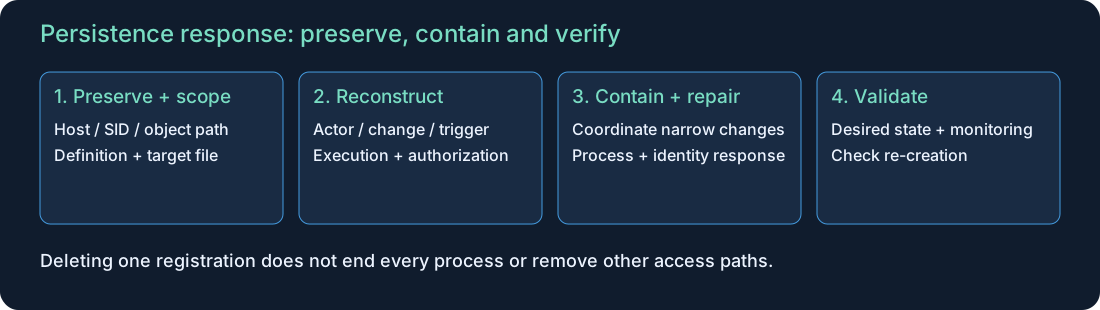
- Establish host identity, time zone/clock alignment, affected user/SID and collection limits.
- Preserve the registration and payload evidence before changes where feasible; prioritize containment when active harm requires it.
- Reconstruct the creator, configuration change, eligible trigger, actual execution and subsequent activity with independent evidence.
- Validate authorized software/change records and effective write permissions; inspect additional persistence and stolen identities.
- Coordinate endpoint isolation and narrowly scoped disabling/removal with the service owner and incident lead.
- Address running processes, compromised payloads, accounts/tokens and initial access separately.
- Validate the desired state and monitoring; use controlled trigger testing only when safe, then monitor for re-creation and recurrence.
Do not blindly delete services, tasks or WMI objects by name. Preserve dependencies and recovery information. Rebooting can trigger a payload and erase volatile evidence; it is not an investigation shortcut. Removal may require rebuild/recovery if host integrity cannot be established.
13. Hardening and common mistakes
| Control | Verification |
|---|---|
| Least privilege and separate administration | Effective permissions on SCM/services, tasks, registry and WMI |
| Protect launch targets and parent folders | ACL review for binaries, scripts, libraries and configuration |
| Application control and endpoint protection | Tested policy and legitimate-workflow coverage |
| Audit/EDR collection and retention | Known benign changes produce usable end-to-end evidence |
| Managed baselines and change ownership | Reviewed differences with owners, expiry and rollback |
| Identity response and recurrence monitoring | Credentials/certificates addressed when implicated; no unapproved re-creation |
Avoid treating all PowerShell, WMI, signed software or user-profile paths as malicious or safe. A valid signature does not prove approval; a hash match identifies content, not intent. A clean current inventory cannot prove no earlier persistence existed.
Map supported behavior rather than tool names: Run/Startup → T1547.001; scheduled task → T1053.005; Windows service → T1543.003; WMI subscription → T1546.003. Record execution/persistence intent and evidence separately.
14. Completion checks and next learning
Explain the difference between registration and execution, identify the trigger and run identity for one mechanism, scope a task to its host/full path, and distinguish Security, System and Sysmon sources. State what the synthetic case cannot prove and how cleanup will be validated.
Review Windows logs, Splunk basics, Windows lateral movement and AD CS identity risks. Continue with the Sysmon investigation guide for event coverage, filtering and process-lifetime correlation.
Next: Windows Credential Protection and Dumping Detection connects LSASS, SAM and LSA Secrets with protection state and process-access evidence.
Source review: 22 October 2026. Microsoft references support product behavior and event interpretation; MITRE supports technique classification. Diagrams, queries and the exercise are original educational material. No persistence was installed, unknown payload executed, host policy changed or production Splunk detection validated for this publication.
Related articles
Windows App Control · Read Audit, Block and Signature Events
Connect Windows Code Integrity policy decisions, signature records and policy activation evidence without mistaking a block for malware execution.
Blue Team Fundamentals: Detection to Response
An introduction to security monitoring, triage, investigation, incident response, and detection improvement.