Active Directory · Intermediate
Windows Lateral Movement: SMB, RDP, WinRM, WMI, PsExec, Detection and Defense
Compare Windows remote access and execution paths, authentication and permissions, destination and DC logs, Splunk triage, and a synthetic DFIR investigation.
Updated 2026-10-22
On this page
Series guide 5. Start with AD Fundamentals, Kerberos, NTLM and LDAP & AD Enumeration. This guide explains authorized administration and the evidence needed to investigate its misuse. Hosts, accounts, IPs and the exercise are fictional. Configuration examples inspect the local system; they do not enable services or execute commands remotely.
1. What lateral movement actually means
Windows lateral movement is an adversary using access to one system or identity to reach another system. It is an objective and behavior, not the name of one protocol. The same remote-management features support legitimate helpdesk, deployment, inventory and incident response.
Follow the chain network reachability → authentication → authorization → session or operation → execution, if any → business impact. A reachable port proves neither valid credentials nor permission. A successful logon proves neither remote command execution nor credential theft. A file copied to a share need not have executed.
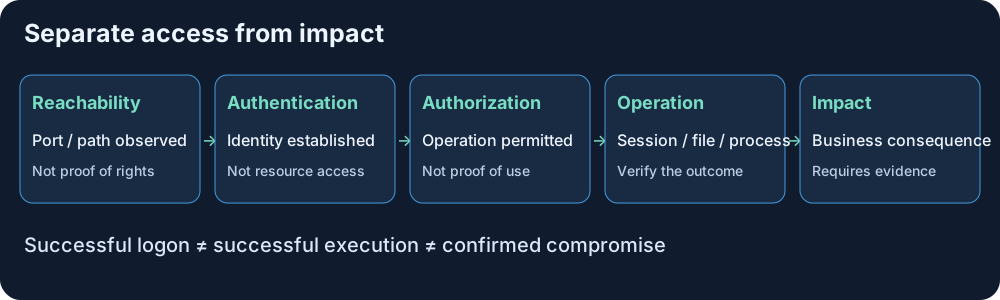
The earlier LDAP chapter modeled what a principal might control. This chapter asks which rights were actually used, against which host, through which mechanism, and with what result.
2. Compare the five remote-management paths
| Path | Typical transport | What it provides | Preconditions to check |
|---|---|---|---|
| SMB share access | TCP 445; supported SMB over QUIC uses UDP 443 | Remote files and named pipes | Server/share availability and share/NTFS or pipe permissions |
| PsExec-style service execution | Often SMB 445 plus SCM RPC over supported transports | Remote service-assisted process execution | Administrative-share access where used and service-control rights |
| RDP | Commonly TCP/UDP 3389; gateways change the observed path | Interactive remote desktop/session | RDP service, logon rights, group/policy and gateway controls |
| WinRM / PowerShell Remoting | Normally TCP 5985 HTTP or 5986 HTTPS | WS-Management operations and configured remoting endpoints | Listener, firewall, authentication and endpoint authorization |
| WMI over DCOM | TCP 135 endpoint mapping plus negotiated RPC ports | Management queries and permitted methods | DCOM/WMI namespace rights, firewall, UAC/token context |
Ports are defaults and investigation leads, not a protocol verdict or a complete firewall plan. WMI/CIM can also use WS-Man, and PowerShell remoting can use SSH. A product name is not sufficient to infer its transport. The methods below describe common Windows paths, not every vendor implementation.
3. Identity, rights and credential exposure are separate
- Kerberos tickets and NTLM responses authenticate in different ways; SMB or WinRM does not imply NTLM.
- Authorization comes from the destination, including service/endpoint ACLs, logon rights, share/NTFS rights and applicable policy.
- Local administrator is not identical to Domain Admin; local-account remote UAC restrictions and token filtering can affect an otherwise valid login.
- Pass-the-Hash, Pass-the-Ticket and NTLM relay describe different credential-use mechanisms. A successful network logon alone does not distinguish them.
- Credential exposure depends on authentication and delegation configuration, the client and protection mode; never infer it solely from the port.
Do not solve an access-denied investigation by disabling UAC, relaxing authentication or widening TrustedHosts. First identify the intended management path and exact denied permission. A valid credential for an ordinary user does not automatically allow service creation or a remote shell.
4. SMB and PsExec-style execution
SMB supports files and named pipes. A common service-execution sequence authenticates, accesses an administrative share, optionally places a service component, asks the Service Control Manager through RPC to create/start a service, and obtains output through implementation-dependent channels. SCM performs service management; SMB alone does not turn every file operation into execution.
Microsoft PsExec is a legitimate administration tool. Its options affect the service name, copied program and execution context; other tools implement similar patterns differently. Do not require one fixed service/binary name, assume every run uses SYSTEM, or assume every implementation creates a new service each time. Microsoft PsExec.
Evidence chain: destination 4624 Type 3 → relevant 5140/5145 → file evidence → service install/start evidence → process tree. A service installation event does not itself prove that the service ran. Inspect binary path, signature/hash, parent/child processes, account and approved deployment records.
5140 is session-level evidence at the first share access attempt, not a file-operation counter. 5145 is an access check, not proof a write completed. Consult the detailed SMB guide for protocol and audit prerequisites.
5. RDP: remote interactive access
RDP creates or reconnects an interactive session. On the destination, 4624 Logon Type 10 (RemoteInteractive) is a useful lead, together with TerminalServices session channels and 4778/4779 where collected. Gateway/proxy addresses, reconnects and session reuse can alter what the analyst sees.
Type 3 is not uniquely SMB; Type 10 is not proof of a human attacker. A helpdesk login may be expected. NLA authenticates before a full remote desktop is established, but NLA is not equivalent to MFA or proof of authorization for every subsequent action.
Remote Credential Guard can reduce credential exposure in supported Kerberos-based RDP scenarios. It differs from Credential Guard and Restricted Admin mode; validate deployment requirements and helpdesk use cases rather than treating these names as interchangeable. Disconnecting a session is also different from logging off. Remote Credential Guard, 4778 reconnect event.
6. WinRM and PowerShell Remoting
WinRM implements WS-Management. A listener can support administrative operations and configured PowerShell session endpoints; access depends on the endpoint and account. Default endpoints commonly require administrators, but delegated/JEA endpoints can intentionally allow narrower access.
HTTP 5985 does not automatically mean plaintext PowerShell command traffic. Supported Kerberos/NTLM remoting can protect messages after authentication; HTTPS supplies TLS transport protection and certificate-based server validation. Basic authentication is a different case and must not be treated as providing the same message protection. Check the actual authentication method, TLS and effective policy. WinRM remoting security.
Look for destination logons, WinRM operational records, endpoint process trees and script-block events where available. wsmprovhost.exe can host Windows PowerShell remoting activity, but its presence/absence is not a universal test for every PowerShell version or endpoint. A WinRM connection may be a management query or event-forwarding activity, not a remote shell.
The double-hop problem concerns delegating access from a first remote host to another resource. Avoid enabling broad CredSSP, unconstrained delegation or wildcard TrustedHosts simply to make a test work; first review the approved identity design. WinRM configuration.
7. WMI, DCOM and CIM: identify the actual operation
WMI is a management infrastructure, not just a remote-execution tool. It supports inventory and methods through provider/namespace permissions. Traditional remote WMI commonly uses DCOM/RPC; CIM sessions can use WS-Man or an explicitly selected DCOM transport. A listener on 5985 therefore does not tell you whether the operation was a PowerShell script or a CIM query. Remote WMI requirements.
WmiPrvSE.exe is a legitimate provider host. An unusual child process is a triage lead, but can also be caused by approved management software or local WMI. Correlate the caller, method/namespace where available, source connection and process lineage. Do not assume every inventory query created a process.
WMI-Activity logs can add provider and operation context when configured; do not promise that a single default event logs every successful remote operation. Remote WMI execution and permanent WMI event-subscription persistence are different behaviors, though an incident may include both.
8. Collect evidence from the right hosts
| Evidence | Typical location | What it supports / limitation |
|---|---|---|
| 4624 / 4625 | Destination Security | Successful/failed logon, type, account and available source fields |
| 4648 | Host initiating explicit-credential use | An attempt using explicit credentials, not guaranteed destination success |
| 4672 | Logon host Security | Special privileges assigned, not proof privileges were exercised |
| 4769 / 4776 | DC for domain Kerberos/NTLM context | Ticket/credential validation, not a complete remote-execution log |
| 5140 / 5145 | Share server Security | Share access / detailed access checks; require relevant share auditing |
| 7045 / 4697 | Destination System / Security respectively | Service installation; 4697 requires the relevant Security auditing |
| 4688 / Sysmon 1 | Process host | Process creation with available lineage; command-line collection/configuration matter |
| Sysmon 3 / 11 / 17 / 18 | Instrumented endpoint | Configured network, file creation and named-pipe records |
| 4778 / 4779; TerminalServices channels | Session host | Reconnect/disconnect and session lifecycle context |
| WinRM / WMI-Activity channels | Relevant management host | Mechanism-specific details depending on version/configuration |
| PowerShell 4104 | Relevant PowerShell channel | Script content when logged; not a universal record of all remote management |
| Network flows / PCAP | Sensor vantage point | Endpoints, transport, timing; encryption can hide application operations |
Collect Security audit policy, System, relevant Applications and Services channels, EDR and network coverage deliberately. Sysmon network events and PowerShell logging are not guaranteed defaults. Script logs can contain secrets; protect access and retention. 4624, 4648, Sysmon, PowerShell logging.
Audit prerequisites: review Audit Logon, Other Logon/Logoff Events for session reconnect/disconnect, Credential Validation, Kerberos Service Ticket Operations, Process Creation, Security System Extension for 4697, and File Share / Detailed File Share as relevant. Separate these Security subcategories from System, Sysmon and application-channel collection. A configured policy still needs working forwarding, parsing and retention.
9. Correlate identities, sessions and processes precisely
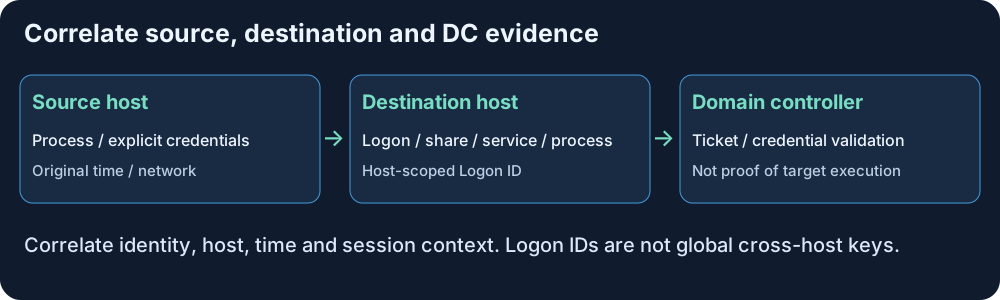
- Fix a UTC window, original timezone and clock offsets; identify source, destination and any gateway/NAT.
- Resolve account domain + name or SID; equal short names can represent different principals.
- Join Logon IDs only with the same host and boot context. A destination
TargetLogonIdmay match laterSubjectLogonIdthere; identical hexadecimal IDs on different hosts are not a global session key. - Use process GUIDs when available; PIDs can be reused. Retain process start time and parent context.
- Match share, service and process facts instead of assuming nearby events came from the same actor. A 7045 service-account field is not necessarily the initiating administrator.
- Check tickets/validation on relevant DCs, including caching and coverage gaps; absence of a new 4769 does not disprove a connection.
- Compare the source/account/target/purpose against an approved window, then investigate deviations.
The result should identify what is observed, what is inferred and what remains unverified. Close timestamps are an investigation aid, not proof of causation.
10. Splunk starting points, with prerequisites
These are SPL templates, not validated production detections. Set real indexes, time ranges, host names and parser mappings. Verify source channels: 7045 is System, not Security. The normalization in the first search avoids requiring both EventCode and EventID to exist.
A. Confirm event ingestion
index=* (EventCode IN (4624,4625,4648,4688,4697,4769,4776,5140,5145,7045)
      OR EventID IN (4624,4625,4648,4688,4697,4769,4776,5140,5145,7045))
| eval event_id=coalesce(EventCode,EventID)
| stats count by host sourcetype event_id
| sort - count
B. Baseline network and remote-interactive logons
index=windows (EventCode=4624 OR EventID=4624)
| eval logon_type=tostring(coalesce(LogonType,Logon_Type))
| eval account=coalesce(TargetUserName,Account_Name,user)
| eval src_ip=coalesce(IpAddress,Source_Network_Address,src_ip)
| eval src_ip=if(isnull(src_ip) OR src_ip="-" OR src_ip="","unknown",src_ip)
| eval account=coalesce(account,"unknown")
| eval auth=coalesce(AuthenticationPackageName,Authentication_Package,AuthenticationPackage,"unknown")
| where logon_type IN ("3","10")
| stats count AS logons values(logon_type) AS logon_types
    values(auth) AS auth_packages
    BY host account src_ip
| sort - logons
unknown preserves records with missing source/account fields for data-quality review. It is not an attribution. Type 3 includes many network services; Type 10 is a remote-interactive lead. Compare rare source/account/host combinations and approved management sources before alerting. Normalize IPv4-mapped IPv6 and actual host names as appropriate.
C. Build a destination timeline
index=windows host="APP01"
  (EventCode IN (4624,4688,4697,5140,5145,7045)
   OR EventID IN (4624,4688,4697,5140,5145,7045))
| eval event_id=coalesce(EventCode,EventID)
| table _time host event_id SubjectUserName TargetUserName
    SubjectLogonId TargetLogonId IpAddress ShareName RelativeTargetName
    ServiceName ServiceFileName ImagePath NewProcessName ParentProcessName
| sort 0 _time
This is a chronological worksheet, not a causal join. Inspect raw event XML and actual field names; not every row will populate every column. A service event by itself does not map the installer to a previous logon. Correlate with EDR and session-specific evidence.
D. Triage selected process ancestry
index=endpoint sourcetype=process_normalized
| eval parent=lower(coalesce(parent_name,"unknown"))
| where parent IN ("wmiprvse.exe","wsmprovhost.exe","services.exe")
| table _time dest_host user parent_name process_name command_line
    process_guid parent_process_guid logon_id
| sort 0 _time
This last search assumes an illustrative normalized EDR schema where parent_name is a basename; it is not a default Windows sourcetype. It intentionally includes common legitimate parents and has no automatic “malicious” verdict. Verify binary provenance, command line, user, source and change ticket. No result may mean missing schema/coverage rather than no execution.
11. Synthetic investigation lab and answer guide
Download the synthetic event worksheet (CSV). It contains 12 selected, normalized observations; it is not native Windows XML, a complete event set or a ready-made Splunk lookup. source_kind, user, detail and the other columns are teaching fields. Times are UTC; 192.0.2.0/24 is a documentation network.
| Time | Observation | First interpretation |
|---|---|---|
| 01:00 | MGMT01 / 192.0.2.10 contacts APP01:445 as ops_lab | Check approved deployment scope |
| 01:00:01–07 | Type 3, ADMIN$ check, service installation, child process | Service-based management pattern; validate operator and execution |
| 01:20 | WS23 / 192.0.2.23 contacts APP01:5985 | Newly seen management source |
| 01:20:01–04 | ops_lab Type 3; unusual wsmprovhost child; script observation | Prioritize correlation and authorization review |
| 01:30–40 | helpdesk_lab Type 10, disconnect and reconnect | Check helpdesk record; disconnect is not necessarily logoff |
Questions: Which host initiated each sequence? Is the same account being used from an unexpected source? Does the service row identify the installer? Can the script record be tied to the same session? What evidence would distinguish a support action from misuse?
Expected analysis: The first sequence is consistent with an approved deployment but still needs the real change record and binary validation. The second deserves investigation because of source and process-context changes, yet the worksheet does not prove PtH, relay, credential theft or a completed objective. The script row needs activity/session correlation. The final RDP sequence can be normal support. Local Logon IDs are scoped to APP01; the service row does not establish the initiating identity.
Next steps: preserve raw records and relevant binaries, identify the source process, verify account ownership/authorization, review additional targets and contain confirmed misuse through the incident process. Do not isolate every management host merely because a service was installed.
12. Read-only local checks for an authorized administrator
Run on the host you administer, with elevation where required. These examples do not establish a remote session, enable remoting or change firewall rules.
Get-Service -Name WinRM,TermService,Winmgmt
Get-NetTCPConnection -State Listen |
  Where-Object LocalPort -in 445,3389,5985,5986 |
  Select-Object LocalAddress,LocalPort,OwningProcess
winrm enumerate winrm/config/listener
Get-SmbServerConfiguration |
  Select-Object RequireSecuritySignature,EncryptData,EnableSMB1Protocol
A missing service/listener can be expected on a different role or edition. A listener is not evidence that a particular user can execute commands; RPC and gateways also mean this port list is incomplete. Inspect the effective endpoint/firewall policy separately.
$since = (Get-Date).AddHours(-2)
Get-WinEvent -FilterHashtable @{LogName='Security'; Id=4624,4625,4648,4688,4697,5140,5145; StartTime=$since} -MaxEvents 100 |
  Select-Object TimeCreated,Id,ProviderName,MachineName,Message
Get-WinEvent -FilterHashtable @{LogName='System'; Id=7045; StartTime=$since} -MaxEvents 30 |
  Select-Object TimeCreated,Id,ProviderName,MachineName,Message
These are bounded samples of local logs, not an exhaustive export. No matching events can reflect auditing, channel access, retention or time-range issues. Preserve originals before changing logging or clearing sessions.
13. Defense by identity, protocol and management path
| Layer | Action | Verification |
|---|---|---|
| Identity | Separate privileged accounts, use LAPS for local admins, reduce service-account rights | Named owners and scoped effective permissions |
| Reachability | Limit workstation-to-workstation management; use approved administration hosts/gateways | Allowed source/target paths and denied unneeded paths tested |
| SMB | Require appropriate signing, encryption where needed, reduce NTLM | Actual session protection and compatibility verified |
| RDP | Restrict logon rights, apply NLA and compatible gateway/MFA controls | Authorized sessions work and unapproved sources are blocked |
| WinRM | Scope listeners/firewalls and endpoint ACLs; use constrained/JEA endpoints where suitable | Permitted roles can perform only intended operations |
| WMI/DCOM | Review namespace/activation rights and management dependencies | Approved inventory works without broad access grants |
| Credentials | Evaluate Credential Guard and appropriate RDP protection modes | Documented OS/support requirements and workflow tests |
| Visibility | Centralize destination/DC/process/session data and preserve retention | Known lab activity produces expected explainable records |
Do not permanently allowlist a tool, service account or jump host without context. They can be compromised. Tune exceptions to purpose, source, target, window and owner; review them over time. Transport encryption does not remove an authenticated administrator’s legitimate command rights, and signing alone does not prevent all credential misuse.
14. Map behavior to MITRE ATT&CK
| Observed behavior | Relevant mapping | Qualification |
|---|---|---|
| RDP use for movement | T1021.001 | Investigate intent and session actions |
| SMB/admin-share movement | T1021.002 | Share use is also normal administration |
| DCOM remote services | T1021.003 | DCOM is not synonymous with all WMI |
| WinRM remote services | T1021.006 | Management traffic alone is not malicious |
| WMI execution | T1047 | Separate query, execution and persistence |
| Service execution | T1569.002 | Installation and execution are distinct |
| PowerShell execution | T1059.001 | Only when PowerShell execution is evidenced |
A single incident can have remote-service and execution mappings. Apply credential-abuse mappings only when their prerequisites are evidenced; do not label every NTLM logon Pass-the-Hash. Remote Services overview.
15. Troubleshooting and knowledge checks
| Claim / symptom | Correction or first check |
|---|---|
| Port open means execution succeeded | Check authentication, authorization and destination operation |
| Type 3 proves SMB or PtH | It is a network logon type shared by multiple services |
| 4648 proves the destination login succeeded | It records an explicit-credential attempt |
| 7045 proves a malicious service ran | Validate start/process evidence and approved deployment |
| HTTP WinRM always sends commands in plaintext | Check authentication and negotiated message protection |
| WMI always uses TCP 135 | Determine DCOM versus WS-Man/CIM and actual endpoints |
| Same Logon ID means same cross-host session | Scope to host/boot and correlate identity plus time |
| No new 4769 means no service access | Cached tickets and incomplete DC coverage matter |
| Access denied despite valid credentials | Check endpoint/service/namespace rights and token context |
Completion check: explain all five paths; distinguish logon from execution; assemble source/destination/DC evidence; interpret one synthetic sequence; document missing telemetry; and select a compatible control that addresses the observed path.
16. Continue the learning path
Return to LDAP & AD Enumeration, review SMB details or practice network evidence correlation. Windows logs and Splunk basics support collection and search troubleshooting.
This completes the five-document AD/authentication/remote-management sequence. Continue with AD CS Security. Suggested future extensions are Windows persistence and Sysmon.
Source review: 22 October 2026. Microsoft and MITRE links above support product/event behavior and technique classification. Diagrams, queries, triage examples and the CSV are original teaching material. Fields and process patterns vary by deployed version. No live remote execution, directory collection or production Splunk test was performed during publication.
Related articles
Active Directory Fundamentals: Domains, DCs, DNS, OUs, GPOs and Security
A thorough, beginner-friendly AD DS guide covering identity architecture, Kerberos, authorization, Group Policy, replication, FSMO, defensive logging and safe lab exercises.
AD CS Security: Certificate Templates, ESC Risks, Strong Mapping, Detection and Defense
Understand certificate enrollment and authentication, AD CS template and CA permissions, selected ESC risks, modern mapping enforcement, audit evidence, Splunk searches and a synthetic investigation.