Tools & Labs · Intermediate
Sysmon Guide: Event Coverage, Filtering, ProcessGuid Correlation, Splunk and Investigation
Build a defensible Sysmon collection workflow, interpret selected events, correlate process lifetimes, validate filters and investigate a synthetic timeline without confusing telemetry with proof.
Updated 2026-10-22
On this page
Windows telemetry extension. Read Windows logs and Windows persistence. Names, GUIDs and events in the exercise are fictional. Examples inspect telemetry or illustrate configuration; no agent is installed, policy applied or unknown payload executed by this article.
1. Sysmon’s role in an investigation
Sysmon is a Windows service/driver that supplies endpoint events. It complements Security logs and EDR; it is not a malware verdict engine. Current Windows events use Microsoft-Windows-Sysmon/Operational. Microsoft Sysmon reference.
The analyst’s job is to connect observations to a specific question. A process launch, a network event and a registry change may establish a useful sequence without establishing intent, a transferred document or successful persistence.
Treat every conclusion as bounded by endpoint coverage, configuration, collection and retention. “No matching records returned” describes a search result, not a clean host. This guide covers Windows Sysmon, not the Linux implementation or every product event.
2. The complete evidence pipeline
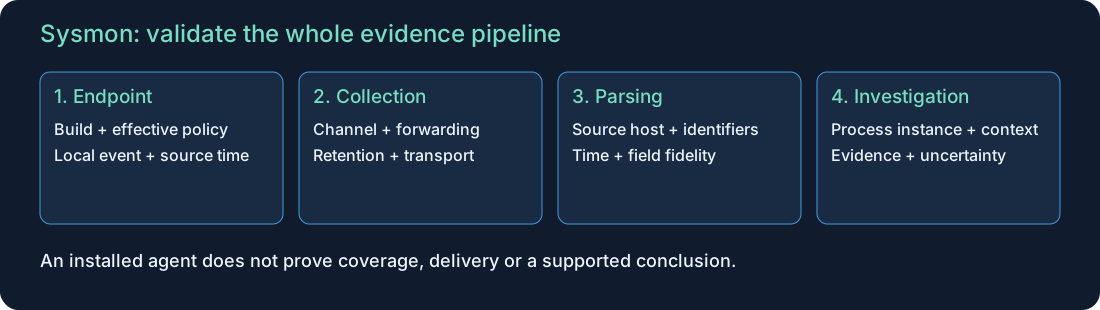
| Stage | Validation question | Failure that can mislead |
|---|---|---|
| Endpoint generation | Did the installed build and active rules capture this activity locally? | Excluded event mistaken for no activity |
| Local channel | Is the channel accessible and sized for outages? | Overwrite before collection |
| Forwarder / collector | Is the original endpoint and XML preserved? | Collector hostname substituted for source |
| Parsing / indexing | Are event family, time and identifiers extracted correctly? | PID/GUID or channel fields missing |
| Investigation | Is the sequence supported by compatible evidence? | Nearby events presented as a causal chain |
WEF forwards existing events; it does not install Sysmon, enable its filters or adjust channel capacity. Test generation and collection independently. Microsoft WEF guidance.
Keep a coverage inventory by host role: expected agent/build, policy revision, source channel, last verified test, forwarding path, retention and owner. A dashboard containing events from some hosts does not establish fleet-wide coverage.
3. Selected events: observation first
The following is a compact event map, not a promise of default collection. Check the installed schema and the official event definitions.
| ID | Observation | Investigation limit |
|---|---|---|
| 1 / 5 | Process create / terminate | Process lifetime is not the whole user session |
| 3 | Network connection | No application payload or exfiltration verdict |
| 7 | Image load | Loading alone does not establish a malicious DLL |
| 10 | Process access | Access alone does not establish credential theft |
| 11 | File create/overwrite | No complete file content or universal write history |
| 12 / 13 / 14 | Registry create/delete / value set / rename | Registration is not later execution |
| 19 / 20 / 21 | WMI filter / consumer / binding | Registration is not consumer execution |
| 22 | DNS query | Not proof of a successful subsequent connection |
| 4 / 16 / 255 | Service state / configuration change / error | Context and expected changes still need review |
For each event, preserve fields actually present rather than inventing a common schema. An absent field can be normal for that event family. Separate source data, parser enrichment and analyst inference in reports.
4. ProcessGuid, PID and parent relationships
A PID can be reused. Sysmon’s ProcessGuid helps distinguish process instances. Use source endpoint + compatible GUID + event time, while retaining raw identifiers. A process image path is not an instance key.
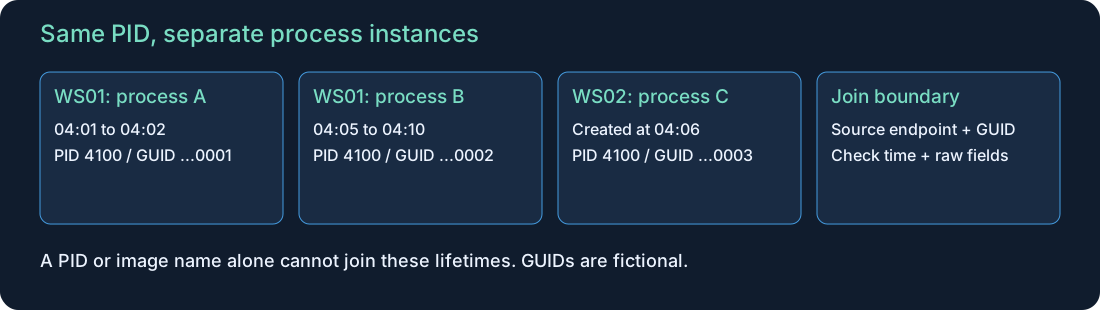
| Candidate join | Correct boundary |
|---|---|
| ProcessGuid to ProcessGuid | Same source endpoint and compatible representation |
| ParentProcessGuid to ProcessGuid | Child’s parent reference to the parent’s own creation record |
| PID to PID | Same host, representation and demonstrated lifetime |
| Image path to image path | Content/location lead, not a unique process |
| Logon ID to logon ID | Same host/session context; not a global user key |
Different event families can identify a source process, target process or registered object. For process-access investigations, inspect both source and target identifiers; do not automatically treat a target GUID as the actor. WMI registration events do not all carry the process fields used by process-create events.
A parent reference is useful telemetry, but a tree alone is not a complete explanation of who initiated an action. Confirm commands, tokens/users, execution context and other sources. Missing parent creation can reflect a search window, retention or collection gap.
5. Configuration as a reviewed coverage decision
Version the policy with its source, review date, hash and intended host roles. Binary version, configuration schema version and policy revision are different things. Network event 3 and image-load event 7 are not default-enabled coverage. Exclude matches override includes; explicit group relations help make filter intent clear. See the Sysmon configuration reference.
Start from investigation requirements rather than collecting everything or excluding every noisy process. For each rule, write a small acceptance plan: one benign activity that should appear, a near-match that should not, required fields, expected source identity and expected collection latency.
SwiftOnSecurity’s configuration repository is an example of a community-maintained policy source. Review its actual revision, license and assumptions before adapting it; a popular template is not evidence that your estate is covered. The XML below is original teaching material.
A deliberately narrow filter fragment
<EventFiltering>
  <RuleGroup name="Lab network scope" groupRelation="and">
    <NetworkConnect onmatch="include">
      <DestinationIp condition="is">192.0.2.10</DestinationIp>
      <DestinationPort condition="is">443</DestinationPort>
    </NetworkConnect>
  </RuleGroup>
</EventFiltering>
This is an EventFiltering fragment, not a complete deployable configuration. Its intended match is destination 192.0.2.10 AND port 443. The address is a documentation placeholder; do not send traffic to it expecting a lab server.
Acceptance cases: that pair should match; the same address on another port and another address on 443 should not match this rule. Other rules/exclusions can change the effective result. Validate with the target binary’s supported schema and controlled positive/negative tests before deployment.
This fragment is unsuitable as fleet-wide network coverage. Saving valid XML proves neither schema compatibility nor runtime behavior. No configuration was loaded as part of this publication.
6. Safe rollout and rollback
| Phase | Action | Reviewable evidence |
|---|---|---|
| Plan | Identify supported hosts, authorized binary, policy and owner | Versioned package and change record |
| Pilot | Test a representative small cohort | Local samples and resource/volume measurements |
| Validate | Check schema, include/exclude behavior and transport | Positive/negative results and parsed fields |
| Expand | Roll out in controlled cohorts | Coverage and service-health records |
| Recover | Retain prior approved package/policy and procedure | Tested rollback and dependency notes |
Installing or changing the agent affects a host. Follow the official instructions and your organization’s change process; this article keeps executable examples read-only. Do not copy an old install command into production without checking current support and package provenance.
Measure disk use, processing impact, event rate, transport backlog and licensing/storage costs. A large exclusion can lower volume while silently removing a needed investigation path. Record that tradeoff with the affected detection owners.
7. Read-only inspection and raw fields
Use an authorized host and appropriate permissions. These are bounded live queries, not forensic acquisition or a fleet audit.
A. Service and channel inventory
Get-Service |
  Where-Object { $_.Name -like 'Sysmon*' } |
  Select-Object Name,Status,StartType

Get-WinEvent -ListLog 'Microsoft-Windows-Sysmon/Operational' |
  Select-Object LogName,IsEnabled,RecordCount,MaximumSizeInBytes,LogMode
The name filter covers conventional Sysmon names, not custom naming. A running service does not prove desired filters or forwarding. Record permission failures and collection time; do not interpret an inaccessible log as empty.
B. Installed schema and active configuration
& 'C:\Tools\Sysmon64.exe' -s
& 'C:\Tools\Sysmon64.exe' -c
Replace the path with the already installed, trusted binary. -s displays schema; -c without a file displays configuration. Do not append a configuration filename while performing a read-only review. This example does not download or install software. Capture outputs under the approved inventory process.
C. Named EventData fields from a bounded sample
$sysmonSince = (Get-Date).AddHours(-2)
Get-WinEvent -FilterHashtable @{
  LogName='Microsoft-Windows-Sysmon/Operational'
  Id=1,3,5,11,13,22
  StartTime=$sysmonSince
} -MaxEvents 100 | ForEach-Object {
  $sysmonEvent = $_
  [xml]$sysmonXml = $sysmonEvent.ToXml()
  $sysmonRow = [ordered]@{
    TimeUtc = $sysmonEvent.TimeCreated.ToUniversalTime().ToString('o')
    EventId = $sysmonEvent.Id
    RecordId = $sysmonEvent.RecordId
    Computer = $sysmonEvent.MachineName
  }
  foreach ($sysmonData in $sysmonXml.Event.EventData.Data) {
    $sysmonRow[$sysmonData.Name] = $sysmonData.'#text'
  }
  [pscustomobject]$sysmonRow
}
This reads at most 100 matching records from two hours. Output properties vary by event; inspect individual objects or raw XML so formatting does not hide fields. Do not rely on fixed Properties[0] offsets across event types/versions. For evidentiary collection, preserve source EVTX/XML separately. Get-WinEvent reference.
8. Normalize without losing source meaning
Keep original Computer, provider, channel, event version, record ID, EventData and timestamps. Separate endpoint time, receipt time and indexing time. Sysmon event timestamps are UTC; a SIEM display can use another time zone.
| Normalized field | Validation |
|---|---|
| endpoint | Original source machine, not merely WEC/forwarder host |
| event_id | Numeric ID plus provider/channel |
| process_guid / parent_guid | Correct source fields; preserve raw value |
| process_id | Source representation and process lifetime |
| event_time | Defined parsing and clock alignment |
| image / command_line | Full fields when collected; avoid silent truncation |
Field aliases and GUID casing can be normalized consistently, but never manufacture a missing GUID. Security 4688 is complementary process evidence with its own audit prerequisites and field meanings; it does not acquire a Sysmon ProcessGuid simply because a PID is similar. For 4688, compare the new process field NewProcessId; the raw ProcessId field identifies the creator process. Convert hexadecimal and decimal representations deliberately rather than joining those fields by name. Command-line capture also needs its additional policy. Microsoft 4688.
Assess duplicates using source identity, channel and record context. Record IDs can reset across log lifecycle changes; do not globally deduplicate by record number alone. A cryptographic hash identifies a particular file representation and algorithm, not whether execution was approved.
9. Splunk investigation templates
Use your actual indexes, time range and parser. Map Channel/LogName, Computer and GUID aliases from raw XML first. The searches intentionally exclude events without the mapped Sysmon channel; investigate such parsing gaps separately.
A. Coverage and freshness by event family
index=sysmon
| eval channel=coalesce(Channel,LogName), endpoint=coalesce(Computer,host)
| where channel="Microsoft-Windows-Sysmon/Operational"
| eval event_id=coalesce(EventCode,EventID)
| stats count AS records max(_time) AS latest_event BY endpoint event_id
| eval age_seconds=now()-latest_event
| convert ctime(latest_event)
| sort 0 endpoint event_id
Interpret freshness against host role, workload and expected event rates. This returns only hosts/events already present in the search window. Join against an external expected-host inventory to detect completely absent systems. Clock skew or future-dated events can distort age; inspect raw times.
B. One process instance across event types
index=sysmon (EventCode IN (1,3,5,11,13,22) OR EventID IN (1,3,5,11,13,22))
| eval channel=coalesce(Channel,LogName), endpoint=coalesce(Computer,host)
| where channel="Microsoft-Windows-Sysmon/Operational"
| eval process_guid=lower(coalesce(ProcessGuid,ProcessGUID)), event_id=coalesce(EventCode,EventID)
| where endpoint="WS01" AND process_guid="{00000000-0000-0000-0000-000000000001}"
| table _time endpoint event_id process_guid ProcessId Image CommandLine
    ParentProcessGuid QueryName DestinationIp DestinationPort TargetFilename TargetObject
| sort 0 _time
Replace the host and fictional GUID with the case’s values. The fallback host is valid only if it represents the original endpoint. The result is a timeline, not proof of causation or a complete process history. Missing create/terminate events need investigation; do not invent a lifetime boundary.
C. Parent references from process creation
index=sysmon (EventCode=1 OR EventID=1)
| eval channel=coalesce(Channel,LogName), endpoint=coalesce(Computer,host)
| where channel="Microsoft-Windows-Sysmon/Operational"
| eval process_guid=lower(coalesce(ProcessGuid,ProcessGUID))
| eval parent_guid=lower(coalesce(ParentProcessGuid,ParentProcessGUID))
| where isnotnull(parent_guid) AND parent_guid!=""
| table _time endpoint process_guid ProcessId Image CommandLine
    parent_guid ParentProcessId ParentImage ParentCommandLine User
| sort 0 _time
Each row describes a child and its recorded parent reference. To reconstruct a tree, resolve the parent GUID to its own event 1 on the same endpoint and appropriate time range. This search does not perform that resolution or automatically classify unusual parents.
D. Service/configuration/error review
index=sysmon (EventCode IN (4,16,255) OR EventID IN (4,16,255))
| eval channel=coalesce(Channel,LogName), endpoint=coalesce(Computer,host)
| where channel="Microsoft-Windows-Sysmon/Operational"
| eval event_id=coalesce(EventCode,EventID)
| table _time endpoint event_id State Version SchemaVersion Configuration
    ConfigurationFileHash ErrorId Description
| sort 0 _time
Fields vary by event/version; use raw XML to map them. These are state/change/error observations, not periodic heartbeats. An old event 4 does not prove the agent is still healthy, and no event 255 does not prove error-free collection. Correlate approved changes, endpoint state and independent transport health.
These searches have not been executed against a production Splunk instance. Test extraction, missing-field behavior, duplicates and representative benign workloads before creating an alert.
10. Investigative questions and competing explanations
| Observation | Working hypothesis | Evidence needed before escalation |
|---|---|---|
| Unfamiliar process with network activity | Unexpected application or abuse | Parent, command, owner, endpoint context and destination ownership |
| Registry autostart change | Possible persistence | Exact value, target, authorization and later trigger/execution |
| Process-access record | Sensitive process interaction | Source/target, access context, approved tooling and independent behavior |
| DNS plus network timing | Potential related communication | Same process instance, DNS result and actual destination; no assumed one-to-one mapping |
| New filter revision followed by silence | Coverage regression | Effective policy, local generation, host activity and transport state |
Enrichment should retain provenance. Reputation, signature and allowlist status can support triage but do not establish intent. A malicious process can use a common image name; approved software can exhibit uncommon activity.
Use evidence-supported ATT&CK behavior, not event-number mappings: a registry record is not automatically T1547.001, and process access is not automatically credential dumping. See the Windows persistence guide for mechanism-specific proof.
11. Synthetic process-lifetime exercise
Download 14 fictional timeline rows. This is an analyst worksheet, not raw Sysmon XML or a production parser fixture. GUIDs are fabricated; object summarizes different source fields. The Security PID is normalized to decimal for teaching. No malware or private organizational data is included.
| UTC | Observation | Boundary |
|---|---|---|
| 04:01–04:02 | WS01 process A, PID 4100, GUID ending 0001 | DNS/network/file/registry events share A’s GUID |
| 04:05–04:10 | WS01 process B, PID 4100, GUID ending 0002 | Reused PID; separate lifetime |
| 04:05 | Security 4688 with normalized PID 4100 and inventory.exe | Same stated creation time as B; corroboration candidate, not a GUID join |
| 04:06 | WS02 PID 4100, GUID ending 0003 | Another host, another process |
| 04:07–04:08 | Configuration change and error on WS01 | Cause and coverage impact unconfirmed |
Questions: Which events belong to A? Is B responsible for A’s earlier network event? Does the DNS query prove the later connection used its answer? Is the Run value evidence of a successful logon launch? Does the configuration event explain the error?
Answer guide: A’s GUID connects its supplied records on WS01. B and WS02 must remain separate despite the same PID. The worksheet does not supply DNS answers, payload content, transfer size, later logon execution, parent context or approved configuration diff. Those conclusions remain unknown. The nearby configuration and error events are leads, not a demonstrated cause. In this worksheet, the 4688 record shares B’s stated creation time, host, PID and image, so it is a corroboration candidate for B. Verify the raw event and account/command context before association; normalized PID alone is insufficient. A new-process event at a different creation time must be investigated as a mismatch rather than silently joined to an already running instance.
12. Validate collection with a benign test plan
- Define a small, approved activity and the exact expected event/fields for a pilot host.
- Record the build, active policy hash, time window and source endpoint.
- Observe locally, then confirm the forwarded and indexed copy.
- Test a near-match outside a narrow rule and verify the expected omission without assuming transport failure.
- Compare counts, identities and timestamps; investigate truncation, duplication or delay.
- Document limits and owner acceptance; repeat when relevant policy, build or pipeline changes.
A successful XML parse or PowerShell syntax check validates only that layer. It does not replace an actual agent test. No network traffic was generated or host agent changed to create this article.
13. Retention, privacy and response
Command lines, paths, users and DNS data can expose internal information or accidental secrets. Apply access controls, retention and incident-handling rules to raw and enriched records. Redact public examples without destroying the protected original evidence.
During an incident, preserve endpoint and collector evidence, configuration history and collection gaps. Coordinate containment independently of logging changes. Avoid restarting or uninstalling the sensor as a first troubleshooting step when it can remove visibility. Scope a suspected coverage problem before changing a fleet policy.
A useful closure record states what was observed, which hypothesis was supported, what remains unknown, how the host was contained/recovered and whether expected telemetry returned. More events are useful only when the team can retain and interpret them.
14. Completion checks and related learning
Explain PID reuse, resolve a parent GUID correctly, identify one filtered-out activity and distinguish missing telemetry from no activity. Demonstrate a local-to-SIEM validation plan and state what the exercise cannot prove.
Continue with Windows persistence, Windows lateral movement, Windows logs and Splunk basics. This completes the planned AD/authentication, remote-management, AD CS, persistence and Sysmon extension sequence; it is a learning milestone, not a claim of exhaustive Windows security coverage.
Next: Windows Credential Protection and Dumping Detection connects LSASS, SAM and LSA Secrets with protection state and process-access evidence.
Use the Windows Incident Response Lab to combine Sysmon, authentication, task and response evidence.
Source review: 22 October 2026. Microsoft supplies product/collection definitions, the linked community repository illustrates policy maintenance, and MITRE supplies behavior classification. Diagrams, searches, filter fragment and exercise are original teaching material. Checks for this publication cover document consistency, syntax and asset delivery; operational Sysmon/Splunk validation remains environment-specific.
Related lesson
Linux process investigation and PID reuse
Verify Windows Event Forwarding Delivery
Related articles
Getting Started with Splunk Security Investigations
Learn a practical approach to reviewing indexes, time ranges, event fields, and potential security incidents.
User-Agent investigation lab: 20 synthetic events and worked answers
Compare approved tools, malware-associated strings, browser impersonation and missing encrypted visibility without external traffic.