Cloud Security · Beginner
Investigate AWS VPC Flow Logs: Direction, Decisions, and Missing Data
Read cloud network flow records at the right observation point, compare NAT addresses, and test eight conclusions with synthetic records.
Updated 2026-11-21
On this page
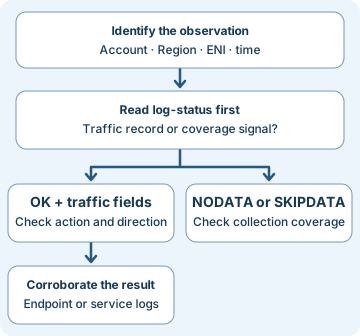
A client times out reaching a service. You find ACCEPT for its outbound traffic and SKIPDATA on the interface. Start by establishing what was observed, in which direction and time window, and what the logging system could have missed. Then look for independent evidence of the application’s result.
1. A flow is an observation at a particular point
An Amazon VPC is a logically isolated cloud network. A subnet is an address range within it. An ENI (elastic network interface) is a virtual network interface. VPC Flow Logs can be configured at VPC, subnet, or network-interface scope. A subscription defines the monitored resource, traffic selection, and delivery configuration. Subscribing at VPC or subnet scope still gives interface-level observations for ordinary ENI flow records.
A flow record summarizes one direction of IP traffic over an aggregation interval. The five-tuple consists of source and destination address, source and destination port, and protocol. Include the observation point, account context, Region, and time in investigations. The same tuple can recur in another network or even on the same ENI. Packet capture and application logs answer questions about packet order and requests that an aggregate cannot answer.
| Field group | How to read it | Limit |
|---|---|---|
interface-id, flow-direction |
Ingress goes into the observed interface. Egress leaves it. | Direction is local to the observation point. It does not mean internet inbound or outbound. |
srcaddr, dstaddr, ports, protocol |
Tuple as represented at this point. Protocol 6 is TCP and 17 is UDP. | Parse the configured field order. The default format has no flow-direction or pkt-* address fields. |
pkt-srcaddr, pkt-dstaddr |
Packet-level addresses reported at this point when available. | NAT and client IP preservation may change how fields compare across observations. A value does not name a person or process. |
start, end, packets, bytes |
Approximate Unix-second boundaries and counters for this flow record. | Not ingest time, packet timestamps, or application byte counts. Do not sum the same traffic across interfaces as distinct transfers. |
action, log-status |
Read network disposition and logging state separately. | A dash represents an inapplicable or unavailable field. Keep it distinct from zero. |
AWS documents configurable maximum aggregation windows of one or ten minutes, with one minute or less for ENIs attached to Nitro-based instances. Delivery is separate and best effort. Record the configured interval, use a UTC time range, and allow for timestamp approximation and delayed delivery. AWS describes up to 60 seconds of timing difference for certain start or end values. Avoid lining up two sources solely by exact seconds.
2. Read the decision and the logging status
| Observation | Supported interpretation | Next evidence |
|---|---|---|
ACCEPT / OK |
The observed traffic was accepted and this record has normal logging status. | Check reverse direction, then TCP, TLS, or application evidence as appropriate. |
REJECT / OK |
The observed traffic was rejected and the log was collected. | Check applicable security groups, subnet network ACLs, and timing. The row does not name a denying rule. |
NODATA |
AWS reported no traffic for this interface and interval in this flow log. | Check subscription selection and excluded traffic before generalizing. |
SKIPDATA |
AWS skipped some records in the interval due to an internal issue such as capacity. | Mark a coverage gap. Consult other interfaces, telemetry sources, and delivery health. |
| No matching row | This search returned no match. | Verify scope, schema, time range, traffic selection, delivery, retention and exclusions. |
TCP flags are a summary. In the custom tcp-flags field, 1 represents FIN, 2 SYN, 4 RST, and 18 SYN+ACK. Flags may be combined across packets. For example, 3 records SYN and FIN bits in that direction during the interval. Their order cannot be recovered from the value. A zero means no supported flags were logged, which can occur with standalone ACK traffic. A dash can mean unavailable. Investigate a full handshake with packet or connection evidence.
3. Follow a direct flow and one NAT observation
In synthetic row A01, eni-client observes egress TCP from 10.10.1.25:52344 to 10.10.2.80:443 starting at 00:30:00 UTC. It shows ACCEPT / OK and flags 2. Row A02 reverses both endpoints, reports ingress on that same ENI during an overlapping window, and shows 18. This is a candidate reply containing SYN+ACK. Positive evidence from both directions still leaves the full handshake, TLS validation and HTTP outcome to be checked. A03 has the same reverse tuple about five minutes earlier. A04 belongs to another account. A05 is on the server ENI and offers a separate observation, outside the same-ENI pairing rule.
Now look at synthetic row C01 on the zonal NAT gateway ENI. Ingress dstaddr=10.10.0.9 represents the interface’s private address. The packet-level pkt-dstaddr=203.0.113.80 is the candidate remote destination. For C02, egress toward that remote address is observed with the gateway as source. Do not claim an exact port translation mapping just because a destination and time overlap. Look at source workload ENI, gateway scope, ports, timing, and additional corroboration. In AWS’s separate regional NAT gateway example, resource-id identifies the gateway while ENI-specific fields are inapplicable. Identify gateway type and schema before comparing rows.
4. Collect, detect, and respond
- Identify coverage. Save the account, Region, observation resource, subscription ID, traffic type (
ALL,ACCEPT, orREJECT), format, activation time, log destination, and requested time window. Preserve raw records, their arrival times, partition or stream names, and the query used. Check delivery errors and parsers. A subscription that captures only accepted traffic cannot establish the absence of rejections. AWS excludes several categories, such as certain instance requests to Amazon-provided DNS, and instance metadata traffic. Use appropriate DNS or endpoint evidence for those questions. - Match by viewpoint. Start at the affected ENI and reconstruct the direction and the tuple. Compare nearby intervals in both directions. For a direct path, reverse the addresses and ports on the same interface as a candidate check. For a NAT or proxy path, assess each leg separately. Compare log counters only where the same packets will not be counted again. Enrich ENIs with an inventory valid at the event time and account for address or attachment changes.
- Use a baseline. Repeated rejections to many destinations may indicate unauthorized discovery, a rollout, retry logic, or a policy change. Establish peer groups and compare with normal rejected-destination counts and volume. A new allowed egress path and higher byte counts can justify review. First consider expected updates, backups, and proxy changes. Use workload identity, endpoint activity, DNS evidence, and deployment records to test competing explanations.
- Act on corroborated evidence. Security groups are stateful. Network ACLs are stateless, so inspect rules in both directions.
REJECTcan also occur for traffic after connection closure. Use historical configuration and CloudTrail for change history where collected. Reachability Analyzer models supported configuration paths and can identify a modeled blockage. It does not send packets or verify that a service handled a request. For service failure, compare load balancer, TLS and application records. Escalate unauthorized traffic through the incident procedure, preserve evidence before containment where feasible, and confirm expected traffic and logging after remediation.
For an authorized AWS account, AWS CLI v2 with ec2:DescribeFlowLogs can query subscription metadata in the selected Region. Replace the example resource ID and Region with the approved scope. Separate read permission is needed for the log destination. This read-only command returns subscriptions for the specified resource. Also check the subnet or ENI individually if no subscription is attached to the VPC itself.
aws ec2 describe-flow-logs --region us-east-1 \
  --filter 'Name=resource-id,Values=vpc-0123456789abcdef0' \
  --query 'FlowLogs[].{Id:FlowLogId,Resource:ResourceId,Type:TrafficType,Format:LogFormat,Interval:MaxAggregationInterval,Created:CreationTime,State:FlowLogStatus,Destination:LogDestination,Delivery:DeliverLogsStatus}' \
  --output json
5. Offline exercise · Twelve rows, eight checks
Download the normalized CSV and Python check script into the same local folder. The exercise uses fixed synthetic data. The row ID, account and Region labels are exercise columns. Real field order and availability depend on the configured format and delivery type. Only Python 3 is needed. The script makes no AWS or network calls.
- Find the reverse candidate for
A01by matching account, Region, interface, protocol, reversed endpoints, opposite direction, and an overlapping interval. Explain why each ofA03throughA05is excluded. This simple overlap check is specific to the exercise data. Production searches need explicit time uncertainty and handling of multiple candidates. - Separate
B01’s network decision from logging, then compareB02andB03. UseC01to name the observed interface address and remote destination separately. - Run the script. Expect
8 synthetic checks passed.
python3 vpc-flow-log-review.py
| Exercise | Expected conclusion |
|---|---|
A01 and A02 |
A02 is the only same-ENI reverse candidate. Flags 18 support a SYN+ACK observation. |
B01, B02, B03 |
Rejected traffic with normal logging, a no-data report, and a logging gap respectively. |
C01 and C02 |
NAT interface destination differs from packet destination on ingress. Flags 3 on egress show FIN and SYN bits without packet order. |
D01 |
UDP row. TCP flags are unavailable. |
E01 |
Outbound acceptance, with no matching return row in the fixture. B03 overlaps on the same ENI, making the missing return evidence especially inconclusive. |
If the CSV cannot be found, check both filenames and save the files together. If you match an earlier or different-interface row, inspect time, provenance and direction before changing the script. If you see E01 without its reply, save the coverage observation and look for another vantage point.
Verification scope. Python checks were executed against the synthetic data. AWS behavior and CLI prerequisites were reviewed against AWS documentation. No live VPC traffic or AWS account execution was used.
6. Check your understanding
- Both directions show
ACCEPT. Did HTTP return 200? Look up the application’s response. These rows are network observations at the named interface. - Can you identify which security group rule returned
REJECT? Preserve the tuple and time, then compare applicable rules, connection state and independent evidence. The flow row gives a disposition without a rule ID. - Why preserve
SKIPDATAinstead of treating it as zero bytes? It indicates missing visibility. Zero would imply a precise observation the record cannot support. - Which address belongs to the gateway in
C01?dstaddris the gateway ENI’s private address for this ingress observation. Readpkt-dstaddrfor the packet-level destination. Use the documented semantics for each resource type.
Completion criteria. Identify the correct reverse candidate, explain the three coverage outcomes (normal logging, no data, skipped records), and write a case note that separates an observed network decision, an unverified application outcome, and the next evidence source.
7. Official references and next steps
Reviewed 2026-11-21. The field semantics refer to the Amazon VPC documentation at that date. The default uses version 2 fields; custom fields are versioned individually. The CLI reference reviewed displayed AWS CLI 2.40.1.
- Collection scope, timing, field versions and traffic exclusions. Flow logs basics · Flow log records · Limitations
- Official examples for TCP flags, zonal and regional NAT, and direction. Flow log record examples
- Control scope and modeled paths. Security groups · Network ACLs · Reachability Analyzer
- Subscription query and destination requirements. AWS CLI describe-flow-logs
Previous · Firewall, NAT, and Network Sensor Evidence
Next · Zeek Connection Evidence
Related articles
AWS IAM Roles and CloudTrail Investigation
Trace role trust, temporary STS credentials and subsequent API calls through eight CloudTrail examples.
AWS KMS Investigation · Key Use, CloudTrail and S3 Reads
Follow envelope encryption, read key-policy and Decrypt evidence, and distinguish a KMS call from the use of application data.