Active Directory · Intermediate
LDAP & Active Directory Enumeration: Filters, ACLs, BloodHound, Detection and Defense
A connected guide to normal LDAP operations, scoped directory discovery, AD object permissions, BloodHound attack-path validation, Windows telemetry and practical hardening.
Updated 2026-10-22
On this page
Series guide 4. Read AD Fundamentals, Kerberos Authentication and NTLM Authentication first. Examples use a fictional
lab.exampledomain and are intended for authorized, read-only assessment. Commands are reference examples, not results from a live AD deployment.
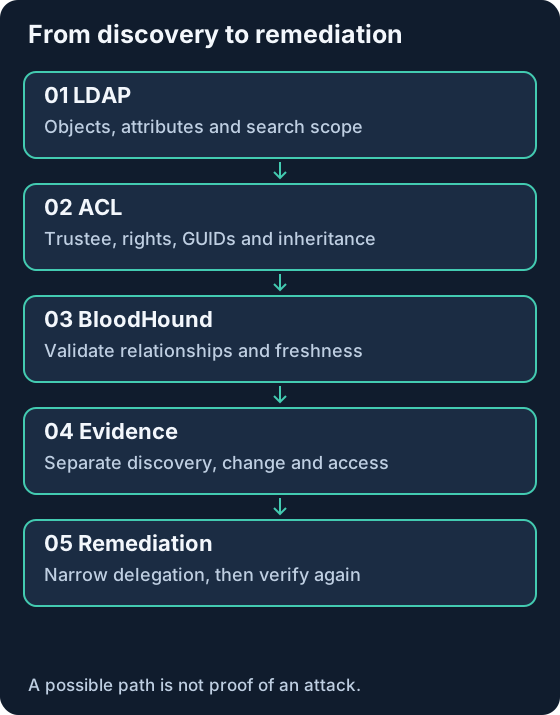
1. The connection: directory data → permissions → paths → evidence
LDAP enumeration means systematically querying directory information: identities, groups, computers, configuration and relationships. Administrators, inventory systems and adversaries can issue similar searches. A search becomes meaningful when its identity, source, scope, requested attributes and operational context are considered together.
The questions build on each other:
- LDAP: What objects exist, and which attributes can this identity read?
- ACL analysis: What can this identity, including its group memberships, change?
- BloodHound: Can those relationships form a route to an important asset?
- Detection: What evidence shows discovery, modification or subsequent access?
- Defense: Which unnecessary permission can be removed to break the route?
Reading a service account’s SPN does not reveal its password. Finding a possible path does not establish that an attacker traversed it. Treat observed data, modeled capability and confirmed activity as separate evidence classes throughout an investigation.
2. LDAP and AD are different things
Active Directory Domain Services (AD DS) is Microsoft’s directory service. LDAP is a protocol used to access a directory. AD also relies on DNS, Kerberos, replication and other services; LDAP is not the entirety of AD, nor is it a synonym for Kerberos authentication.
| Concept | Meaning | Example or consequence |
|---|---|---|
| Entry / object | An item represented in the directory | User, group, computer, OU |
| Attribute | A property of an object | sAMAccountName, member, servicePrincipalName |
| DN | Distinguished name identifying an entry by its directory location | CN=Alice,OU=Lab,DC=lab,DC=example |
| RDN | The first relative component of a DN | CN=Alice |
| Naming context | A directory partition | Domain, Configuration, Schema |
| Schema | Definitions of object classes and attributes | Data types, allowed properties |
| SID / objectGUID | Identifiers useful when correlating objects | A DN can change after a rename or move |
CN=Users is normally a container, not an OU. Do not mechanically replace CN= with OU= when constructing a search base. The AD computer class derives from user: (objectClass=user) alone can return computers as well as user accounts.
Domain controllers and the Global Catalog
A domain controller hosts directory partitions. The Global Catalog (GC) supports forest-wide searches using partial replicas for other domains; not every attribute is present in that partial attribute set. A missing property in a GC response is not proof that the property is absent on the object’s domain controller. Record the queried server, port and naming context before comparing results.
3. Normal connection, authentication and search
A typical protected session establishes transport security, authenticates, searches and then closes the association:
Client → DC: connect; establish TLS if using LDAPS or StartTLS
Client ↔ DC: Bind / authentication exchange
Client → DC: SearchRequest(base, scope, filter, attributes, controls)
DC → Client: zero or more SearchResultEntry / referrals
DC → Client: SearchResultDone(result code)
Client → DC: next search, next page, or Unbind
Bind establishes an authentication association; authorization still governs each operation. Search returns readable data; Modify, Add, Delete and ModifyDN are distinct operations. Zero entries with a successful result code differs from an operation error or an incomplete result. Referrals and client referral-following behavior can extend the search beyond the initially selected server. Protocol reference: RFC 4511.
| Endpoint | Typical role | Interpretation |
|---|---|---|
| TCP 389 | LDAP, including StartTLS and SASL protection | The port alone does not prove plaintext |
| TCP 636 | LDAP over TLS from connection establishment | Validate certificate trust and server name |
| TCP 3268 | Global Catalog LDAP | Scope and available attributes differ from domain LDAP |
| TCP 3269 | Global Catalog over TLS | TLS does not add missing GC attributes |
| UDP 389 | CLDAP / DC locator use | Not the normal TCP bind-and-search workflow |
Simple bind sends a name and password at the LDAP layer and needs TLS protection. SASL can use mechanisms such as Kerberos through negotiation. Authentication choice, encryption and directory permissions are separate dimensions.
Signing, encryption and channel binding
Signing supplies integrity, not confidentiality. TLS or SASL sealing supplies confidentiality. Channel binding ties supported authentication to its TLS channel; it is not an ACL and does not prevent an authenticated user from reading data they are entitled to read. LDAPS alone does not establish that all relay protections are configured. Check effective policies and client compatibility rather than assuming defaults from an OS name. Microsoft LDAP security overview.
4. Define the search before writing the filter
For every assessment query, record this tuple:
server + identity + base DN + scope + filter + requested attributes + limits
| Scope | Searches | Suitable use |
|---|---|---|
| Base | The base entry itself | RootDSE or one known object |
| OneLevel | Immediate children, excluding the base | Objects directly inside one OU |
| Subtree | Base and all descendants | A deliberately bounded lab OU |
RootDSE, addressed by an empty base DN with base scope, exposes server capabilities and naming-context information such as defaultNamingContext. It is not the same object as the domain root. Some RootDSE information can be readable anonymously while ordinary directory searches require authentication.
Request only attributes needed for the question. Start with a small OU; document size/time limits and paging. Paging splits entries across responses but does not grant additional access. Large multi-valued attributes, such as group member, can require range retrieval independently of entry paging. Check final result codes and completeness before calling an inventory exhaustive.
5. LDAP filter syntax, with precise examples
Filters use prefix Boolean operators, not SQL syntax:
| Purpose | Filter |
|---|---|
| Equality | (sAMAccountName=alice) |
| Attribute exists | (servicePrincipalName=*) |
| Prefix match | (cn=Lab*) |
| AND | (&(objectCategory=person)(objectClass=user)) |
| OR | (|(sAMAccountName=alice)(sAMAccountName=bob)) |
| NOT | (!(description=*)) |
In a filter value, escape literal *, (, ), backslash and NUL as \2a, \28, \29, \5c and \00. For example, the literal name Ops (Lab) becomes (cn=Ops \28Lab\29). DN escaping and filter escaping are different rules; a DN inserted into a filter needs correct handling at both layers. Use library escaping for user-supplied input rather than concatenating raw text. RFC 4515.
AD-specific matching rules
The bitwise AND rule 1.2.840.113556.1.4.803 tests whether specified bits are set; the transitive rule 1.2.840.113556.1.4.1941 follows applicable DN-valued links. These are AD extensions rather than universally portable LDAP expressions. Microsoft search-filter syntax.
# Enabled person/user accounts (ACCOUNTDISABLE bit 2 is not set)
(&(objectCategory=person)(objectClass=user)(!(userAccountControl:1.2.840.113556.1.4.803:=2)))

# User accounts with at least one SPN
(&(objectCategory=person)(objectClass=user)(servicePrincipalName=*))

# Accounts with Kerberos pre-authentication disabled
(&(objectCategory=person)(objectClass=user)(userAccountControl:1.2.840.113556.1.4.803:=4194304))

# Direct members represented by memberOf
(memberOf=CN=Lab-Operators,OU=Lab,DC=lab,DC=example)

# Direct or nested members through the memberOf link chain
(memberOf:1.2.840.113556.1.4.1941:=CN=Lab-Operators,OU=Lab,DC=lab,DC=example)
memberOf does not represent the primary-group relationship and a direct lookup does not expand nested groups. A transitive query is not a complete reconstruction of a Windows access token across all trust and resource scenarios. Also, adminCount=1 is a historical/protection-related clue, not an authoritative list of current administrators.
The 4194304 flag identifies a setting requiring review; it does not prove exploitation. SPNs are normal service metadata. See Microsoft’s UAC flag definitions and the existing Kerberoasting guide for the authentication connection.
6. A scoped, read-only enumeration workflow
Prepare an authorized lab OU, its owner, an approved account, a trusted DC certificate and a collection window. Keep exports in an access-controlled location: an identity inventory can itself be sensitive.
Windows: Active Directory PowerShell module
The following uses the RSAT ActiveDirectory module and the current identity. The example requires the fictional OU=Lab to exist. It deliberately limits results to 100; this is a sample, not a full inventory.
Import-Module ActiveDirectory
$dc = 'dc01.lab.example'
$root = Get-ADRootDSE -Server $dc
$base = 'OU=Lab,' + $root.defaultNamingContext

Get-ADUser -Server $dc -SearchBase $base -SearchScope Subtree `
  -LDAPFilter '(&(objectCategory=person)(objectClass=user))' `
  -Properties memberOf,servicePrincipalName,whenChanged `
  -ResultPageSize 100 -ResultSetSize 100 |
  Select-Object SamAccountName,DistinguishedName,memberOf,
    servicePrincipalName,whenChanged
Use -LDAPFilter for LDAP syntax and -Filter for the module’s expression language; they are not interchangeable. AD PowerShell cmdlets normally communicate through AD Web Services, so this example does not guarantee an LDAP 389/636 connection from the workstation. Get-ADUser reference.
Linux / OpenLDAP client: directly observe LDAP
These examples use ldapsearch, TLS with normal certificate validation, and a password prompt. Configure the lab CA in the client’s trust store first. Do not bypass verification to make a failed connection appear successful.
# Discover the domain naming context (authenticated RootDSE base search)
ldapsearch -LLL -x -H ldaps://dc01.lab.example:636 \
  -D 'reader@lab.example' -W -b '' -s base \
  '(objectClass=*)' defaultNamingContext namingContexts

# Sample at most 100 user entries in the approved OU
ldapsearch -LLL -x -H ldaps://dc01.lab.example:636 \
  -D 'reader@lab.example' -W \
  -b 'OU=Lab,DC=lab,DC=example' -s sub -z 100 -l 15 \
  '(&(objectCategory=person)(objectClass=user))' \
  sAMAccountName distinguishedName memberOf servicePrincipalName
With ldap://...:389, the OpenLDAP -ZZ option requires successful StartTLS; it is different from implicit LDAPS. The 100-entry and 15-second limits can produce partial results or a limit error. In LDIF output, attribute:: denotes base64-encoded values, and folded lines continue the preceding value; do not misread these as corruption. OpenLDAP ldapsearch manual.
What to collect, and what not to infer
| Data | Investigation question | Interpretation limit |
|---|---|---|
| Users and status flags | Is the account expected and owned? | Enabled does not establish recent use |
| Groups and links | Who inherits a delegated responsibility? | Include nesting and primary-group limitations |
| Computers / OS metadata | Where are managed systems represented? | Directory OS text can be stale |
| SPNs / delegation metadata | Which services and trust relationships need review? | Configuration is not evidence of abuse |
| OU / GPO links | Which containers and policies affect an asset? | A link alone does not prove effective policy |
| Security descriptors | Who can read, modify or delegate control? | Requires effective-rights interpretation |
7. From readable objects to effective AD permissions
An object’s security descriptor includes owner information, a DACL defining access and a SACL defining audit conditions. Each ACE describes a trustee and an allowed/denied operation, possibly constrained to an attribute, property set or child class. A SACL records audit intent; it does not grant access. Microsoft object-permission model.
To interpret an ACE, inspect:
- The trustee SID and the reviewing account’s applicable group memberships.
- Allow/deny type and the precise requested right.
ObjectType: the property, property-set or extended-right GUID, when present.InheritedObjectType: the descendant class restriction, when present.- Inheritance/propagation flags, whether it applies to the current object, and whether inheritance is blocked.
- Other relevant ACEs and their evaluation order.
An inherited permission on an OU may affect only certain descendant classes. A GUID is not a human-readable permission name; resolve it against the schema or Extended-Rights definitions. Do not summarize every WriteProperty ACE as “can change everything.” Object-specific ACE evaluation.
Read an ACL without changing it
Run in a domain-connected RSAT session with permission to read the descriptor. This explicitly binds the AD provider drive to the selected DC:
Import-Module ActiveDirectory
New-PSDrive -Name LabAD -PSProvider ActiveDirectory -Root '//RootDSE/' `
  -Server 'dc01.lab.example' | Out-Null
$dn = 'CN=Lab-Operators,OU=Lab,DC=lab,DC=example'
$acl = Get-Acl -LiteralPath ('LabAD:\' + $dn)
$acl | Select-Object Owner,AreAccessRulesProtected
$acl.Access | Select-Object IdentityReference,AccessControlType,
  ActiveDirectoryRights,ObjectType,InheritedObjectType,
  InheritanceType,IsInherited
Remove-PSDrive -Name LabAD
This lists descriptor entries; it does not calculate the complete effective access of a selected user. Capture the DC and collection time, resolve GUIDs, and use an effective-access review before making a finding. Removing the temporary local provider drive does not modify the directory.
8. Permissions that deserve closer review
| Right / relationship | Security meaning | Defensive review |
|---|---|---|
| GenericAll | Broad control of the specific AD object | Confirm object type, target sensitivity and exceptions |
| GenericWrite | Broad property-writing capability | Determine which useful properties can actually be changed |
| WriteDacl | Ability to alter the object’s access rules | Review who can delegate further rights |
| WriteOwner | Ability to change ownership under applicable rules | Evaluate owner-rights restrictions and effective access |
| ForceChangePassword | Password reset extended right | Different from changing a password while knowing the old one |
| AddMember | Ability represented by a group-membership control edge | Inspect the group’s member permissions and resulting access |
| Replication-related extended rights | Potential directory replication capability | Scrutinize domain-root grants to non-DC principals |
| Read access to managed secrets | Potential local/service-account credential exposure | Review authorized readers and protection configuration |
GenericAll over a computer object is not automatically local administrator access to the running computer. Directory control can create other opportunities, but their preconditions must be validated. Likewise, ownership does not always imply unrestricted DACL control; OWNER RIGHTS and current directory behavior matter. GenericAll, WriteDacl, SpecterOps owner-rights analysis.
Protected administrative objects can have inheritance behavior maintained through AdminSDHolder/SDProp. A removed group membership does not necessarily clean up historical adminCount or restore inheritance. Investigate the protection mechanism before repeatedly editing an ACL that is subsequently restored.
9. BloodHound: model relationships, then validate them
SharpHound collects data; BloodHound ingests and analyzes graph relationships. Users, groups, computers and other objects are nodes. Edges encode memberships, permissions or other relationships. Not every edge is a directly traversable control capability.
| Edge | Read it as | Avoid this assumption |
|---|---|---|
| MemberOf | Membership relationship | Every group is privileged |
| AdminTo | Administrative relationship to a computer | It proves a login occurred |
| HasSession | A session relationship observed during collection | Credentials are certainly recoverable now |
| GenericAll / WriteDacl | Object-control capability | A permission was actually exercised |
| Contains / GPLink | Structural or policy relationship | Each is independently an exploitation step |
A graph is a time-bounded model, not an execution log. Session data ages quickly, collection permissions can leave gaps, and model support changes by version. Record collector/BloodHound versions, methods, timestamps and failed collections. “No path found” can mean missing data.
Choose collection scope intentionally
For a first authorized directory assessment, prefer a scoped collection that answers the question. DCOnly avoids contacting member computers, whereas Default/All can include endpoint-related methods. DC-only data will not give the same live endpoint/session coverage. Verify flags against the installed collector and record scope exclusions. SharpHound CE, collection-method reference.
Do not publish real collection ZIPs or graph exports to this public wiki. They describe internal identities and control relationships. This guide’s graph is synthetic and requires no collection against a production domain.
10. A complete synthetic attack-path review
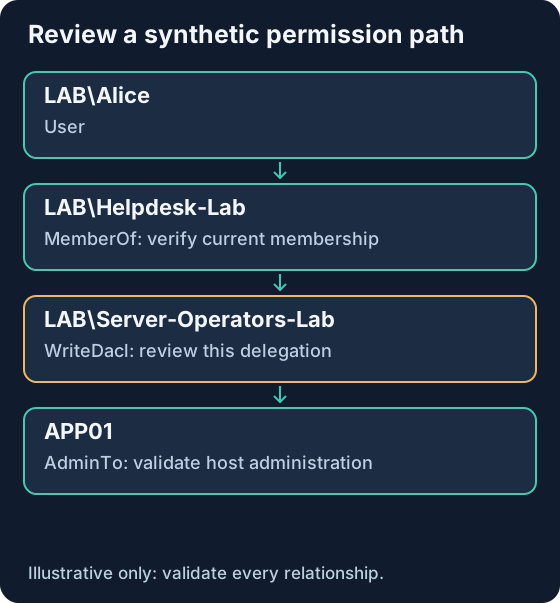
Suppose an approved assessment identifies this modeled path:
LAB\Alice
  --MemberOf--> LAB\Helpdesk-Lab
  --WriteDacl--> LAB\Server-Operators-Lab
  --AdminTo--> APP01
The second edge means Helpdesk-Lab can alter the group object’s DACL. The third means Server-Operators-Lab has administrative access to APP01 according to collected data. This does not mean Alice currently belongs to that group, or that a DACL modification has occurred.
| Step | Evidence to verify | A finding is premature if… |
|---|---|---|
| Membership | Current direct/nested membership and identity mapping | Group links or SIDs are stale |
| WriteDacl | Current group ACL, trustee and applicable ACE | The ACE is scoped differently or blocked |
| Intermediate capability | Whether the delegated control can lead to group membership control | The graph hides a needed condition |
| AdminTo | Current local administration / applicable policy on APP01 | Local policy or group membership has changed |
| Business impact | APP01’s role and reachable sensitive services | The target is mislabeled or decommissioned |
Remediation: remove or narrow the unnecessary Helpdesk-Lab delegation on Server-Operators-Lab through the organization’s change process. Preserve the before/after ACL and business-owner approval. Recollect affected relationships, check alternate routes and confirm legitimate helpdesk work still functions. A shorter path is not always the highest-risk path; prioritize reachable critical assets and the number of routes a change removes.
11. Telemetry: what each source can actually establish
| Source / event | What it can support | Prerequisite or limitation |
|---|---|---|
| Network flows | Source, DC, port, timing, traffic volume | TLS or sealing hides search content |
| Endpoint process/network telemetry | Which process contacted directory services | Coverage and process attribution vary |
| 1644, Directory Service | Details of selected expensive/inefficient/slow searches | Diagnostic logging and thresholds; not every LDAP search |
| 4662, Security | Audited operations on directory objects | Audit Directory Service Access and matching SACL |
| 5136, Security | Audited attribute modifications | Audit Directory Service Changes and matching SACL |
| 4728 / 4732 / 4756 | Member additions to security-enabled global/local/universal groups | Relevant account-management auditing and correct target/log source |
| 4624 / 4769 | Logon or Kerberos service-ticket context | Neither contains a complete LDAP query history |
| 4688 / PowerShell 4104 | Process/script context where enabled | Script logging does not cover every LDAP-capable program |
Event 1644 is principally diagnostic telemetry. Enable it for a controlled period with capacity planning, then restore the intended operational configuration; high-volume logging can create load. Microsoft 1644 guidance.
For 4662, resolve operation/property GUIDs and identify the object. For 5136, correlate object GUID, actor/logon ID, correlation ID and attribute name; a value deletion and addition can belong to the same modification. Never treat 5136 as a record of a read-only search. 4662 documentation, 5136 documentation.
LDAP transport-security events
| Event | Interpretation |
|---|---|
| 2886 | Signing is not required: configuration warning |
| 2887 | Periodic summary of accepted unprotected binds |
| 2888 | Periodic summary of rejected unprotected bind attempts |
| 2889 | Detailed unprotected-bind client/identity information when diagnostic logging is enabled |
| 3039 | TLS bind failed channel-binding-token validation |
| 3040 / 3041 | Unprotected TLS-bind summary / channel-binding configuration warning under documented conditions |
2889 is not a successful signed-bind event; 3041 is not a successful channel-binding event. Interpret the rendered message, provider, OS version and effective settings. These events assess transport/authentication protection, not whether a directory query was malicious. Microsoft signing event messages, KB4520412 channel-binding events.
12. Detect behavior with context, not one filter
An SPN search alone is ordinary administration. A stronger hypothesis combines several observations: a previously unseen workstation/account pair, wide directory scope, multiple sensitive attribute families, unusual process context, and a subsequent control change.
| Candidate signal | Plausible legitimate source | Next check |
|---|---|---|
| Many OU/group queries | Inventory or identity governance | Approved source, owner, schedule and baseline |
| Bulk security-descriptor reads | ACL audit / BloodHound assessment | Assessment window, collector identity, scope |
| SPN/pre-authentication searches | Service-account hygiene review | Process context and later Kerberos activity |
| Group/DACL changes after discovery | Delegation maintenance | Change ticket, exact objects and actor |
| Newly seen LDAP client | New application rollout | Software provenance and service owner |
Use approved collectors as documented context, not an unconditional permanent allowlist. An authorized service account can still be compromised. Baseline source, account, time window and purpose together.
Splunk starting point: normalized search summaries
This is an illustrative schema, not a claim that standard Windows ingestion supplies these fields. Create and validate a parser first. user may need enrichment; do not infer a reliable identity from source IP alone.
index=ad_lab sourcetype=ldap_search_normalized
| bin _time span=5m
| stats count AS observed_queries dc(filter) AS distinct_filters
    sum(entries_returned) AS observed_entries
    values(search_base) AS bases values(process_name) AS processes
    BY _time src_ip user
| where observed_queries >= 50 AND distinct_filters >= 5
The thresholds 50/5 are lab hypotheses to tune, not universal attack thresholds. If input comes from thresholded 1644 events, counts represent logged searches, not all searches or unique returned directory objects. Test known maintenance periods and approved assessments before alerting.
Splunk starting point: selected directory modifications
index=windows sourcetype="XmlWinEventLog:Security" EventCode=5136
  AttributeLDAPDisplayName IN ("nTSecurityDescriptor","member",
    "msDS-AllowedToActOnBehalfOfOtherIdentity",
    "msDS-KeyCredentialLink","servicePrincipalName")
| table _time Computer SubjectUserName SubjectLogonId ObjectDN
    AttributeLDAPDisplayName OperationType OpCorrelationID
Field names depend on the Windows add-on and parser. This searches changes, not enumeration. Pair it with baseline ACLs, group-management events and endpoint evidence. Missing events may reflect missing SACLs, collection gaps or an incorrect field mapping.
13. Investigation exercise: observation versus conclusion
The following is a synthetic timeline, not native event output:
| Time (UTC) | Observation | Appropriate conclusion |
|---|---|---|
| 01:00 | Approved inventory host reads the Lab OU | Expected discovery if scope matches its change record |
| 01:20 | New workstation issues 70 logged searches covering five filter families | Investigate an unusual pattern; do not label compromise yet |
| 01:23 | 5136 records a group security-descriptor change by the same account | A modification occurred; resolve the changed ACE |
| 01:24 | Security-group membership addition is logged | Verify group, member, actor and authorization |
| 01:27 | APP01 records a relevant logon | Correlate logon identity and method; authentication alone is not proof of execution |
Questions: Which host/process initiated the activity? Was there an approved assessment? Does the modified ACL actually enable the modeled route? Did the account acquire membership or use it? Are timestamps normalized and clocks synchronized?
Expected answer: the new source and search breadth justify triage; the later ACL and membership changes justify a higher-priority investigation if unauthorized. The timeline supports a hypothesis of path traversal only after identity, object and access evidence are correlated. It does not demonstrate credential theft or domain compromise by itself.
Preserve original event XML, collection times, DC identities, object GUIDs/SIDs, before/after permissions and endpoint records. If misuse is confirmed, coordinate account/session containment and permission rollback with the identity owner; preserve evidence before destructive cleanup.
14. Defense: remove unnecessary routes and improve visibility
| Priority | Action | Completion evidence |
|---|---|---|
| 1 | Review control of privileged groups, domain roots and critical service identities | Named owner and justified effective permissions |
| 2 | Remove stale or broad delegations; separate administrative tiers | Before/after ACL review and reduced reachable critical assets |
| 3 | Require appropriate signing/TLS/channel binding after compatibility testing | Effective policy plus successful application tests and reviewed bind events |
| 4 | Restrict management sources and review service-account privileges | Documented dependencies and approved source/account pairs |
| 5 | Target SACLs and centralized DC/endpoint log collection | A known lab read/change produces expected, explainable telemetry |
| 6 | Repeat scoped collection after remediation | Relevant path removed, alternate paths reviewed, business functions preserved |
Do not remove broad directory-read permissions indiscriminately: many AD applications depend on them. Prioritize sensitive attributes and dangerous write/delegation rights. Transport hardening protects the channel; it does not remove legitimate authenticated enumeration. Strong authentication, least privilege, endpoint security and monitoring solve different parts of the problem.
Inventory and remediate clients before enforcing signing or channel binding. Include certificate renewal, server-name validation, device compatibility and rollback criteria in the change plan. Avoid weakening certificate validation or retaining unprotected simple binds as a permanent workaround.
15. Troubleshooting and common misconceptions
| Symptom / claim | Check or correction |
|---|---|
| No entries returned | Base/scope, naming context, filter, read permissions, referrals and GC attribute availability |
| Only some entries/members returned | Size/time limit, paging, range retrieval and collector failures |
| TLS fails | Trust chain, hostname, expiry and DC certificate/service configuration |
| Strong authentication required | Bind mechanism and effective signing policy; do not disable protection blindly |
| PowerShell query works but no client LDAP traffic appears | ADWS can be used by the AD module |
| GenericAll means local admin | AD object control and host administration are different relationships |
| Every LDAP search generates 4662 | It depends on auditing and matching SACLs |
| BloodHound found no path, so the environment is safe | Data coverage, freshness and model limitations still matter |
| Encryption prevents enumeration | It protects data in transit; readable directory data remains readable |
16. Practical completion checklist and further reading
- Explain LDAP, AD DS, authentication and authorization separately.
- Write and interpret a scoped filter, including literal-value escaping.
- Record server, identity, base, scope, attributes, limits and collection time.
- Distinguish sampled or partial results from a complete inventory.
- Resolve one ACE’s trustee, right, GUIDs and inheritance without modifying it.
- Validate every relationship in one synthetic BloodHound path.
- Distinguish discovery evidence, permission changes and actual resource access.
- Test audit prerequisites and a detection hypothesis against known legitimate activity.
- Document remediation, alternate paths and verification limitations.
Continue with Windows Logs, Splunk Basics, SMB Security and Kerberoasting.
Next — series guide 5: Windows Lateral Movement: SMB, RDP, WinRM, WMI and PsExec connects directory permissions to actual remote access, execution and evidence.
Source review: 21 October 2026. References above support protocol and product behavior; the lab domain, diagrams, proposed thresholds and investigation exercise are original illustrative material. Verify tool flags, event messages and policies against deployed versions. No commands in this document were executed against a live directory during publication.
Related articles
Active Directory Fundamentals: Domains, DCs, DNS, OUs, GPOs and Security
A thorough, beginner-friendly AD DS guide covering identity architecture, Kerberos, authorization, Group Policy, replication, FSMO, defensive logging and safe lab exercises.
AD CS Security: Certificate Templates, ESC Risks, Strong Mapping, Detection and Defense
Understand certificate enrollment and authentication, AD CS template and CA permissions, selected ESC risks, modern mapping enforcement, audit evidence, Splunk searches and a synthetic investigation.