Active Directory · Intermediate
NTLM Authentication & Attacks: NTLMv1/v2, Relay, Pass-the-Hash, Detection and Defense
A full guide to NTLM challenge-response, NT hashes vs NetNTLMv2, Responder and name poisoning, relay and PtH, Windows 4624/4776 auditing, Splunk hunts and SMB/LDAP hardening.
Updated 2026-10-22
On this page
Prerequisites: Active Directory Fundamentals and Kerberos Authentication. This is a defender-focused examination of authentication, abuse and detection. Perform investigations or lab exercises only with authorization. All identities and hostnames are illustrative.
1. What is NTLM and where is it used?
NTLM (New Technology LAN Manager) is Microsoft’s family of challenge-response authentication protocols, historically widely supported across Windows services and standalone machines.
Rather than directly sending the user’s plaintext password to a resource server, the client demonstrates knowledge of a secret derived from the user’s password by calculating a response to a server-provided challenge.
NTLM is sometimes used for SMB file shares, HTTP applications, RPC, non-domain clients, legacy NAS systems, IP-based connections and Windows local accounts. However, the use of SMB does not automatically mean NTLM—SMB frequently uses Kerberos.
Kerberos uses tickets scoped to services (SPNs), whereas NTLM’s server-authentication and channel-binding properties depend on the host protocol and negotiated protections. As a result, NTLM can be vulnerable to authentication capture or relay in improperly secured environments.
Common reasons that Kerberos is not used
- Missing or misregistered Service Principal Names (SPNs).
- Connecting by IP address where the expected service identity cannot be resolved.
- Standalone servers or machines outside trusted domains.
- Legacy clients/applications supporting only NTLM.
- Service policies or negotiation behavior preventing Kerberos.
NTLM fallback is not automatic in all applications. Policies can prevent it, yielding an authentication failure instead.
2. Vocabulary: NTLMv1, NTLMv2, NT hash and NetNTLM
| Item | What it means | Important distinction |
|---|---|---|
| NTLM | Windows family of challenge-response authentication mechanisms | Not a version designation on its own |
| NTLMv1 | Older, weak challenge-response protocol | Remove/disable where possible |
| NTLMv2 | Uses HMAC-MD5-based response calculation with timestamps and client challenge material | Stronger than v1, but not an automatic relay defense |
| NT hash | Password-derived MD4 long-term credential value | Not the network response captured in an NTLM exchange |
| NetNTLMv1/v2 | Common practitioner terminology for observed network authentication response material | Not equivalent to dumping an NT hash |
| LM hash | Old LAN Manager password hash | Different from NT hash and network NTLM response |
| NTLMSSP | Security Support Provider involved in the NTLM message protocol | Not synonymous with SMB or HTTP |
A frequent misconception is that capturing a NetNTLMv2 response means obtaining an NT hash. It does not. They are different artifacts with different attack and forensic implications.
What does NTLMv2 calculate?
Conceptually, the client uses a key derived from the NT hash, a server challenge, a client nonce, a timestamp and other target-related data to calculate an NTLMv2 response.
- Weak passwords: Offline password guessing against captured responses may succeed.
- Long random passwords: Offline recovery can be impractical.
- Relay: A separate mechanism involving a live authentication exchange. Even a strong password does not inherently prevent relay.
3. How NTLM challenge-response works: Types 1, 2 and 3
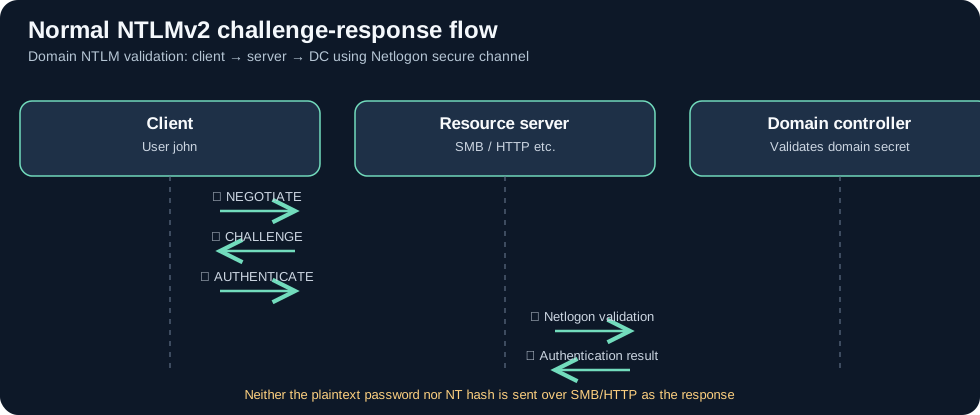
| NTLMSSP message | Direction | Meaning |
|---|---|---|
| Type 1: NEGOTIATE | Client → server | Negotiated capabilities and options |
| Type 2: CHALLENGE | Server → client | Server nonce (challenge), target info |
| Type 3: AUTHENTICATE | Client → server | Identity information and cryptographic response |
Consider CLIENT01 accessing FILE01:
- The client and resource server negotiate NTLM.
- The server generates an unpredictable 8-byte challenge.
- The client computes a response from its credential-derived secret and the NTLMv2 data.
- If this is a domain user, the target server typically validates the supplied challenge and response through a Netlogon secure channel to a domain controller. If this is a local user belonging to the target, the server can validate against its local SAM.
- Once authenticated, the resource server independently checks authorization to the share or application.
The password and NT hash are not transmitted verbatim as this network challenge-response. NTLM can negotiate signing/sealing/session protections in specific applications; those are separate from the question of whether the target service is properly authenticated to the client.
4. NTLM versus Kerberos
| Property | Kerberos | NTLMv2 |
|---|---|---|
| Core scheme | KDC-issued service tickets | Challenge–response |
| Target service identity | SPNs protected by ticket encryption | Not equivalently tied to a KDC-issued SPN ticket |
| Mutual authentication | Supported | Not the same built-in assurance |
| Transport | TCP/UDP 88 with KDC; app-specific service traffic | Inside SMB, HTTP(S), RPC and other application protocols |
| Typical attacks | Kerberoasting, ticket theft/forgery | Relay, NetNTLM capture, Pass-the-Hash |
| Current direction | Prefer where possible | Audit and phase down dependency |
SMB is a transport/service protocol, not an authentication choice. Likewise, NTLM can protect applications other than SMB.
5. Where the challenge-response is validated
| Identity scenario | Where it is commonly verified |
|---|---|
| Domain user authenticating to member server | Target validates through Netlogon pass-through to a DC |
| Target’s own local user account | Target may validate using local SAM |
| Standalone Windows machine | Local account verification |
| Trusted-domain principal | Depends on domain trust and authentication routes |
This matters for evidence collection: Event 4776 is important for domain-account NTLM credential validation on DCs, whereas Event 4624 Logon Type 3 on the target resource host provides a view of network authentication at the destination.
Event 4776 Workstation should not automatically be treated as a guaranteed source IP or the identity of the specific application server. Correlate with destination and network logs.
6. How LLMNR, NBT-NS, mDNS, WPAD and UNC references lead to NTLM
NTLM-related attacks may begin with insecure name resolution or automatic authentication, not with a flaw in the NTLM message format itself.
- LLMNR: Multicast local name-resolution fallback on some Windows networks.
- NBT-NS: Legacy NetBIOS name queries.
- mDNS: Multicast DNS used by certain clients and applications.
- WPAD: Web Proxy Auto-Discovery; rogue proxy discovery can sometimes induce proxy authentication.
- UNC reference: A path such as
\\untrusted-host\sharemay trigger authentication to a remote SMB resource.
These do not always result in NTLM. Behavior depends on operating systems, client settings, resolution order, caching and authentication policy.
Where Responder fits
Responder is a network name-poisoning and credential-capture tool often mentioned in NTLM abuse discussions. Defenders should watch for unauthorized name-resolution replies, rogue SMB/HTTP destinations and unexpected outbound NTLM authentication rather than treating the presence of a specific tool name as proof that a user’s password was recovered.
A spoofed lookup alone does not mean the attacker has obtained plaintext passwords or NT hashes.
7. Three attacks that must not be conflated
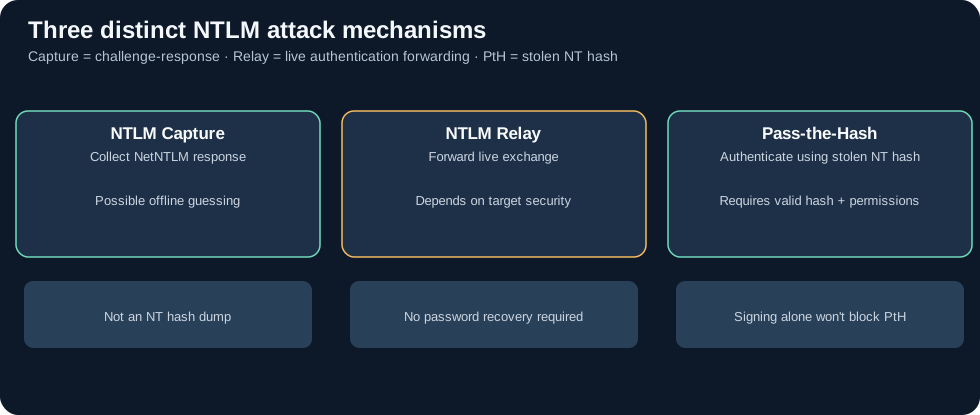
| Technique | Attacker starts with | Objective | Recover password first? |
|---|---|---|---|
| NTLM capture | NetNTLM challenge-response material captured from authentication | Offline guessing or analysis | Only if the objective requires plaintext |
| NTLM relay | Position to forward a live NTLM handshake and a receptive target | Authenticate as the victim to another service | No |
| Pass-the-Hash (PtH) | A previously obtained NT hash | Authenticate using the hash without plaintext | No |
7.1 NTLM capture
When a client authenticates to an untrusted SMB/HTTP endpoint, an observer controlling that endpoint may capture the NTLM server challenge and client response material.
Investigation: Look for unusual destinations, suspicious LLMNR/NBT-NS traffic, unexpected authentication after opening UNC paths, and endpoint process/file telemetry. A captured NetNTLMv2 response is not an NT hash.
7.2 NTLM relay
An attacker forwards an in-progress NTLM authentication toward another target service in a configuration that accepts it. The success conditions depend on protocol-specific protections, actual permissions and application behavior.
SMB signing required at the SMB target normally blocks ordinary relay to that protected SMB session because the attacker cannot produce valid signed subsequent messages using only the forwarded handshake.
However, credentials induced over SMB might be relayed to other targets such as LDAPS or HTTP endpoints where channel binding, EPA or other service-specific defenses are absent. Enabling signing on one protocol is not a substitute for auditing others.
7.3 Pass-the-Hash
PtH starts with a stolen NT hash. Knowing that secret can allow an adversary to compute the required NTLM response/session cryptographic material, subject to account permissions and NTLM policy.
SMB signing alone does not prevent PtH. Controls such as Windows LAPS, Credential Guard, LSASS protections, segregated admin credentials, NTLM reduction and least privilege have more direct relevance.
8. SMB signing, LDAP signing, channel binding and EPA
| Control | Where | What it protects |
|---|---|---|
| SMB signing | SMB sessions | Message integrity; a major defense against ordinary relay to SMB |
| SMB encryption | SMB 3.x | Transport confidentiality/integrity |
| LDAP signing | LDAP SASL connections | Message integrity; not a universal NTLM-to-LDAP relay defense by itself |
| LDAP Channel Binding Token (CBT) | TLS-secured SASL LDAP/LDAPS | Binds the authentication to the correct TLS session, addressing cross-session relay |
| HTTP Extended Protection for Authentication (EPA) | Supported HTTP authentication endpoints | Service/channel binding and reduction of authentication forwarding |
| NTLM blocking | Appropriate OS/service policies | Prevents NTLM use, removing related attack paths in scope |
Important qualification: Current Microsoft guidance distinguishes LDAP signing from TLS channel binding. An LDAPS connection with TLS but no required CBT can remain at risk of an NTLM relay involving a separate TLS session.
Simple LDAP bind and SASL bind are not interchangeable. CBT for LDAP applies to TLS + SASL sessions; a simple bind relies on TLS transport protections and does not operate with the same CBT mechanism.
Microsoft references: LDAP signing, LDAP channel binding, SMB signing.
9. Forced authentication and remote UNC references
An attacker may use an unexpected UNC reference, document content or certain Windows/RPC interactions to induce a victim device or user to initiate authentication to an attacker-controlled destination.
This is related to MITRE ATT&CK T1187: Forced Authentication.
Defender questions: Why did this system initiate a connection to the unexpected remote host? Did a document, icon, service, name query or RPC action occur immediately before it? Was NTLM actually used, and what was the account and target service?
10. Microsoft’s NTLM status as of October 2026
Microsoft documents NTLMv1 removal, deprecation of NTLMv2, and a continuing long-term migration toward Kerberos/Negotiate. Deprecation does not mean NTLMv2 had already been universally removed from all Windows systems by October 2026.
On Windows 11 24H2 and Windows Server 2025, supported SMB clients can block NTLM for outbound SMB connections. This is an SMB-client capability, not a universal guarantee that the entire machine cannot use NTLM for every application.
Microsoft also provides newer NTLM client policies with audit vs enforcement modes, but their availability and scoping depend on OS version, edition and management channel.
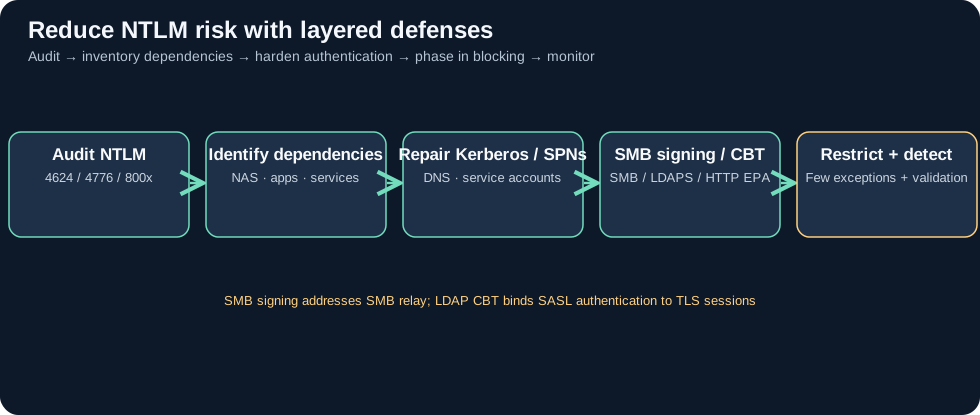
Before enforcing NTLM blocks, discover dependencies including older NAS appliances, hard-coded IP addresses, unmaintained line-of-business apps and cross-domain systems. Repair Kerberos DNS/SPNs and conduct a staged compatibility rollout.
Official sources: NTLM overview, removed/deprecated features, SMB client NTLM blocking, NTLM Policy CSP.
11. Windows events and evidence locations
| Event or source | Typical location | What to inspect |
|---|---|---|
| 4624 | Destination host Security | Successful logon, Type 3, authentication package, NTLM package version, source |
| 4625 | Destination host Security | Logon failures, status/substatus, account/source |
| 4776 | DC Security (domain accounts) | NTLM credential validation, account, workstation and outcome |
| 4672 | Logon host Security | Special privileges granted to the logon |
| 5140 / 5145 | Destination SMB file server Security | Share access and detailed share-level access checks |
| 7045 | Destination host System | Windows service installed |
| NTLM 8001–8004 family | Microsoft-Windows-NTLM/Operational when audit/restriction policy enabled |
NTLM audit/restriction activities—availability and fields depend on policy |
| DNS, LLMNR, NBT-NS | Network capture / endpoint telemetry | Name resolution anomalies and possible spoofing |
Interpreting Event 4624
Check Authentication Package = NTLM, then Package Name (NTLM only) for NTLM V1 or NTLM V2. Where possible, corroborate the raw event fields.
Microsoft documents rare legacy cases where Event 4624 reported NTLM V1 even when the network exchange was actually NTLMv2. Investigate OS version, policy and packet evidence instead of automatically labeling every such record a verified downgrade.
Event 4776 is not a full network flow
The DC can record domain NTLM validation, but the standard event does not reliably provide the real source IP and exact destination service name. Its workstation field is not equivalent to a flow record. Correlate 4776 + destination 4624 + network telemetry to infer the full path.
NTLM Operational audit logs
Where policy enables NTLM audit or restriction, the event channel Applications and Services Logs > Microsoft > Windows > NTLM > Operational may produce records in the 8001–8004 family. These are not guaranteed default records on every Windows deployment.
12. Splunk: baseline before attributing an attack
All SPL below is a template. First verify Windows log ingestion, actual index, sourcetype, field names, time range and relevant audit policies.
A. Check whether NTLM-related security events are ingested
index=* (EventCode=4624 OR EventID=4624 OR EventCode=4776 OR EventID=4776)
| eval event_id=coalesce(EventCode,EventID)
| stats count by host sourcetype event_id
| sort - count
Depending on ingestion and parsing, an event may have only EventCode or EventID. Normalize them into event_id with coalesce before grouping; requiring both original fields in BY can omit events where one is absent.
B. Identify network logons that use NTLM
index=* (EventCode=4624 OR EventID=4624)
| eval auth=coalesce(AuthenticationPackageName,Authentication_Package,AuthenticationPackage)
| eval logon=coalesce(LogonType,Logon_Type)
| eval src=coalesce(IpAddress,Source_Network_Address,src_ip)
| eval user=coalesce(TargetUserName,Account_Name,user)
| where lower(auth)="ntlm" AND tostring(logon)="3"
| stats count as ntlm_logons dc(user) as unique_users
        values(user) as users by host src
| sort - ntlm_logons
Caveat: Source IP may be missing or shown as -. Correlate EDR, firewall and Zeek flow information.
C. Inventory reported NTLM authentication subpackage versions
index=* (EventCode=4624 OR EventID=4624)
| eval auth=coalesce(AuthenticationPackageName,Authentication_Package,AuthenticationPackage)
| eval version=coalesce(LmPackageName,Package_Name_NTLM_only,PackageName)
| where lower(auth)="ntlm"
| stats count by host version
| sort - count
Parser field names vary. Validate the source XML Package Name (NTLM only) before creating an NTLMv1 migration dashboard, and account for legacy mislabeling noted earlier.
D. Identify bursts of failed NTLM credential validation
index=* (EventCode=4776 OR EventID=4776)
| eval requester=coalesce(TargetUserName,Account_Name,user)
| eval workstation=coalesce(Workstation,WorkstationName,Source_Workstation)
| eval status=lower(tostring(coalesce(Status,Error_Code)))
| where isnotnull(status) AND status!="0x0" AND status!="0"
| bin _time span=10m
| stats count as failures dc(requester) as distinct_accounts
        values(status) as failure_codes by _time workstation
| where failures>=15 AND distinct_accounts>=5
| sort - failures
This is a starter password-spraying hypothesis, not proof of an attack. Check status codes, expected service accounts, workstation names and whether NTLM failure logging covers the relevant systems.
E. Confirm NTLM Operational audit collection
index=* (EventCode=8001 OR EventCode=8002 OR EventCode=8003 OR EventCode=8004
         OR EventID=8001 OR EventID=8002 OR EventID=8003 OR EventID=8004)
| eval event_id=coalesce(EventCode,EventID)
| stats count by host sourcetype event_id
A zero-result search may mean the policy or log forwarder is not collecting the NTLM Operational channel.
13. Read-only hardening assessment
Check SMB signing and current SMB session characteristics
Get-SmbClientConfiguration | Select-Object RequireSecuritySignature
Get-SmbServerConfiguration | Select-Object RequireSecuritySignature
Get-SmbConnection
Account for both ends’ policies and the actual connection. SMB signing is not a universal Pass-the-Hash control.
NTLM-related Security Options Group Policy
Computer Configuration
 └ Windows Settings
   └ Security Settings
     └ Local Policies
       └ Security Options
         ├ Network security: LAN Manager authentication level
         ├ Network security: Restrict NTLM: Audit NTLM authentication in this domain
         ├ Network security: Restrict NTLM: Audit Incoming NTLM Traffic
         └ Network security: Restrict NTLM: Outgoing NTLM traffic to remote servers
Available policy names and behaviors vary by Windows version and domain setup. Prefer auditing first, inventory application owners and establish exceptions before denying production authentication.
Check the availability of SMB-client NTLM restrictions
On an appropriate supported Windows version:
Get-SmbClientConfiguration | Format-List *NTLM*
Properties such as BlockNTLM are version/patch dependent. Do not change production NTLM settings without a staged and reversible rollout.
LDAP, HTTP and credential hardening
- LDAP SASL: Strengthen signing/integrity; where TLS SASL binds are used, require appropriate LDAP channel binding after compatibility checks.
- HTTP/IIS/AD CS web endpoints: Review Extended Protection for Authentication (EPA) and remove unnecessary NTLM dependencies.
- SMB: Require signing; use encryption where sensitive data warrants it.
- Admin credentials: Apply Windows LAPS, Credential Guard/LSASS protections, least privilege and account separation.
- Network: Restrict unnecessary workstation-to-workstation TCP 445 traffic and outbound authentication to untrusted endpoints.
14. DFIR scenario: distinguish relay, PtH and legitimate remote management
Fictional case: CLIENT01 unexpectedly authenticates to SERVER02 using NTLM, after which SERVER02 shows administrative-share access and a new service installation.
- Identity: On
SERVER02verify Event 4624 Authentication Package and Logon Type. - Validation: Locate the relevant DC 4776 but do not interpret Workstation as a guaranteed client IP.
- Actual network path: Correlate Zeek
conn.log, firewall and EDR network data. - Authentication inducement: Look for unusual DNS/LLMNR/NBT-NS/WPAD activity, UNC file references and suspicious endpoint processes.
- Follow-on: Review
5140/5145 ADMIN$,7045,4688and Sysmon process/pipe telemetry. - Test competing explanations: Is there evidence of live relay, prior NT-hash theft, or routine administrative software deployment?
- Conclusion: A successful NTLM logon alone does not distinguish PtH from relay or legitimate authentication.
- Response: Preserve evidence, evaluate accounts and hosts, contain confirmed malicious activity, and plan compatible hardening actions.
15. Common misconceptions and false positives
- “NTLM sends plaintext passwords.” False; it uses challenge-response.
- “NetNTLMv2 is the NT hash.” False; different artifacts.
- “Strong passwords eliminate relay.” False; relay forwards a live exchange.
- “SMB signing automatically blocks PtH.” False.
- “LDAPS with TLS automatically blocks NTLM relay.” False; CBT matters for TLS + SASL.
- “LDAP signing universally stops NTLM-to-LDAP relay.” False; assess the authentication binding and protocol.
- “Event 4776 shows the full end-to-end TCP connection.” False.
- “Every NTLM V1 label proves an actual NTLMv1 exchange.” Investigate legacy event misreporting.
- “Block NTLM immediately without audits.” Risky; legacy dependencies can fail.
16. A staged NTLM reduction roadmap
- Inventory users, hosts, applications, NAS, IP-based paths and cross-domain requirements.
- Audit NTLM on destination servers, DCs and in the NTLM Operational channel when available.
- Repair Kerberos dependencies such as DNS, SPNs, service identities and legacy software.
- Harden destinations with SMB signing, compatible LDAP CBT/EPA, admin restrictions and credential isolation.
- Pilot NTLM blocking for low-risk selected hosts, sites or organizational units.
- Enforce in stages with documented, time-limited exceptions and rollback plans.
- Continuously monitor failures and any newly introduced NTLM dependencies.
The goal is reliable, hardened authentication, not a misleading target of zero NTLM log entries regardless of outages or data gaps.
17. MITRE ATT&CK mapping
| Technique | Reference | Relevance |
|---|---|---|
| T1557.001 | LLMNR/NBT-NS Poisoning and SMB Relay | Spoofed name replies, live authentication relay |
| T1187 | Forced Authentication | Induced remote NTLM authentication |
| T1550.002 | Pass the Hash | Authenticate using stolen NT hash |
| T1021.002 | SMB/Windows Admin Shares | Lateral movement over SMB |
| T1110 | Brute Force | Online password guessing |
| T1110.002 | Password Cracking | Offline recovery attempts |
18. Quick review
- Does NTLMv2 transmit the plaintext password? No.
- Is a captured NetNTLMv2 response the NT hash for PtH? No.
- Does NTLM relay require a weak password? No.
- Can SMB signing alone protect LDAP/HTTP services? No.
- Does a DC Event 4776 establish that PtH occurred? No.
- What comes before blocking NTLM? Audit usage and resolve legitimate dependencies.
19. Official references and related articles
- Microsoft: NTLM Overview
- Microsoft: NTLM user authentication
- Microsoft: Removed and deprecated Windows Server features
- Microsoft: Block NTLM on SMB connections
- Microsoft: NTLM Policy CSP
- Microsoft: Event ID 4624
- Microsoft: Event ID 4776
- Microsoft: SMB signing
- Microsoft: LDAP signing
- Microsoft: LDAP Channel Binding
- Wiki: Active Directory Fundamentals
- Wiki: Kerberos Authentication
- Wiki: WPAD Security
- Wiki: SMB Security and Remote Execution
Next guide: LDAP & AD Enumeration — normal LDAP operations, filters, ACLs, BloodHound path validation, detection and defense.
Related articles
Active Directory Fundamentals: Domains, DCs, DNS, OUs, GPOs and Security
A thorough, beginner-friendly AD DS guide covering identity architecture, Kerberos, authorization, Group Policy, replication, FSMO, defensive logging and safe lab exercises.
AD CS Security: Certificate Templates, ESC Risks, Strong Mapping, Detection and Defense
Understand certificate enrollment and authentication, AD CS template and CA permissions, selected ESC risks, modern mapping enforcement, audit evidence, Splunk searches and a synthetic investigation.