title: Tool Practice: HTTP and SMB tags: - oscp - practical
Tool Practice: HTTP and SMB
Updated / 최종 수정: 2026-11-05
What you will actually run
A loopback-only HTTP service and authenticated SMB share. Discover HTTP with Nmap, fuzz three paths with ffuf, read the response with curl, transfer a harmless text file with Impacket, and compare its SHA-256. No Windows VM or domain is required.
Prerequisites: a Linux/Kali VM; Python 3, Nmap, ffuf, curl, Impacket; two terminals. Use only 127.0.0.1. Ports 18080 and 1445 must be free. The high SMB port avoids root; it is for Impacket clients, not native Windows UNC access.
sudo apt install nmap ffuf curl impacket-scripts python3-impacket
mkdir -p ~/oscp-tool-lab/{web/admin,share,downloads}
cd ~/oscp-tool-lab
printf 'Training home
' > web/index.html
printf 'Training admin page
' > web/admin/index.html
printf 'Training login page
' > web/login
printf 'admin
login
missing
' > words.txt
printf 'OSCP practice: controlled SMB transfer
' > share/note.txt
These pages contain no vulnerable application and no exam material. A discovered admin path demonstrates enumeration, not compromise.
1. HTTP discovery and false positives
Terminal A:
Terminal B:
cd ~/oscp-tool-lab
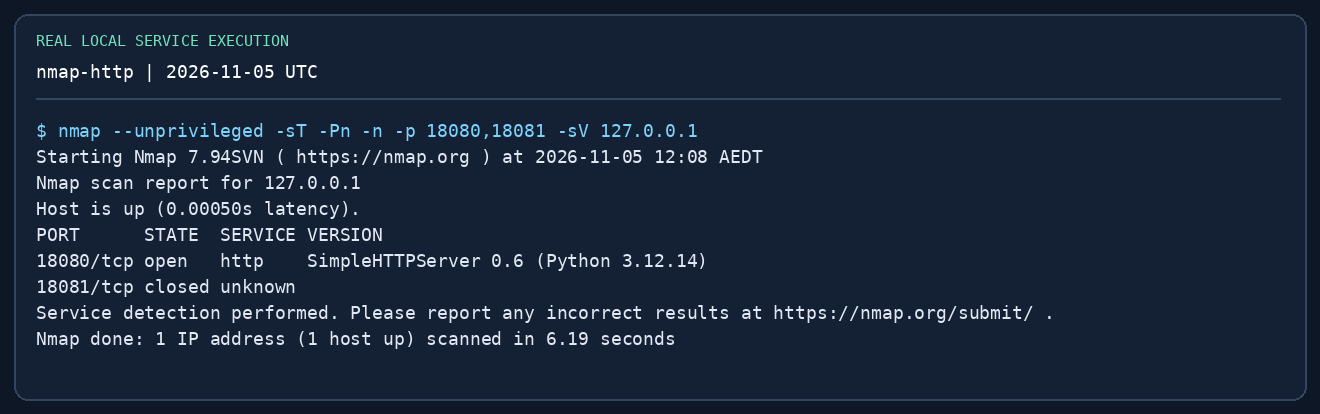
nmap --unprivileged -sT -Pn -n -p 18080,18081 -sV 127.0.0.1
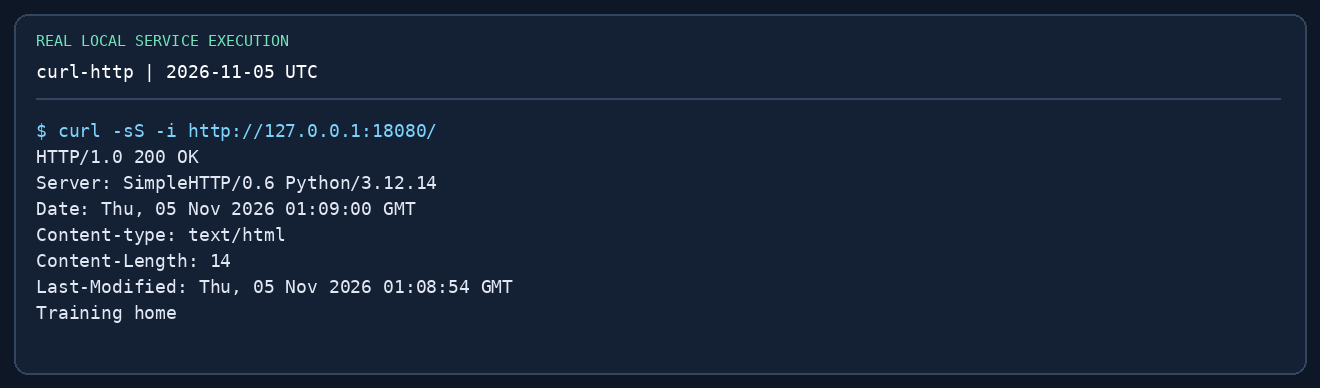
curl -i http://127.0.0.1:18080/
curl -i http://127.0.0.1:18080/missing
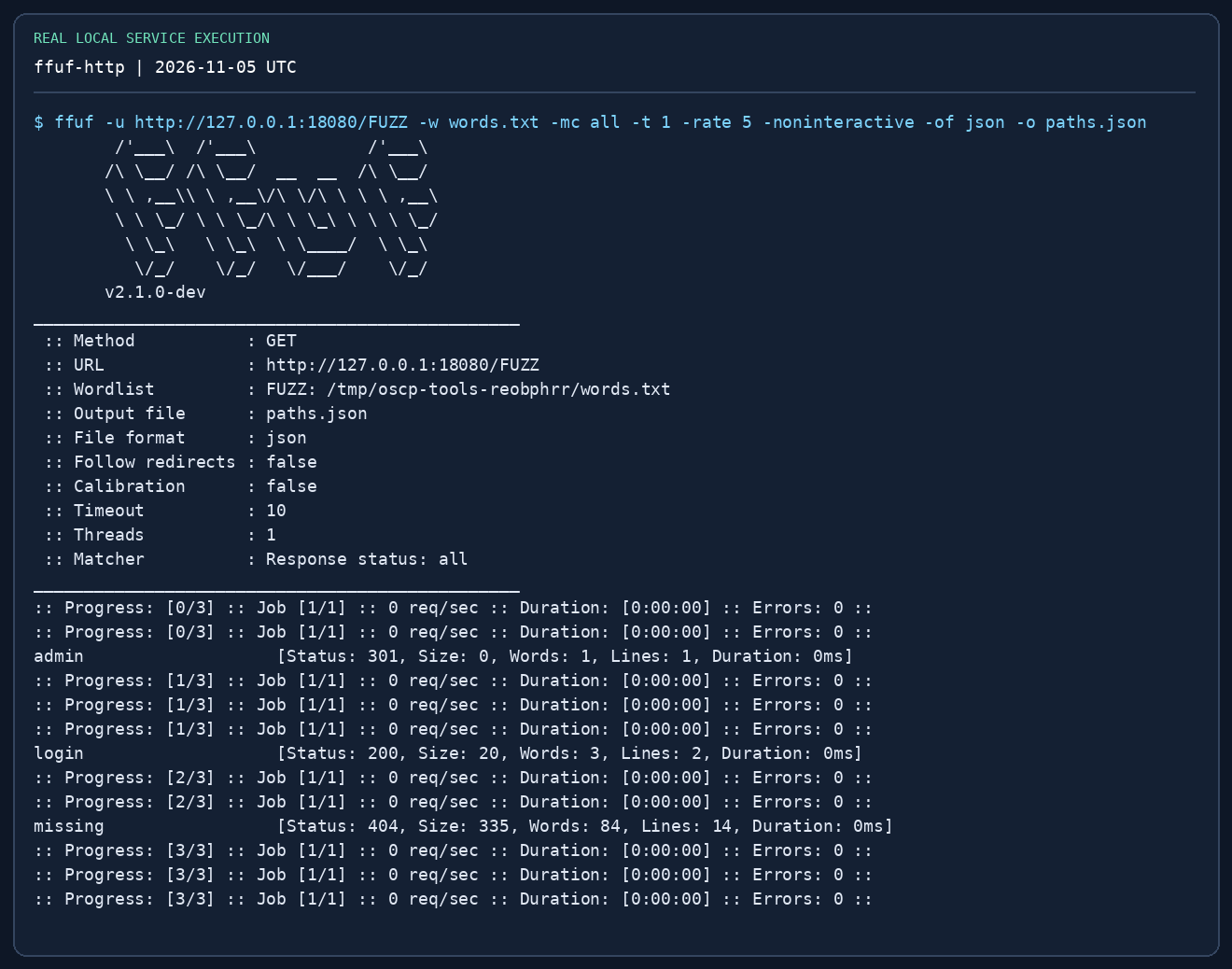
ffuf -u http://127.0.0.1:18080/FUZZ -w words.txt -mc all   -t 1 -rate 5 -noninteractive -of json -o paths.json
curl -i http://127.0.0.1:18080/admin/
Read the result: 18080 should be open; 18081 should be closed if unused. admin redirects to /admin/, login responds 200, missing responds 404. If the service name differs, trust the actual banner and port response rather than memorising the label. A 301 is a navigation hint. Use curl -L only after recording where it redirects.
Failure drill: stop Terminal A and repeat one curl command. Explain the difference between connection refused and HTTP 404. Restart the server before continuing.
2. Authenticated SMB transfer
Terminal A (leave it running):
cd ~/oscp-tool-lab
impacket-smbserver LAB "$PWD/share" -smb2support -ip 127.0.0.1 -port 1445   -username learner -password 'LabOnly-123!'
Terminal B:
cd ~/oscp-tool-lab/downloads
# Impacket 0.13.1 CLI restricts -port to 139/445; use its API mini-shell here:
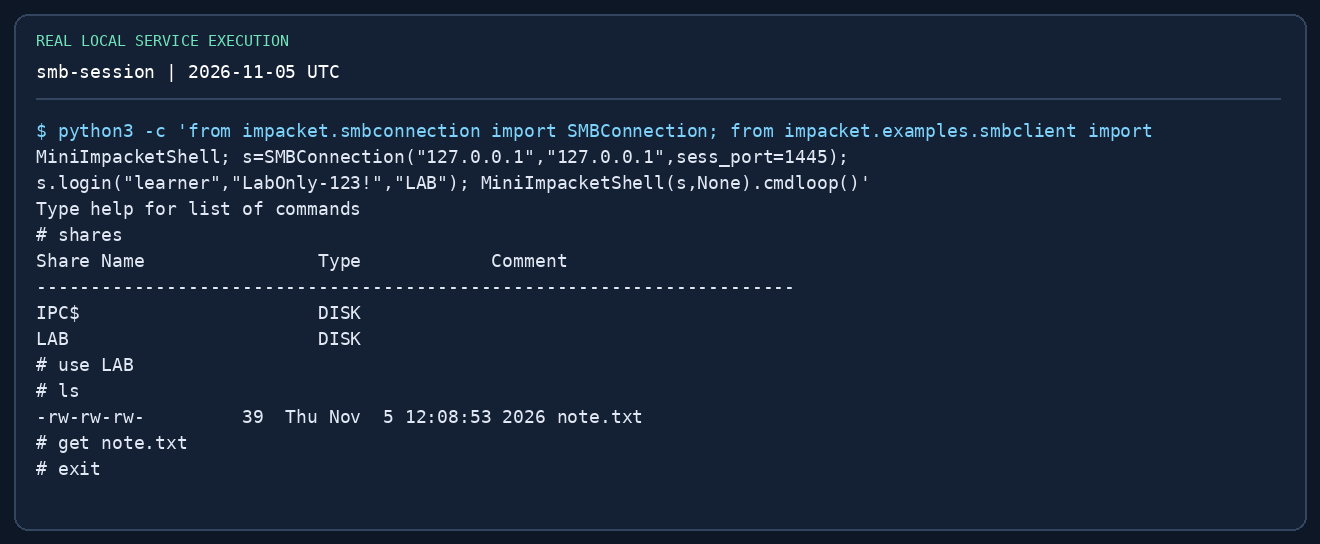
python3 -c 'from impacket.smbconnection import SMBConnection; from impacket.examples.smbclient import MiniImpacketShell; s=SMBConnection("127.0.0.1","127.0.0.1",sess_port=1445); s.login("learner","LabOnly-123!","LAB"); MiniImpacketShell(s,None).cmdloop()'
At the SMB # prompt:
Back in the local shell:
cd ~/oscp-tool-lab
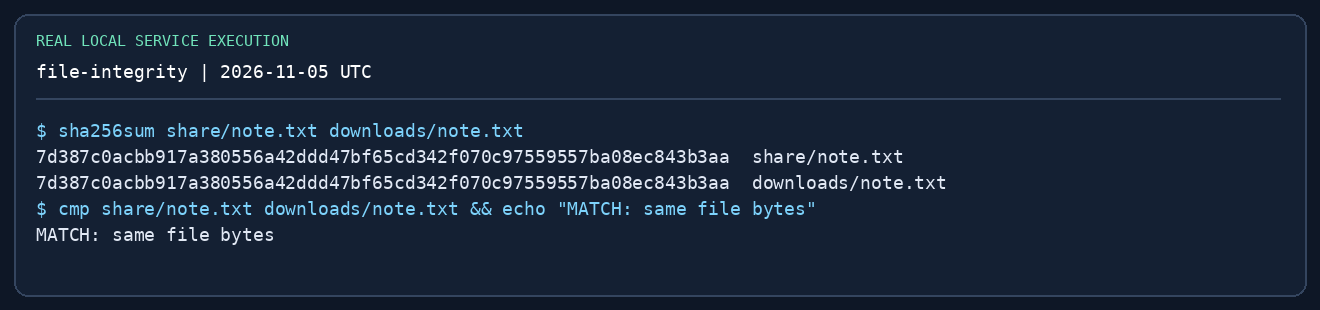
sha256sum share/note.txt downloads/note.txt
cmp share/note.txt downloads/note.txt && echo 'MATCH: same file bytes'
The two hashes must match; cmp exits 0 on identical bytes. You authenticated and read a permitted share, not obtained a Windows shell or domain admin. shares and use LAB happen in the SMB mini-shell; sha256sum happens in Bash.
Failure drills: (1) use the wrong password once and observe authentication failure; (2) use a nonexistent share and distinguish that from login failure; (3) change port 1445 to an unused high port and distinguish connection failure. No password loop is needed. Stop your servers with Ctrl-C after the exercise.
3. Add a Windows/AD lab next
The loopback lab cannot validate LDAP, Kerberos, WMI, SCM, Windows tokens or replication. On your own isolated Windows domain or an authorised training range, provision a normal domain user, one member server, a DC and deliberately scoped test rights. Follow the Impacket handbook and write down these observations:
| Drill | Success evidence | Expected denied case |
|---|---|---|
| Share read | Listing/download + matching file hash | Non-readable admin share |
| SPN / AS-REP | Account mapping and correctly identified hash format | Account not eligible for AS-REP |
| MSSQL | SQL identity, role membership and actual execution context | Login valid elsewhere but SQL permission absent |
| WMI / SCM | Verified identity in the target shell | Standard user cannot create an admin service |
| Offline SAM | Correct hive pair parsed into typed fields | Wrong/missing SYSTEM hive |
| DCSync | Only with deliberately granted replication rights | Member-host local admin is insufficient |
| Kerberos cache | Correct realm, hostname and selected cache | Wrong service hostname or expired cache |
Do not expect every technique on every OSCP set. Lab success is about understanding prerequisites and alternatives.
4. Capture provenance and limitations
The repository's scripts/oscp-captures/capture.py runs the local demonstrations and captures the upstream Impacket help output. render.py renders the exact captured text into PNGs without editing the output; the on-image title distinguishes help from an executed service interaction. Raw .txt logs and manifest.json record commands, versions, SHA-256 and capture time. The images are terminal-output renderings, not remote desktop/GUI screenshots. AD success screens are deliberately not invented.
Reproduce all repository captures from a Linux workspace:
python3 -m venv /tmp/oscp-captures-venv
/tmp/oscp-captures-venv/bin/pip install -r scripts/oscp-captures/requirements.txt
PATH="/tmp/oscp-captures-venv/bin:$PATH" python3 scripts/oscp-captures/capture.py
/tmp/oscp-captures-venv/bin/python scripts/oscp-captures/render.py
Install Nmap, ffuf and curl with your distribution first. These scripts use temporary loopback services, create only a temporary work directory, terminate their own children and write capture files under the repository. They do not contact a domain or scan a network. Port conflicts fail clearly instead of killing unrelated processes.
Completion record
Record the command, expected result, observed result, failure explanation and next action for each drill. Keep a target screenshot showing identity and IP in your Windows/AD mock report; the loopback file-transfer image is not a substitute for exam proof.